This article provides a guide on Why Shorter Videos Win the Scroll Economy. For readers seeking an in-depth exploration, continue reading for detailed information and expert insights.
The consumption of content today is quicker than ever before. On TikTok, Reels, and Shorts, audiences demand impact within a matter of seconds. Long introductions and slow-motion footage tend to be skipped, while sharp, tight cuts gain attention. It is here that tools such as AI clip maker by Pippit step in and assist content makers in making their storytelling more concise so that each frame counts.
Pippit empowers creators with a competitive advantage through its intelligent editing features that render videos captivating, algorithm-optimized, and ready to compete in the scroll-dominated world. By eliminating redundant fluff, creators are able to present the essential message and do so at the ideal speed.
We’re exploring “Why Shorter Videos Win the Scroll Economy” in this article, with all the key information at your fingertips.
Let’s explore it together!
Table of Contents
The Power of Precision Cuts
Each second matters with short-form content. When videos are concise and tightly cut, audiences won’t swipe away as readily. Cutting accurately does more than saves time. It creates rhythm, instills anticipation, and brings satisfaction sooner. Rather than drifting into a narrative, creators can drop the hook immediately and bring audiences directly into the essence of the message.
Why Smaller Means Stronger in the Scroll Economy
These days most people don’t have the attention span to watch long news programs and TV shows.
Small clips reign supreme not only due to audience attention spans, but because the way algorithms incentivize them. Apps such as TikTok and Instagram love videos that hold audiences’ attention until the bitter end. When a viewer clicks through to the end of your video, it’s a cue to the algorithm that your video is worth promoting to more users. Short, snappy edits facilitate this more easily, providing creators with greater reach and exposure.
Where Rhythm Matters, Not only Time
Trimming a video is like writing poetry. It’s not about conciseness, but about rhythm. Removing pauses, cutting out filler, and synchronizing visuals with audio allows creators to achieve the natural and interesting flow. Strategic pauses, rapid zooms, and abrupt cuts keep the viewer on the edge while reinforcing the core message.
Where Tools Matter, Not Only Time
Good editing isn’t necessarily about instinct; it’s also about tools. Using Pippit’s built-in online video cutter, creators have the ability to trim videos frame-by-frame. This translates into no distracting pauses, no hanging moments, and no wasted time. A tidy timeline paves the way for videos that cut through a feed full of constant competition.
From Scroll to Stop: Getting Viewers to Stop
True success in the scroll economy isn’t being seen, it’s getting people to stop scrolling. Strong visuals paired with tight edits can turn a glance into a full watch. By finding that sweet spot between entertainment and clarity, creators leave viewers with no excuse to swipe away. Instead, they lean in, tune in, and perhaps even rewatch.
Fun with Pippit: Three Steps to Trim Videos
Using Pippit AI Clip Maker is straightforward — just follow the steps below to trim, polish, and export professional-quality clips.
Step 1: Open the video editor
Sign up for Pippit and visit your dashboard. In the left menu, go to Video Generator and then Video Editor. Upload your video file with the “Click to upload” button, or just drag and drop it in the editor. This positions you with a simple editing space where you have complete control over all the details.

Step 2: Use the video trimmer tool
After uploading, review the timeline at the bottom of the editor. Utilize the handles on either side to cut away excess footage. For mid-cuts, move the Playhead to the precise time you desire to break and click Split. This allows you to remove or reorganize pieces, making sure the flow is clean and interesting.

Step 3: Export, share, and publish your trimmed video
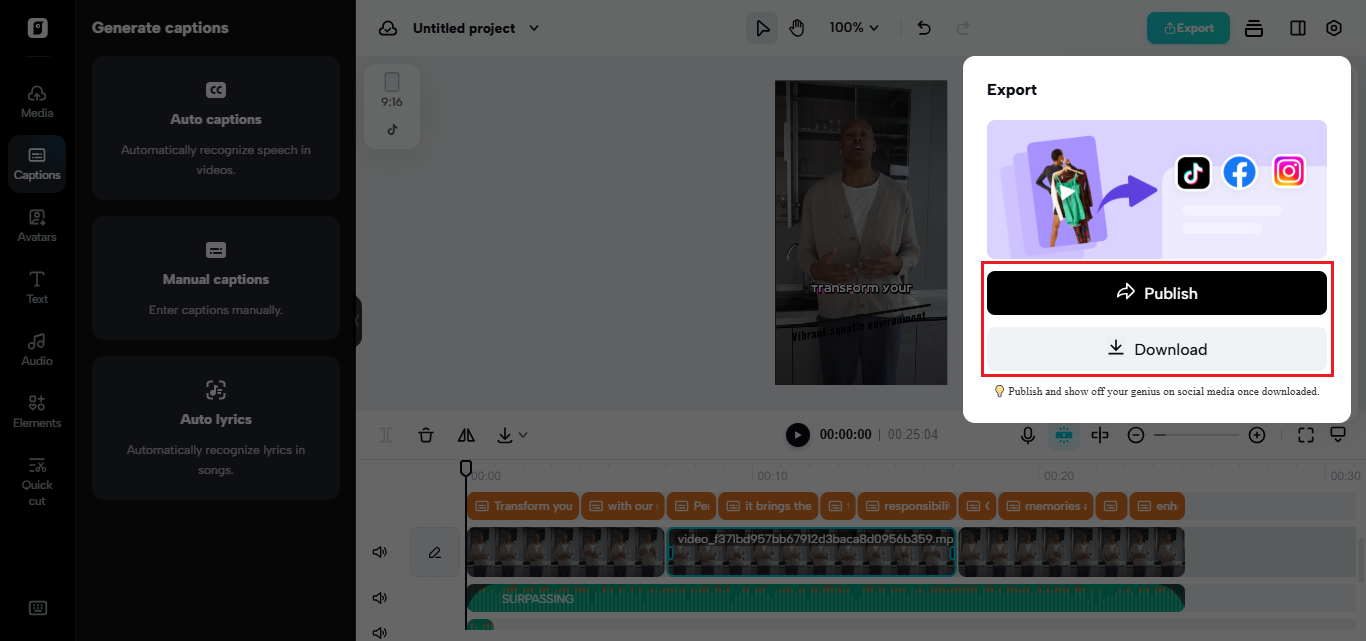
Once you’re happy with the edit, click Export at the top.. Select your desired resolution, format, and quality, then save it to your device. Or post directly to TikTok, Instagram, or Facebook. Pippit also provides you with analytics, so you can view how your video performs and make your next one even better.
Visual Polish Matters
Short-form content isn’t just about video rhythm, it’s also about how sleek it is. Regardless of the narrative’s quality, blurry or washed-out imagery diminishes impact. This is why you see many creators pair their edits with enhancements. A free image enhancer online can automatically give visuals a facelift, which can sharpen details and make colors pop. This added layer of sheen can turn even straightforward content professional and ready for prime time.
Conclusion:)
Short-form videos are not a compromise, they’re a tactic. A higher cut, more vibrant images, a tighter cut helps creators shine in the fast-paced world of content creation. Software programs like Pippit not only make editing easier, but can equip creators with a studio-finish without the need for a studio.
So if you want to learn the scroll economy, you better get to the point. Try Pippit today and see how tighter cut and sharper images halt the scroll and cause the conversation to start.
“Short-form videos aren’t shortcuts; they’re smart cuts. And with Pippit AI, anyone can master storytelling in seconds.” – Mr Rahman, CEO Oflox®
- 5+ Best AI Kiss Video Generator Free (Best Picks + Safety Tips)
- How to Get Clients for Video Editing: A Step-by-Step Guide!
- How to Create Backlinks for YouTube Videos: A Complete Guide!
Have you tried Pippit AI yet for your video editing? Share your experience or ask your questions in the comments below — we’d love to hear from you!