This article provides a complete guide on What Is a Load Balancer, including its meaning, importance, history, working process, types, algorithms, features, benefits, challenges, popular tools, real-world applications, expert tips, common mistakes, FAQs, and future trends.
Imagine visiting your favourite website during a major sale or watching a live sports event online when millions of people are accessing the same platform simultaneously. Despite the massive traffic, the website remains fast, responsive, and available. Have you ever wondered how these applications handle so many users without crashing? The answer often lies in a powerful technology called a Load Balancer.
A Load Balancer is one of the most important components of modern IT infrastructure. It acts as an intelligent traffic manager that distributes incoming user requests across multiple servers instead of sending all traffic to a single machine. This ensures that no server becomes overloaded, improving application performance, increasing reliability, reducing downtime, and delivering a seamless user experience. Today, load balancing is widely used in websites, cloud computing, microservices, Kubernetes, AI platforms, streaming services, banking applications, e-commerce stores, and enterprise systems.

As businesses continue to adopt cloud-native architectures and AI-powered applications, the importance of load balancing has grown significantly. Whether you’re building a small website or managing a global platform with millions of users, understanding how load balancers work is essential for creating scalable, secure, and highly available applications.
Let’s explore it together.
Table of Contents
What Is a Load Balancer?
A Load Balancer is a networking device or software application that intelligently distributes incoming client requests across multiple backend servers.
Instead of directing every user request to a single server, the load balancer determines which server is currently best suited to process the request based on predefined rules or algorithms.
Think of it as a traffic police officer standing at a busy road intersection. Instead of allowing every vehicle to use one lane, the officer distributes traffic across several lanes, reducing congestion and ensuring smoother movement.
Similarly, a load balancer ensures that:
- No server receives excessive traffic
- Requests are processed faster
- Applications remain available even if one server fails
- Users experience consistent performance
Today, almost every large-scale website and cloud platform relies on load balancing to deliver seamless digital experiences.
Why Is a Load Balancer Important?
Modern applications serve users from across the world 24×7. Without load balancing, a sudden increase in visitors could overwhelm servers and cause outages.
A load balancer helps organisations maintain stable performance even during traffic spikes.
Why do businesses use load balancers?
| Without Load Balancer | With Load Balancer |
|---|---|
| One server handles all requests | Traffic shared across servers |
| Slow response | Faster response |
| High chance of crash | High availability |
| Difficult to scale | Easy horizontal scaling |
| Poor user experience | Better customer experience |
Real-Life Analogy
Imagine visiting a supermarket with only one billing counter. As more customers arrive, the queue grows longer, causing delays and frustration.
Now imagine the supermarket opening ten billing counters. Customers are automatically directed to whichever counter is free. The checkout process becomes much faster.
A load balancer works in the same way.
- Customers = Users
- Billing Counters = Servers
- Queue Manager = Load Balancer
History of Load Balancing
The concept of load balancing has evolved significantly over the past three decades.
1. Early Internet Era (1990s)
Most websites operated using a single physical server. Since internet traffic was relatively low, this approach was sufficient.
However, as websites became more popular, servers began experiencing frequent overloads.
2. Enterprise Data Centres (2000–2010)
Large organisations started deploying dedicated hardware load balancers from companies like:
- F5 Networks
- Citrix
- Cisco
- A10 Networks
These specialised devices efficiently distributed traffic across multiple servers and became standard components in enterprise data centres.
3. Cloud Computing Era (2010–2020)
With the rise of cloud platforms such as AWS, Microsoft Azure, and Google Cloud, software-based load balancing gained popularity.
Instead of purchasing expensive hardware, businesses could use managed cloud load balancers that automatically scaled according to traffic demands.
4. Modern Era (2020–2026)
Today, load balancing has become a core component of:
- Cloud-native applications
- Kubernetes clusters
- Docker containers
- AI platforms
- SaaS products
- Global CDNs
- Edge computing
- Serverless architectures
Modern load balancers are AI-assisted, highly automated, and capable of routing billions of requests every day.
How Does a Load Balancer Work?
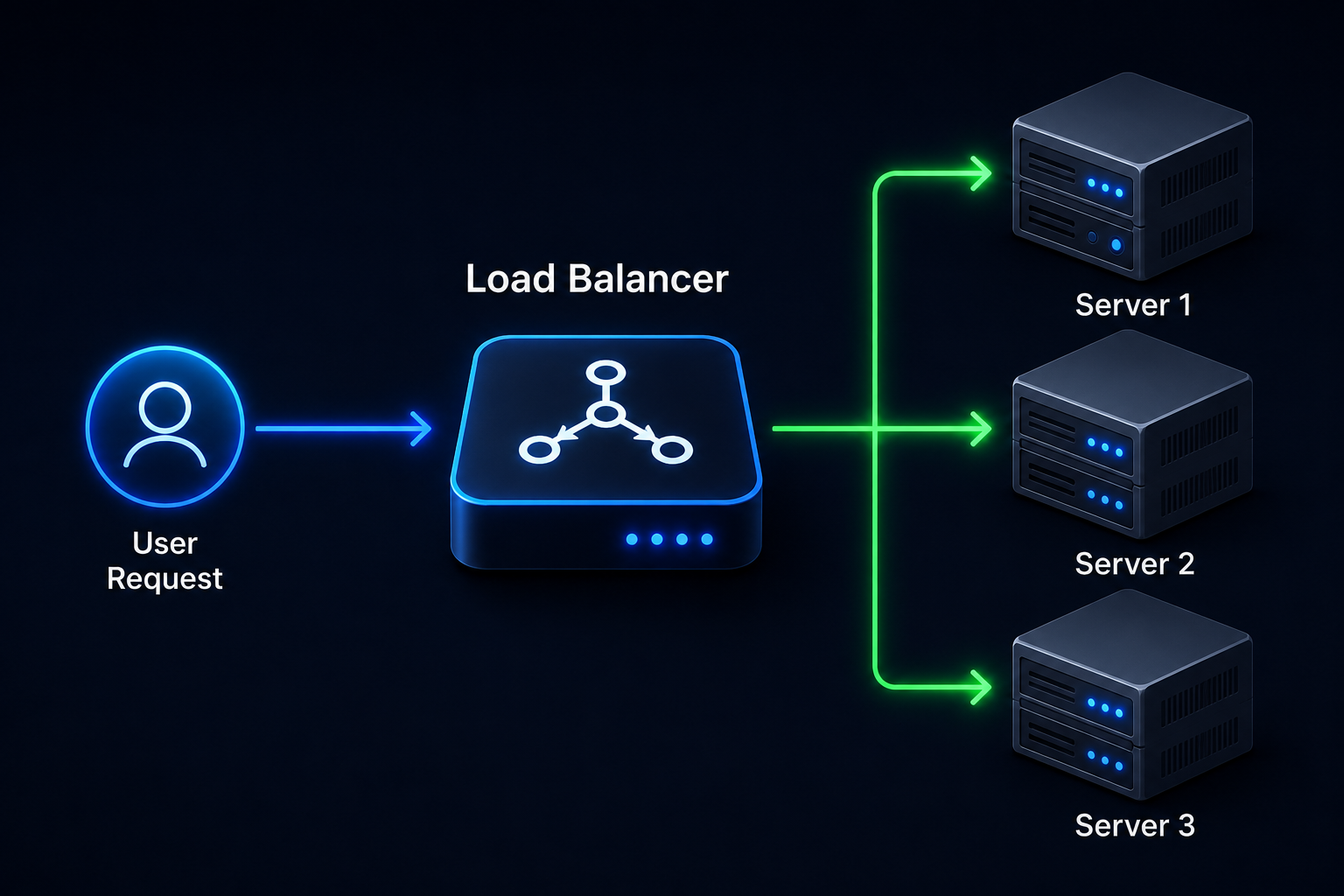
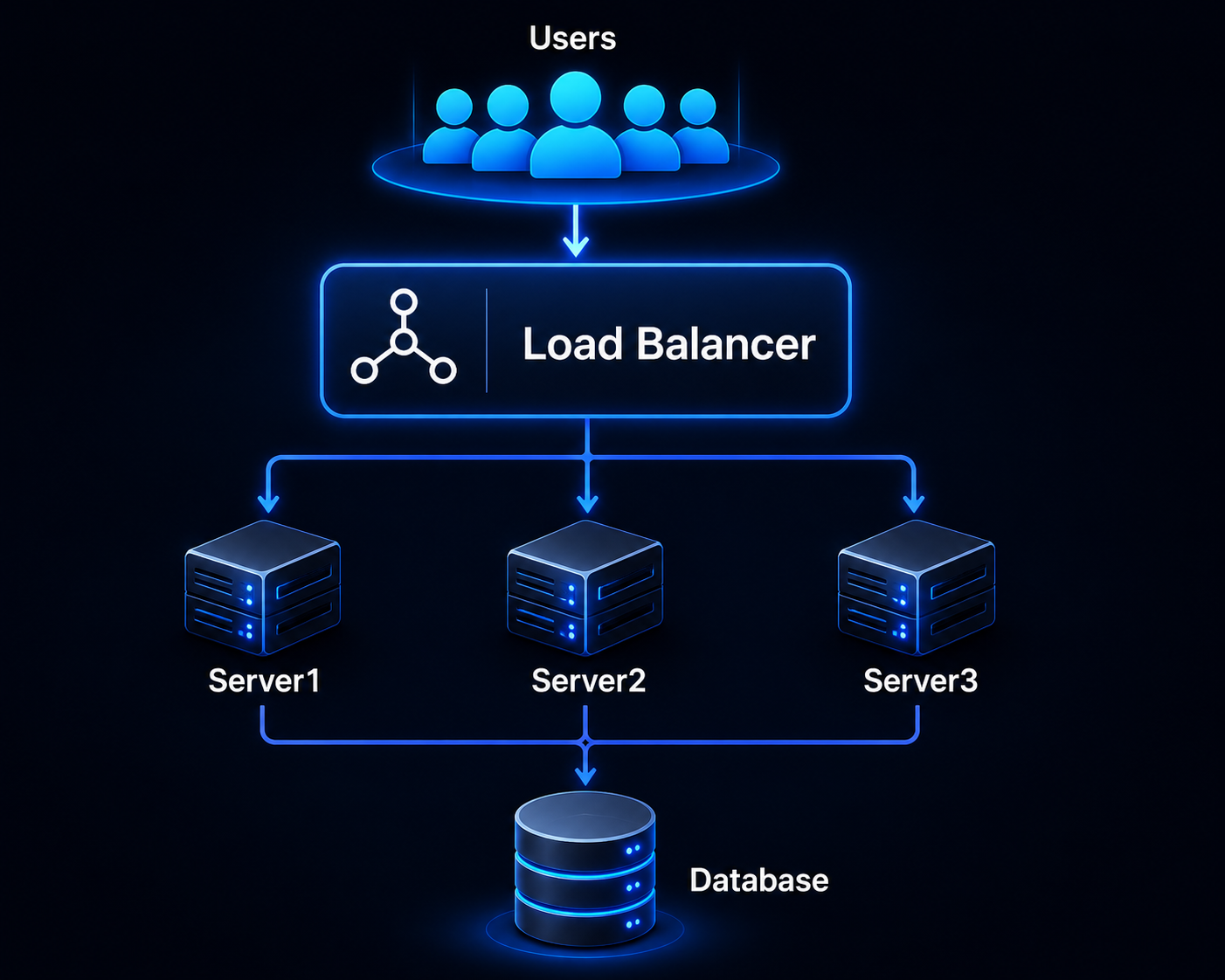
At its core, a load balancer sits between users and backend servers. Instead of users communicating directly with a server, every request first reaches the load balancer.
The load balancer then decides which backend server should process the request.
1. User Sends a Request
A user opens:
https://www.example.com2. Request Reaches the Load Balancer
Instead of directly accessing Server 1, the request first reaches the load balancer.
The load balancer analyses several factors such as:
- Current server load
- CPU usage
- Active connections
- Health status
- Response time
- Geographic location
- Session persistence (if enabled)
3. Best Server Is Selected
Using a load-balancing algorithm, the system identifies the most suitable server.
Example:
4. Server Processes the Request
The selected server:
- Processes the request
- Retrieves required data
- Generates the webpage or API response
5. Response Returns to User
The processed response is sent back through the load balancer to the user’s browser.
The entire process typically takes only a few milliseconds.
Basic Architecture of Load Balancer
Key Components of a Load Balancer
A load-balancing environment consists of several important components.
| Component | Purpose |
|---|---|
| Client | Sends requests |
| Load Balancer | Distributes traffic |
| Backend Servers | Process requests |
| Health Monitor | Checks server status |
| Network | Transfers data |
| Database | Stores application data |
How Does a Load Balancer Know Which Server Is Healthy?
One of the most valuable features of a load balancer is Health Checking.
The load balancer continuously monitors every backend server by sending periodic health-check requests.
It verifies whether each server is:
- Running properly
- Responding within acceptable time limits
- Returning valid HTTP status codes (such as 200 OK)
- Connected to required services like databases or APIs
If a server becomes slow, stops responding, or fails health checks, the load balancer automatically removes it from the traffic pool. New user requests are redirected only to healthy servers, helping maintain uninterrupted service.
Once the failed server recovers and starts passing health checks again, it is automatically added back into rotation without affecting users.
This automatic failover mechanism is one of the main reasons why modern websites remain available even when individual servers encounter problems.
Types of Load Balancers
Not all load balancers work in the same way. Some distribute traffic based on network information like IP addresses and ports, while others inspect the actual content of requests, such as URLs, HTTP headers, or cookies.
Choosing the right type of load balancer depends on your application’s architecture, traffic volume, security requirements, and performance goals.
The two most common categories are:
- Layer 4 (Transport Layer) Load Balancer
- Layer 7 (Application Layer) Load Balancer
1. Layer 4 (L4) Load Balancer
A Layer 4 Load Balancer operates at the Transport Layer of the OSI model.
Instead of inspecting webpage content, it routes traffic using information such as:
- Source IP Address
- Destination IP Address
- TCP Port
- UDP Port
Since it doesn’t analyse HTTP requests, it processes traffic extremely quickly.
How Layer 4 Works?
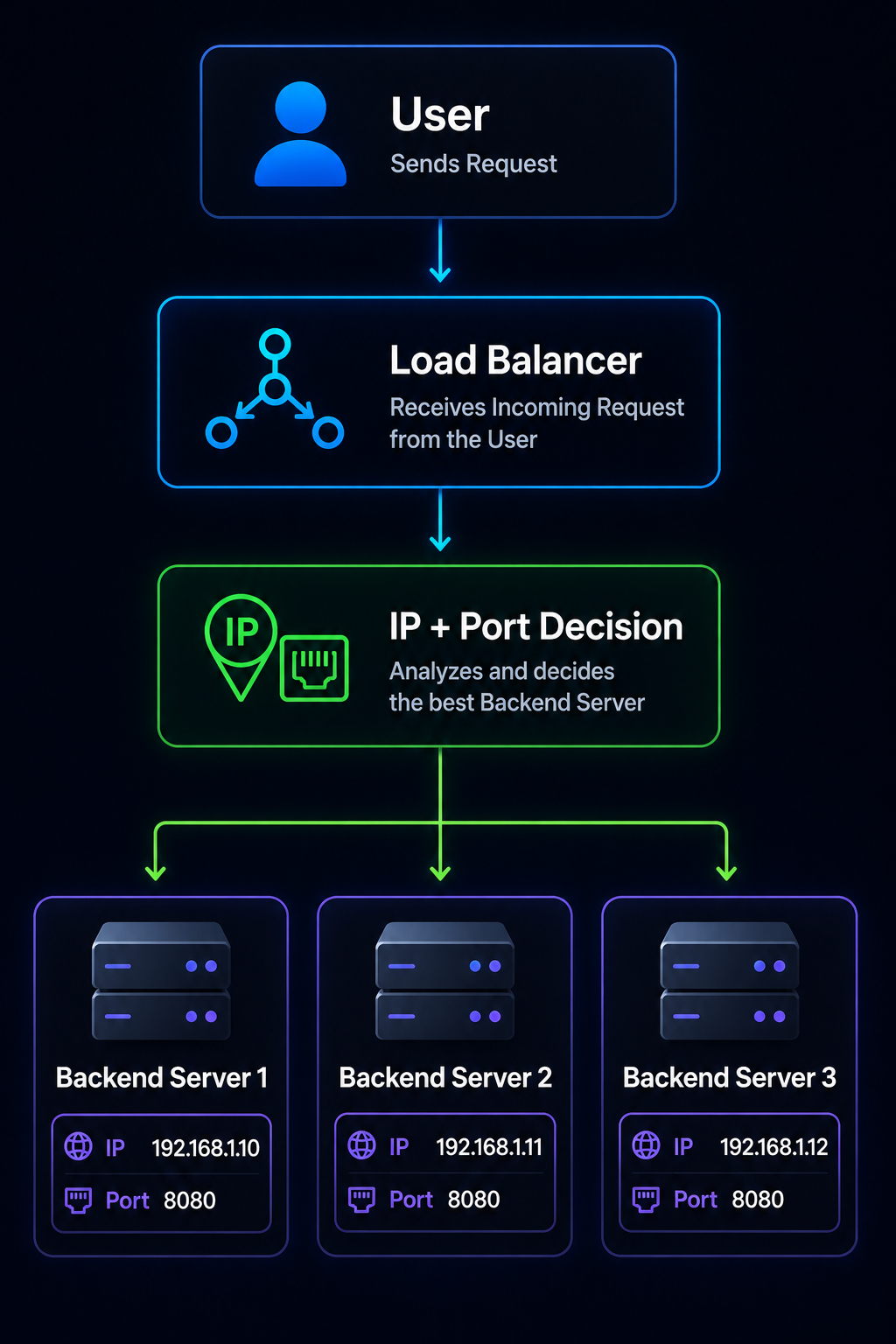
The load balancer simply decides:
“Which server should receive this TCP connection?”
without looking inside the request.
| Advantages | Disadvantages |
| Extremely fast | Cannot inspect URLs |
| Lower latency | Cannot route by API path |
| Handles millions of connections | Cannot route by cookies |
| Uses less CPU | Limited application awareness |
| Excellent for network-level applications |
Best Use Cases:
- Gaming servers
- VoIP systems
- SMTP mail servers
- DNS services
- Database clusters
- Large TCP applications
2. Layer 7 (L7) Load Balancer
A Layer 7 Load Balancer operates at the Application Layer.
Unlike Layer 4, it understands:
- URLs
- HTTP Headers
- Cookies
- API Requests
- Hostnames
- HTTP Methods
This allows much smarter traffic routing.
Example:
Instead of randomly distributing requests, it can route based on URL.
example.com/images

↓

Image Server
example.com/api

↓

API Server
example.com/login

↓

Authentication Server
This intelligent routing improves performance and makes large applications easier to manage.
| Advantages | Disadvantages |
| Smart routing | More CPU intensive |
| URL-based routing | Slightly slower than Layer 4 |
| Cookie-based routing | Configuration is more complex |
| SSL termination | |
| Better security | |
| Ideal for microservices |
Best Use Cases:
- Websites
- REST APIs
- SaaS applications
- Kubernetes
- E-commerce platforms
- Cloud-native applications
Layer 4 vs Layer 7 Load Balancer
| Feature | Layer 4 | Layer 7 |
|---|---|---|
| OSI Layer | Transport | Application |
| Understands HTTP | No | Yes |
| URL Routing | No | Yes |
| Cookie Routing | No | Yes |
| SSL Termination | Limited | Excellent |
| Speed | Very High | High |
| CPU Usage | Low | Moderate |
| Best For | Network Traffic | Web Applications |
Hardware vs Software Load Balancer
Another important classification is based on implementation.
1. Hardware Load Balancer
A hardware load balancer is a dedicated physical appliance installed inside a data centre.
Examples include:
- F5 BIG-IP
- Citrix ADC
- Cisco ACE
- A10 Thunder ADC
These devices are purpose-built for handling very large enterprise workloads.
| Advantages | Disadvantages |
| Extremely powerful | Expensive |
| Dedicated hardware | Requires maintenance |
| Enterprise-grade reliability | Less flexible |
| High throughput | Scaling often requires purchasing additional hardware |
| Advanced security features |
2. Software Load Balancer
A software load balancer runs on a virtual machine, cloud instance, or container.
Popular examples include:
- NGINX
- HAProxy
- Traefik
- Envoy Proxy
| Advantages | Disadvantages |
| Affordable | Depends on underlying infrastructure |
| Easy to deploy | May require tuning for maximum performance |
| Cloud-friendly | |
| Highly scalable | |
| Open-source options available |
Hardware vs Software Comparison
| Feature | Hardware | Software |
|---|---|---|
| Cost | High | Low |
| Flexibility | Medium | High |
| Cloud Support | Limited | Excellent |
| Scalability | Moderate | Excellent |
| Maintenance | Higher | Lower |
| Popular Among | Enterprises | Startups & Cloud Apps |
Load Balancing Algorithms
A load balancer uses algorithms to decide which backend server should receive the next request.
Different algorithms are suitable for different workloads.
1. Round Robin
This is the simplest and most widely used algorithm.
Traffic is distributed sequentially.
Example:
Request 1 → Server A

Request 2 → Server B

Request 3 → Server C

Request 4 → Server A

Request 5 → Server B
Every server receives an equal number of requests.
Best For:
- Servers with identical hardware
- Equal workloads
- Simple web applications
2. Weighted Round Robin
Sometimes servers have different capacities.
Example:
| Server | Capacity |
|---|---|
| A | High |
| B | Medium |
| C | Low |
Weights can be assigned:
Server A = 5

Server B = 3

Server C = 1
Now Server A receives more requests because it has greater processing power.
Best For:
- Mixed hardware environments
- Cloud scaling
- High-performance clusters
3. Least Connections
Instead of counting total requests, the load balancer checks how many active users each server is currently handling.
Example:
| Server | Active Connections |
|---|---|
| Server A | 180 |
| Server B | 42 |
| Server C | 91 |
The next request goes to Server B because it has the fewest active connections.
Best For:
- Long-lived user sessions
- Chat applications
- Video streaming
- Gaming platforms
4. Least Response Time
This algorithm measures:
- Current response speed
- Number of active connections
It then selects the fastest-performing server.
Best For:
- High-performance APIs
- Financial applications
- AI inference services
- Real-time analytics
5. IP Hash
Here, the client’s IP address determines which server handles the request.
Example:
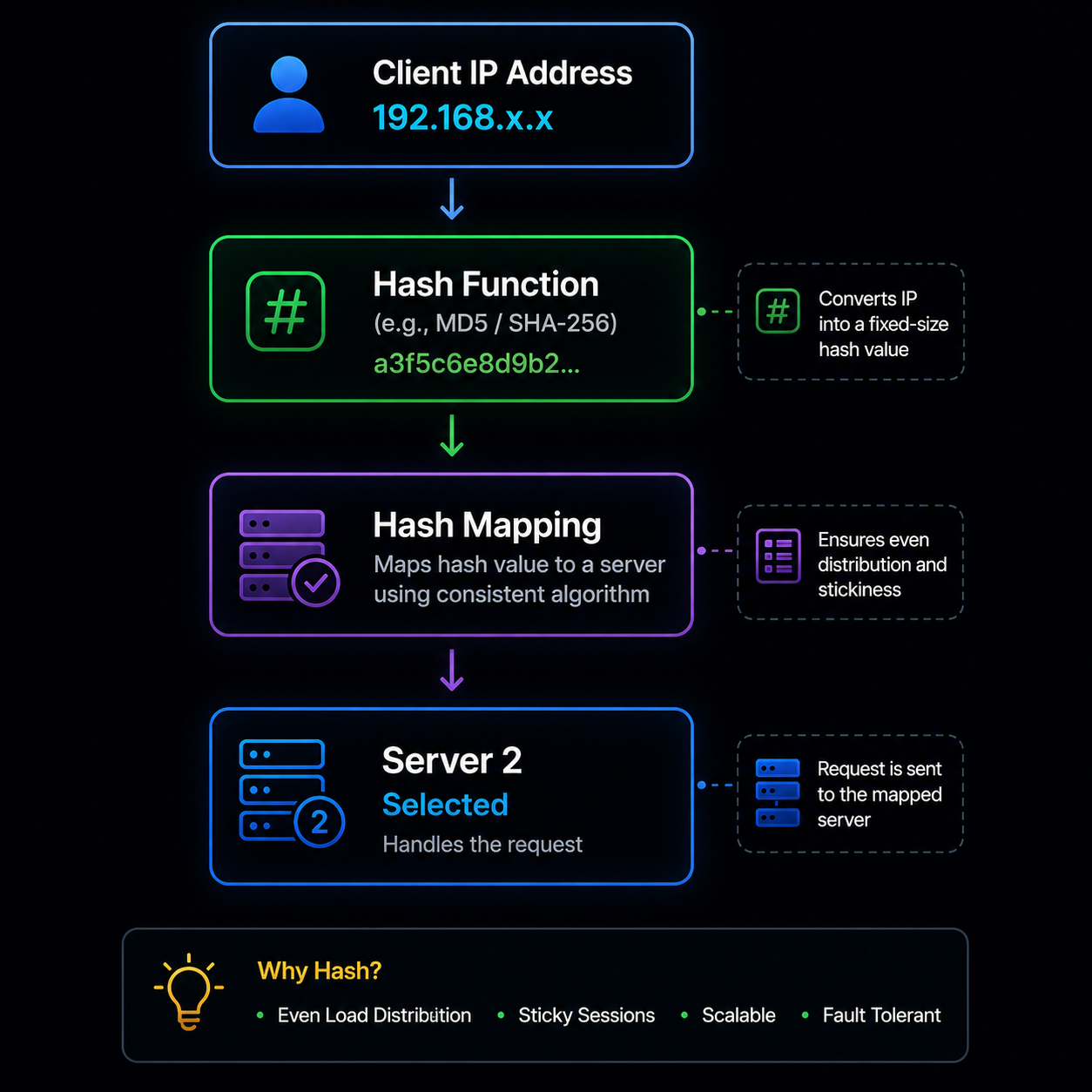
The same user is consistently directed to the same server unless the server becomes unavailable.
Best For:
- User session consistency
- Personalised dashboards
- Shopping carts
6. Random Algorithm
The load balancer randomly selects a backend server.
Although simple, it is generally less efficient than other algorithms.
Best For:
- Testing environments
- Small deployments
- Temporary services
Popular Algorithms Comparison
| Algorithm | Best For | Performance |
|---|---|---|
| Round Robin | Equal servers | Good |
| Weighted Round Robin | Unequal servers | Very Good |
| Least Connections | Long sessions | Very Good |
| Least Response Time | Fastest server selection | Very Good |
| IP Hash | Sticky users | Good |
| Random | Testing | Average |
What Is Session Persistence (Sticky Sessions)?
Some applications require a user to stay connected to the same backend server throughout their session.
This is known as Session Persistence or Sticky Sessions.
Imagine a customer adds products to a shopping cart. If each request goes to a different server that doesn’t share session data, the cart could appear empty.
With sticky sessions, the load balancer remembers the user’s connection and keeps sending their requests to the same server for the duration of the session.
| Common Use Cases: | Benefits: | Drawbacks: |
| Online banking | Better user experience | Uneven traffic distribution |
| E-commerce carts | Consistent session data | Reduced scalability |
| Student portals | Easier authentication handling | Server overload if many users stick to one node |
| CRM systems | ||
| Healthcare applications |
Modern applications often avoid sticky sessions by storing session data in shared databases or distributed caches like Redis.
What Is SSL/TLS Termination?
HTTPS traffic is encrypted using SSL/TLS, and decrypting every request consumes server resources.
With SSL/TLS Termination, the load balancer handles encryption and decryption before forwarding plain HTTP traffic to backend servers (within a secure internal network).
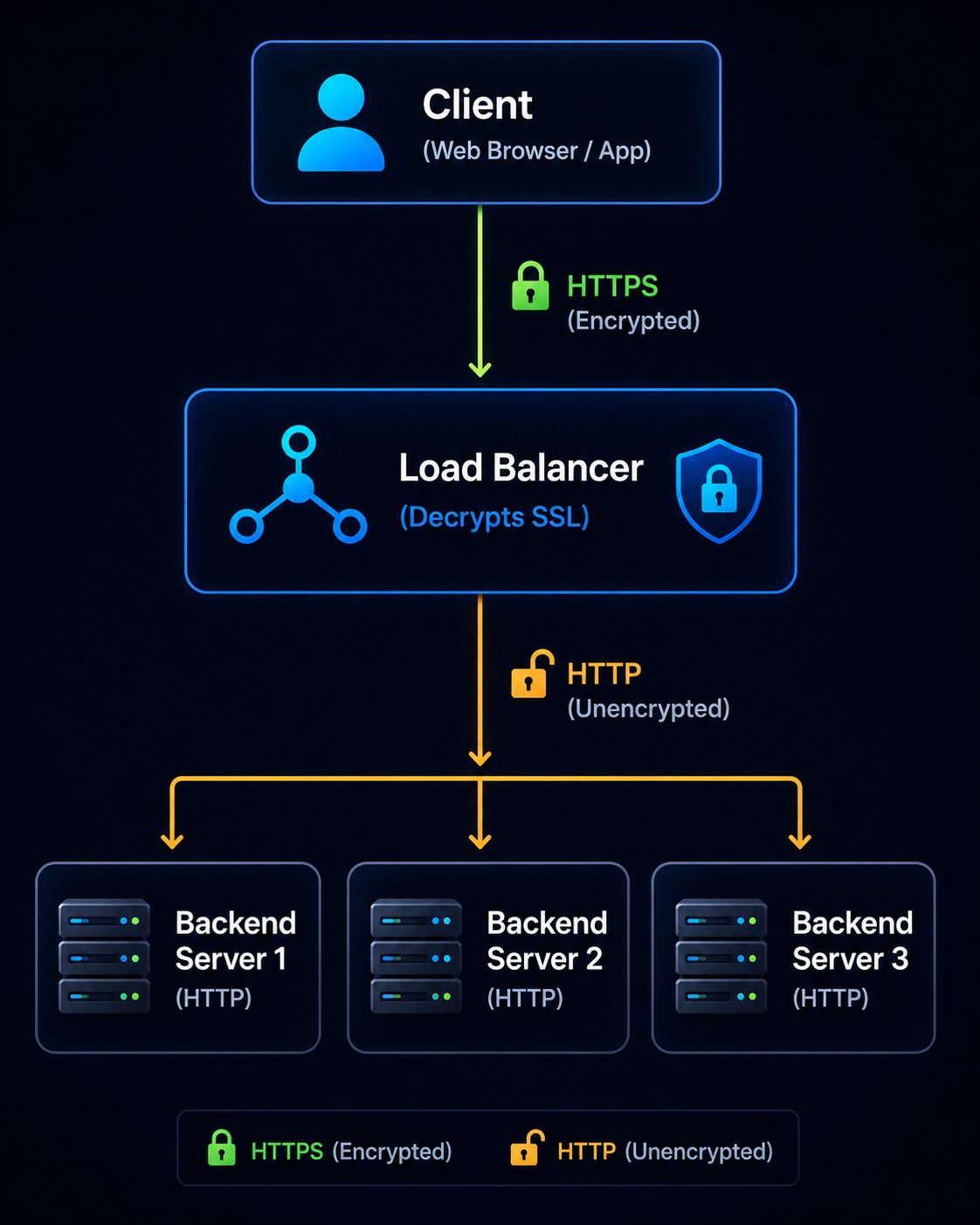
Benefits:
- Reduces server CPU usage
- Simplifies certificate management
- Improves application performance
- Easier certificate renewal
Reverse Proxy vs Load Balancer
Many beginners confuse these two technologies because both sit between users and backend servers.
| Feature | Reverse Proxy | Load Balancer |
|---|---|---|
| Main Purpose | Protect and optimise backend servers | Distribute traffic |
| Traffic Distribution | Optional | Core function |
| SSL Termination | Yes | Yes |
| Caching | Yes | Sometimes |
| Compression | Yes | Limited |
| Multiple Backend Servers | Optional | Primary design |
| Health Checks | Limited | Advanced |
Can One Tool Do Both?
Yes. Modern tools such as NGINX, Envoy, and HAProxy can act as both a reverse proxy and a load balancer, making them popular choices for cloud-native applications.
Typical Load Balancer Traffic Flow
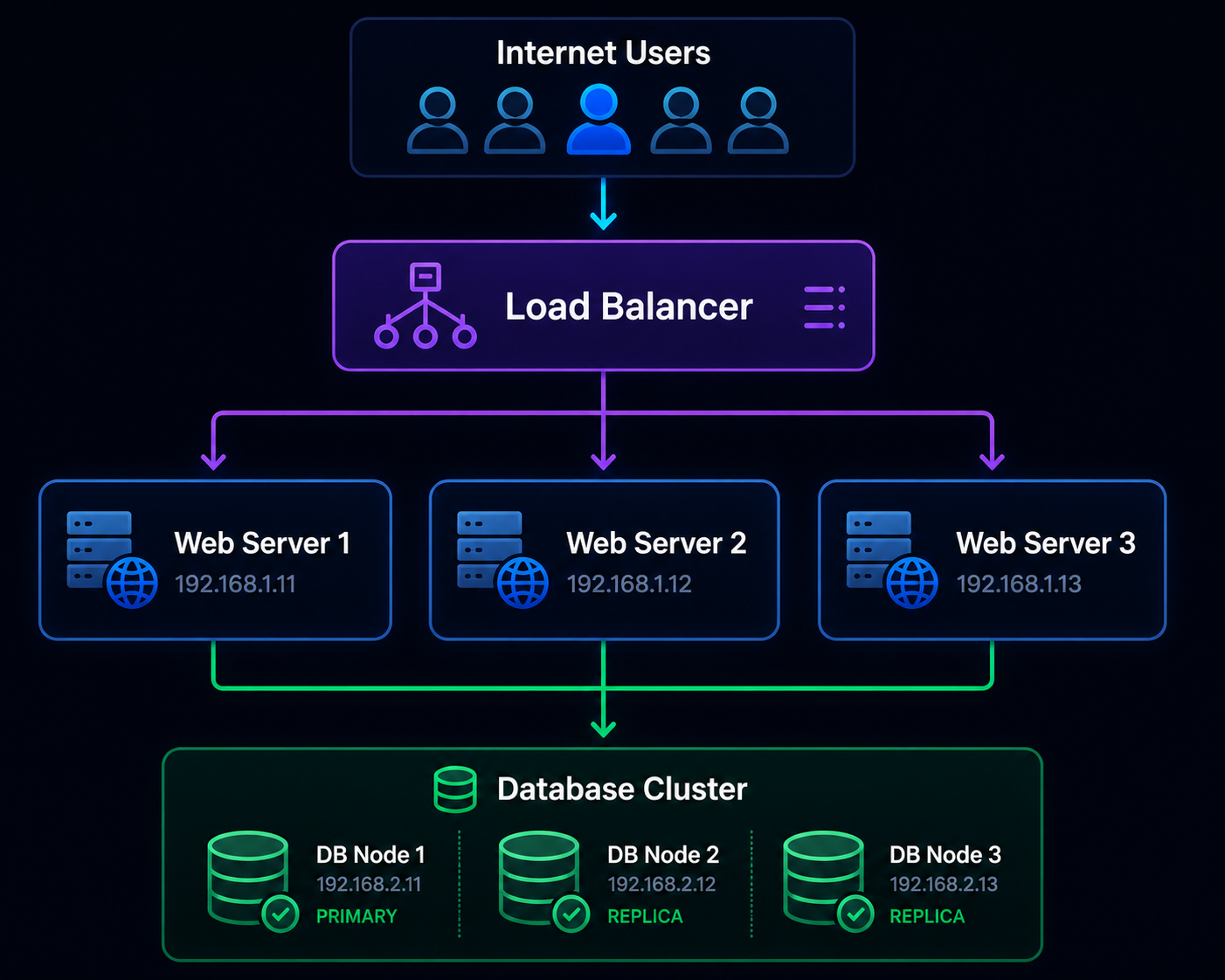
In this architecture:
- The load balancer receives all incoming traffic.
- It performs health checks and selects the best server using a configured algorithm.
- If one server becomes unavailable, traffic is automatically redirected to the remaining healthy servers.
- Users continue to access the application without noticing the backend failure.
Key Features of a Load Balancer
Modern load balancers offer much more than simple traffic distribution. They include intelligent features that improve application performance, availability, security, and scalability.
Below are the most important features every beginner and professional should understand.
1. Intelligent Traffic Distribution
The primary function of a load balancer is to distribute incoming requests across multiple backend servers using predefined algorithms.
Instead of overloading one server, requests are shared intelligently to maintain consistent performance.
Benefits:
- Prevents server overload
- Faster response times
- Better user experience
- Improved resource utilisation
2. Health Monitoring
A load balancer continuously checks whether backend servers are healthy. It sends periodic health-check requests to verify that each server is functioning correctly.
If a server fails, it is automatically removed from the traffic pool. Once the server recovers, it is added back automatically.
Health checks may include:
- HTTP Status Code (200 OK)
- TCP Connection Test
- Response Time
- API Endpoint Verification
- Database Connectivity
3. Automatic Failover
If one server suddenly crashes, users should not notice any interruption.
The load balancer immediately redirects traffic to healthy servers.
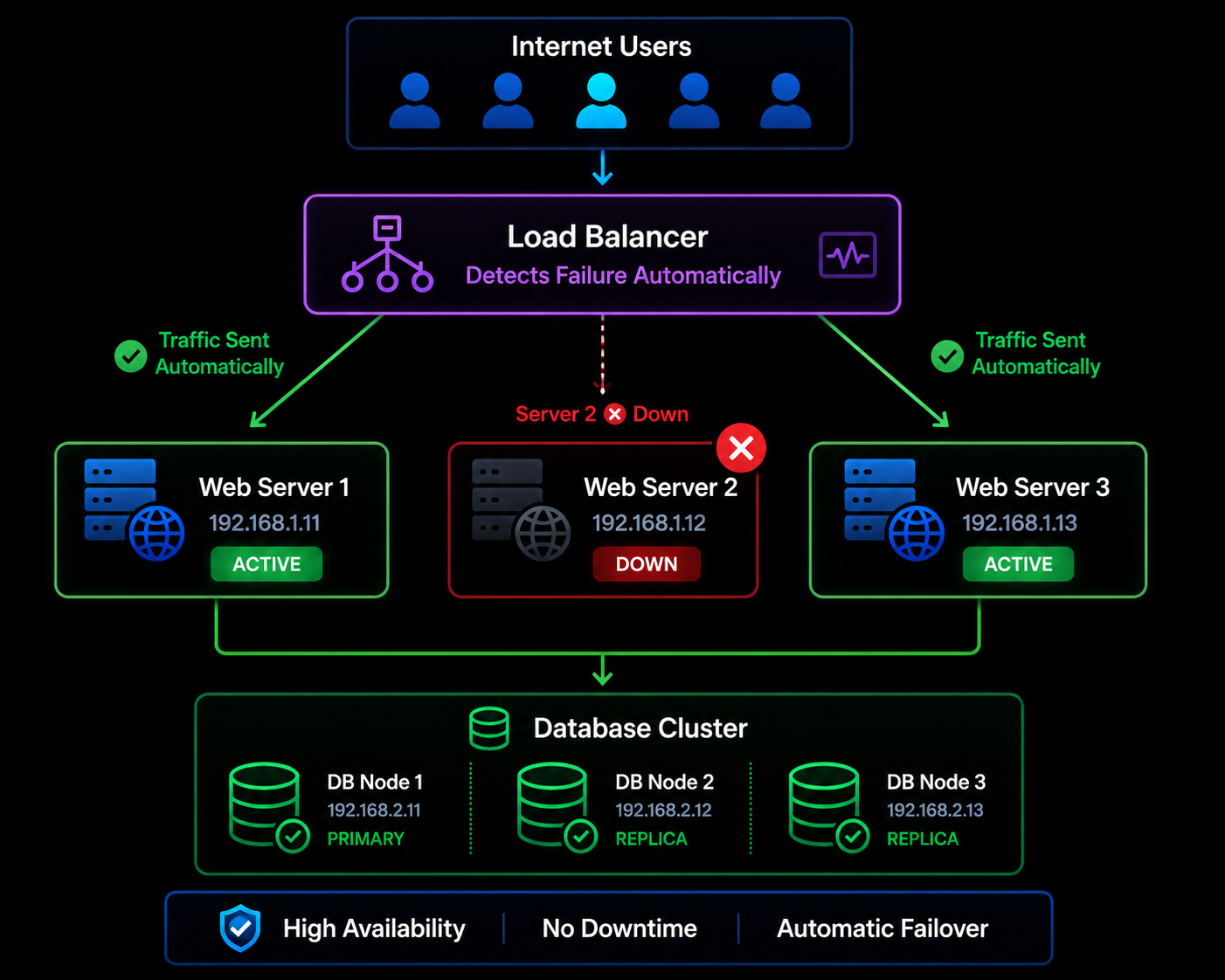
This feature ensures maximum uptime.
4. High Availability
Load balancers eliminate the Single Point of Failure (SPOF) by distributing workloads across multiple servers.
Even if one server fails:
- Website remains online
- Applications continue running
- Users experience minimal disruption
5. Auto Scaling Support
Modern cloud load balancers integrate with auto-scaling groups.
Example:
Morning Traffic
3 Servers
Evening Peak Traffic
12 Servers
Late Night
3 Servers
Servers automatically increase or decrease based on demand.
This helps optimise both performance and infrastructure costs.
6. SSL/TLS Offloading
Instead of each backend server handling encryption, the load balancer performs SSL/TLS processing.
Advantages include:
- Lower CPU usage
- Faster backend processing
- Easier certificate management
- Improved performance
7. Content-Based Routing
Layer 7 load balancers can route traffic based on application-level information.
Example:
| URL | Destination |
|---|---|
| /api | API Server |
| /images | Image Server |
| /login | Authentication Server |
| /payments | Payment Service |
This is especially useful for a microservices architecture.
8. Session Persistence
Sticky Sessions ensure that a user’s requests continue to reach the same backend server throughout a session.
Ideal for:
- Online banking
- Shopping carts
- Student portals
- CRM systems
9. Security Integration
Many enterprise load balancers include built-in security capabilities.
Common security features include:
- DDoS mitigation
- Web Application Firewall (WAF)
- Rate limiting
- IP filtering
- Bot protection
- Geo-blocking
10. Detailed Analytics
Modern load balancers provide valuable performance metrics such as:
- Requests per second
- Server response time
- Error rates
- CPU usage
- Active connections
- Health status
- Throughput
These insights help administrators identify bottlenecks before they affect users.
Benefits of Using a Load Balancer
Load balancing offers significant advantages for businesses of all sizes.
- Faster Website Performance: Traffic is shared among multiple servers, reducing response times and improving page speed. Users enjoy smoother browsing experiences.
- Better Reliability: If one server fails, users are automatically redirected to healthy servers. This significantly reduces downtime.
- High Availability: Applications remain accessible even during Hardware failures, Software crashes, Maintenance windows, and Traffic spikes.
- Improved Scalability: As traffic grows, additional servers can be added without disrupting existing users. This is known as horizontal scaling.
- Better Resource Utilisation: Instead of leaving some servers idle while others are overloaded, the load balancer distributes workloads efficiently.
- Enhanced User Experience: Users experience Faster loading pages, Stable connections, Fewer errors, and Consistent application performance.
- Easier Maintenance: Administrators can temporarily remove one server for updates while others continue serving users. This enables maintenance with little or no downtime.
- Better Disaster Recovery: If one data centre becomes unavailable, traffic can be redirected to another location. This improves business continuity.
- Cost Optimisation: Cloud-based load balancers help organisations scale infrastructure according to demand. Benefits include reduced idle resources, Lower operational costs, and Efficient cloud utilisation.
- Improved Security: Load balancers act as the first point of contact between users and backend servers. They can filter malicious traffic before it reaches the application.
Challenges and Limitations of Load Balancers
Although load balancing offers numerous benefits, it also comes with certain challenges.
Understanding these limitations helps organisations design more resilient systems.
1. Configuration Complexity
Large enterprise environments often involve:
- Multiple regions
- Hundreds of servers
- Microservices
- Kubernetes clusters
Incorrect configuration can lead to:
- Routing failures
- Performance degradation
- Service outages
2. Additional Infrastructure Cost
Enterprise-grade hardware load balancers can be expensive.
Costs include:
- Hardware appliances
- Licensing
- Maintenance
- Support contracts
However, cloud-based solutions have reduced this challenge considerably.
3. Session Management Issues
Applications using sticky sessions may experience:
- Uneven traffic distribution
- Server imbalance
- Reduced scalability
Modern architectures typically store session data in shared databases or distributed caches.
4. Single Point of Failure
A poorly designed environment with only one load balancer introduces a new point of failure.
Best practice is to deploy redundant load balancers using High Availability (HA) configurations.
5. SSL Certificate Management
Managing SSL certificates across multiple domains and services can become complex without the aid of automation.
Many organisations use automated certificate management tools to simplify renewals.
6. Monitoring Requirements
A load balancer itself must also be monitored.
Important metrics include:
- Latency
- Error rate
- Active connections
- Throughput
- Health check failures
Without monitoring, performance issues may go unnoticed.
7. Debugging Complexity
When multiple servers, proxies, APIs, and microservices are involved, troubleshooting can become more difficult.
Proper logging and observability tools are essential.
Popular Load Balancer Tools
Several excellent load-balancing solutions are available today.
Some are open source, while others are enterprise-grade products.
1. NGINX
One of the world’s most popular software load balancers.
| Features: | Best For: |
| Reverse proxy | Websites |
| Layer 7 load balancing | APIs |
| SSL termination | SaaS platforms |
| Caching | Kubernetes ingress |
| Compression | |
| API gateway support |
2. HAProxy
HAProxy is known for exceptional performance and reliability.
It is widely used by financial institutions and high-traffic platforms.
| Features: | Best For: |
| High performance | Enterprise applications |
| Health checks | Large-scale web services |
| SSL offloading | Banking systems |
| TCP & HTTP support | |
| Detailed statistics |
3. Traefik
Traefik is a modern cloud-native load balancer designed for containers and microservices.
| Features: | Best For: |
| Docker integration | Docker |
| Kubernetes integration | Kubernetes |
| Automatic service discovery | Cloud-native environments |
| HTTPS automation | |
| Dynamic configuration |
4. Envoy Proxy
Envoy is one of the most advanced proxies used in service mesh architectures.
| Features: | Best For: |
| Layer 7 proxy | Microservices |
| API routing | Service Mesh |
| gRPC support | Istio |
| Observability | Cloud platforms |
| Dynamic configuration |
5. F5 BIG-IP
An enterprise-grade hardware and virtual load-balancing platform.
| Features: | Best For: |
| Advanced traffic management | Large enterprises |
| Web Application Firewall (WAF) | Banks |
| DDoS protection | Government organisations |
| SSL acceleration | Telecom companies |
| Global traffic management |
Cloud Load Balancers
Cloud providers offer fully managed load-balancing services that automatically scale with demand.
These services reduce operational overhead and integrate seamlessly with cloud infrastructure.
1. AWS Elastic Load Balancer (ELB)
Amazon Web Services provides several types of managed load balancers under the Elastic Load Balancing (ELB) service.
| Types: | Features: | Best For: |
| Application Load Balancer (ALB) | Auto Scaling integration | AWS-hosted websites |
| Network Load Balancer (NLB) | Health checks | APIs |
| Gateway Load Balancer (GWLB) | SSL termination | Microservices |
| Classic Load Balancer (Legacy) | Multi-AZ support | Enterprise applications |
| High availability | ||
| CloudWatch monitoring |
2. Microsoft Azure Load Balancer
Azure offers a highly available Layer 4 load-balancing service for cloud applications.
| Features: | Best For: |
| Public and Internal Load Balancer | Azure Virtual Machines |
| Zone redundancy | Enterprise workloads |
| Health probes | Hybrid cloud deployments |
| High throughput | |
| Auto scaling support |
3. Google Cloud Load Balancing
Google Cloud provides a globally distributed load-balancing platform that operates across Google’s worldwide network.
| Features: | Best For: |
| Global Anycast IP | Global applications |
| Cross-region traffic distribution | AI platforms |
| HTTP(S), TCP, SSL, and UDP support | Large-scale SaaS products |
| Automatic scaling | |
| Cloud CDN integration |
Kubernetes Load Balancing
Kubernetes relies on load balancing to distribute traffic among containerised applications.
Common components include:
- Service (ClusterIP, NodePort, LoadBalancer)
- Ingress Controller
- NGINX Ingress
- Traefik Ingress
- Envoy Gateway
Benefits include:
- Automatic scaling
- Self-healing
- Rolling updates
- Zero-downtime deployments
- Efficient service discovery
CDN and Load Balancer Integration
A Content Delivery Network (CDN) and a load balancer often work together to deliver fast, secure, and reliable applications.
Typical request flow:
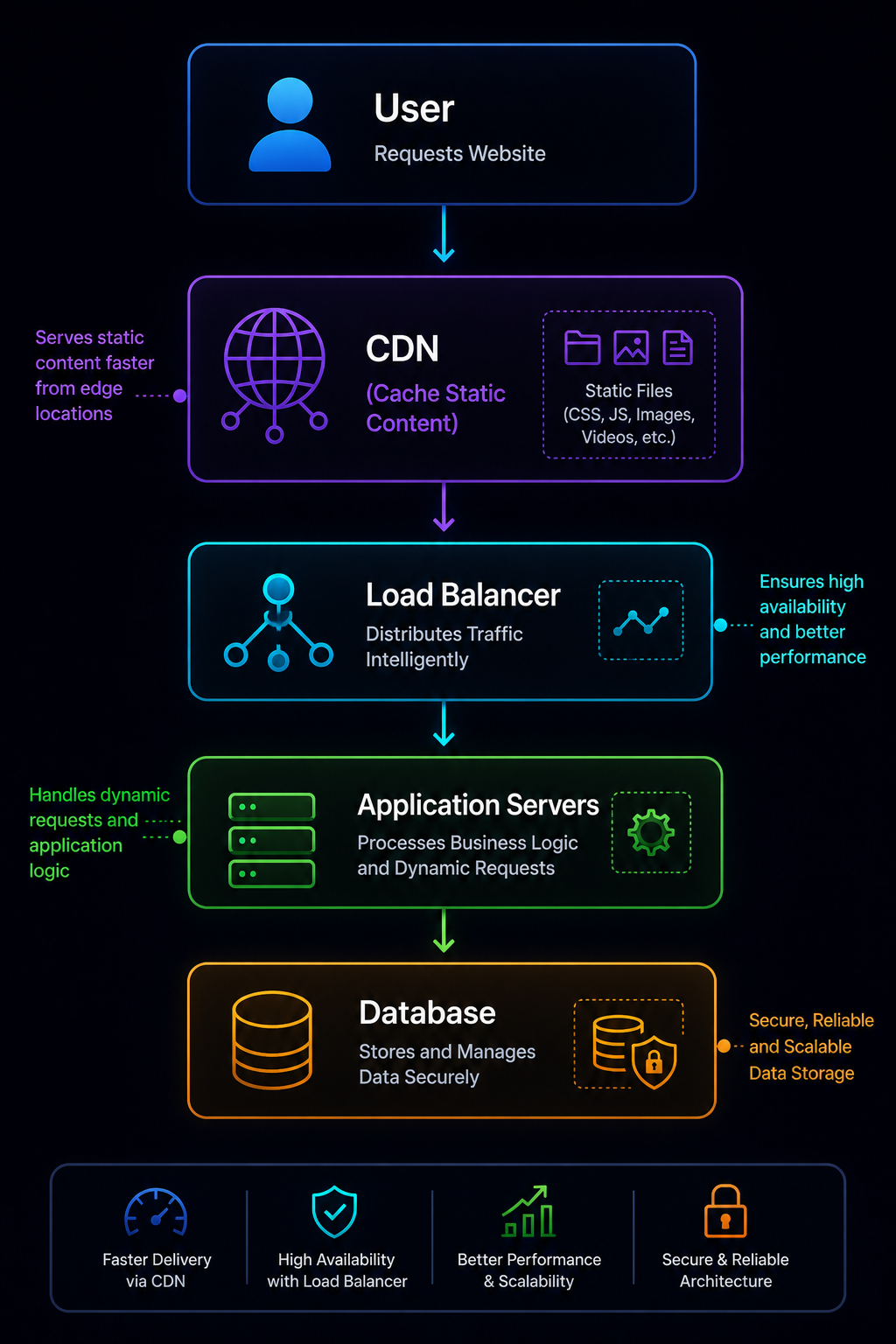
Benefits of Combining CDN with Load Balancing:
- Faster global content delivery
- Reduced server load
- Lower latency
- Better DDoS protection
- Improved website availability
- Enhanced user experience
For example, when a user requests an image, the CDN may serve it directly from the nearest edge location. If dynamic content is needed, the request is forwarded to the load balancer, which then routes it to the most appropriate backend server.
Real-World Examples of Load Balancers
Load balancing powers many of the websites and applications people use every day. Even if users never see it, a load balancer is often working behind the scenes to keep services fast and available.
1. Netflix
Netflix serves millions of users simultaneously across the world.
When multiple people stream different movies or TV shows, load balancers distribute requests across hundreds of servers and multiple cloud regions to ensure uninterrupted streaming.
Why Netflix Uses Load Balancing?
- Handles millions of concurrent users
- Reduces buffering
- Supports global traffic
- Improves availability
- Enables automatic scaling
2. Amazon
During major shopping events like Prime Day or festive sales, Amazon experiences enormous traffic spikes.
Load balancers distribute customer requests across thousands of application servers to keep the platform responsive.
Benefits:
- Faster product searches
- Reliable checkout process
- High availability
- Seamless shopping experience
3. Google Search
Every Google search request is routed through a highly distributed infrastructure.
Load balancing ensures users are connected to healthy servers that can respond quickly, helping deliver search results in fractions of a second.
4. Banking Applications
Banks must remain available around the clock.
Load balancers help by:
- Distributing login requests
- Managing payment transactions
- Supporting ATM services
- Improving security
- Reducing downtime
5. E-Commerce Websites
Online stores often receive heavy traffic during flash sales.
Load balancers prevent server overload and maintain smooth performance for:
- Product browsing
- Shopping carts
- Payment gateways
- Order processing
6. AI Platforms
Modern AI services process millions of inference requests daily.
Load balancers distribute requests across GPU clusters to:
- Reduce response times
- Balance GPU workloads
- Increase throughput
- Improve service reliability
Mini Case Study: Festival Sale Traffic Spike
Imagine an online shopping website normally receives 20,000 visitors per day.
During a festive sale, traffic suddenly jumps to 500,000 visitors.
1. Without a Load Balancer
- One server becomes overloaded.
- Website slows down.
- Checkout failures increase.
- Customers leave without purchasing.
2. With a Load Balancer
- Traffic is shared across multiple servers.
- New servers can be added automatically through auto scaling.
- The website remains fast and available.
- More customers complete their purchases successfully.
This example highlights why load balancing is a critical part of modern digital infrastructure.
Expert Tips for Using Load Balancers Successfully
A load balancer can significantly improve application performance, but following best practices ensures you get the maximum benefit.
1. Always Enable Health Checks
Regular health checks help the load balancer detect unhealthy servers and redirect traffic automatically.
2. Avoid a Single Load Balancer
Deploy redundant load balancers in a High Availability (HA) setup to eliminate single points of failure.
3. Choose the Right Algorithm
Different workloads require different strategies.
- Round Robin for equal servers
- Least Connections for long user sessions
- Least Response Time for latency-sensitive applications
- Weighted Round Robin for mixed-capacity servers
4. Monitor Performance Continuously
Track key metrics such as:
- Response time
- Error rates
- Active connections
- CPU utilisation
- Memory usage
- Network throughput
Continuous monitoring helps identify issues before users notice them. Set thresholds against rolling baselines rather than fixed numbers, since traffic patterns shift by hour and by season. Teams without round-the-clock staff often move this layer to AI-powered infrastructure managed services, where anomaly detection catches the drift and routine failovers run without anyone on call.
5. Use Auto Scaling
Integrating a load balancer with auto-scaling groups allows your infrastructure to handle sudden traffic increases while optimising costs during quieter periods.
6. Secure Your Load Balancer
Protect the entry point to your application by enabling:
- Web Application Firewall (WAF)
- DDoS protection
- SSL/TLS encryption
- Rate limiting
- Access control policies
7. Test Disaster Recovery Plans
Simulate server failures regularly to verify that traffic is redirected correctly and recovery procedures work as expected.
Common Load Balancer Mistakes
Even experienced teams can make mistakes that reduce performance or reliability.
- Ignoring Health Checks: Without proper health checks, failed servers may continue receiving requests, causing unnecessary downtime.
- Choosing the Wrong Algorithm: Using Round Robin for applications with long-running sessions can result in uneven workloads. Always select an algorithm based on application behaviour.
- Forgetting SSL Configuration: Improper SSL/TLS setup can lead to security vulnerabilities or certificate errors. Keep certificates updated and use strong encryption standards.
- Creating a Single Point of Failure: Deploying only one load balancer defeats the purpose of high availability. Use redundant load balancers across multiple availability zones whenever possible.
- Skipping Monitoring: Without logs and metrics, diagnosing performance problems becomes difficult. Use monitoring and alerting tools to gain visibility into your infrastructure.
- Overlooking Session Management: Applications that rely on sticky sessions without a shared session store may face scalability issues. Consider storing session data in Redis or another distributed cache.
- Poor Capacity Planning: Even with load balancing, backend servers must have sufficient capacity to handle expected traffic. Plan for both average and peak workloads.
FAQs:)
A. A Load Balancer is a hardware or software solution that distributes incoming network or application traffic across multiple servers to improve performance, availability, and reliability.
A. It prevents any single server from becoming overloaded, improves application performance, reduces downtime, and supports scalability.
A. Layer 4 operates using network information such as IP addresses and ports, while Layer 7 makes routing decisions based on application-level data like URLs, HTTP headers, and cookies.
A. Round Robin is one of the most widely used algorithms due to its simplicity, but Least Connections and Least Response Time are often preferred for dynamic workloads.
A. Yes. By distributing requests across multiple servers and preventing overload, a load balancer helps maintain fast and consistent response times
A. No. Small businesses, startups, and personal projects can also benefit, especially when applications begin receiving increasing traffic.
A. Yes. NGINX can function as a reverse proxy, web server, API gateway, and Layer 7 software load balancer.
A. AWS Elastic Load Balancer (ELB) is a managed cloud service that automatically distributes traffic across multiple AWS resources to improve application availability and scalability.
A. Yes. Kubernetes supports load balancing through Services, Ingress Controllers, and cloud-provider integrations to expose applications efficiently.
A. Future load balancers will become increasingly intelligent, integrating AI-driven traffic optimisation, edge computing, zero-trust networking, and predictive scaling.
Conclusion:)
Load balancing has become one of the foundational technologies behind today’s internet. From small business websites to global streaming platforms, it ensures that applications remain fast, reliable, and available even under heavy traffic.
By intelligently distributing requests across multiple servers, a load balancer improves performance, prevents overload, supports automatic scaling, and enhances fault tolerance. Modern solutions also provide advanced capabilities such as health checks, SSL/TLS termination, intelligent routing, security integration, and real-time monitoring.
Whether you’re a student learning cloud computing, a developer building scalable applications, or an organisation preparing for future growth, understanding how load balancers work is an essential skill in modern IT infrastructure.
As cloud-native architectures, AI applications, Kubernetes, and edge computing continue to evolve, load balancing will play an even greater role in delivering secure, high-performance digital experiences.
By selecting the right load-balancing strategy, following best practices, and continuously monitoring your infrastructure, you can build applications that are resilient, scalable, and ready for the future.
“Performance attracts users, but reliability earns their trust. A load balancer is the silent technology that keeps both alive.” — Mr Rahman, Founder of Oflox®
Read also:)
- What is Proxy Server and how it works? A Complete Guide!
- What is Data Lakehouse? A Complete Beginner’s Guide!
- What Is Prompt Chaining? A Complete Guide for Beginners!
Did this guide help you understand Load Balancers? Share your thoughts, questions, or experiences in the comments below—we’d love to hear from you!