This complete guide will explain What Is Cache Invalidation, how it works, why it is important, different cache invalidation strategies, its major features, benefits, challenges, popular tools, real-world examples, common mistakes, expert tips, and future trends.
Caching helps websites, applications, APIs, and software systems load faster by temporarily storing frequently requested data. Instead of processing the same request repeatedly, the system can serve stored information directly from the cache, which can reduce server load, database queries, and response time.
However, caching can also create problems when the original data changes but the cached version remains outdated. For example, a product price may be updated in the database, while visitors continue seeing the old price because an earlier version is still stored in the cache.
Cache invalidation helps solve this problem by removing, updating, expiring, or revalidating cached data when it is no longer accurate.
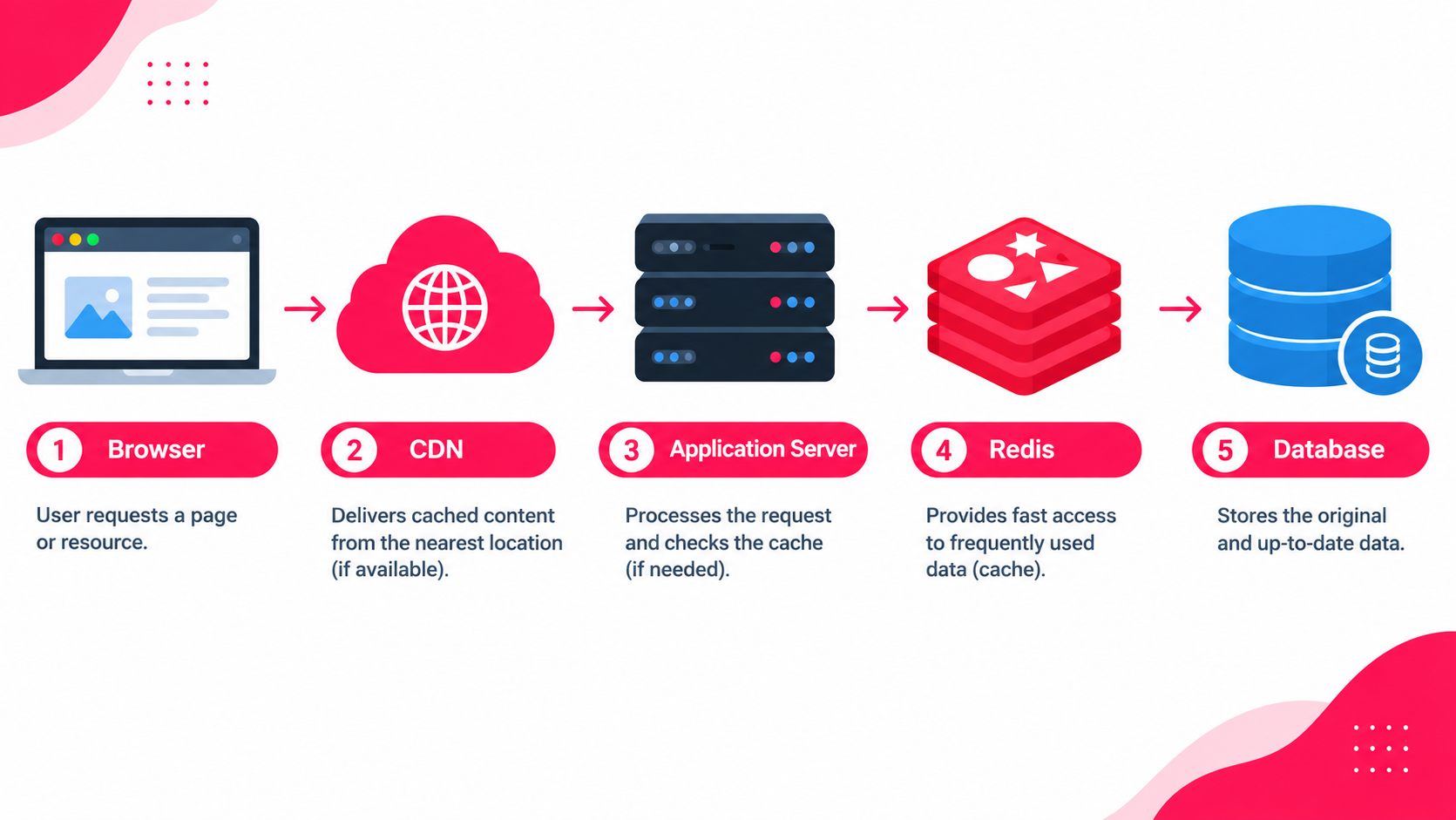
It plays an important role in modern websites and applications where information may be cached at multiple levels, including browsers, content delivery networks (CDNs), application servers, APIs, databases, and object caching systems such as Redis.

Whether you are a website owner, developer, software engineer, blogger, SEO professional, digital marketer, SaaS founder, or IT professional, understanding cache invalidation can help you improve website performance while ensuring users receive fresh and accurate information.
Let’s explore it together.
Table of Contents
What Is Cache Invalidation?
Cache invalidation is the process of marking cached information as outdated or removing it when the original data has changed, so that the next request receives fresh and accurate information.
In simple words:
Cache invalidation tells a caching system: “This stored copy is no longer valid. Do not continue serving it.”
Suppose a website stores this product information in cache:
Product ID: 501
Name: Wireless Keyboard
Price: ₹1,499
Later, the administrator changes the price in the database:
Price: ₹1,199If the cached version is not updated or removed, visitors may continue seeing ₹1,499.
A cache invalidation process can remove the old cached entry:
product:501 → INVALIDThe next request then retrieves the latest value from the database:
product:501 → ₹1,199The new information can then be stored in the cache again.
Redis describes cache invalidation as removing cached data when that information is no longer valid or useful so that cached content remains consistent with the source data.
What Is a Cache?
Before understanding invalidation, it is useful to understand caching itself.
A cache is a temporary storage layer containing copies of frequently requested information.
Instead of repeatedly requesting the original source, a system checks whether the requested information is already available in the cache.
A simplified flow looks like this:
User Request
     ↓
Check Cache
     ↓
Cache Hit? ─── Yes ──→ Return Cached Data
     │
     No
     ↓
Fetch From Database/Server
     ↓
Store in Cache
     ↓
Return Data
According to MDN, HTTP caching allows previously stored responses to be reused for later requests, reducing the need to contact or process requests at the origin server repeatedly.
Caching can exist at several levels.
| Cache Type | Example |
|---|---|
| Browser Cache | CSS, JS, images and fonts |
| CDN Cache | Static assets and HTML |
| Reverse Proxy Cache | NGINX or Varnish |
| Application Cache | Frequently requested application data |
| Object Cache | Redis or Memcached |
| Database Cache | Repeated database query results |
| API Cache | Frequently requested API responses |
| Service Worker Cache | PWA resources |
| DNS Cache | Domain resolution data |
Each cache layer may require a different invalidation strategy.
Cache Invalidation vs Cache Expiration vs Cache Eviction
These three terms are often used incorrectly.
Understanding the difference is extremely important.
| Concept | Meaning | Example |
|---|---|---|
| Cache Invalidation | Data is declared outdated because its source changed | Product price updated |
| Cache Expiration | Data automatically becomes stale after a predefined time | Cache expires after 10 minutes |
| Cache Eviction | Data is removed to free limited cache space | Least-used entry removed |
| Cache Revalidation | Cache checks whether existing content is still current | ETag returns 304 |
| Cache Purging | Cached content is explicitly deleted | CDN URL manually purged |
Example:
Suppose a blog page has a cache lifetime of one hour.
If nothing changes, the cached page may remain valid for the full hour.
But if the author updates the article after only five minutes, you may not want visitors to see the old article for another 55 minutes.
An explicit invalidation can remove the cached version immediately.
That is the difference between waiting for expiration and actively invalidating outdated information.
Why Is Cache Invalidation Important?
Caching improves performance only when the cached information is trustworthy.
Serving outdated content can sometimes be worse than having no cache at all.
1. Keeps Information Fresh
The most basic objective of cache invalidation is ensuring that users receive updated information.
This is especially important for:
- Product prices
- Stock availability
- Account information
- News websites
- Financial dashboards
- Booking systems
- API data
- Login permissions
- Website settings
2. Prevents Data Inconsistency
Modern applications often contain several copies of the same information.
For example:
Database
   ↓
Application Cache
   ↓
Reverse Proxy
   ↓
CDN
   ↓
Browser
The database may contain the latest information while one or more caching layers contain older information.
Invalidation helps keep these copies reasonably synchronised.
3. Protects User Experience
Imagine placing an order because an eCommerce website says:
In Stock – ₹499
After checkout, the customer discovers that the product actually costs ₹599 or is unavailable.
Such inconsistencies create frustration and reduce trust.
Proper invalidation decreases this risk.
4. Improves Application Reliability
Applications may make decisions based on cached information.
If outdated permissions, inventory numbers, configuration values, or account states remain cached, application behaviour can become incorrect.
5. Allows Longer Cache Durations
Without a reliable invalidation mechanism, developers often use extremely short TTL values because they are afraid of stale data.
With proper invalidation, some resources can safely remain cached for longer periods and only be cleared when required.
This can improve performance without sacrificing freshness.
History and Background of Cache Invalidation
Caching has existed since the early development of computer systems.
Processors used high-speed memory caches because accessing main memory was comparatively expensive. Operating systems cached disk information, database systems cached frequently requested data, and web browsers later began caching web resources.
As websites became larger, several additional caching layers appeared:
- Browser caching
- Proxy caching
- Reverse proxy caching
- Content Delivery Networks
- Database query caching
- Distributed object caching
- Microservice caching
- Edge computing
Caching became more powerful, but it also created a bigger synchronisation problem.
A single piece of information could now exist in many places.
Modern cache invalidation therefore focuses not simply on deleting a cached file but on coordinating data freshness across distributed systems.
HTTP caching standards also support validation mechanisms such as ETag, Last-Modified, If-None-Match, and If-Modified-Since. A stale response can be checked against the origin instead of always downloading the complete resource again.
How Does Cache Invalidation Work?
The exact process depends on the technology, but the basic workflow remains similar.
1. Original Data Is Requested
Suppose a customer visits:
/products/laptopThe application retrieves information from its database.
2. Data Is Stored in Cache
The result may be stored using a cache key:
product:501Value:
{
  "name": "Laptop Pro",
  "price": 65000,
  "stock": 14
}
Future requests can use this copy.
3. Original Data Changes
An administrator updates the price:
₹65,000 → ₹61,999Now the database and cache contain different values.
4. Change Triggers Invalidation
The application may execute something similar to:
DELETE CACHE KEY product:501Or send an invalidation event:
ProductUpdated: 5015. Old Cached Data Becomes Unusable
The outdated cache entry is:
- Deleted,
- Marked stale,
- Replaced,
- Versioned, or
- Scheduled for revalidation.
6. Next Request Fetches Fresh Data
The next visitor requests the product.
Because the cache entry no longer exists, the application accesses the source database.
7. Cache Is Rebuilt
Fresh information is stored:
product:501 = ₹61,999Future visitors receive the updated result directly from cache.
Main Cache Invalidation Strategies
There is no single invalidation strategy suitable for every application. Most production systems combine several techniques.
1. Time-Based Invalidation Using TTL
TTL means Time to Live.
Each cached entry receives an expiration period.
Example:
product:501
TTL = 600 seconds
After 600 seconds, the entry becomes stale or expires.
| Advantages | Disadvantages |
| Easy to implement | Freshness depends on TTL length. |
| Requires little application logic | A 60-minute TTL could allow outdated information to remain visible for almost an hour. |
| Prevents data from remaining cached forever | TTL therefore works best where temporary staleness is acceptable. |
| Suitable for information that changes predictably |
2. Explicit Cache Purging
Instead of waiting for TTL expiration, an application explicitly deletes cached content when something changes.
Example:
Database updated
       ↓
Delete cache key
       ↓
Next request regenerates cache
For Redis:
DEL product:501For a CDN, the application might purge:
https://example.com/products/laptopCloudflare supports granular cache purging using individual URLs and also supports purge operations based on tags, hostnames, and URL prefixes.
Explicit purging provides better freshness than relying only on TTL.
3. Event-Driven Cache Invalidation
Large applications frequently use events.
Suppose an eCommerce application’s product service updates an item.
It publishes:
ProductUpdatedOther services listen for the event.
Product Service
      ↓
ProductUpdated Event
      ↓
Cache Service
      ↓
Invalidate product:501
Event-driven invalidation is useful in:
- Microservices
- Distributed applications
- SaaS platforms
- Large marketplaces
- Real-time systems
Technologies such as Kafka, RabbitMQ, Redis Pub/Sub, webhooks, and cloud messaging systems may participate in this architecture.
4. Cache Busting Through Versioning
Cache busting creates a new URL whenever a resource changes.
Instead of:
style.cssyou may serve:
style.8f25a1.cssWhen the CSS file changes:
style.f781b2.cssThe browser sees a completely different URL and downloads the new file.
This technique is widely used for:
- CSS
- JavaScript
- Fonts
- Images
- Frontend bundles
MDN recommends URL-based cache busting for versioned subresources and notes that versioned assets can safely use long caching periods because their URL changes when their content changes.
AWS CloudFront also recommends versioned filenames for frequently updated assets in many cases because versioning can simplify rollbacks and avoid some limitations associated with invalidation.
5. ETag-Based Revalidation
Sometimes deleting cached content completely is unnecessary.
Instead, the browser can ask:
Has this resource changed?
The server provides an ETag.
Example response:
ETag: "page-v128"Later, the browser requests:
If-None-Match: "page-v128"If nothing changed:
304 Not ModifiedThe browser reuses its cached copy.
If content changed:
200 OK
ETag: "page-v129"
The new resource is downloaded.
This reduces unnecessary data transfer while maintaining freshness.
6. Last-Modified Revalidation
Another HTTP mechanism uses a timestamp.
Server:
Last-Modified: Fri, 11 Sep 2026 07:30:00 GMTBrowser:
If-Modified-Since: Fri, 11 Sep 2026 07:30:00 GMTThe server checks whether the resource has changed.
If not:
304 Not ModifiedETag generally provides more precise content validation, although both mechanisms can be used together.
7. Tag-Based Cache Invalidation
Instead of invalidating individual URLs, cached objects can be organised using tags.
Example:
product:501
category:laptops
brand:example
If every laptop page needs to be cleared, the system invalidates:
category:laptopsThis technique is powerful for websites containing thousands or millions of pages.
Tag invalidation is supported by modern CDN platforms. CloudFront documentation, for example, describes invalidating all cached objects associated with a configured cache tag rather than targeting every URL separately.
8. Write-Through Cache Updating
Instead of deleting cached data after database changes, the application updates both locations.
Write Request
   ↓
Update Database
   ↓
Update Cache
Example:
Database:
price = ₹799

Cache:
price = ₹799
This can provide fast access immediately after a write.
However, developers must carefully handle failures where one update succeeds but the other fails.
9. Cache-Aside Invalidation
Cache-aside is one of the most common caching patterns.
The application manages the cache manually.
Read:
Check Cache
↓
Missing?
↓
Read Database
↓
Store Cache
Write:
Update Database
↓
Delete Cached Entry
The next read automatically rebuilds the cache.
This approach is simple and flexible.
Major Features of an Effective Cache Invalidation System
A good invalidation architecture should provide the following characteristics.
- Selective Invalidation: Only related cached items should be removed whenever possible.
- Fast Propagation: Changes should reach all relevant caching layers quickly.
- Automation: Publishing or updating content should automatically initiate required cache operations.
- Dependency Awareness: The system should understand that changing one item may affect several cached pages.
- Observability: Developers should be able to see Cache hits, Cache misses, Purges, TTL values, Revalidation, and invalidation failures.
- Scalability: Invalidation should continue working when the platform grows from hundreds to millions of cached objects.
Benefits of Cache Invalidation
Proper cache invalidation provides several performance and reliability advantages.
- Faster Websites Without Excessive Stale Content: Caching continues providing fast responses while invalidation ensures important changes appear quickly.
- Reduced Database Load: Frequently accessed data remains cached instead of continuously hitting the database.
- Better Server Performance: Fewer requests need complete application processing.
- Improved Scalability: Large traffic volumes can often be handled more efficiently with CDNs and distributed caches.
- Accurate Business Information: Prices, product availability, account states, and configuration data remain closer to their actual source values.
- Better Deployment Process: Versioned assets and deployment-triggered invalidation prevent users from receiving mismatched JavaScript, CSS, or HTML.
Challenges of Cache Invalidation
Cache invalidation sounds simple:
Data changed → delete old cache.
Real systems are usually more complicated.
1. Identifying Every Affected Cache Entry
Changing one product may affect:
- Product page
- Category page
- Search results
- Homepage
- Recommendations
- API response
- Related-product widgets
Deleting only the product page may not be enough.
2. Distributed Cache Layers
A request may travel through:
Browser
→ CDN
→ Reverse Proxy
→ Application Cache
→ Database
Clearing one layer does not automatically clear every other layer.
3. Race Conditions
Consider this situation:
- Cache entry expires.
- Request A starts rebuilding it.
- Database is updated.
- Invalidation occurs.
- Request A finishes using older data.
- Old data enters cache again.
This is a race condition.
Distributed systems may require version numbers, locks, event ordering, or timestamps to prevent such problems.
4. Cache Stampede
Suppose a popular homepage cache expires.
Suddenly 10,000 requests reach the origin server simultaneously. All of them attempt to regenerate the same information.
This is known as a cache stampede or thundering-herd problem.
Possible solutions include:
- Request coalescing
- Distributed locking
- Stale-while-revalidate
- TTL jitter
- Background refreshes
5. Too Many Purges
Purging an entire cache whenever one article changes may be simple, but it can create unnecessary origin traffic.
Cloudflare specifically warns that clearing an entire CDN cache can cause many subsequent requests to return to the origin and recommends targeted single-file purging where appropriate.
10+ Popular Tools and Technologies for Cache Invalidation
Several technologies provide invalidation functionality.
| Tool/Platform | Typical Use |
|---|---|
| Redis | Application and object cache |
| Memcached | In-memory data caching |
| Cloudflare | CDN and edge caching |
| AWS CloudFront | CDN caching |
| Varnish | Reverse proxy caching |
| NGINX | Proxy/FastCGI caching |
| Browser HTTP Cache | Client-side resources |
| Service Workers | PWA caching |
| WordPress Cache Plugins | CMS page caching |
| Application Frameworks | Data/object caching |
1. Redis
Redis is widely used as an application cache.
A common pattern is:
GET product:123After updating the database:
DEL product:123Redis client-side caching can also track accessed keys and send invalidation messages to clients when tracked data changes.
2. Cloudflare
Cloudflare provides several purge options, including:
- URL
- Prefix
- Hostname
- Cache tag
- Entire cache
For most ordinary changes, targeted invalidation is preferable to clearing everything.
3. AWS CloudFront
CloudFront supports invalidation by paths and allows wildcard invalidation for suitable path patterns.
For example:
/images/*can invalidate content within a path. CloudFront documents specific rules around wildcard placement and invalidation paths.
4. Varnish
Varnish supports methods such as:
- PURGE
- BAN
- Tag/yKey-style invalidation
A purge can immediately discard matching cached content, while bans provide expression-based invalidation for broader groups of objects.
Practical Cache Invalidation Examples
Let’s understand cache invalidation with some practical real-world examples.
1. eCommerce Product Price
Old price:
₹2,999Updated database price:
₹2,499Recommended process:
Update database
↓
Invalidate product cache
↓
Invalidate affected category/search cache
↓
New request retrieves ₹2,499
↓
Fresh result cached
2. Updating a Blog Article
An editor updates:
- Article title
- Content
- Featured image
- Meta description
Affected cache might include:
/article-url/
/
/category/technology/
/author/rahman/
/sitemap.xml
A smart system invalidates only relevant pages instead of the entire website.
3. Deploying New CSS
Old:
app.cssBetter deployment:
app.a82f91.cssNew deployment:
app.f9083c.cssNo traditional purge is required for the old browser cache because the browser requests a completely new URL.
4. User Permission Changes
Suppose:
User Role = EditorThe administrator changes it to:
User Role = ViewerIf permissions are cached for an hour, the user could temporarily retain access they should no longer have.
Security-sensitive information should therefore use carefully designed invalidation rather than depending only on long TTL values.
5. API Response
API:
GET /api/products/50Cached response:
{
  "id": 50,
  "stock": 30
}
After an order:
stock = 29The application can invalidate:
api:product:50The next API call retrieves the updated quantity.
How to Implement Cache Invalidation Properly
A reliable strategy usually begins with the data itself rather than the cache technology.
1. Identify What You Are Caching
Prepare a list.
Example:
| Resource | Cache Layer |
|---|---|
| CSS | Browser + CDN |
| Blog pages | CDN + page cache |
| Products | Redis |
| API response | API cache |
| Database queries | Application cache |
2. Identify the Source of Truth
Every cached object should have an authoritative source.
Examples:
Product → Database
Article → CMS database
CSS → Deployment files
Account → User database
API data → Backend service
3. Decide How Fresh It Must Be
Not all information requires the same freshness.
| Data | Suggested Approach |
|---|---|
| Static logo | Long TTL + versioning |
| CSS/JS | Hashed filenames |
| Blog content | Purge on publish/update |
| Product stock | Event-based invalidation |
| Product price | Immediate invalidation |
| Analytics report | Short TTL may be enough |
| User permissions | Immediate/security-aware invalidation |
4. Create Clear Cache Keys
Avoid confusing cache names.
Bad:
cache_4829Better:
product:501
category:laptops
user:829:permissions
article:192
Clear keys simplify invalidation and debugging.
5. Trigger Invalidation After Successful Writes
A simple pattern is:
UPDATE database
IF successful:
    DELETE related cache
Do not remove the valid cache before knowing whether the database update succeeded unless your architecture intentionally requires that behaviour.
6. Handle Dependent Pages
Maintain relationships.
For example:
Product 501
├── product:501
├── category:laptops
├── brand:abc
├── homepage:featured
└── search:laptops
Changing Product 501 may invalidate several entries.
7. Add Safe TTL Values
Explicit invalidation can occasionally fail.
TTL provides a useful safety mechanism.
For example:
Invalidate on update
+
Maximum TTL = 30 minutes
Even if invalidation fails, stale data will not remain forever.
8. Monitor Results
Track:
Cache Hit Ratio
Cache Miss Ratio
Invalidation Count
Invalidation Errors
Origin Requests
Response Time
Cache Rebuild Time
Monitoring helps determine whether the cache strategy is improving performance or simply creating complexity.
Useful HTTP Cache Headers
Developers working with website caching should understand several important headers.
1. Cache-Control
Example:
Cache-Control: public, max-age=3600The response can remain fresh for one hour.
2. no-cache
A commonly misunderstood directive is:
Cache-Control: no-cacheIt does not necessarily mean “do not store this response.”
Instead, it generally requires the cached response to be validated before reuse.
MDN recommends combining no-cache with validators such as ETag and Last-Modified when a resource may be stored but should be checked for freshness before reuse.
3. no-store
Cache-Control: no-storeThis instructs caches not to store the response.
It is appropriate for situations where storing information is undesirable.
4. immutable
Hashed assets can use:
Cache-Control: public, max-age=31536000, immutableBecause a new filename is produced whenever the resource changes.
Common Cache Invalidation Mistakes
Here are some common cache invalidation mistakes that developers and website owners should avoid.
1. Clearing the Entire Cache Every Time
This is easy but inefficient.
It destroys useful cached information unrelated to the change.
Prefer targeted invalidation wherever practical.
2. Depending Only on Very Short TTLs
A 10-second TTL may hide invalidation problems but produce unnecessary server and database traffic.
Build proper invalidation for information that must change immediately.
3. Using Very Long TTLs Without Versioning
Static assets cached for one year should generally use versioned URLs.
Otherwise, users may continue loading outdated files.
4. Forgetting Related Pages
Updating a blog article but clearing only the article page may leave category pages or homepage cards outdated.
5. Confusing no-cache With no-store
These directives solve different problems.
Incorrect headers can create unnecessary performance issues.
6. Ignoring Browser Cache
Clearing Redis or your CDN does not necessarily remove copies already stored in visitors’ browsers.
Hashed asset filenames are useful for this reason.
7. Ignoring Failure Conditions
Ask:
What happens if the database update succeeds but cache invalidation fails?
Production applications need retry strategies, TTL fallbacks, queues, or reconciliation mechanisms.
8. Caching Highly Dynamic Information Aggressively
Not everything needs caching.
Caching very small but constantly changing datasets may introduce more complexity than performance benefit.
Expert Tips for Better Cache Invalidation
Follow these expert tips to make cache invalidation faster, safer, and more reliable.
1. Design Invalidation Before Adding Cache
Do not first build caching and later ask how to clear it.
Every cached resource should have an invalidation plan.
2. Combine TTL With Active Invalidation
A strong strategy often uses:
Event invalidation + TTL fallback3. Prefer Versioning for Static Assets
CSS, JavaScript and compiled frontend files work extremely well with content hashes.
4. Use Cache Tags for Related Content
Tags are especially useful for:
- Categories
- Brands
- Authors
- Products
- Tenants
- Languages
5. Keep Cache Keys Predictable
Developers should be able to determine which key represents a resource.
6. Measure Cache Hit Ratio
Caching that rarely produces hits may not be worth maintaining.
7. Avoid Over-Invalidation
Removing 100,000 entries because one small object changed can increase infrastructure load unnecessarily.
8. Test Cache Behaviour During Deployment
Test both:
Cold cacheand:
Warm cachebecause some problems appear only after old objects are already cached.
Cache Invalidation and SEO
Cache management can also indirectly affect SEO.
Suppose you update:
- Page title
- Meta description
- Canonical tag
- Structured data
- Internal links
- Content
- Robots instructions
but a CDN continues serving an older HTML version.
Visitors and search-engine crawlers may temporarily receive outdated HTML.
Therefore, publishing workflows should ensure important HTML cache layers are invalidated when SEO-critical content changes.
Special attention should be given to:
HTML pages
XML sitemaps
robots.txt
structured data
canonical tags
redirect rules
Do not automatically purge an entire website for every SEO edit. Instead, identify which cached resources are actually affected.
Real-World Applications of Cache Invalidation
Cache invalidation is used throughout modern technology.
1. eCommerce
Used for:
- Prices
- Offers
- Inventory
- Product information
- Categories
2. News Websites
Breaking news articles may require immediate cache clearing.
3. SaaS Applications
Dashboards, settings, permissions and account information may be cached.
4. Social Networks
Cached:
- Profiles
- Posts
- Counters
- Feeds
- User relationships
may require frequent invalidation.
5. Banking and FinTech
Freshness requirements can be extremely strict for account and transaction-related information.
6. Streaming Platforms
Cached metadata may include:
- Titles
- Thumbnails
- Recommendations
- Availability
7. APIs
API gateways commonly cache frequently requested responses to decrease latency and backend workload.
Cache Invalidation Architecture Example
Consider a modern eCommerce application:
When a product changes:
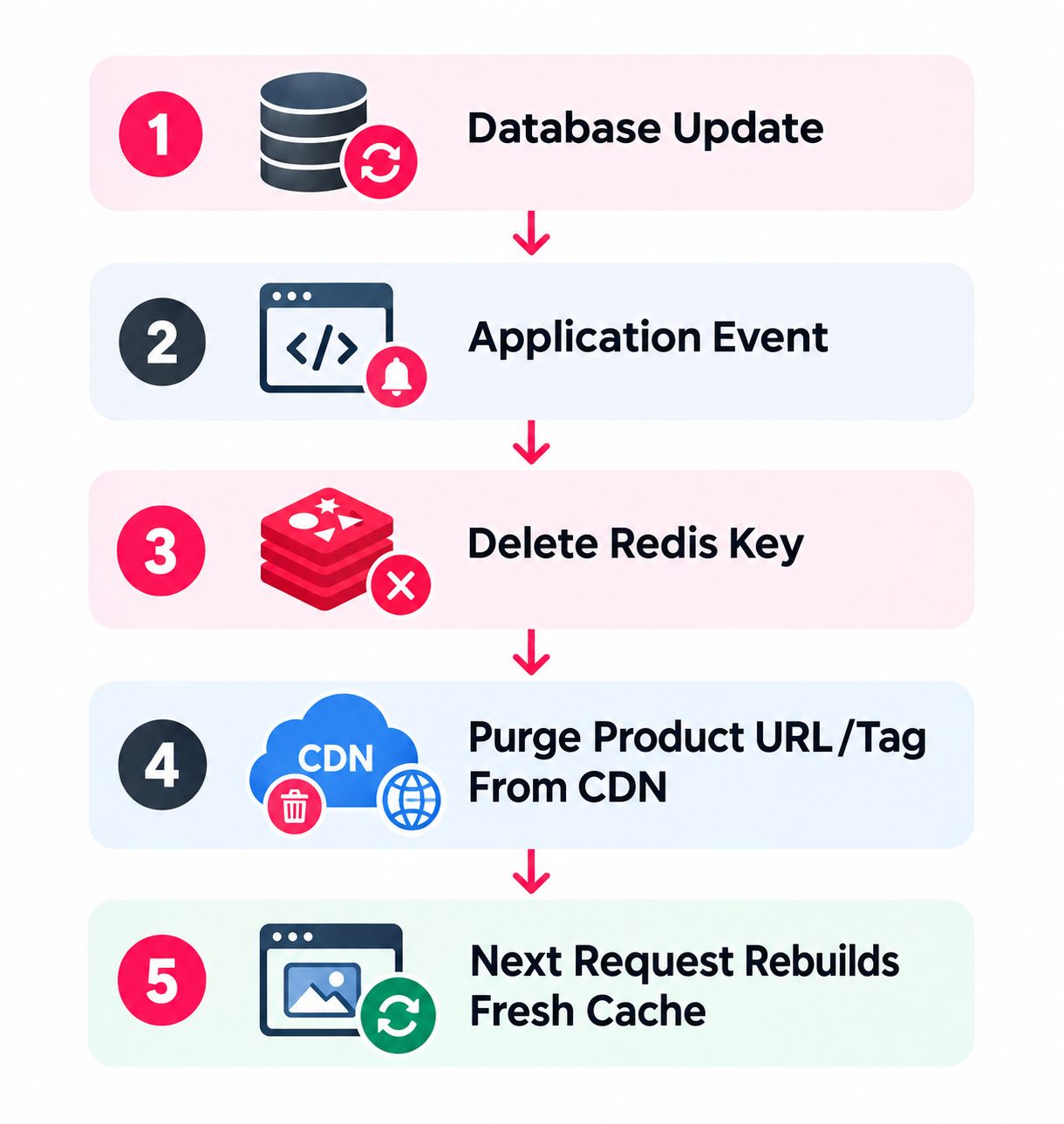
A larger implementation might additionally invalidate:
Product Page
Category Page
Homepage Component
Search Results
API Cache
Recommendations
This demonstrates why invalidation becomes more difficult as applications become more interconnected.
How to Test Cache Invalidation
Testing should be part of development and deployment.
1. Update Content
Change a known value.
Example:
Product price: ₹500 → ₹4502. Check Origin Data
Confirm the database contains:
₹4503. Request the Cached Page
Check whether the website still shows:
₹500or correctly displays:
₹4504. Inspect Headers
Useful headers may include:
Cache-Control
Age
ETag
Last-Modified
CF-Cache-Status
X-Cache
5. Repeat the Request
The first request after invalidation may be a cache miss.
Later requests should become hits again.
A healthy sequence might look like:
MISS
HIT
HIT
HIT
FAQs:)
A. Cache invalidation means removing or marking cached information as outdated after the original information changes. It ensures users receive fresh data instead of an older cached copy.
A. It is required because caching creates additional copies of information. When the original data changes, those cached copies may become outdated and must be removed, updated, or revalidated.
A. The major strategies include: TTL expiration, Explicit cache purge, Event-driven invalidation, Cache busting, Versioning, ETag validation, Tag-based invalidation, Write-through updates, and Cache-aside invalidation.
A. TTL, or Time to Live, defines how long a cached object is considered usable before becoming stale or expiring.
A. Not exactly. Cache clearing generally means deleting cache content, while invalidation means declaring specific cached information no longer valid. Deletion may be one method used to implement invalidation.
A. Invalidation happens because information is no longer valid, while eviction usually happens because the caching system needs to remove items to manage limited storage capacity.
A. It can become difficult in distributed systems because the same information may be cached in browsers, CDNs, application servers, Redis instances, APIs, and other services. The more dependencies a system contains, the more carefully invalidation must be designed.
Conclusion:)
We hope this article has helped you understand what cache invalidation is, how it works, why it is important, and how different cache invalidation strategies are used in modern websites and applications.
Cache invalidation helps ensure that outdated cached data is removed, updated, expired, or revalidated whenever the original information changes. This allows websites and applications to continue benefiting from faster loading times and reduced server load without repeatedly showing old or incorrect information to users.
However, managing cache invalidation properly requires more than simply clearing the entire cache. Developers should carefully consider cache keys, TTL values, dependencies, browser caching, CDN caching, API responses, object caches, event-driven updates, and the relationship between different cached resources.
A well-designed cache invalidation strategy can improve website performance, reduce database load, support scalability, maintain data freshness, and provide a more reliable user experience.
“Effective cache invalidation creates the right balance between fast performance and fresh, accurate data.” — Oflox®
As websites, SaaS platforms, APIs, cloud applications, and distributed systems continue to grow, cache invalidation will remain an important part of modern web and software development.
Read also:)
- What Is Backend for Frontend (BFF)? A Complete Guide!
- What Is Web Server Log? A Complete Guide for Beginners!
- What Is Code Splitting? Complete Guide with Examples!
If you are implementing caching in your website or application, always plan how the cached data will be refreshed or invalidated when the original information changes.