This complete guide will explain What Is Backend for Frontend (BFF), how BFF architecture works, why it is important, and how it helps different frontend applications communicate efficiently with backend services.
Modern websites and applications often depend on multiple backend services to deliver fast, personalised, and feature-rich digital experiences to users.
As applications become more advanced, businesses may have a website, mobile app, admin dashboard, customer portal, and other digital interfaces connected to the same backend infrastructure.
However, each frontend may have different requirements. A mobile application may need smaller and faster API responses, while a desktop application may require more detailed information. Similarly, an admin dashboard may need additional data, permissions, and functionality that normal users do not require.
Managing all these requirements through one general-purpose backend API can gradually make the application complex and difficult to maintain.
This is where Backend for Frontend (BFF) becomes important.
Backend for Frontend is an architectural pattern that provides a dedicated backend layer for a specific frontend application or user experience. The BFF sits between the frontend and underlying backend services, helping aggregate data, transform responses, simplify API communication, and deliver information according to the frontend’s specific requirements.
For example, a web application can use a Web BFF, while a mobile application can have a separate Mobile BFF. Both may communicate with the same underlying services while providing responses optimised for their respective user experiences.
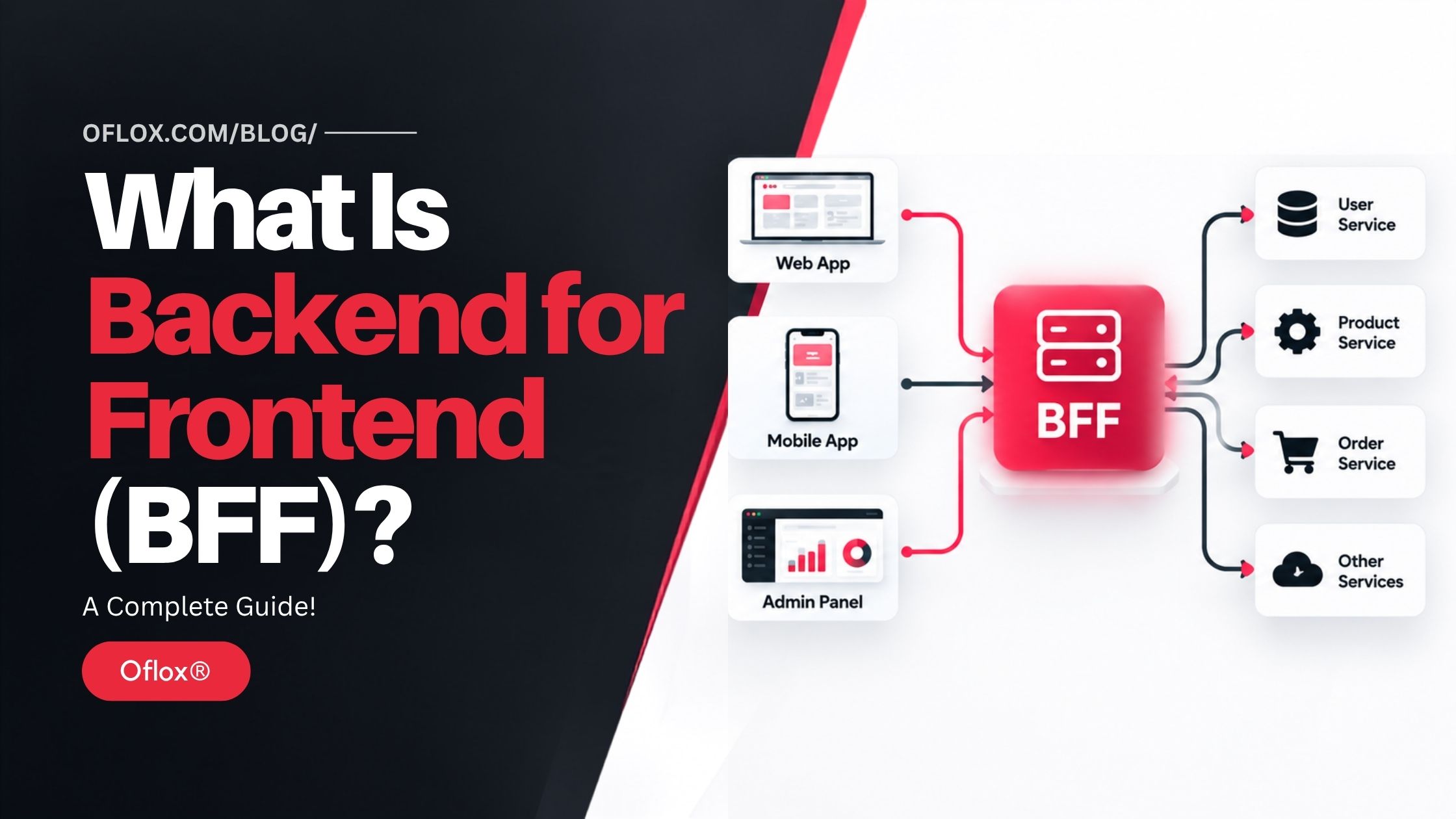
Whether you are a beginner, frontend developer, backend developer, full-stack professional, software architect, or business owner managing a modern application, understanding Backend for Frontend can help you build more scalable, maintainable, and frontend-friendly software systems.
Let’s explore it together.
Table of Contents
What Is Backend for Frontend (BFF)?
Backend for Frontend (BFF) is an architectural pattern in which a dedicated server-side backend is created for a specific frontend application or user experience.
The BFF acts as an intermediary between the frontend and underlying backend services.
Instead of this:
Frontend → Multiple Backend Servicesthe architecture becomes:
Frontend → BFF → Backend ServicesFor an application containing different interfaces, it may look like:
Web App → Web BFF → MicroservicesMobile App → Mobile BFF → MicroservicesAdmin Dashboard → Admin BFF → MicroservicesEach BFF can provide exactly the data and operations required by its frontend.
The concept was popularised by software architect Sam Newman. In his 2015 description of the pattern, Newman explained the idea as having one backend per user experience rather than relying entirely on a general-purpose API backend. He also noted its use at organisations including REA and SoundCloud.
A BFF generally does not replace your core business services. Instead, it sits between the user interface and those services.
Its job may include:
- aggregating information from multiple APIs;
- transforming backend responses;
- filtering unnecessary fields;
- handling frontend-specific authentication;
- simplifying API calls;
- reducing network requests;
- caching suitable responses;
- coordinating calls to microservices; and
- presenting data in a format convenient for the frontend.
In simple words:
A Backend for Frontend gives each frontend an API layer designed specifically for its own requirements.
Backend for Frontend at a Glance
| Factor | Backend for Frontend |
|---|---|
| Full Form | Backend for Frontend |
| Abbreviation | BFF |
| Type | Software architecture pattern |
| Position | Between frontend and backend/domain services |
| Main Purpose | Provide frontend-specific backend functionality |
| Common Use | Web, mobile, microservices and micro-frontends |
| Data Aggregation | Yes |
| Data Transformation | Yes |
| Client-Specific Optimisation | Yes |
| Typical Technologies | Node.js, .NET, Java, Go, GraphQL, serverless functions |
| Suitable For | Applications with different frontend requirements |
| Major Advantage | Frontend autonomy and optimised communication |
| Major Challenge | Additional services and operational complexity |
Why Is Backend for Frontend Important?
Modern frontend applications often consume information from many independent systems.
Imagine an eCommerce application’s product page.
To display one screen, the frontend may require:
- product information;
- current price;
- stock availability;
- customer reviews;
- delivery estimate;
- personalised recommendations;
- promotional offers; and
- user wishlist status.
Without a BFF, the browser or mobile application may have to communicate directly with several APIs.
That can make frontend development complicated and increase network communication.
With a BFF, the frontend could make one request:
GET /product-page/123The BFF then communicates with the required backend services, combines the relevant information, and sends a UI-ready response to the frontend.
AWS similarly identifies aggregation, transformation, authorisation toward private APIs, reduced network load, and easier client consumption as useful BFF responsibilities.
This separation becomes particularly valuable when mobile and desktop interfaces have significantly different requirements.
Without BFF
A shared backend may gradually contain conditions such as:
- if mobile, return these fields;
- if web, return additional information;
- if tablet, use another response;
- if admin, expose extra functionality;
- if partner portal, transform the response again.
The API becomes increasingly coupled to many frontend requirements.
With BFF
Each frontend gets a focused API layer.
This makes it possible to optimise the experience independently without continuously changing a single shared interface.
History and Background of the BFF Pattern
The growth of microservices played an important role in making the BFF pattern popular.
Traditional applications frequently followed a relatively straightforward architecture:
Frontend → Monolithic Backend → DatabaseAs systems became larger, organisations increasingly divided backend functionality into smaller services.
The architecture started looking like:
Frontend → API Gateway → MicroservicesThis improved separation of backend capabilities, but created another challenge.
A user interface is usually an aggregation of many capabilities.
For example, an online banking dashboard might require:
- account service;
- transaction service;
- notification service;
- profile service;
- card service; and
- analytics service.
Making the browser communicate independently with every microservice can create unnecessary complexity.
The Backend for Frontend pattern developed as one solution to this problem.
Sam Newman’s original BFF pattern write-up was published in November 2015 and described the BFF as a server-side component tightly focused on a particular UI and typically maintained by the same team responsible for that user experience.
Since then, BFF architecture has become relevant across microservices, mobile development, micro-frontends, cloud-native applications and serverless architectures.
AWS guidance, for example, describes BFFs in micro-frontend environments as server-side services belonging to their corresponding micro-frontends rather than shared domain services.
How Does Backend for Frontend Work?
A BFF sits between the client application and backend services.
Consider an eCommerce application with:
- a website;
- an Android/iOS application; and
- an internal admin dashboard.
The underlying services may include:
- Product Service
- Inventory Service
- Pricing Service
- Customer Service
- Order Service
- Recommendation Service
Instead of connecting every frontend directly to every service, the system can introduce:
- Web BFF
- Mobile BFF
- Admin BFF
The architecture becomes:
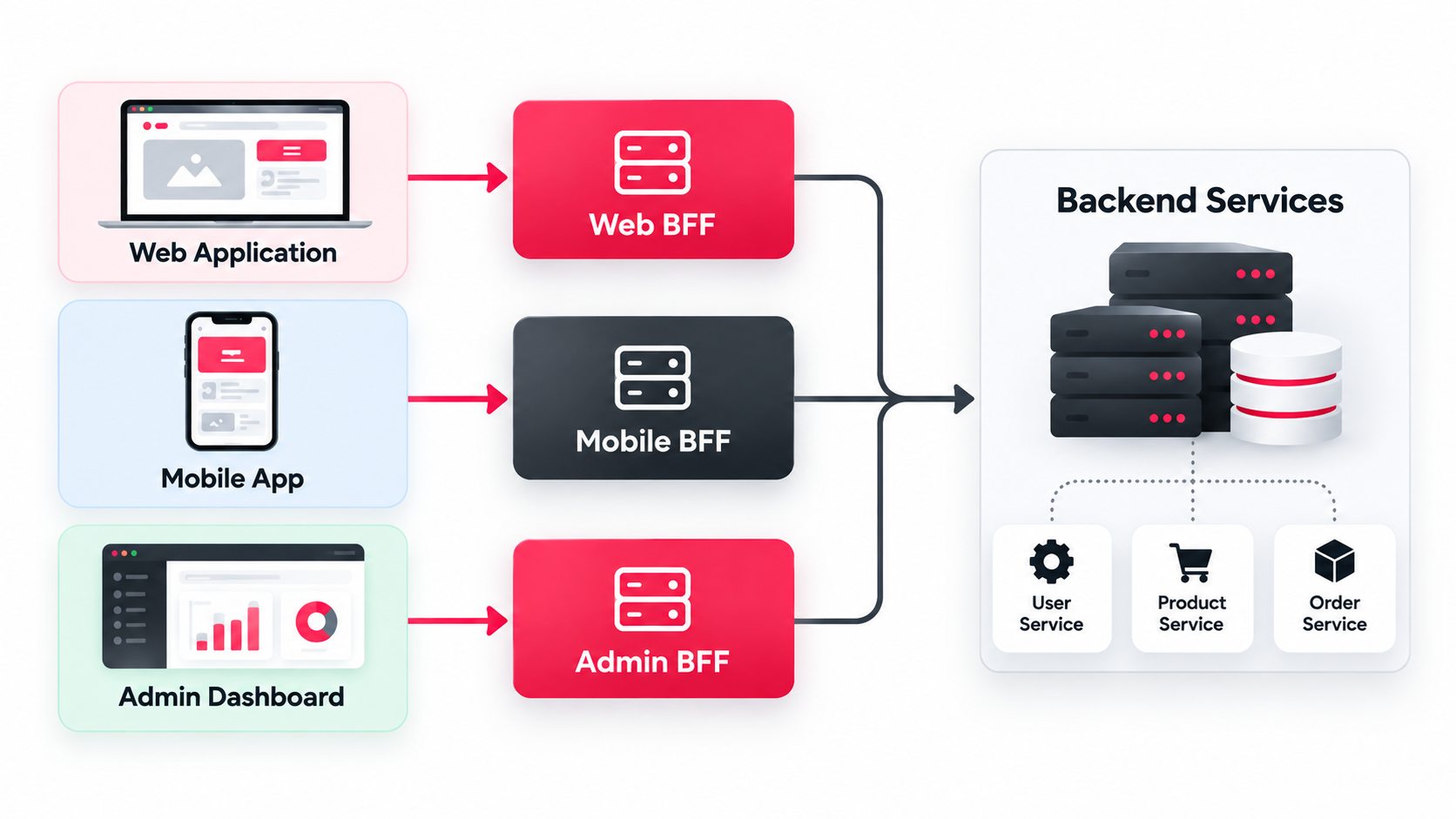
Let us understand the request lifecycle step by step.
1. User Performs an Action
Suppose a customer opens the home screen of a shopping mobile application.
The application needs:
- user profile;
- featured products;
- active offers; and
- recommendations.
Instead of calling four services separately, it requests something like:
GET /mobile/homefrom the Mobile BFF.
2. BFF Receives the Request
The Mobile BFF understands exactly what the mobile home screen requires.
It may also verify:
- authentication;
- permissions;
- request parameters; and
- session information.
3. BFF Calls Backend Services
The BFF communicates with the relevant services.
For example:
Mobile BFF
    ├── Customer Service
    ├── Product Service
    ├── Promotion Service
    └── Recommendation Service
Where appropriate, independent calls can be made concurrently rather than sequentially.
4. Backend Services Return Data
Each service returns its own response.
The Product Service may return detailed product records, while the Recommendation Service returns product IDs and ranking information.
5. BFF Aggregates the Information
The BFF combines these responses.
Instead of sending every available backend field, it keeps only the information needed by the mobile home screen.
6. BFF Transforms the Response
The backend might store price, image, inventory and product information in different formats.
The BFF converts this information into a frontend-friendly response.
For example:
{
  "user": {
    "name": "Customer"
  },
  "featuredProducts": [
    {
      "id": 101,
      "name": "Wireless Headphones",
      "price": 2499,
      "image": "/images/product-101.webp",
      "inStock": true
    }
  ]
}
7. Frontend Renders the UI
The mobile application receives one structured response and renders the screen.
The frontend does not need to understand the internal architecture of all backend services.
This is one of the biggest practical advantages of BFF.
Key Features of Backend for Frontend
An effective BFF architecture usually provides several important capabilities.
1. Frontend-Specific APIs
The API contract is designed around the user interface rather than around the internal database or service structure.
For example, a mobile endpoint can return a smaller dataset while a desktop endpoint returns richer information.
2. API Aggregation
A BFF can collect data from multiple backend services and return a combined response.
This reduces frontend orchestration.
3. Response Transformation
Backend information can be converted into exactly the structure expected by the UI.
This may involve:
- renaming fields;
- combining objects;
- removing unnecessary information;
- converting formats; or
- calculating presentation-oriented values.
4. Reduced Client Chattiness
Instead of making many network requests, the frontend may request an aggregated resource from the BFF.
AWS specifically notes the use of BFFs to reduce frontend chattiness toward APIs.
5. Independent Frontend Evolution
The mobile and web teams can evolve their respective BFF contracts according to their own requirements.
A mobile optimisation does not necessarily require changing the web API.
6. Backend Abstraction
The frontend does not need to know whether information comes from:
- microservices;
- legacy systems;
- third-party APIs;
- databases;
- serverless functions; or
- another internal platform.
The BFF provides a stable interface.
7. Security Boundary
A BFF can help keep certain server-side operations away from browser JavaScript.
For example, Microsoft provides a React/Node BFF architecture sample in which tokens are obtained and stored in the backend context while the browser communicates through a secure session cookie.
This can be particularly valuable for browser-based authentication designs when implemented correctly.
Benefits of Backend for Frontend
Backend for Frontend offers several benefits that can improve application performance, flexibility, and overall development efficiency.
1. Better Frontend Performance
A BFF can reduce unnecessary network communication by aggregating several backend requests.
This can be especially beneficial for mobile users on slower connections.
2. Smaller Payloads
A backend service might return 40 fields even though a mobile screen needs only eight.
The Mobile BFF can return only those eight.
Smaller payloads can reduce:
- bandwidth consumption;
- parsing work;
- transfer time; and
- unnecessary frontend processing.
3. Simplified Frontend Code
Without a BFF, the frontend may need complicated logic for combining responses from different services.
With BFF:
UI → One BFF Request → UI-ready DataThis can make frontend components easier to understand and maintain.
4. Independent Team Ownership
A frontend team can own both:
- its UI; and
- its BFF.
This reduces dependence on a central API team for every frontend-specific modification.
Microsoft’s architecture guidance highlights this autonomy as one advantage because teams can independently manage aspects such as language selection, release cadence, workload priorities and feature integration.
5. Better User Experience
A mobile application and desktop application should not necessarily receive identical responses.
BFF allows developers to optimise each channel according to its real user experience.
6. Backend Protection
The BFF hides internal backend topology from the client.
If an internal service changes, the BFF can adapt while maintaining the frontend contract.
7. Easier Legacy Integration
Suppose a modern React application needs information from:
- REST API;
- SOAP service;
- legacy ERP system; and
- third-party API.
The BFF can provide one modern interface over these systems.
8. Failure Isolation
Separate BFFs can also help contain certain failures between frontend experiences. Microsoft’s architecture guidance notes that isolating services by interface can prevent the availability of one client path from automatically affecting another in the same way.
BFF vs API Gateway
Backend for Frontend and API Gateway are often confused, but they solve different problems.
| BFF | API Gateway |
|---|---|
| Designed for a specific frontend | Usually serves multiple clients/services |
| Contains frontend-specific orchestration | Focuses on general API infrastructure |
| Can aggregate UI-specific data | Primarily routes and manages API traffic |
| Often owned by frontend/product team | Often centrally/platform managed |
| Shapes data for a UI | Provides common API policies |
| May contain presentation-specific logic | Commonly handles routing, throttling and gateway security |
They can also work together.
For example:
Mobile App
    ↓
API Gateway
    ↓
Mobile BFF
    ↓
Microservices
The gateway may handle common infrastructure concerns, while the BFF handles mobile-specific data composition.
In some architectures, gateway technology can itself implement lightweight BFF functionality. Microsoft demonstrated this approach in 2026 using Azure API Management policies for orchestration and transformation, while also noting that complex transformation logic may be better placed in a dedicated service.
BFF vs Traditional Backend
| Traditional Shared Backend | Backend for Frontend |
|---|---|
| One API for several clients | Backend tailored to a frontend |
| General-purpose responses | UI-specific responses |
| Centralised evolution | Greater frontend autonomy |
| May produce over-fetching | Can return only required information |
| Frontend may orchestrate APIs | BFF can perform orchestration |
| Fewer deployable services | Additional operational components |
A traditional backend is not automatically bad.
If your application contains one straightforward frontend, introducing a BFF may simply add unnecessary complexity.
BFF vs GraphQL
GraphQL and BFF address some overlapping problems, but they are not identical.
GraphQL allows clients to specify the fields they require.
A query might request:
query {
  product(id: 101) {
    name
    price
    rating
  }
}
This helps reduce over-fetching.
A BFF, however, can do much more than field selection.
It can perform:
- authentication orchestration;
- backend aggregation;
- protocol translation;
- caching;
- service coordination;
- client-specific workflows; and
- integration with legacy systems.
GraphQL can also be used inside a BFF architecture.
AWS lists AppSync GraphQL APIs as one possible deployment approach for BFFs, alongside Lambda and container-based implementations.
Microsoft notes that GraphQL may reduce or even remove the need for a separate BFF in some situations where client-specific querying already solves the underlying requirement.
Therefore, the correct choice depends on the architecture rather than a simple “GraphQL vs BFF” rule.
How to Implement Backend for Frontend (BFF)
A successful BFF implementation starts by understanding the specific needs of each frontend application.
1. Identify Your Frontends
List every meaningful user experience.
For example:
- website;
- mobile application;
- admin portal;
- customer dashboard;
- smart TV application.
Do not automatically create a BFF for every device.
Create separate BFFs where the interfaces have genuinely different requirements.
2. Analyse Data Requirements
Determine:
- what information each screen needs;
- which backend provides it;
- how frequently it changes;
- what data can be cached;
- which operations require authentication; and
- which calls can run concurrently.
3. Define BFF Responsibilities
A good BFF should generally contain frontend-specific integration logic, not the core business domain.
For example:
Good BFF responsibility:
Combine product, price and availability information for a product page.
Poor BFF responsibility:
Implement the company’s complete pricing algorithm.
Core pricing rules belong in the appropriate domain service.
4. Select Technology
Choose a technology your team can operate effectively.
Common choices include:
- Node.js with Express/Fastify/NestJS;
- ASP.NET Core;
- Java with Spring Boot;
- Go;
- GraphQL;
- serverless functions; and
- cloud API-management technologies for lightweight orchestration.
5. Design Frontend-Oriented Endpoints
Avoid simply duplicating every microservice endpoint.
Instead of:
/products
/prices
/inventory
/reviews
a product-page BFF might provide:
/product-page/{id}This endpoint represents what the UI actually needs.
6. Implement Aggregation
The BFF requests information from relevant backend systems.
Independent requests should often run concurrently.
Conceptually:
const [product, price, inventory] = await Promise.all([
  getProduct(id),
  getPrice(id),
  getInventory(id)
]);
The BFF then constructs one response.
7. Add Error Handling
Do not assume every downstream service will always respond successfully.
Decide what happens if:
- reviews are unavailable;
- recommendation service times out;
- inventory API fails; or
- a third-party API becomes slow.
Sometimes the page can still work with partial information.
Design graceful degradation where appropriate.
8. Secure the BFF
Apply suitable controls including:
- authentication;
- authorisation;
- secure cookies where appropriate;
- input validation;
- rate limiting;
- HTTPS;
- secret management; and
- protection against common web attacks.
Never assume that a BFF is secure merely because it is “backend” code.
9. Add Observability
Monitor:
- request rate;
- response time;
- downstream latency;
- errors;
- timeouts;
- cache performance; and
- service dependencies.
Distributed tracing is particularly useful because one BFF request may generate several downstream calls.
10. Test the Complete User Flow
Test more than individual endpoints.
Measure:
- total frontend loading time;
- behaviour under slow networks;
- partial backend failures;
- authentication failures;
- high traffic; and
- deployment compatibility.
10+ Popular Tools and Technologies for BFF Architecture
| Technology | Typical BFF Use |
|---|---|
| Node.js | JavaScript/TypeScript BFF development |
| Express.js | Lightweight HTTP APIs |
| Fastify | Performance-oriented Node APIs |
| NestJS | Structured TypeScript applications |
| ASP.NET Core | Enterprise .NET BFF services |
| Spring Boot | Java-based enterprise systems |
| Go | Lightweight, high-performance services |
| GraphQL | Flexible frontend-oriented data APIs |
| AWS Lambda | Serverless BFF |
| Azure Functions | Serverless BFF |
| API Gateway | Routing/API-management layer |
| Redis | Caching suitable data |
| OpenTelemetry | Distributed tracing and observability |
| Docker | Packaging BFF services |
| Kubernetes | Container orchestration at scale |
The right technology is not necessarily the most fashionable one.
Choose according to:
- team expertise;
- existing infrastructure;
- expected traffic;
- latency requirements;
- deployment model; and
- maintenance cost.
Practical BFF Example
Imagine an online travel platform.
Its mobile application’s hotel-details screen requires:
- hotel details;
- room prices;
- availability;
- reviews;
- location information; and
- personalised offers.
Without BFF:
Mobile
 ├── Hotel API
 ├── Pricing API
 ├── Inventory API
 ├── Review API
 ├── Location API
 └── Offer API
The mobile application now understands six backend systems.
With BFF:
Mobile
   ↓
Hotel Details BFF
   ├── Hotel Service
   ├── Pricing Service
   ├── Inventory Service
   ├── Review Service
   ├── Location Service
   └── Offer Service
The application makes one frontend-oriented request.
The BFF returns something like:
{
  "hotel": {
    "name": "Example Hotel",
    "rating": 4.5,
    "startingPrice": 4999,
    "roomsAvailable": true,
    "reviewSummary": "Excellent",
    "distanceFromAirport": "8 km",
    "offer": "10% off"
  }
}
This is much easier for the mobile UI to consume.
Challenges and Limitations of Backend for Frontend
BFF is useful, but it also introduces several architectural and operational trade-offs that should be considered before implementation.
- Additional Infrastructure: Using separate Web, Mobile, Admin, or other specialised BFFs means maintaining more services. Each BFF requires deployment, monitoring, security, testing, updates, and ongoing maintenance, which can increase operational costs.
- Code Duplication: Different BFFs may perform similar data transformations, validations, or integrations. Some duplication may support frontend independence, but excessive duplication can increase development effort and long-term maintenance costs.
- Additional Network Hop: A BFF changes communication from Client → Service to Client → BFF → Service. This additional network layer can introduce latency if requests, aggregation, caching, and downstream communication are not properly optimised.
- Risk of Becoming Another Monolith: A BFF can gradually accumulate business logic, database operations, integrations, authentication, reporting, workflows, and unrelated endpoints. Keep each BFF focused on frontend-specific orchestration and data requirements.
- Complex Error Handling: One BFF request may depend on several downstream services. Developers should plan for retries, timeouts, fallbacks, partial responses, circuit breaking, and situations where individual services become slow or unavailable.
- Increased Testing Requirements: BFF architecture requires testing more than the BFF itself. Teams should also verify frontend-to-BFF contracts, downstream service integrations, authentication flows, failure scenarios, and complete end-to-end user experiences.
When Should You Use Backend for Frontend?
BFF is particularly useful when:
- you have multiple frontends with significantly different requirements;
- mobile and web need different payloads;
- the frontend currently makes too many API requests;
- microservices create complicated client-side orchestration;
- frontend teams need greater release independence;
- backend APIs expose too much internal complexity;
- you need frontend-specific aggregation;
- you are building micro-frontends with independent bounded contexts; or
- legacy and modern services must be presented through one UI-oriented interface.
Microsoft similarly recommends considering BFF when a general-purpose backend creates substantial maintenance overhead or when individual interfaces need specific optimisation.
When Should You Avoid BFF?
Do not implement an architecture pattern simply because it is popular.
BFF may be unnecessary when:
- only one frontend exists;
- all clients have almost identical requirements;
- your backend is already simple;
- frontend API communication is not a performance problem;
- GraphQL or another existing layer already solves your data-shaping requirements;
- your team cannot support additional services; or
- the BFF would simply proxy every request without adding useful functionality.
Architecture should remove meaningful complexity—not relocate it.
Expert Tips for Better BFF Architecture
- Keep BFFs Thin: Use the BFF mainly for data orchestration, aggregation, and adaptation. Keep core business rules inside the appropriate backend or domain services.
- Design Around User Experiences: Create BFF endpoints according to actual frontend screens, workflows, and data requirements instead of directly copying the structure of your microservice APIs.
- Parallelise Independent Requests: When multiple backend requests do not depend on each other, execute them concurrently where appropriate. This can reduce overall aggregation latency and improve response times.
- Set Strict Timeouts: Do not allow one slow downstream service to block the complete frontend experience. Configure suitable timeouts, fallbacks, and failure-handling strategies.
- Cache Carefully: Cache frequently requested and relatively stable information where it provides a real performance benefit. Avoid careless caching of private user data, rapidly changing inventory, sensitive financial information, or permission-dependent responses.
- Measure End-to-End Performance: Do not evaluate performance only by looking at BFF response time. Measure the complete user experience, including frontend rendering, network requests, backend processing, and downstream dependencies.
- Maintain Clear Ownership: Clearly define which team owns each BFF. Ideally, the team responsible for a particular frontend experience should also have strong ownership of its BFF contract.
- Add Distributed Tracing: A single frontend request can trigger several downstream API calls. Use distributed tracing to identify slow dependencies, bottlenecks, errors, and service failures more efficiently.
Common Backend for Frontend Mistakes
Avoiding common BFF mistakes can help you build a cleaner, faster, and more maintainable architecture.
- Creating Too Many BFFs: Do not create a separate BFF for every screen or component. Too many BFFs can create a highly distributed architecture that becomes expensive and difficult to develop, deploy, monitor, and maintain.
- Sharing One BFF Across Different Experiences: Avoid using the same BFF for mobile, web, and admin applications when their requirements are significantly different. Otherwise, you may recreate the same shared-backend problem that BFF architecture is designed to solve.
- Putting Business Logic in the BFF: Keep core business rules inside the appropriate domain or backend services. A BFF should mainly handle frontend-specific aggregation, transformation, and orchestration.
- Using BFF as a Simple Proxy: Avoid creating a BFF that only forwards requests using Frontend → BFF → Same API without providing useful aggregation, adaptation, security, or other frontend-specific functionality.
- Ignoring Failure Scenarios: A BFF may depend on several downstream services. Always prepare for slow APIs, timeouts, unavailable services, partial failures, and other unexpected situations.
- Over-Aggregating Data: Do not return unnecessarily large responses simply to reduce the number of HTTP requests. The goal should be to provide useful UI-ready data, not just fewer API calls.
- Ignoring Security: Properly validate authentication, authorisation, user permissions, and incoming data. Never automatically trust client-provided information simply because the request comes through your own frontend.
Backend for Frontend and Micro-Frontends
BFF architecture can pair naturally with micro-frontends.
Suppose a large financial dashboard contains independently owned areas:
- Transactions
- Investments
- Loans
- Profile
Each micro-frontend may have a corresponding server-side API layer where justified.
AWS guidance says a BFF in a micro-frontend architecture should belong to the same bounded context as that micro-frontend and should not be casually shared across unrelated bounded contexts.
This can create strong vertical ownership:
Team A:
Transactions UI + Transactions BFF

Team B:
Investments UI + Investments BFF

Team C:
Loans UI + Loans BFF
Each team controls its user-facing experience from frontend through the relevant integration layer.
However, not every micro-frontend automatically requires a BFF. AWS explicitly notes that a BFF should be introduced when it provides actual value.
FAQs:)
A. BFF stands for Backend for Frontend. It is an architecture pattern where a backend layer is designed specifically around the requirements of a particular frontend or user experience.
A. Backend for Frontend is a specialised server that sits between a frontend application and backend services. It collects, transforms and optimises information so the frontend receives exactly what it needs.
A. BFF is used to simplify frontend development, aggregate multiple backend calls, optimise payloads, isolate frontend-specific requirements and allow different user interfaces to evolve more independently.
A. A BFF can be implemented as a small independently deployable service and often appears in microservices architectures. However, its defining characteristic is its responsibility to a particular frontend experience rather than simply being small or independently deployed.
A. No. An API Gateway generally manages common API concerns such as routing, policies, throttling and gateway-level security, while a BFF focuses on frontend-specific aggregation and adaptation. They can be used together.
A. Yes. A BFF can expose GraphQL, REST or another appropriate interface. GraphQL may itself remove the need for some BFF use cases, but it can also be part of a BFF architecture.
A. Yes. Node.js is a popular option, especially when frontend teams already work with JavaScript or TypeScript. BFFs can also be developed using Java, .NET, Go, serverless functions and other technologies.
A. No. Create a separate BFF only where different frontend requirements justify the additional service. Similar interfaces may not require separate BFFs.
A. It can improve end-user performance by reducing client-side network calls, payload size and frontend orchestration. However, an inefficient BFF can add latency because it introduces another network hop.
A. Core business rules should normally remain in domain/backend services. The BFF should concentrate primarily on frontend-specific orchestration, transformation and integration.
Conclusion:)
We hope this article has helped you understand what Backend for Frontend (BFF) is, how BFF architecture works, and why it is important for modern web and software development.
Backend for Frontend provides a dedicated backend layer for a particular frontend application or user experience. It can help aggregate data from multiple services, transform API responses, reduce unnecessary client-side requests, simplify frontend development, and deliver information according to the specific requirements of web, mobile, admin, and other interfaces.
However, implementing BFF effectively requires more than simply adding another backend layer. Development teams should carefully consider frontend requirements, API design, service ownership, security, caching, error handling, performance, monitoring, and the operational complexity of maintaining multiple BFF services.
“Backend for Frontend turns complex backend services into focused experiences built around what each frontend actually needs.” — Oflox®
Read also:)
- What Is Full Stack Web Development: A-to-Z Guide for Beginners!
- What Is JavaScript Async? A Complete Guide for Beginners!
- What Is Code Splitting? A Complete Guide for Beginners!
If you have any questions, experiences, or suggestions related to Backend for Frontend (BFF), please feel free to share them in the comment section below. Your feedback can help other readers understand this important software architecture pattern more effectively.
Could you add a sample response for a partial failure, such as when hotel details load but the reviews service times out? Showing how the frontend distinguishes unavailable data from an empty result would make the example more practical.