This article provides a detailed guide on What Is Crawl Depth? how it affects website navigation and page discovery, and how to measure and improve it through practical technical SEO and internal linking strategies.
Have you ever published a useful article or product page, only to realise that visitors can barely find it through your website?
Imagine running an online clothing store. Your homepage links to collections, collections lead to several subcategories, and an important kurta appears only after browsing multiple listing pages. The product exists, but reaching it takes unnecessary effort.
A similar problem can affect blogs, agency websites, educational portals, and SaaS resources. Important pages gradually become buried under archives, menus, and older content.
This is where crawl depth becomes useful.
It helps you understand how far a page sits from your website’s starting point in terms of links. Reviewing it can reveal whether your navigation reflects what actually matters to your business and readers.
However, improving crawl depth involves more than placing every URL on your homepage. You need a clear structure, relevant connections, accessible links, and sensible priorities.
Let’s explore it together!
Table of Contents
What Is Crawl Depth?
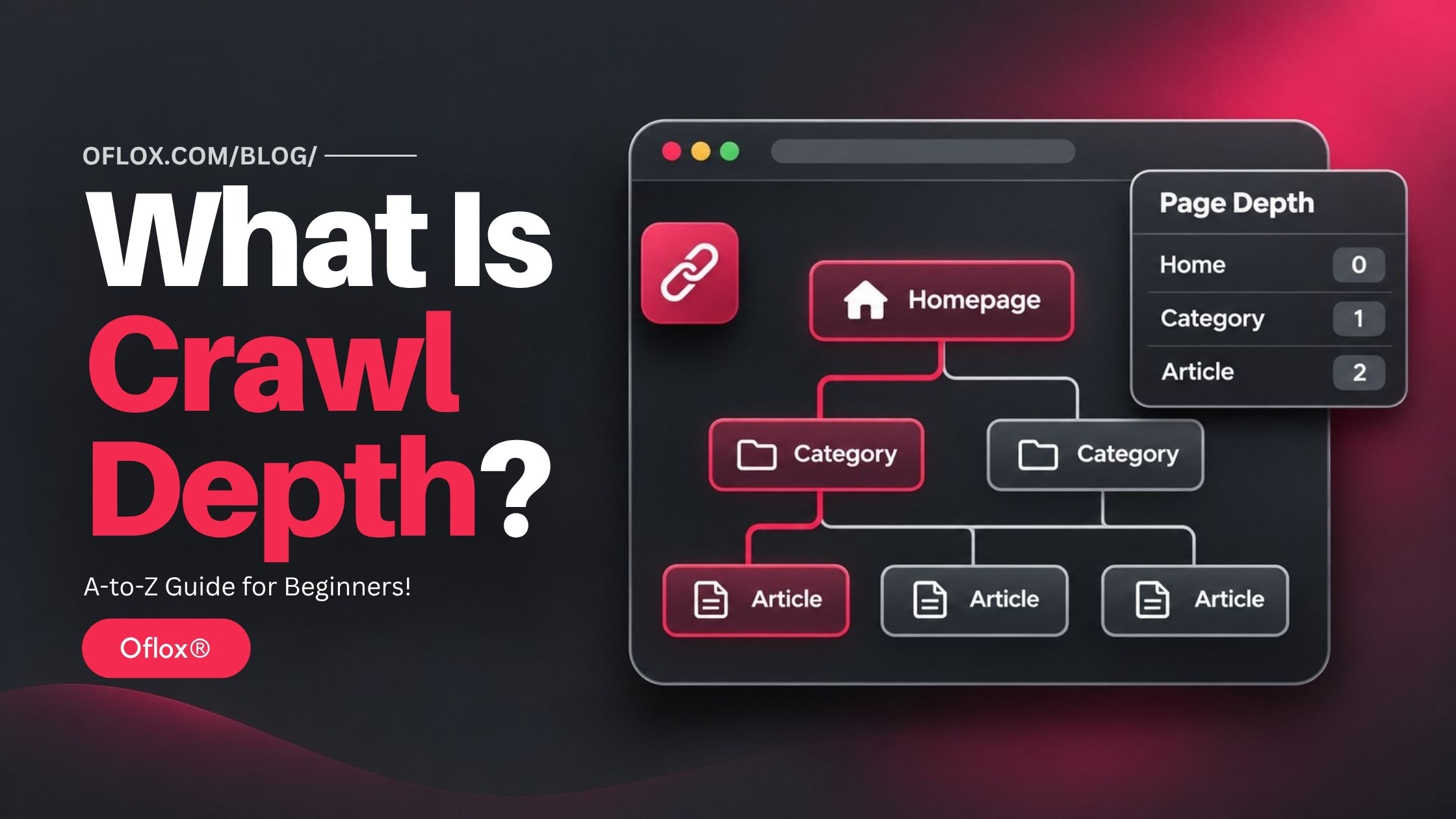
Crawl depth is the minimum number of link steps needed to reach a page from a chosen starting URL, usually the homepage. A page linked directly from the homepage has a depth of 1 when the homepage is counted as depth 0.
For example, consider a homepage that links to a services page. That services page links to an SEO services page. The SEO page links to an audit service.
| Page | Shortest route from homepage | Depth |
|---|---|---|
| Homepage | Starting page | 0 |
| Services | One internal link | 1 |
| SEO services | Two internal links | 2 |
| SEO audit service | Three internal links | 3 |
If you add a direct homepage link to the audit service, its shortest route becomes one step. The longer route can still exist, but the page now has a shallower path.
The starting point matters. A crawl beginning at /blog/ measures distance from the blog homepage, which can differ from a crawl starting at the main website homepage.
Crawl tools also have counting conventions. Screaming Frog documents depth from the start page and currently counts redirects as an additional level. Record these conventions before comparing reports.
Crawl Depth vs Click Depth vs URL Depth
These terms are related, but they answer different questions.
| Term | What it measures | Practical meaning |
|---|---|---|
| Crawl depth | Link distance from a crawl’s starting URL | How far a page is within the discovered link structure |
| Click depth | Often used for the same link distance | Can also describe a person’s actual navigation journey |
| URL or folder depth | Nested directories in a URL | How the address is organised |
| Crawl budget | Resources a search engine allocates to crawling | How much crawling it can and wants to perform |
Suppose a URL is:
example.com/shop/women/ethnic-wear/kurtas/blue-kurta/It looks deeply nested. However, if the homepage links directly to it, its link depth is 1 under our convention.
Meanwhile, example.com/blue-kurta/ has a short address but could sit several links away inside an archive.
Changing URL folders does not automatically improve crawl depth. Review links before considering a URL migration.
Also, a user clicking a menu button is not always equivalent to a crawler following a link. The resulting navigation needs to expose a usable URL.
How Did Crawl Depth Become Important?
Website structure became an SEO concern as websites expanded beyond a few static pages into catalogues, publishing platforms, and large content libraries.
On a small business website, most pages may be accessible through the main menu. On a growing publication, an article can move from the homepage into category listings and eventually into older archive pages.
Later, filters, dynamic menus, infinite scrolling, and JavaScript interfaces created additional discovery challenges. A page could appear accessible to a visitor while remaining difficult to find through ordinary links.
Crawl-depth analysis provides a practical way to examine this complexity. It turns a broad question—“Is our structure clear?”—into a page-level measurement.
Today, its value comes from combining that measurement with content purpose, technical accessibility, and business importance.
Why Is Crawl Depth Important for SEO?
Depth is useful because it highlights how a website connects its content. It should guide investigation rather than become a score you optimise in isolation.
- It Helps Assess Page Discovery: An important page needs a dependable route from other pages. If its only route passes through many archive pages, maintaining an additional relevant route may be worthwhile. Google explains that navigation and page linkages help it understand website structure. It can use the number of links needed to reach a page, alongside links pointing to that page, to infer relative importance.
- It Exposes Mismatches in Business Priorities: Imagine your highest-priority service sitting six links away while outdated promotional pages remain in the main navigation. A depth report makes that mismatch easier to discuss with your content and development teams.
- It Supports Clearer Visitor Journeys: Someone reading an SEO guide may want an audit checklist or service next. Relevant connections reduce the need to return to search or explore unrelated menus. The benefit comes from useful routes, not simply fewer clicks at any cost.
- It Supports Content Maintenance: Depth reports can reveal older resources that still deserve visibility. These pages may need refreshed information, stronger category placement, or contextual links from newer articles.
- It Improves Technical Prioritisation: Combining depth with indexability, internal links, and commercial value helps separate urgent issues from harmless structural complexity. A deep current product page deserves different attention from a deep historical announcement.
How Does Crawl Depth Work?
A crawler examines a starting page, extracts links, and follows eligible URLs within its configured scope. It then repeats that process across discovered pages.
For a simplified link model:
Depth of a page = the fewest link steps from the starting page to that page.
Suppose a tutorial has two routes:
- Homepage → Blog → Category → Archive → Tutorial: depth 4.
- Homepage → Resources → Tutorial: depth 2.
The shortest discovered route gives the tutorial depth 2.
This is a model of the links your audit can access. It does not reveal Googlebot’s exact browsing history or its next scheduled request.
Search engines may already know a URL through previous crawls, external links, sitemaps, and other discovery sources. A homepage crawl examines one useful perspective on accessibility.
If a tool misses a rendered menu, excludes a section, or reaches a configured limit, its reported structure may be incomplete. Always interpret the number alongside crawl settings.
What Is a Good Crawl Depth?
For many websites, keeping priority pages within roughly one to three link steps of the homepage is a useful planning target.
However, this is a practical heuristic, not a universal Google requirement or a guaranteed ranking formula.
| Page type | Suggested review approach |
|---|---|
| Main services and major categories | Provide prominent, dependable navigation |
| Important guides and current products | Make them reachable through relevant hubs or categories |
| Specialist supporting resources | Allow more depth when the hierarchy remains useful |
| Historical archives | Review according to continuing reader value |
| Pages with no discovered internal route | Investigate discoverability separately |
Depth 4 is not automatically a problem. Depth 2 is not automatically good.
A shallow page can still contain outdated information, block indexing, or fail to answer the reader’s question. A deeper specialist resource can remain valuable and well connected within its subject area.
Ask: Does this page’s accessibility match its purpose and priority?
Crawl Depth, Crawl Budget, and Indexing
These concepts should be reviewed together without treating them as interchangeable.
- Crawling: Fetching a URL’s content.
- Indexing: Processing content for possible inclusion in a search index.
- Ranking: Selecting and ordering eligible results for a query.
Reducing link distance can improve internal accessibility. It does not guarantee that Google will index a page, rank it higher, or revisit it immediately.
Google’s crawl-budget guidance focuses mainly on very large or rapidly changing sites. Smaller websites generally benefit more from maintaining useful content, accurate sitemaps, and healthy indexing than from trying to calculate a supposed daily Googlebot allowance.
For a typical agency blog, start by asking whether important articles have meaningful internal links. For a large marketplace, also investigate duplicate URL generation, server health, and the scale of crawlable inventory.
How to Check Crawl Depth?
Use this workflow to turn a crawl export into a prioritised action plan.
1. Define Your Priority Pages
List pages that support current business and reader needs:
- Main service pages.
- Important product or course pages.
- Useful category and resource hubs.
- Evergreen guides with continuing demand.
- Pages supporting enquiries, registrations, or purchases.
Do this before sorting by depth. Otherwise, you may spend time improving unimportant pages simply because they have the largest number.
2. Choose a Consistent Starting URL
Use the canonical homepage for a whole-site review. For a section review, use its landing page and clearly label the results.
Record the hostname, starting URL, crawl date, rendering mode, and exclusions. Keep these consistent for your follow-up crawl.
3. Check the Crawl Configuration
Review internal-link following, rendering, URL scope, and crawl limits.
If the site relies on JavaScript navigation, check whether your crawler can see the relevant rendered links.
Avoid setting a maximum depth so low that the audit cannot discover the problem you want to measure. Use a reasonable crawl speed, particularly on shared hosting.
4. Export Page-Level Data
Collect:
- URL.
- Status code.
- Indexability.
- Crawl depth.
- Unique internal linking pages.
- Available traffic or conversion data.
In Screaming Frog, crawl depth is available in the Internal tab. Inspect the selected page’s incoming links to understand why it has that position.
5. Separate Meaningful Page Groups
Group products, services, blog posts, categories, and other templates. Exclude assets from a content-page comparison.
Compare similar pages. An average mixing images, articles, redirects, and search filters tells you little about whether readers can find your services.
6. Check for Orphan Candidates
A link-following crawl cannot discover every disconnected page by itself.
Compare discovered URLs with your CMS inventory, XML sitemap, Search Console exports, and relevant analytics landing pages. Verify differences manually.
A page appearing only in a sitemap may be discoverable to search engines while lacking a useful internal navigation route. That still deserves attention.
7. Validate Individual Concerns
For a priority page, inspect its incoming links and actual navigation route. Check whether links point to the final URL and whether the destination is available and intended for indexing.
Use Search Console’s URL Inspection tool for Google’s indexed-page information and live accessibility testing. A successful live test does not guarantee indexing.
8. Build an Action Sheet
| URL type | Finding | Proposed action | Priority |
|---|---|---|---|
| Main service | Depth 5, limited links | Add relevant service-hub placement | High |
| Useful tutorial | Only in old archives | Link from a maintained topic hub | High |
| Current product | Search-only discovery | Add category browsing route | High |
| Old announcement | Deep but still accessible | Review relevance before changing | Low |
Assign an owner and a validation method to each action. A report becomes useful when someone can implement its recommendations.
How to Reduce Crawl Depth on Your Website
Here are the following methods to improve your website’s structure and help visitors and crawlers discover important pages.
1. Improve the Main Navigation
Your menu should reflect the main tasks visitors want to complete. For an agency, this could include services, resources, company information, and contact details. Avoid turning the menu into an inventory of every article.
Review labels with someone unfamiliar with the website. If they cannot predict where a link leads, the navigation needs work even when depth looks low.
2. Build Useful Category and Topic Hubs
A hub gives related resources a stable home.
An SEO hub could organise:
- Technical SEO.
- Content planning.
- Measurement and reporting.
- Link analysis.
Each subsection should help readers choose a relevant next resource.
Do not create empty categories purely to insert another navigation level. A hub should explain its topic and curate genuinely useful destinations.
3. Add Contextual Internal Links
Connect pages where the destination helps the reader complete a related task.
For example, a website audit guide can link to a crawl-depth explanation. A crawl-depth article can link to a practical internal-linking checklist.
Use descriptive anchor text such as “technical SEO audit checklist.” Google recommends crawlable anchor links and meaningful link text; it does not prescribe a magical link count per page.
4. Give Older Evergreen Content Stable Routes
Publishing another article should not make your best older guide harder to find indefinitely.
Maintain resource collections, update relevant category pages, and add useful references from new content. Automated related-post modules can support this work, but review their relevance.
5. Make Pagination Accessible
Visitors may use “Load more” or infinite scrolling, but later content should have crawlable routes that do not depend entirely on user actions.
Google’s pagination guidance recommends linked page URLs and explains that crawlers generally do not click buttons to reveal additional content.
Check an older article or product manually. Can you reach it through stable listing URLs?
6. Use Breadcrumbs Appropriately
Breadcrumbs help visitors understand where a page belongs and navigate to parent sections.
However, adding a child-to-parent breadcrumb does not automatically create a shorter homepage-to-child route.
To improve that route, the parent or another accessible page needs a link to the child. Review links in both directions.
7. Repair Broken Links and Redirect Routes
Update internal links to useful final destinations. Remove dead links, investigate redirect chains, and avoid sending readers through unnecessary intermediate URLs.
Distinguish these technical repairs from a full navigation redesign. Sometimes a small template correction fixes many affected pages.
8. Maintain an Accurate XML Sitemap
Keep your sitemap aligned with the canonical pages you want discovered and indexed. A sitemap supplements discovery; it does not replace internal navigation or guarantee crawling and indexing.
It also does not create an ordinary internal hyperlink from your homepage.
9. Review Filters and Duplicate Navigation
Large catalogues can generate many combinations of colour, size, price, and sorting options.
Decide which landing pages have distinct search value and which combinations simply repeat existing inventory. Coordinate canonicalisation, crawling controls, and navigation with technical support.
Avoid blocking everything without checking the consequences. Google must be able to crawl a URL to read a page-level noindex instruction.
5+ Tools for Crawl-Depth Analysis
Different tools answer different parts of the investigation.
| Tool or source | Useful role | Limitation to remember |
|---|---|---|
| Screaming Frog SEO Spider | Depth, incoming links, and crawl exports | Results depend on configuration and accessible routes |
| Google Search Console | Indexing checks and search performance | Does not provide a complete homepage-depth audit |
| CMS URL inventory | Pages missing from a crawl | Includes pages you may not want indexed |
| Analytics | Landing pages and business outcomes | Visits do not explain the complete link structure |
| Verified server logs | Actual crawler requests | Requests do not reconstruct every internal route |
| Spreadsheet | Joining evidence and assigning actions | URL variants need consistent handling |
Search Console’s Crawl Stats report can help investigate request patterns, response issues, and host health. Use it alongside a crawler rather than treating it as a depth report.
Practical Crawl-Depth Examples
The following are hypothetical illustrations, not audited case studies or promised results.
1. A Digital Marketing Blog
A useful technical SEO guide is accessible only through older archive pages. Its measured depth is 7. The editor adds it to a relevant topic hub linked from the blog homepage.
The shorter route is now:
Homepage → Blog → Topic hub → GuideThis gives depth 3. Next, the team checks that the hub remains useful and that new articles reference the guide when appropriate.
2. An Online Clothing Store
A current kurta collection appears only after several listing pages. The store creates a clear category route and links the collection from a relevant seasonal landing page.
Visitors gain another sensible browsing path without every item being added to the main menu. The team monitors collection visits, product discovery, and purchases separately from the depth change.
3. A School Website
An admissions page is accessible only from an old notice. The school adds “Admissions” to its main navigation and connects current class information to the admissions process.
The improved route supports parents looking for eligibility, dates, and enquiry details.
4. A SaaS Help Centre
A troubleshooting article has no incoming link from the relevant setup guide. Adding a contextual troubleshooting reference improves the support journey.
Its value may come from helping readers at the right moment, even if homepage depth barely changes.
Common Challenges and Practical Solutions
| Challenge | Likely issue | Practical response |
|---|---|---|
| Older articles become deeper | Chronological archives dominate discovery | Maintain topic collections |
| Menus work for visitors but not the audit | Rendering or link implementation differs | Inspect rendered HTML and crawler settings |
| Important pages are missing | Disconnected routes or crawl exclusions | Compare with CMS and sitemap inventories |
| Average depth improves but enquiries do not | Depth is disconnected from page quality or intent | Review the landing page and conversion journey |
| A redesign changes many routes | Navigation templates were altered | Compare priority URLs before and after release |
| Too many categories create confusion | Taxonomy grew without editorial control | Consolidate overlapping sections thoughtfully |
When an audit produces unexpected findings, validate a few representative URLs before changing the entire website.
Expert Tips and Common Mistakes
Follow these practical tips and avoid common mistakes to improve crawl depth while keeping your website easy to navigate.
1. Expert Tips
- Prioritise useful pages: Start with pages that solve current reader problems or support important business actions.
- Use several meaningful connections: One short route improves minimum depth, but other relevant links can make a page easier to discover in different contexts.
- Check mobile navigation: A desktop menu review may miss problems in a collapsed mobile interface.
- Preserve useful hierarchy: Flattening everything can make a large catalogue harder to understand.
- Keep audit conditions consistent: Changes to the start URL, scope, or rendering can create apparent improvements that are not real structural changes.
2. Common Mistakes
Avoid these common mistakes:
- Treating three clicks as a Google rule.
- Counting URL slashes instead of links.
- Assuming a sitemap fixes orphan navigation.
- Adding hundreds of unrelated footer links.
- Changing established URLs merely to shorten their appearance.
- Ignoring indexability and content quality.
- Claiming that depth reduction alone caused a ranking improvement.
How to Measure Whether Your Changes Worked
To check whether your crawl-depth improvements worked, compare the updated link structure with changes in page discovery and performance.
Then monitor outcomes over an appropriate period:
| Measurement | Question it answers |
|---|---|
| Priority-page depth | Did the intended route become shorter? |
| Internally reachable priority pages | Did important disconnected pages gain routes? |
| Incoming linking pages | Did useful connections become broader? |
| Indexing status | Are intended pages being indexed? |
| Organic visits and impressions | Is search visibility changing? |
| Enquiries, sales, or registrations | Is the overall journey supporting business goals? |
Annotate publication dates, content updates, promotions, and redesigns. These can affect performance alongside link changes. A lower sitewide average is not enough if your most important pages remain difficult to find.
FAQs:)
A. Crawl depth is how many link steps separate a page from a chosen starting page, usually the homepage. A direct homepage link normally gives depth 1 when the homepage is depth 0.
A. There is no universal ideal. One to three steps is a useful planning target for many priority pages, but relevance, website size, and navigation quality matter.
A. Google describes using page linkages and distance to understand relative importance. However, a crawler’s depth score is not a standalone ranking formula or proof of a ranking penalty.
A. Yes. A deep page may be known through internal links, external references, sitemaps, or previous crawls. Depth alone does not determine discovery or indexing.
A. No. URL length and folder structure do not tell you how many internal links are needed to reach a page.
A. Compare a link-following crawl with other inventories, such as your CMS and sitemap. Investigate pages without a discovered internal route, while checking for exclusions and rendering problems.
A. No. Relevant categories, service hubs, resource collections, and contextual links can provide clear routes without overcrowding the homepage.
A. Check after major navigation changes, migrations, or large publishing updates. Set a recurring review schedule based on how quickly your website changes.
Conclusion:)
Understanding what crawl depth is helps you judge whether your website makes important content easy to reach.
Start with your priority pages, measure their shortest internal routes, and investigate weak navigation, disconnected resources, and inaccessible links. Improve relevant hubs and contextual connections, then verify the changes with a consistent crawl.
At Oflox®, the practical lesson is straightforward: organise your website around the information people need and the actions they want to complete.
“A useful page deserves a clear path. Build links that help readers reach the right information at the right time.” — Mr Rahman, Oflox®
Read also:)
- What Is Content Decay? A-to-Z Guide for Beginners!
- 5+ Best Collaborator Alternatives: A-to-Z Guide for Beginners!
- 5+ Best Looker Studio Alternatives: A-to-Z Guide for Beginners!
Which important page on your website takes the most effort to reach? Share the first navigation change you would make in the comments below.