This article provides a complete guide to What Is SDLC in Software Engineering? And how its seven phases work, and how teams use different SDLC models to build and maintain software.
Imagine you run a paying guest (PG) property in Dehradun. Your staff track rent in a spreadsheet and send reminders from their phones. You decide to build an app that sends these reminders automatically.
The request sounds simple until you work through the details. What if a tenant pays in two instalments? What if they clear the balance just before the reminder goes out? Who checks whether the app sent the right message, and what should staff do if it sends the same one twice?
The Software Development Life Cycle (SDLC) helps teams answer these questions as they plan, design, build, test, release, and maintain software. It gives everyone, from the business owner to the developer and tester, a clear understanding of what the software should do and how to verify it.
Teams organise this work in different ways. Some review and approve each major phase before moving ahead. Others release a small set of features, gather feedback, and use what they learn to plan the next update.
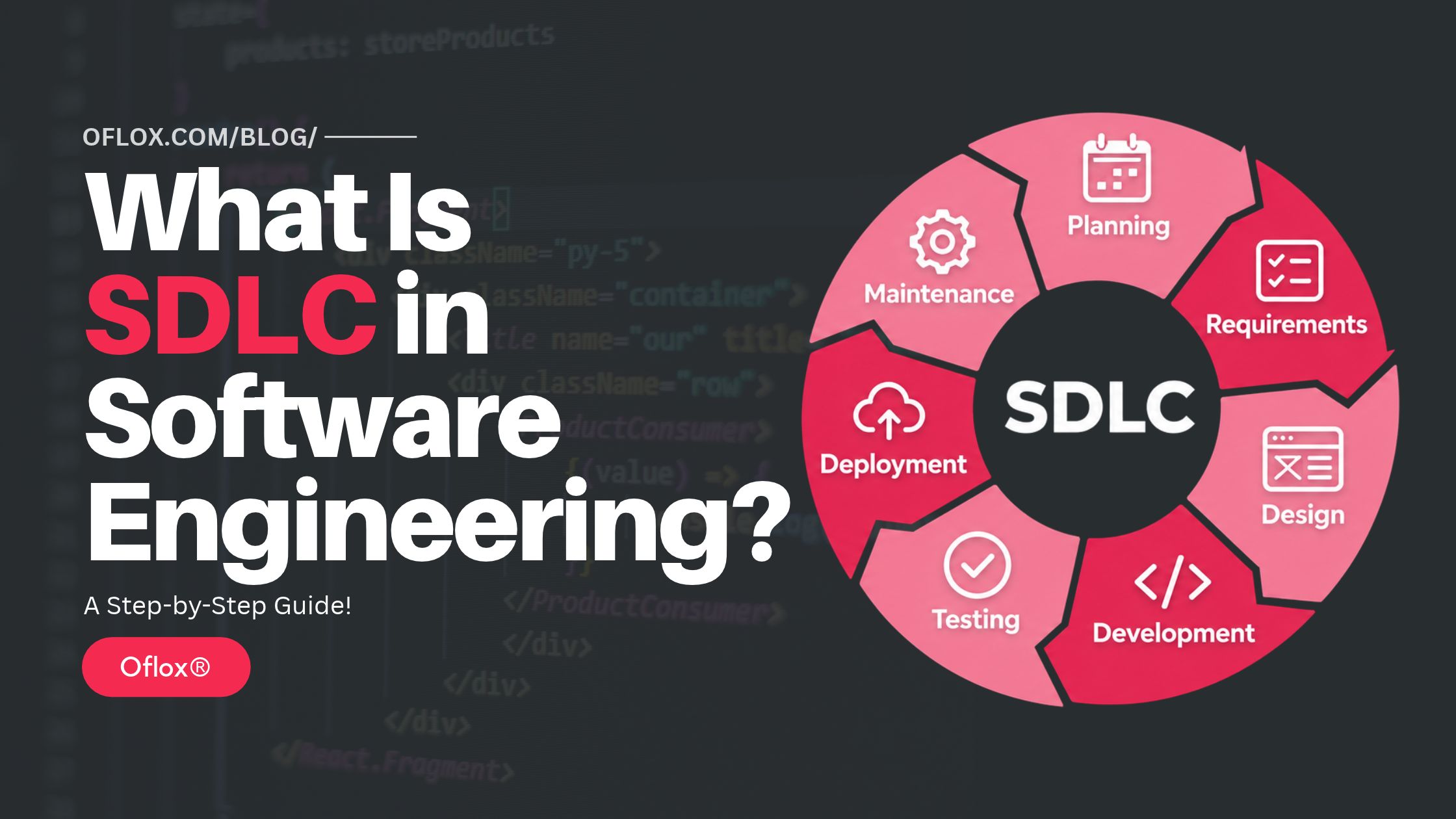
In this Oflox® guide, we explain the meaning, importance, history, seven phases, and common models of SDLC. We also cover practical tools, common mistakes, and emerging trends, using a PG rent reminder feature to show how a simple request becomes working software.
Let’s explore it together!
Table of Contents
What Is SDLC in Software Engineering?
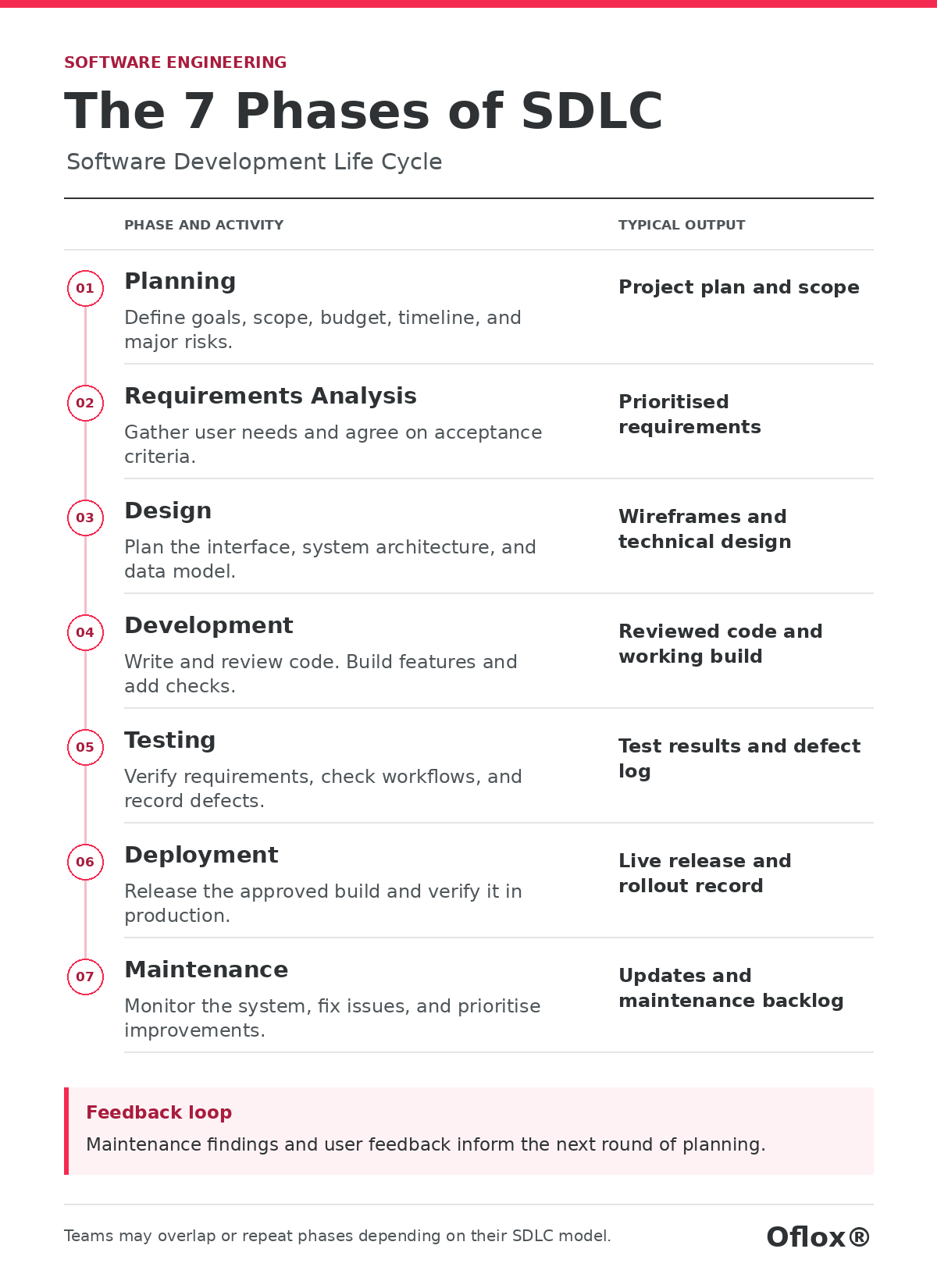
SDLC stands for Software Development Life Cycle. It is the process software teams follow to plan, analyse requirements, design, develop, test, deploy, and maintain software. Each phase answers a different question, from what problem the software should solve to how the team will keep it working after release.
The seven-phase version is a common way to teach and organise these activities. Some teams combine planning and requirements, while others treat operations or retirement as separate stages. The phases can also overlap. A team might test the first payment workflow while designing the dashboard for the next release.
Think of the lifecycle as the work a team must account for over time. An SDLC model describes how the team arranges that work. A Waterfall-style project may put formal reviews between major stages. An Agile team may plan, design, build, and test a small piece of the product in each iteration.
Why Is SDLC Important?
A good lifecycle makes decisions visible while there is still time to act on them. Suppose the PG owner asks for “automatic reminders”. A developer might assume that the app should remind everyone with an unpaid invoice. The owner may expect staff to approve the first round manually. Resolving that difference during requirements work can save a redesign, and documenting it gives testers a clear behaviour to verify.
The SDLC also makes handovers easier. A new engineer should be able to find the reminder rules, see which checks ran before release, and learn how to pause outgoing messages. An owner comparing software proposals can use the same logic to ask who handles data migration, what acceptance looks like, and how support works once the app goes live.
What Are the Key Features of a Well-Run SDLC?
| Feature | What it looks like in practice |
|---|---|
| Clear ownership | A named person can resolve a business rule or make a release decision. |
| Defined outputs | A requirement has acceptance criteria, and a release has a record of what shipped. |
| Traceability | A developer can connect a change to its requirement and the tests that cover it. |
| Feedback loops | Pilot findings, support tickets, and usage data can shape the next release. |
| Risk management | The team reviews permissions, data handling, and recovery throughout delivery. |
| Proportionate documentation | A small update might need one issue and a test result. A risky migration warrants a written plan and approval. |
A Brief History of the Software Development Life Cycle
Here’s how the Software Development Life Cycle evolved, from early sequential models to iterative development, Agile, and DevOps.
- Early lifecycle thinking and sequential development: As software projects grew larger, teams needed ways to coordinate requirements, design, implementation, and delivery across many people. Winston W. Royce’s 1970 paper is often associated with Waterfall because it illustrated a staged sequence. The paper also pointed out the danger of discovering fundamental problems late in testing and proposed additional feedback and risk-reduction steps.
- Iterative approaches and the Agile Manifesto: Iterative approaches let teams revisit designs as they learn. The Spiral model brought risk analysis into repeated development cycles. In 2001, the Agile Manifesto articulated values such as delivering working software, collaborating with customers, and adapting to change. For a product team, that can mean showing staff a basic rent ledger early and changing the workflow after seeing how they actually record payments.
- DevOps and security throughout the lifecycle: As teams began releasing software more frequently, development and operations increasingly shared responsibility for delivery and production health. Automated builds, repeatable deployments, and monitoring made it easier to connect changes in code with what happened after release. Secure development guidance extended that thinking to practices such as protecting source code, reviewing dependencies, and responding to reported vulnerabilities
What Are the 7 Phases of SDLC?
Here are the seven phases of the Software Development Life Cycle (SDLC), what teams do in each phase, and what each phase produces.
1. Planning
Planning answers whether the project is worth doing, what belongs in the first release, and what constraints the team must work within. Start with the business problem and the people affected. Then estimate the effort, agree on an initial budget and schedule, and identify risks that could change either.
The PG owner may want room allocation, expense reports, a tenant portal, and payments on day one. If staff spend most of their time reconciling rent, plan a pilot around one property, a rent ledger, and one reminder channel. Check whether the spreadsheet has enough reliable information to import opening balances. Decide whether the pilot will be judged by reduced reconciliation time, fewer incorrect reminders, or both, and record how you’ll measure it.
Typical output — A scope statement, rough estimate, success criteria, key risks, and a decision on whether to proceed.
2. Requirements Analysis
Requirements analysis turns broad requests into behaviour the team can agree on and verify. Talk to the people who do the work. Observe how they handle unusual cases, such as a tenant moving out mid-month or paying part of the bill in cash and the rest through UPI.
A functional requirement describes what the app does. For example, a manager can record two payments against the same invoice. A non-functional requirement describes a constraint or quality the app must meet, such as access restrictions or how quickly a report must load under an agreed workload.
For reminders, the owner might agree that the app checks outstanding balances at 6 pm IST on the due date. A tenant with ₹2,000 remaining on a ₹7,500 invoice should receive a reminder for ₹2,000. A fully paid invoice should generate none. Ask what counts as a confirmed payment, how staff handle disputed balances, and what happens on a day when the message provider is unavailable. Write the answers as acceptance criteria, which are specific conditions the team can check before approving the feature.
Typical output — A prioritised backlog or requirements document with acceptance criteria, assumptions, and outstanding decisions.
3. Design
Design sets out how the software will meet those requirements. It covers the user interface, application structure, data model, integrations, and decisions about access and reliability. A prototype can show the payment entry screen, while a technical design can explain which records supply the outstanding balance shown on it.
For the PG app, decide how properties, tenants, invoices, payments, and reminder attempts relate. Limit staff access to the properties they manage. Show the property owner a preview of the reminder amount and give staff a way to see whether a message was queued, sent, or failed. Agree on what should happen if a payment arrives after a reminder is queued.
Design for recovery as well. If staff turn reminders off during an incident, the team needs a clear rule for queued messages when the feature comes back on. Some old reminders may be irrelevant by then.
Typical output — Screen flows, a data model, integration decisions, and written reasoning for choices that will affect future changes.
4. Development
During development, engineers build the approved workflows, review changes with teammates, and add automated checks. Version control records what changed and why. Small changes are generally easier to review because a teammate can understand the business rule and its consequences in one sitting.
For the reminder feature, start with an end-to-end flow that handles one invoice and a simulated message provider. Then cover partial payments, permissions, retries, and operational controls. Recheck a balance before handing a queued message to the provider. If the provider times out after receiving it, use any delivery-status or deduplication mechanism the provider supports. Where delivery remains uncertain, make that uncertainty visible to the operator so they can decide how to handle it.
Engineers can test business logic before the full screen exists. For example, an automated test can check that ₹5,500 paid against a ₹7,500 invoice leaves a ₹2,000 balance. A separate integration test can check that the reminder process reads the current balance from the database.
Typical output — Reviewed code, migration scripts where needed, build artefacts, and automated checks.
5. Testing
Testing checks that the software performs as agreed and that changes have not broken other workflows. Unit tests cover individual rules. Integration tests check how components work together. End-to-end tests exercise a complete workflow. User acceptance testing lets business users confirm that the workflow fits the way they work.
For the PG app, have a manager record a part-payment and check the balance on the dashboard, in the reminder preview, and in an exported report. Test what happens if a payment is confirmed after a reminder is queued, if the same background job runs twice, or if a manager tries to view a property outside their assignment. For the migration, compare imported balances against a sample of the original records.
A test result should support a decision. If a bug could send the wrong balance to tenants, the team may hold the release. If an export column can be widened manually, the owner may accept it as a known issue with an agreed fix date.
Typical output — Test results, reported defects, unresolved risks, and evidence for the release decision.
6. Deployment
Deployment puts an approved version into a target environment. A team may make it available to users immediately or enable it gradually, for example through a feature flag, which is a setting that controls who can use a feature.
For the PG app, try the migration in a test environment first. Confirm how to restore the data, import the pilot property’s records, and reconcile a set of balances. Deploy the app with automatic messages disabled. Ask a manager to check a few tenant accounts and preview reminder amounts before enabling the feature for that property.
Set clear conditions for pausing the rollout, such as incorrect balances or repeated sends. Work through recovery separately for the app and the data. Returning to an earlier app version may still leave database changes or messages that have already gone out. A safe release plan accounts for those effects before production is involved.
Typical output — A live release, release notes, recorded verification checks, and a recovery plan with a named owner.
7. Maintenance
Maintenance includes monitoring, support, bug fixes, dependency updates, performance improvements, and changes based on user feedback. It also includes planning for a system’s retirement where relevant, including handover or export of data that customers still need.
After the pilot, staff might report that the dashboard says “Sent” even when a provider later reports failure. The team can review where that status comes from. A useful fix may be to display “Submitted” when the provider accepts the request and “Delivered” only once the channel reports delivery. The next release then starts with a new requirement, a design change, and tests that cover the revised behaviour.
Set an owner for alerts and support. If messages fail on the due date, somebody should know when to investigate, whom to inform, and whether staff can handle that day’s reminders manually.
Typical output — Support records, incident follow-ups, monitored service health, and a backlog for the next release.
How Does SDLC Work in a Real Software Project?
Here’s how SDLC works in a real software project, from turning a feature request into clear requirements to testing, releasing, and improving the feature based on user feedback.
| Situation | Expected behaviour | Evidence before rollout |
|---|---|---|
| A tenant owes ₹2,000 at send time | Show the current ₹2,000 balance in the reminder. | A partial-payment test and a preview reviewed by staff. |
| Full payment arrives before submission | Skip the reminder and record the reason. | A test that confirms a payment after queueing and before the worker submits the message. |
| A message request times out | Follow the provider’s recovery rules and record uncertain delivery for review. | A test simulating the timeout and checking what the operator sees. |
| Staff pause the pilot | Stop new sends for that property and account for queued jobs. | A rehearsal in the test environment with pending reminders. |
A clinic booking app faces a similar timing question when a patient cancels a slot after an appointment reminder has been queued. An online store faces a different one when stock changes between placing an item in the cart and submitting an order. In each case, the team should decide which record is authoritative and when the system checks it. That decision gives engineers something concrete to build and testers something concrete to verify.
5+ Common SDLC Models & Approaches
Here are some common SDLC models and approaches, how each one organises software development, and when to use it based on your project’s requirements, risks, and need for user feedback.
| Model or approach | How it works | When it fits | Trade-off |
|---|---|---|---|
| Waterfall | Work moves through major stages with formal handovers. | The scope is stable and a contract requires sign-off at milestones. | Late changes can require rework across several approved outputs. |
| Agile | Teams deliver small pieces of usable software and adapt based on feedback. | Priorities can change and users can review progress regularly. | Without a clear product owner, frequent changes can disrupt priorities. |
| Iterative | The team revisits and improves a solution over multiple cycles. | A workflow needs refinement after people try it. | Repeated refinement can consume the schedule without clear exit criteria. |
| Spiral | Each cycle identifies major risks and uses experiments or prototypes to reduce them. | Technical uncertainty or the cost of failure warrants formal risk work. | Risk analysis takes expertise and time. |
| V-Model | The team plans corresponding verification and validation activities alongside specification and design. | Test traceability and sign-off matter for a complex or tightly controlled system. | Frequent requirement changes can create substantial updates to the test plan. |
For the PG app, a team could deliver the ledger and reminders in short iterations while still requiring written approval for the first production data migration.
Decide how to work based on what is uncertain, how costly a mistake would be, and how quickly users can give feedback. A migration that can affect hundreds of balances needs different release controls from a change to the wording of a dashboard label.
Benefits & Challenges of Using SDLC
Here are the key benefits and challenges of using SDLC, from clarifying project scope and catching issues early to managing changing requirements and keeping documentation up to date.
| Benefit | Common challenge | Practical response |
|---|---|---|
| Clearer scope and estimates | Users learn more about their needs after seeing the first version. | Keep a prioritised backlog and agree which new requests affect the release date. |
| Earlier detection of problems | Passing tests can create false confidence if key cases are missing. | Review cases against real workflows, including rare and inconvenient ones. |
| Safer releases | Approvals pile up when every change follows the same process. | Require detailed review for high-risk changes and set a lighter path for routine updates. |
| Easier maintenance | Documentation goes out of date as the product evolves. | Update key rules, diagrams, and operating notes in the same change that affects them. |
A useful measure is how quickly the team can answer a production question. If staff report duplicate reminders, can someone find the message record, understand what triggered it, and pause future sends?
That is a better test of lifecycle discipline than counting how many documents the project produced.
5+ Helpful Tools for Managing the SDLC
Here are some helpful tools for managing the SDLC, from tracking requirements and reviewing code to automating tests and monitoring software after release.
| Tool | Where to use it | Practical example |
|---|---|---|
| GitHub Issues | Planning and requirements | Record the reminder rule, name the decision-maker, and attach acceptance criteria. |
| Figma | Interface design and feedback | Let staff click through partial-payment entry and reminder previews before development. |
| Git | Development and version control | Identify which change added a payment validation rule and when it entered the codebase. |
| Playwright | End-to-end browser testing | Check that a confirmed payment updates a tenant balance in the web dashboard. |
| GitHub Actions | Continuous integration and deployment workflows | Run checks on proposed code and automate approved steps in a release workflow. |
| Grafana | Monitoring and maintenance | Visualise reminder failures and processing delays so operators can investigate changes. |
Link related records. For example, connect a payment-rule issue to the proposed code change, its test results, and a release note. When a balance dispute comes in later, one issue can help support staff find the decision history without reading every project document.
Expert Tips and Common Mistakes
Here’s how to make each phase more useful without adding unnecessary work to a small project.
- Replace vague requirements with examples: “Send reminders on time” leaves several decisions open. Specify the date, time zone, balance source, and the outcome for fully paid invoices. Include one ordinary case and one boundary case, such as a payment confirmed just before submission. Ask the person who owns the business rule to agree to both.
- Bring testing into requirements and design discussions: A tester might ask what happens when two staff members edit an invoice while a payment is being recorded. Raising that question early can affect the data model and help the team avoid conflicting balances. Review the likely failure cases while options are still open, then turn the agreed behaviour into test cases.
- Plan recovery before deployment: Write down how to pause a release, what can be reversed, and how the team will verify recovery. Practise restoring data in a controlled environment before a risky migration. If a change affects balances or sends external messages, identify which actions require manual reconciliation after the app is restored.
- Give maintenance a named owner: Agree who reviews failures, responds to support tickets, and decides which fixes go into the next release. Include backup ownership for busy days and leave. For the PG app, the person handling support should be able to recognise whether a reminder failed because of an invalid contact number, a provider response, or a problem with the app.
- Measure what users experience: A team could increase release frequency while still sending confusing reminders. Pair engineering measures with user outcomes. Track failed sends and correction work alongside a simple check of how long staff spend reconciling balances. Define each measure the same way in every pilot review so changes are comparable.
FAQs:)
A. SDLC stands for Software Development Life Cycle. It covers the activities teams use to plan, build, test, release, and maintain software over time.
A. The seven common phases are planning, requirements analysis, design, development, testing, deployment, and maintenance. Teams can group or name these activities differently.
A. Agile teams use lifecycle activities in short delivery cycles. They can design, build, test, and review one feature while preparing requirements for the next.
A. SDLC covers the entire development lifecycle. The Software Testing Life Cycle (STLC) focuses on the testing work, including planning, test design, preparation, execution, defect reporting, and closure. Testing activities can begin while requirements are being discussed.
A. Yes. A team may test one feature while designing another. Feedback from testing or production can send a feature back for requirements or design changes.
A. Yes. A simple scope, agreed requirements, a test record, and a named person to handle release and support may be enough for a small project with limited risk.
A. Use an approach that fits the stability of your requirements, the risk of changes, and the speed of user feedback. Short iterations help when the workflow needs discovery. Formal review points help when changes carry serious consequences or require sign-off.
A. The lifecycle continues through monitoring, support, updates, and eventual retirement where applicable. Production feedback can also start a new cycle of planning and development.
Conclusion:)
Understanding what SDLC is in software engineering helps you see how a software idea becomes a product that people can use and a team can support.
The seven common phases cover the work from initial planning to ongoing maintenance. Teams can organise these phases around formal approvals or short iterations, depending on how stable the requirements are, how quickly users can give feedback, and what could go wrong during release.
For the PG app, the practical approach is to start with one workflow. Agree on when a rent reminder should go out, test what happens when a tenant pays just before it’s sent, and decide who can pause reminders if something goes wrong after launch.
At Oflox®, our advice is to answer three questions before building any feature. What should it do? How will you verify that it works? Who will look after it once it goes live?
“Before you build a feature, agree on what it should do, how you’ll test it, and who will own it after launch.” — Mr Rahman, Oflox®
Read also:)
- What Is System Design in Software Engineering? A-to-Z Guide!
- What Is Transfer Learning in AI? A-to-Z Guide for Beginners!
- What Is Reverse Engineering in Software Engineering?
Have you used SDLC in a software project? Share which phase took more effort than you expected and what you learned from it in the comments below.