This article provides a complete guide on What Is Ticketing System, including its meaning, importance, history, working process, features, benefits, challenges, popular tools, real-world applications, expert tips, common mistakes, and future trends.
Imagine hundreds or even thousands of customers contacting a company every day through email, phone calls, live chat, WhatsApp, social media, and web forms. Without a proper system, customer requests can easily get lost, delayed, or forgotten, leading to poor customer satisfaction and lost business opportunities.
This is where a Ticketing System becomes essential. Instead of managing customer conversations manually, a ticketing system automatically converts every request into a unique ticket, making it easier for support teams to organize, prioritize, assign, track, and resolve issues efficiently.
Today, ticketing systems are no longer limited to IT departments. Businesses of every size—including startups, e-commerce companies, healthcare providers, banks, educational institutions, government organizations, SaaS companies, and customer support centers—use ticketing software to deliver faster, more organized, and more professional support.
Modern ticketing platforms have also evolved with Artificial Intelligence (AI), automation, workflow management, analytics, self-service portals, chatbots, omnichannel communication, and predictive support, making customer service smarter than ever before.
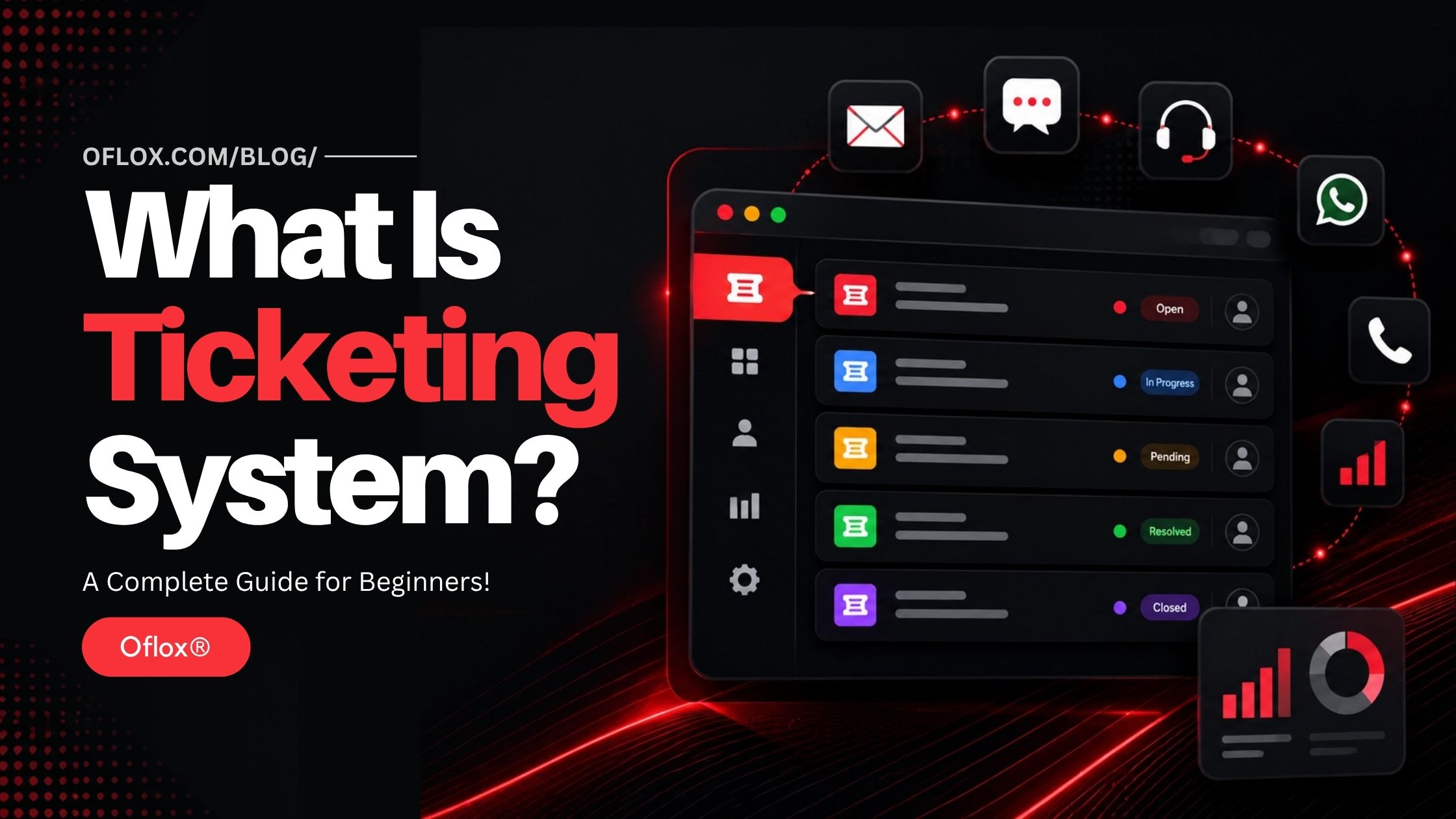
Whether you’re a business owner, customer support executive, IT professional, help desk engineer, digital marketer, or simply curious about customer service technology, understanding ticketing systems has become an essential skill in today’s digital world.
Let’s explore it together.
Table of Contents
What Is a Ticketing System?
A Ticketing System is a software application that helps organizations manage customer requests, technical issues, service inquiries, complaints, and support conversations by converting each request into a unique support ticket.
Each ticket contains all the information related to a customer’s issue, including:
- Customer details
- Issue description
- Priority level
- Assigned support agent
- Status
- Conversation history
- Attachments
- Resolution details
- Response timeline
Instead of handling requests manually through scattered emails or spreadsheets, businesses can track every interaction from creation to resolution within a centralized dashboard.
What Is a Support Ticket?
A support ticket is a digital record of a customer’s request.
For example,
Customer sends:
“My order hasn’t arrived.”
The system automatically creates:
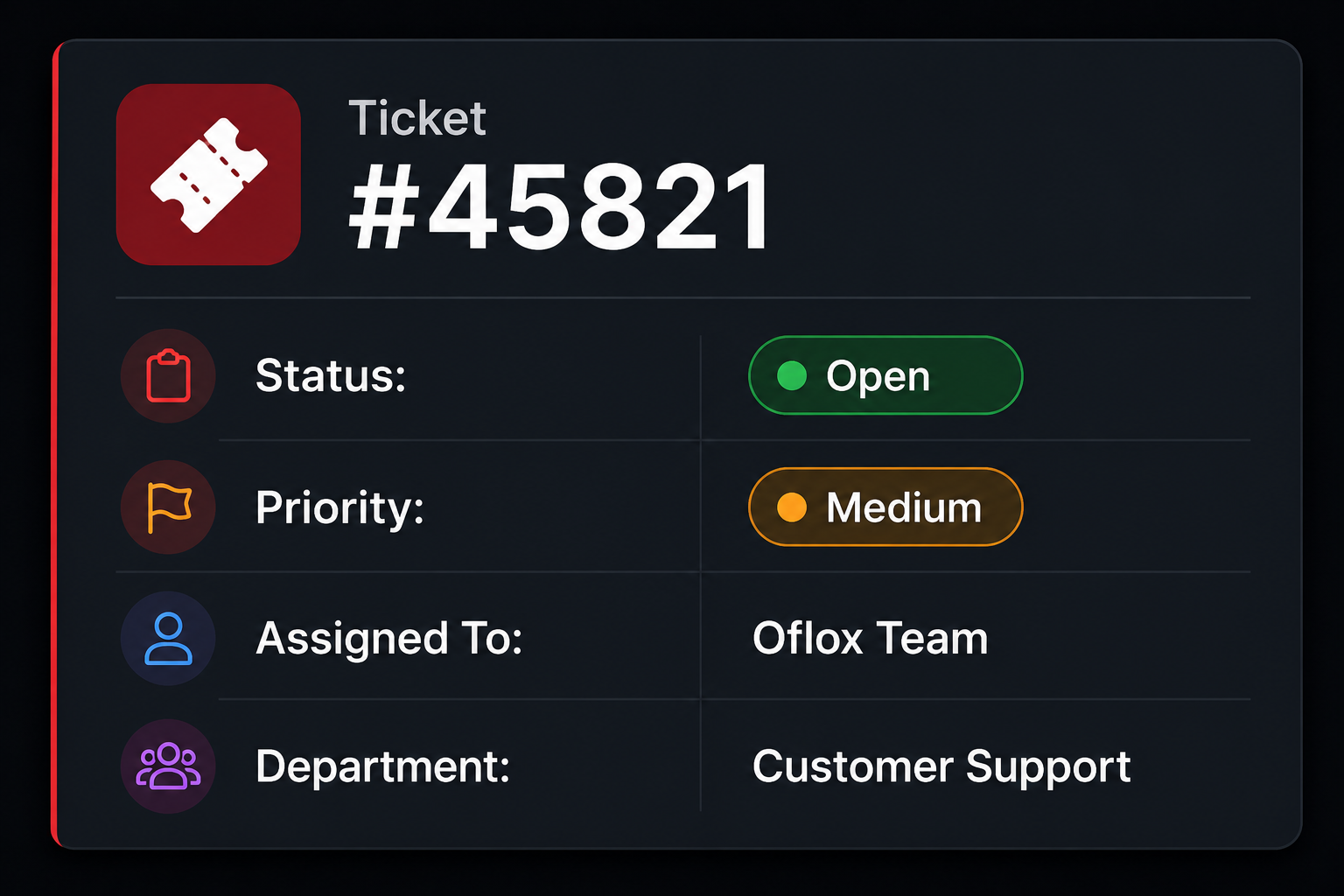
Every future reply remains attached to this ticket until the issue is solved.
Why Is a Ticketing System Important?
As businesses grow, customer communication increases rapidly.
Without ticket management:
- Emails get buried
- Complaints are forgotten
- Duplicate replies occur
- Customers wait longer
- Teams become confused
- Productivity decreases
A ticketing system solves these problems by organizing every request into a structured workflow.
It enables businesses to:
- Never lose customer requests
- Respond faster
- Improve customer satisfaction
- Track employee performance
- Meet SLA (Service Level Agreement) commitments
- Automate repetitive tasks
- Generate performance reports
- Scale customer support operations
Why Businesses Need a Ticketing System
| Business Challenge | Ticketing System Solution |
|---|---|
| Lost emails | Centralized ticket management |
| Slow responses | Automated routing |
| No accountability | Ticket ownership |
| Missed deadlines | SLA monitoring |
| Duplicate work | Shared ticket history |
| Poor communication | Unified conversations |
| Manual tracking | Automated workflows |
| Customer frustration | Faster issue resolution |
History and Evolution of Ticketing Systems
Customer support has changed dramatically over the last few decades.
1. 1980s — Paper-Based Support
Businesses maintained physical registers for customer complaints.
Problems included:
- Difficult tracking
- Lost documents
- Slow updates
- No reporting
2. 1990s — Email Support
Companies started accepting customer requests through email.
Advantages:
- Faster communication
- Digital records
Limitations:
- Overflowing inboxes
- Duplicate emails
- Manual categorization
3. Early 2000s — Help Desk Software
Organizations introduced dedicated help desk applications.
Features included:
- Ticket IDs
- Status tracking
- Assignments
- Internal notes
This marked the beginning of modern ticket management.
4. 2010s — Cloud-Based Ticketing
Cloud computing transformed customer support.
Businesses could now:
- Access tickets from anywhere
- Collaborate remotely
- Integrate multiple communication channels
- Use mobile applications
5. 2020–2026 — AI-Powered Ticketing Systems
Modern ticketing software now includes:
- AI chatbots
- Automatic ticket classification
- Sentiment analysis
- Predictive routing
- Workflow automation
- Voice AI
- Self-service knowledge bases
- Intelligent recommendations
- Generative AI reply suggestions
Ticketing systems have evolved from simple issue trackers into intelligent customer experience platforms.
How Does a Ticketing System Work?
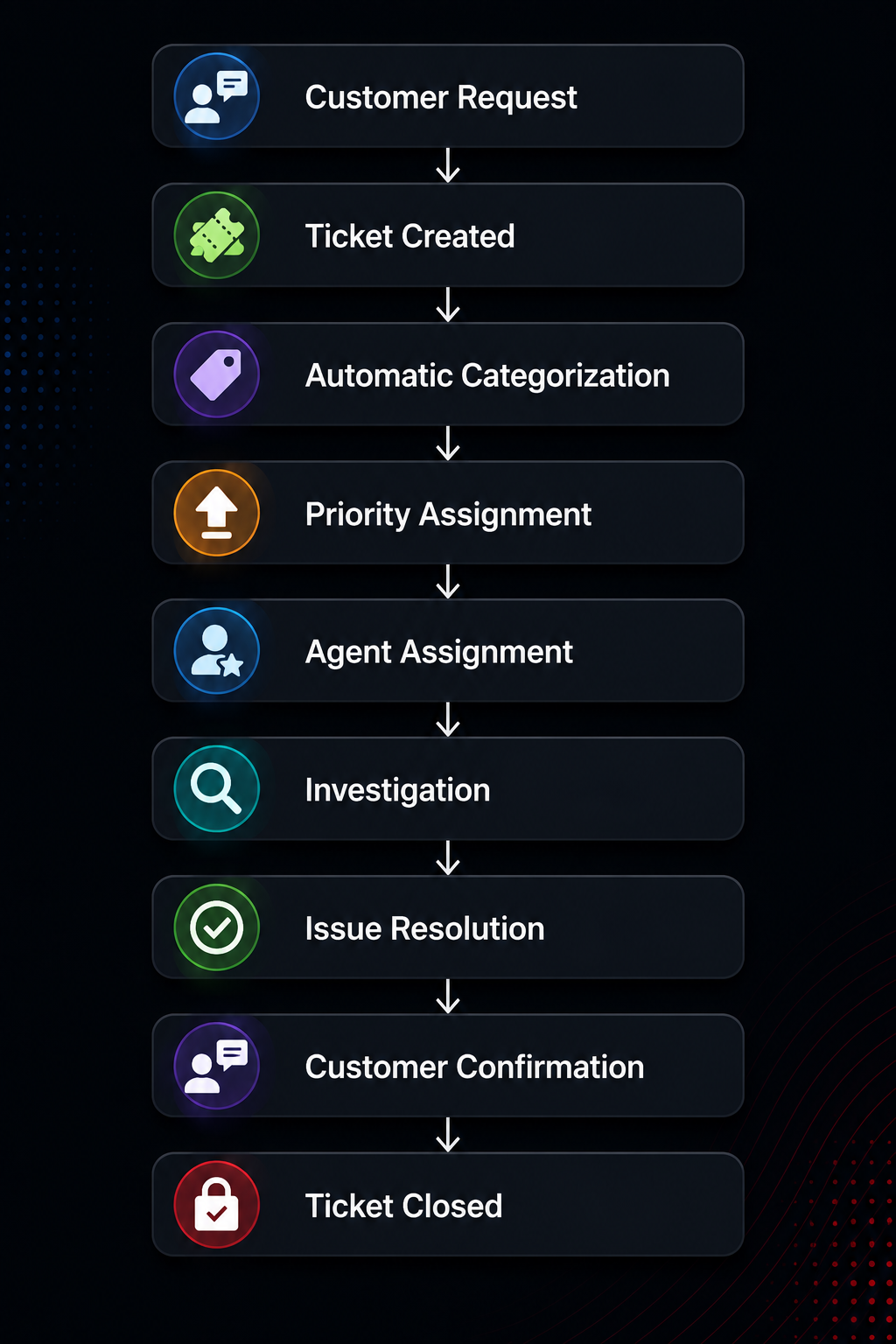
The working process is simple but highly organized. Here is the complete lifecycle of a support ticket.
1. Customer Submits a Request
Customers contact the company through:
- Website form
- Live chat
- Phone call
- Facebook Messenger
- Mobile app
- Social media
- API integrations
Example:
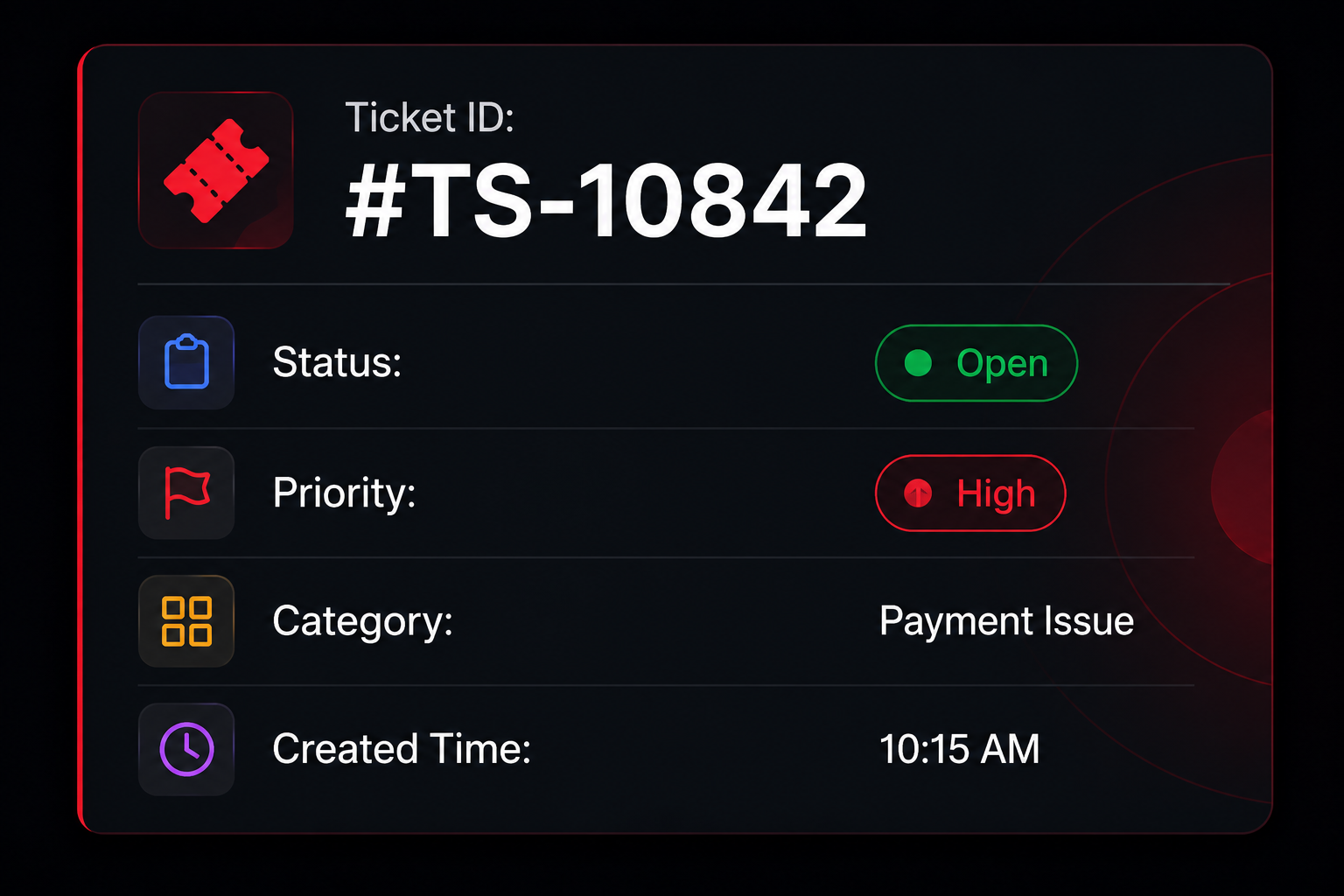
"My payment failed but money was deducted."2. Ticket Creation
The system automatically creates a ticket.
Example:
3. Automatic Categorization
The software analyses the issue.
It may classify the ticket into:
- Billing
- Technical
- Sales
- Refund
- Login
- Shipping
- Product Inquiry
- Complaint
AI-based systems perform this automatically.
4. Priority Assignment
Not every issue is equally urgent.
Example:
| Issue | Priority |
|---|---|
| Password reset | Low |
| Login problem | Medium |
| Payment failure | High |
| Server down | Critical |
This helps support teams focus on the most urgent issues first.
5. Ticket Assignment
The ticket is automatically assigned to the appropriate department.
Examples:
- Billing Team
- Technical Team
- Sales Team
- Returns Department
- Network Engineers
- System Administrators
Some systems use AI to identify the best available agent based on workload and expertise.
6. Investigation
The assigned agent:
- Reviews the issue
- Contact the customer if needed
- Collects additional information
- Collaborates with internal teams
- Documents progress using internal notes
7. Resolution
After identifying the problem, the support agent provides a solution.
Examples include:
- Refund processed
- Password reset completed
- Bug fixed
- Server restored
- Replacement shipped
- Account unlocked
The customer receives a notification with the resolution.
8. Ticket Closure
Once the customer confirms the issue is resolved—or after a predefined waiting period—the ticket status changes to Closed.
Closed tickets remain stored in the system for future reference, reporting, audits, and knowledge base creation.
Ticket Lifecycle:
Main Components of a Ticketing System
A modern ticketing system consists of several core components that work together to ensure smooth support operations.
| Component | Purpose |
|---|---|
| Ticket Dashboard | View and manage all support requests |
| Ticket Queue | Organize tickets by priority or department |
| Assignment Engine | Route tickets to the right agents |
| SLA Management | Track response and resolution deadlines |
| Automation Rules | Reduce manual work through workflows |
| Knowledge Base | Provide self-service help articles |
| Reporting & Analytics | Measure support performance |
| Customer Portal | Allow users to create and track tickets |
| Notifications | Keep customers and agents updated |
| Integrations | Connect with CRM, email, chat, ERP, and other tools |
Key Features of a Ticketing System
Modern ticketing systems are much more than simple issue trackers. They combine automation, AI, collaboration tools, analytics, and customer communication into a single platform.
Below are the most important features you should know.
1. Ticket Creation
Every customer request automatically becomes a support ticket.
Tickets can be created through:
- Live Chat
- Phone Calls
- Website Forms
- Mobile Apps
- Social Media
- API Integrations
Each ticket receives a unique ID for easy tracking.
2. Omnichannel Support
Modern customers use multiple communication channels.
A ticketing system combines conversations from:
- Facebook Messenger
- Telegram
- Website Chat
- Phone Calls
- SMS
Instead of switching between different platforms, agents manage everything from one dashboard.
3. Automatic Ticket Routing
The software automatically sends tickets to the correct department.
Example:
| Customer Request | Assigned Team |
|---|---|
| Refund | Finance |
| Login Issue | Technical Support |
| Sales Inquiry | Sales Team |
| Delivery Problem | Logistics |
| Product Information | Customer Success |
This reduces manual work and improves response speed.
4. Priority Management
Not every customer issue has the same urgency.
Common priority levels include:
- Low
- Medium
- High
- Critical
Example:
| Issue | Priority |
|---|---|
| Password Reset | Low |
| Shipping Delay | Medium |
| Payment Failure | High |
| Website Down | Critical |
5. SLA Management
SLA (Service Level Agreement) helps companies meet promised response times.
Example SLA:
| Priority | First Response | Resolution Time |
|---|---|---|
| Low | 24 Hours | 72 Hours |
| Medium | 8 Hours | 24 Hours |
| High | 2 Hours | 8 Hours |
| Critical | 15 Minutes | 2 Hours |
If deadlines are approaching, managers receive automatic alerts.
6. Workflow Automation
Automation reduces repetitive manual work.
Examples include:
- Auto-assigning tickets
- Auto replies
- Escalations
- Status updates
- Reminder notifications
- Follow-up emails
- Customer surveys
This allows support agents to focus on solving problems instead of administrative tasks.
7. AI-Powered Assistance
Modern ticketing systems use Artificial Intelligence to improve productivity.
AI capabilities include:
- Ticket categorization
- Sentiment analysis
- Smart routing
- Suggested replies
- Automatic summaries
- Spam detection
- Duplicate ticket detection
- Language translation
- Knowledge article recommendations
AI significantly reduces response time while improving consistency.
8. Internal Collaboration
Support teams often need help from multiple departments.
Agents can:
- Add internal notes
- Mention colleagues
- Share files
- Escalate tickets
- Create child tickets
- Collaborate without customers seeing internal discussions
9. Customer Self-Service Portal
Many customers prefer solving problems themselves.
Self-service portals provide:
- FAQs
- Help Articles
- Tutorials
- Video Guides
- Knowledge Base
- Ticket Tracking
This reduces ticket volume while improving customer satisfaction.
10. Reporting and Analytics
Managers need visibility into support performance.
Common reports include:
- Number of tickets
- Resolution time
- First response time
- Customer satisfaction score
- Agent productivity
- Pending tickets
- Reopened tickets
- SLA compliance
These reports help businesses continuously improve their support operations.
Types of Ticketing Systems
Different organizations have different support needs. As a result, ticketing systems are available in various forms.
1. Help Desk Ticketing System
Designed for general customer support.
Suitable for:
- Small Businesses
- Startups
- E-commerce
- Customer Care Teams
Example use cases:
- Order issues
- Account problems
- Refund requests
2. IT Service Management (ITSM) Ticketing System
Used by internal IT departments to manage technology-related issues.
Common requests include:
- Computer problems
- Software installation
- Network failures
- Printer issues
- Password resets
- Hardware replacement
Ideal for medium and large organizations.
3. Customer Support Ticketing System
Focuses on customer experience.
Handles:
- Product inquiries
- Complaints
- Warranty claims
- Returns
- Technical support
- Billing questions
4. Internal Service Desk
Employees submit requests for internal services.
Examples include:
- HR requests
- Payroll issues
- Office maintenance
- Laptop replacement
- Leave management
- Access permissions
5. Enterprise Ticketing System
Large organizations require enterprise-grade capabilities.
Features include:
- Multi-department support
- AI automation
- Workflow builder
- Advanced analytics
- Compliance management
- Multi-language support
- Global operations
6. Industry-Specific Ticketing Systems
Some industries require specialized ticket management.
Examples:
| Healthcare | Education | Banking | Government | Telecom | Manufacturing |
| Patient support | Student help desks | Account disputes | Citizen complaint management | Network outage management | Equipment maintenance |
| Appointment requests | Admission support | Fraud reporting |
Types of Ticketing System
Organizations handle many different types of requests.
| Ticket Type | Example |
|---|---|
| Technical Support | Software Bug |
| Billing | Incorrect Invoice |
| Refund | Payment Return |
| Complaint | Poor Service |
| Feature Request | New Product Idea |
| Incident | Website Down |
| Service Request | Password Reset |
| Maintenance | Server Upgrade |
| Sales Inquiry | Product Pricing |
| Feedback | Customer Suggestions |
Benefits of Using a Ticketing System
A ticketing system provides value to both customers and businesses.
- Faster Response Time: Automated workflows reduce waiting time. Customers receive quicker assistance.
- Better Customer Satisfaction: Customers appreciate Faster replies, Transparent communication, Real-time updates, and Professional support. Satisfied customers are more likely to become loyal customers.
- Organized Workflow: Instead of scattered emails, Everything remains organized inside one platform. Nothing gets lost.
- Increased Team Productivity: Automation removes repetitive tasks. Agents spend more time solving customer issues.
- Improved Accountability: Every ticket shows the assigned agent, Timeline, Activities, and Resolution. Managers can easily monitor performance.
- Data-Driven Decision Making: Reports reveal Common customer issues, Product problems, Team bottlenecks, and Seasonal trends. Businesses can improve services based on real data.
- Better Communication: Everyone involved can see the latest ticket updates. No repeated conversations. No confusion.
- Scalability: As businesses grow, ticketing systems can easily handle More customers, More agents, More departments, and More communication channels without losing efficiency.
Benefits for Different Industries:
| Industry | Major Benefits |
|---|---|
| E-commerce | Faster order support |
| SaaS | Efficient bug tracking |
| Banking | Secure complaint management |
| Healthcare | Better patient support |
| Education | Student help desks |
| Telecom | Outage management |
| Government | Citizen grievance handling |
| Manufacturing | Equipment maintenance requests |
| Travel | Booking issue management |
| Insurance | Faster claim assistance |
Challenges of Ticketing Systems
Although ticketing systems provide numerous benefits, organizations can still face several implementation and operational challenges.
- High Initial Setup: Large organizations may require Workflow configuration, Department mapping, SLA setup, User roles, and Security policies. Implementation can take time.
- Employee Training: Without proper training, employees may use incorrect ticket categories, forget updates, ignore SLAs, and create duplicate tickets. Continuous learning is essential.
- Integration Complexity: Businesses often connect ticketing software with CRM, ERP, Accounting software, Chat platforms, Email systems, and Identity providers. Complex integrations may require technical expertise.
- Too Many Notifications: Excessive alerts can overwhelm support agents. A well-configured notification strategy helps prevent alert fatigue.
- Poor Ticket Categorization: Incorrect ticket classification can result in Delayed resolutions, Wrong assignments, SLA breaches, and Customer dissatisfaction. AI-assisted categorization can significantly improve accuracy.
- Growing Ticket Volume: As businesses expand, customer requests increase. Without automation, support teams may struggle to keep up.
10+ Popular Ticketing System Software
Many excellent ticketing solutions are available today, each designed for different business sizes and use cases.
| Software | Best For | Key Strength |
|---|---|---|
| Zendesk | Customer Support | Omnichannel service |
| Freshdesk | Small & Medium Businesses | Easy automation |
| Jira Service Management | IT Teams | ITSM workflows |
| ServiceNow | Large Enterprises | Enterprise service management |
| Zoho Desk | Growing Businesses | CRM integration |
| Help Scout | Small Teams | Shared inbox simplicity |
| HappyFox | Customer Support | Workflow automation |
| SolarWinds Service Desk | IT Departments | Asset management |
| SysAid | IT Operations | Incident management |
| ManageEngine ServiceDesk Plus | Enterprises | ITIL support |
| InvGate Service Management | Enterprises migrating from legacy vendors | No-code configuration |
Real-World Examples of Ticketing Systems
Let’s explore some real-world examples that show how ticketing systems are used to organize, track, and resolve customer and IT support requests effectively.
- E-commerce Store: A customer reports that their order has not arrived. The ticket is automatically assigned to the logistics team, who check shipment details and update the customer. Once the package is delivered or a replacement is arranged, the ticket is closed.
- SaaS Company: A user encounters a software bug after a recent update. The support agent reproduces the issue, escalates it to the development team, and keeps the customer informed until the bug is fixed in the next release.
- Bank: A customer notices an unauthorised transaction. A high-priority ticket is created, the fraud team investigates immediately, and the customer receives updates throughout the investigation process.
- Hospital: A patient is unable to access an online appointment portal. The issue is logged, assigned to the IT support team, resolved promptly, and the patient is notified once access is restored.
- University: A student cannot log in to the learning management system before an exam. The IT help desk receives the ticket, verifies the student’s account, resets access if necessary, and ensures the issue is resolved before the examination begins.
Ticketing System vs Help Desk vs Service Desk
| Feature | Ticketing System | Help Desk | Service Desk |
|---|---|---|---|
| Primary Focus | Managing support tickets | Resolving customer issues | Delivering IT and business services |
| Scope | Broad | Customer support | Enterprise-wide service management |
| Automation | High | Medium | Very High |
| ITIL Support | Optional | Limited | Extensive |
| Best For | All industries | Customer support teams | Medium to large enterprises |
Expert Tips for Successfully Using a Ticketing System
A well-configured ticketing system is only effective when supported by best practices. Here are some expert tips to maximize its performance.
1. Define Clear Ticket Categories
Create meaningful categories such as:
- Technical Support
- Billing
- Refunds
- Sales
- Shipping
- Product Issues
- Account Management
Proper categorization ensures tickets are automatically routed to the correct department.
2. Set Realistic SLA Policies
Create different SLA rules based on ticket priority.
Example:
- Critical → 15 Minutes
- High → 2 Hours
- Medium → 8 Hours
- Low → 24 Hours
This helps support teams meet customer expectations consistently.
3. Automate Repetitive Tasks
Use automation for:
- Ticket assignment
- Email notifications
- Status changes
- Escalations
- Follow-ups
- Customer satisfaction surveys
Automation reduces manual effort and speeds up response times.
4. Build a Strong Knowledge Base
Many customers prefer finding answers on their own.
Create articles covering:
- FAQs
- Installation guides
- Troubleshooting steps
- Video tutorials
- Product documentation
A good knowledge base reduces ticket volume significantly.
5. Train Your Support Team Regularly
Provide ongoing training on:
- Product knowledge
- Customer communication
- Ticket workflows
- New features
- AI tools
- Security practices
Well-trained agents resolve issues faster and more accurately.
6. Monitor Performance Metrics
Track KPIs such as:
- First Response Time (FRT)
- Average Resolution Time (ART)
- Customer Satisfaction (CSAT)
- Net Promoter Score (NPS)
- SLA Compliance
- Ticket Backlog
- Reopen Rate
These insights help identify bottlenecks and improve service quality.
7. Use AI Responsibly
AI can assist with:
- Ticket classification
- Smart routing
- Suggested replies
- Ticket summaries
- Language translation
However, sensitive or complex customer issues should still involve human review to ensure empathy and accuracy.
8. Continuously Improve Workflows
Customer expectations evolve over time.
Regularly review:
- Automation rules
- Escalation policies
- Ticket categories
- Customer feedback
- Reporting dashboards
Continuous optimization keeps support operations efficient.
Common Ticketing System Mistakes
Even the best software cannot compensate for poor processes. Avoid these common mistakes to ensure your ticketing system delivers maximum value.
- Using Too Many Categories: Excessive categories confuse both customers and support agents. Keep categories simple, logical, and easy to understand.
- Ignoring Ticket Priorities: Treating every ticket equally can delay urgent issues. Always prioritize business-critical requests first.
- Closing Tickets Too Early: Never close a ticket before confirming the issue has been resolved or following your defined closure policy. Premature closures reduce customer trust.
- Poor Internal Communication: Lack of collaboration between departments often results in Delayed responses, Duplicate work, and Inconsistent answers. Encourage internal notes and shared ownership when needed.
- Not Measuring Performance: Without reports, businesses cannot identify Slow agents, Common issues, Customer pain points, and Process bottlenecks. Analytics should guide continuous improvement.
- Ignoring Customer Feedback: Customer satisfaction surveys provide valuable insights into service quality. Use this feedback to improve training, workflows, and support processes.
- Over-Automating Every Process: Automation is helpful, but relying on it for every interaction can frustrate customers. Always provide a clear path to a human support agent for complex or sensitive issues.
- Failing to Maintain the Knowledge Base: Outdated help articles create confusion and increase support requests. Review and update documentation regularly.
FAQs:)
A. A ticketing system is software that converts customer or employee requests into trackable tickets, helping organizations manage, prioritize, and resolve issues efficiently.
A. Ticketing systems are widely used by IT departments, Customer support teams, E-commerce companies, SaaS businesses, Banks, Hospitals, Schools and universities, Government organizations, and Telecom providers.
A. A support ticket is a digital record containing details about a customer’s issue, including its status, priority, assigned agent, and communication history.
A. It helps organizations organize support requests, improve response times, Track issue resolution, meet SLA commitments, increase customer satisfaction, and improve team collaboration.
A. An SLA (Service Level Agreement) defines the expected response and resolution times for different types of support requests.
A. A ticketing system focuses on managing support requests, while a help desk is a broader customer support function that often includes ticket management, self-service resources, and customer communication.
A. Yes. Many ticketing platforms offer affordable or free plans suitable for startups and small businesses.
A. Yes. AI can automate ticket categorization, routing, summaries, suggested replies, and knowledge recommendations, enabling support teams to work more efficiently while maintaining quality.
Conclusion:)
A ticketing system has become a fundamental component of modern customer service and IT support. Instead of relying on scattered emails, spreadsheets, or manual follow-ups, organisations can centralise every request into a structured workflow that improves visibility, accountability, and efficiency.
Whether you run a startup, an e-commerce store, a SaaS company, a hospital, a bank, or a large enterprise, implementing the right ticketing system can help your team respond faster, collaborate better, meet service commitments, and build stronger customer relationships.
As Artificial Intelligence, automation, and predictive analytics continue to evolve, ticketing systems will shift from reactive issue management to proactive customer experience platforms. Businesses that embrace these innovations while maintaining human empathy and strong support processes will be better positioned to meet rising customer expectations.
“Great customer support isn’t about answering every request quickly—it’s about ensuring every customer feels heard, valued, and supported through a well-managed process.” — Mr Rahman
Read also:)
- What Is AI Guardrail? A Complete Beginner’s Guide!
- What Is a Knowledge Graph? A-to-Z Guide for Beginners!
- What Is a Reverse Proxy Server? A Complete Beginner’s Guide!
Have you used a Ticketing System before? Share your experience or questions in the comments below—we’d love to hear from you!