This complete guide will explain what domain migration is, how domain migration works, why businesses migrate domains, its benefits, challenges, tools, SEO considerations, common mistakes, and the correct domain migration process.
Moving a website from one domain name to another may look like a simple technical change, but in reality, it is one of the most sensitive operations in website management and SEO.
A website may have hundreds or even thousands of pages indexed by search engines. Those pages can have backlinks, rankings, traffic, internal links, user bookmarks, brand mentions, analytics data, and years of accumulated SEO signals.
When the domain changes, all these signals need to be transferred as smoothly as possible to the new domain.
Whether you are a website owner, blogger, SEO professional, developer, startup founder, or digital marketer, understanding domain migration can help you protect your website’s traffic and visibility while moving to a new online identity.
Let’s explore it together.
Table of Contents
What Is Domain Migration?
Domain migration is the process of moving a website from one domain name to another while attempting to preserve its content, URLs, search engine visibility, backlinks, users, and SEO value.
For example:
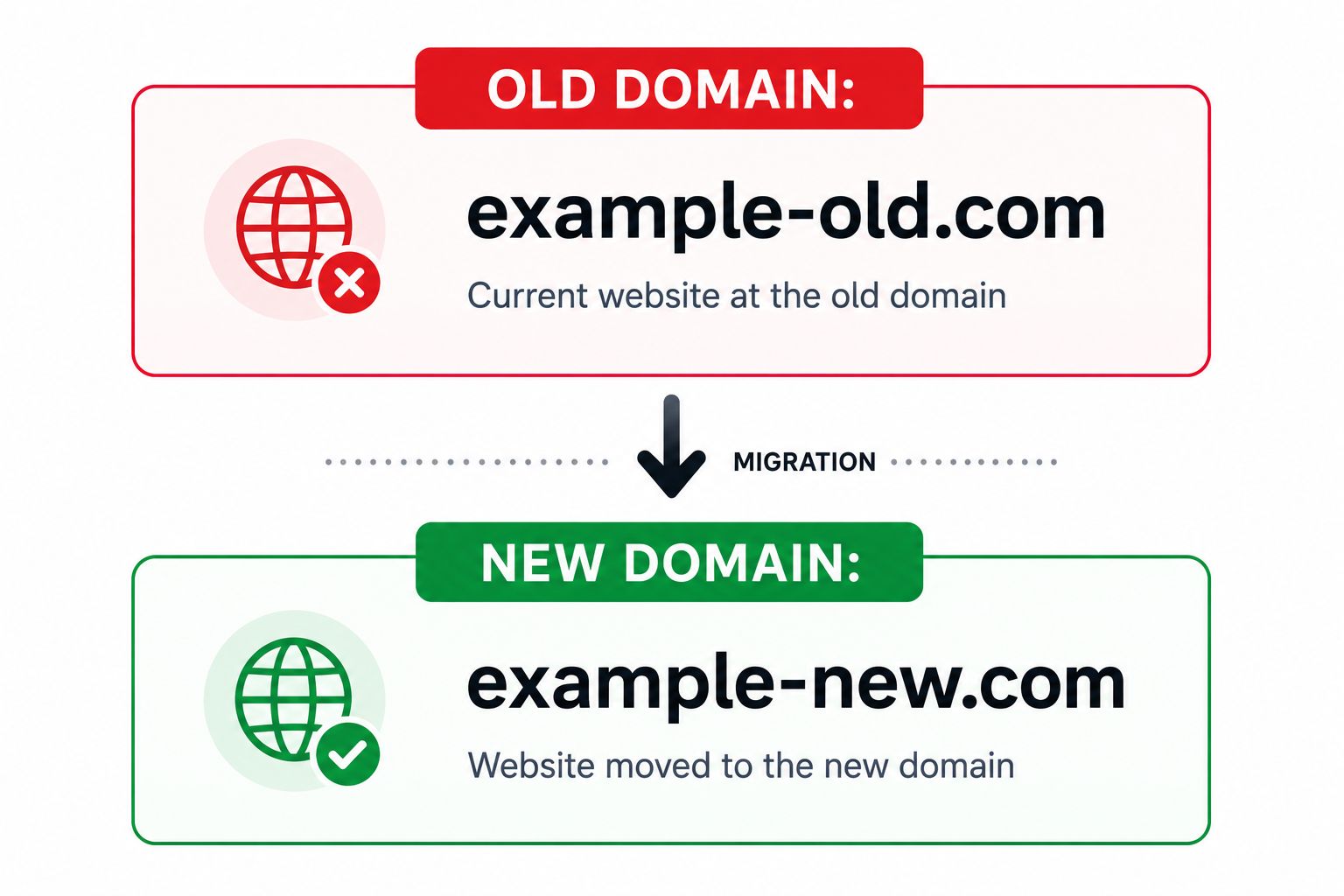
The website content may remain almost identical, but its primary domain changes.
A proper domain migration normally involves much more than copying website files.
It can include:
- Moving website files and databases
- Configuring the new domain
- Setting up HTTPS
- Mapping old URLs to new URLs
- Implementing permanent redirects
- Updating internal links
- Updating canonical URLs
- Updating XML sitemaps
- Updating analytics and tracking configurations
- Verifying the new website in search engine tools
- Monitoring crawling and indexing
- Checking backlinks
- Testing broken links
- Monitoring rankings and organic traffic
The main objective is simple:
Move the website to the new domain while losing as little SEO value, traffic, functionality, and user trust as possible.Why Is Domain Migration Important?
A domain is an important part of a website’s digital identity. Over time, however, businesses may outgrow their original domain.
A startup may change its company name. A business may acquire a better domain. Two companies may merge. A website may move from a country-specific domain to a global domain.
In all these situations, domain migration becomes necessary.
The problem is that search engines already understand the existing website through its old URLs.
For example:
oldbrand.com/services/web-developmentmay have:
- Google rankings
- Backlinks
- Search impressions
- Organic clicks
- Social shares
- Referral traffic
- User bookmarks
If the website suddenly disappears and the new website appears at:
newbrand.com/services/web-developmentwithout proper migration signals, search engines may initially treat the new URL differently.
That is why domain migration is not simply a branding exercise.
It is also an important technical SEO, website architecture, infrastructure, and search visibility project.
A Brief Background of Domain Migration
In the early years of the web, websites were relatively small.
Many businesses operated websites containing only a few HTML pages. Moving such websites between domains could often be handled manually.
Modern websites are significantly more complex.
A business website today may contain:
- Thousands of indexed URLs
- CMS databases
- Dynamic pages
- JavaScript applications
- Product catalogues
- APIs
- CDN configurations
- Analytics systems
- Structured data
- Canonical tags
- Multilingual pages
- Backlinks
- Search engine history
- User accounts
Therefore, modern domain migration requires coordination between SEO, development, infrastructure, analytics, content, and marketing teams.
Search engines have also developed tools and signals that help them understand site moves, including redirects, canonicalisation, XML sitemaps, and site migration/change-of-address mechanisms.
The fundamental principle remains unchanged:
A successful domain migration creates a clear path between the website’s old identity and its new identity.
How Does Domain Migration Work?
A domain migration generally follows this flow:
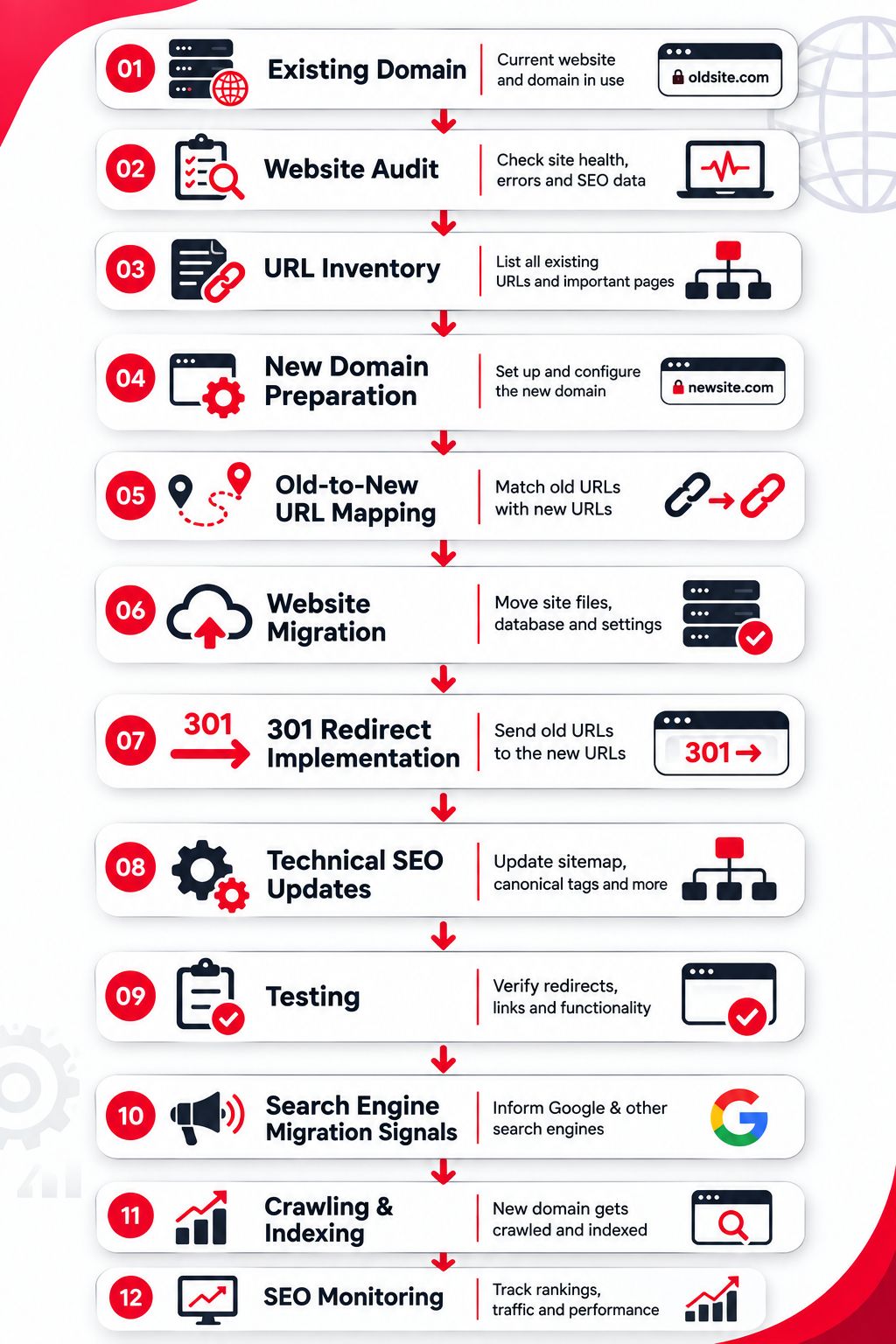
The exact implementation depends on the website platform, server configuration, CMS, URL structure, and migration objective.
Let us understand the complete process.
How to Migrate a Domain Step by Step?
If you are planning to change your website’s domain, following the right migration process step by step can help you avoid broken links, indexing problems, and unnecessary SEO loss.
1. Define the Reason for Migration
Before making technical changes, determine why the domain needs to change.
Common reasons include:
- Rebranding
- Company merger
- Business acquisition
- Better domain acquisition
- Trademark issues
- International expansion
- Moving to a shorter domain
- Changing business direction
- Consolidating multiple websites
- Moving from an outdated domain identity
Clearly defining the objective helps determine the correct migration strategy.
2. Audit the Existing Website
Before migration, create a detailed snapshot of the existing website.
Record important information such as:
| Metric | Why It Matters |
|---|---|
| Indexed URLs | Helps track indexing changes |
| Organic traffic | Establishes a migration benchmark |
| Rankings | Helps detect visibility changes |
| Backlinks | Identifies valuable external links |
| Top pages | Shows which pages require special attention |
| Internal links | Helps update website navigation |
| Canonicals | Prevents incorrect canonical signals |
| Redirects | Identifies existing redirect chains |
| Crawl errors | Prevents old problems from entering the new site |
The pre-migration audit becomes your baseline.
Without a baseline, it becomes difficult to determine whether migration has improved or damaged website performance.
3. Create a Complete URL Inventory
Create a list of important URLs from the old website.
Sources may include:
- XML sitemap
- Website crawl
- CMS database
- Analytics reports
- Search performance data
- Backlink reports
- Server logs
For a large website, relying only on the XML sitemap can be risky because important historical URLs may not appear there.
Your URL inventory should ideally include every URL that currently receives meaningful traffic, backlinks, search visibility, or user visits.
4. Prepare the New Domain
Configure the new domain before redirecting users.
Important preparations can include:
- DNS configuration
- Web hosting
- SSL certificate
- CDN
- CMS configuration
- Database connection
- Security settings
- Email configuration
- Analytics
- Robots directives
- Performance optimisation
The new website should be thoroughly tested before the migration goes live.
5. Create an Old-to-New URL Mapping
URL mapping is one of the most important parts of domain migration.
Suppose your old website contains:
oldsite.com/aboutoldsite.com/services/seooldsite.com/blog/domain-guide
Their equivalent URLs should be identified on the new domain.
For example:
| Old URL | New URL |
|---|---|
| oldsite.com/about | newsite.com/about |
| oldsite.com/services/seo | newsite.com/services/seo |
| oldsite.com/blog/domain-guide | newsite.com/blog/domain-guide |
Whenever possible, redirect an old page to its closest equivalent new page.
Avoid redirecting every URL to the homepage.
6. Back Up Everything
Before making the migration live, create complete backups.
Back up:
- Website files
- Database
- Server configuration
- DNS settings where appropriate
- Redirect configuration
- CMS configuration
- Important analytics data
- Sitemap
- Robots.txt
- Existing URL list
A rollback plan is also highly recommended.
If something goes seriously wrong during deployment, your team should know how to restore the previous working version.
7. Move the Website
Now deploy the website on the new domain.
For a straightforward domain change, the new site may initially preserve the same architecture.
For example:
oldbrand.com/blog/seo-guidebecomes:
newbrand.com/blog/seo-guideKeeping URL paths consistent can make mapping and troubleshooting easier.
However, some migrations also involve structural changes.
For example:
oldbrand.com/resources/seo-guidemay become:
newbrand.com/resources/seo-guideIn such cases, detailed page-level URL mapping becomes even more important.
8. Implement 301 Redirects
A 301 redirect indicates that a resource has permanently moved to another URL.
For example:
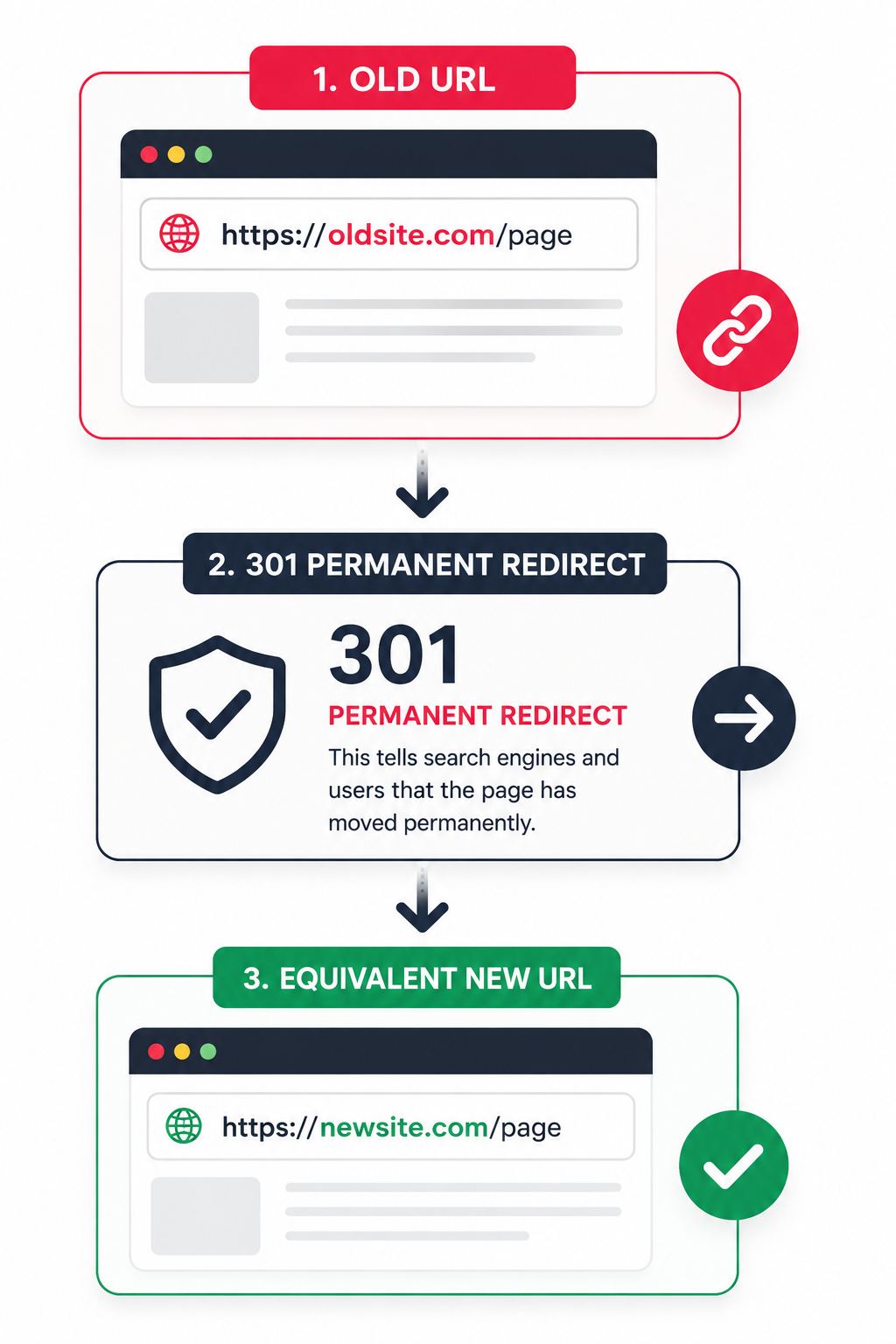
Redirects help both visitors and search engines reach the correct new location.
Ideally, use direct redirects:
Old URL → New URLAvoid unnecessary chains such as:
Old URL → Temporary URL → Another URL → New URLLong redirect chains can make crawling less efficient and complicate troubleshooting.
9. Update Internal Links
Do not depend entirely on redirects for internal navigation.
Update internal links so they directly reference the new URLs.
Check:
- Header navigation
- Footer links
- Blog links
- Breadcrumbs
- Images
- Buttons
- CTAs
- CSS/JS references where applicable
- Structured data URLs
- Canonical URLs
- Hreflang references
- Sitemap URLs
A clean internal linking structure makes the migrated site easier for users and crawlers to navigate.
10. Update Canonical Tags
Canonical tags tell search engines which URL is intended to be the preferred version of a page.
After migration, canonical tags should generally point to the corresponding new-domain URLs.
For example:
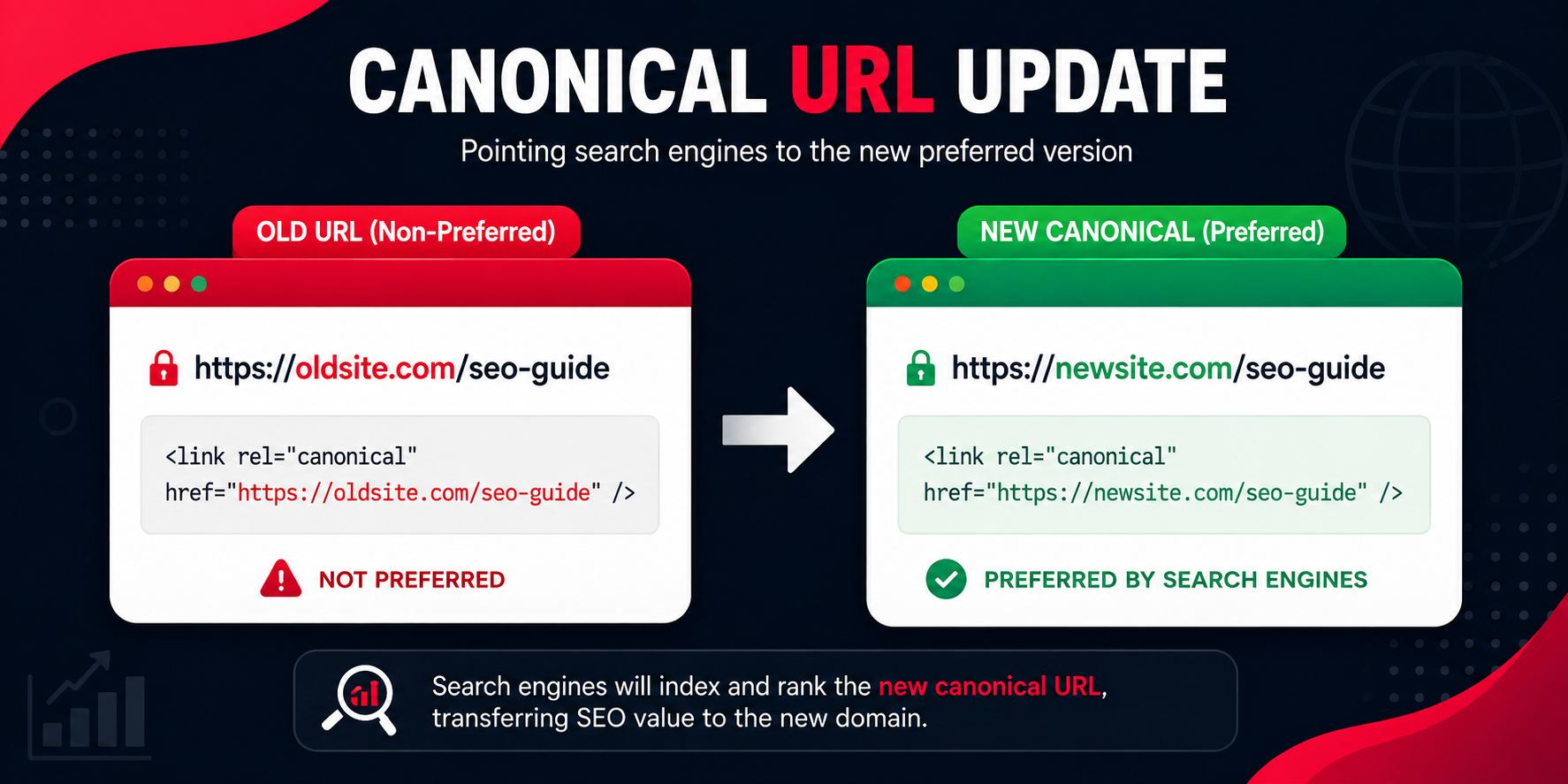
A common migration mistake is launching the new website while its canonical tags still reference the old domain.
This creates conflicting signals.
11. Create a New XML Sitemap
Generate an XML sitemap containing the canonical URLs on the new domain.
The sitemap should ideally contain:
- Valid URLs
- Indexable pages
- Canonical URLs
- Correct HTTPS URLs
- New-domain URLs
Avoid including:
- 404 pages
- Redirecting URLs
- Duplicate pages
- Noindex URLs where they are intentionally excluded from indexing
Submit the appropriate sitemap through relevant webmaster/search tools.
12. Check Robots.txt and Indexing Directives
One small configuration mistake in robots can create major migration problems.
During development, teams sometimes block staging environments with directives designed to prevent indexing.
Those restrictions must not remain on the production website by accident.
Check:
- robots.txt
- Meta robots tags
- X-Robots-Tag headers
- Password protection
- Firewall rules
- CMS visibility settings
Ensure that pages intended for search visibility are crawlable and indexable.
13. Verify Analytics and Tracking
After migration, confirm that your tracking systems are functioning correctly.
Check:
- Web analytics
- Search performance tools
- Tag management
- Advertising pixels
- Conversion tracking
- CRM integrations
- Call tracking
- Ecommerce tracking
Otherwise, the migration may appear to have reduced traffic simply because measurement stopped working.
14. Notify Search Engines Where Applicable
Search platforms may provide site-move or change-of-address features for certain migration scenarios.
Use these mechanisms where appropriate, while also implementing proper redirects and technical signals.
A migration tool should complement good technical implementation—not replace it.
15. Test the Migration
Testing should include more than checking the homepage.
Test important URL groups, including:
- Homepage
- Category pages
- Product/service pages
- Blog posts
- Landing pages
- Images
- Pagination
- PDFs
- High-backlink URLs
- High-traffic URLs
Verify that:
Old URL → 301 → Correct New URL → 200 OKAlso look for:
- 404 errors
- Redirect loops
- Redirect chains
- Mixed content
- Broken resources
- Incorrect canonicals
- Missing metadata
- Noindex errors
16. Monitor the Website After Launch
Migration does not end when the new domain goes live.
Monitor performance over the following days and weeks.
Important metrics include:
- Organic clicks
- Organic impressions
- Indexed pages
- Crawled pages
- Rankings
- 404 errors
- Server errors
- Conversion rate
- Backlinks
- Referral traffic
- Crawl activity
Temporary fluctuations can occur while search engines recrawl and process the move.
The key is to distinguish normal processing from genuine technical problems.
Important Features of a Well-Planned Domain Migration
A professional domain migration generally includes several important characteristics.
- Page-Level Redirect Mapping: Every valuable old URL has an appropriate destination.
- SEO Signal Preservation: The migration is designed to preserve as much existing search equity as practical.
- User Continuity: Users opening old links are automatically taken to relevant new pages.
- Technical Consistency: Canonicals, sitemaps, internal links, structured data, and tracking all use the new domain correctly.
- Crawlability: Search engines can efficiently access and process the migrated site.
- Monitoring: Traffic, crawling, indexing, errors, and rankings are monitored after deployment.
Major Benefits of Domain Migration
Domain migration can offer significant long-term benefits when there is a strong business reason behind it.
- Better Branding: Businesses often migrate because their original domain no longer represents the brand. A shorter, memorable, and relevant domain can strengthen brand recognition.
- Rebranding Flexibility: Suppose a company changes its business name. Keeping an old brand domain may confuse customers. Migration allows the website identity to align with the new company identity.
- Domain Consolidation: Businesses sometimes operate multiple websites covering similar subjects. Instead of dividing authority and marketing resources across several properties, they may consolidate content under one primary domain.
- International Expansion: A company operating under a country-specific domain may later want a broader international identity. A domain migration can form part of its global expansion strategy. However, international SEO requires additional consideration of language, geography, hreflang, and localisation.
- Better User Trust: A professional, easy-to-remember domain can improve brand perception. Users may find a concise domain easier to remember, Type, Share, recommend, and recognise.
- Long-Term Marketing Simplicity: A unified domain can simplify SEO campaigns, Advertising, Social media promotion, Brand mentions, Email marketing, Offline marketing, and Public relations.
Challenges of Domain Migration
Domain migration also involves significant risks.
- Ranking Fluctuations: Search engines need time to crawl old URLs, follow redirects, discover new URLs, and process migration signals. Rankings may therefore fluctuate.
- Organic Traffic Changes: Traffic can temporarily decline if search engines have not fully processed the new domain. Larger migrations may take longer to stabilise.
- Redirect Errors: Incorrect redirects can send users and crawlers to Irrelevant pages, 404 pages, redirect loops, and redirect chains. This is one of the most common technical migration problems.
- Lost Backlinks: External websites may continue linking to old URLs. Correct redirects can preserve access, but it is still useful to update especially valuable backlinks where practical.
- Internal Linking Problems: If thousands of internal links still point to the old domain, the site becomes unnecessarily dependent on redirects.
- Tracking Problems: Incorrect analytics configuration can create misleading data after migration.
- Complex Website Infrastructure: Large ecommerce, SaaS, news, marketplace, and multilingual websites may have complex migration requirements involving APIs, Subdomains, Authentication, CDN, Dynamic URLs, International versions, User accounts, Payment systems, and Multiple databases. Such migrations require detailed technical planning.
Domain Migration vs Website Migration
These terms are related but not identical.
| Domain Migration | Website Migration |
|---|---|
| Primarily changes the domain | Broader website change |
| Example.com → NewExample.com | Can involve CMS, server, protocol, design, structure, or domain |
| Usually requires domain-level SEO migration | May or may not change the domain |
| Redirect mapping is critical | Requirements depend on migration type |
Therefore:
Every domain migration is a type of website migration, but not every website migration requires changing the domain.
Domain Migration vs Hosting Migration
Hosting migration means moving the website from one hosting environment or server to another.
The public domain may remain unchanged.
For example:
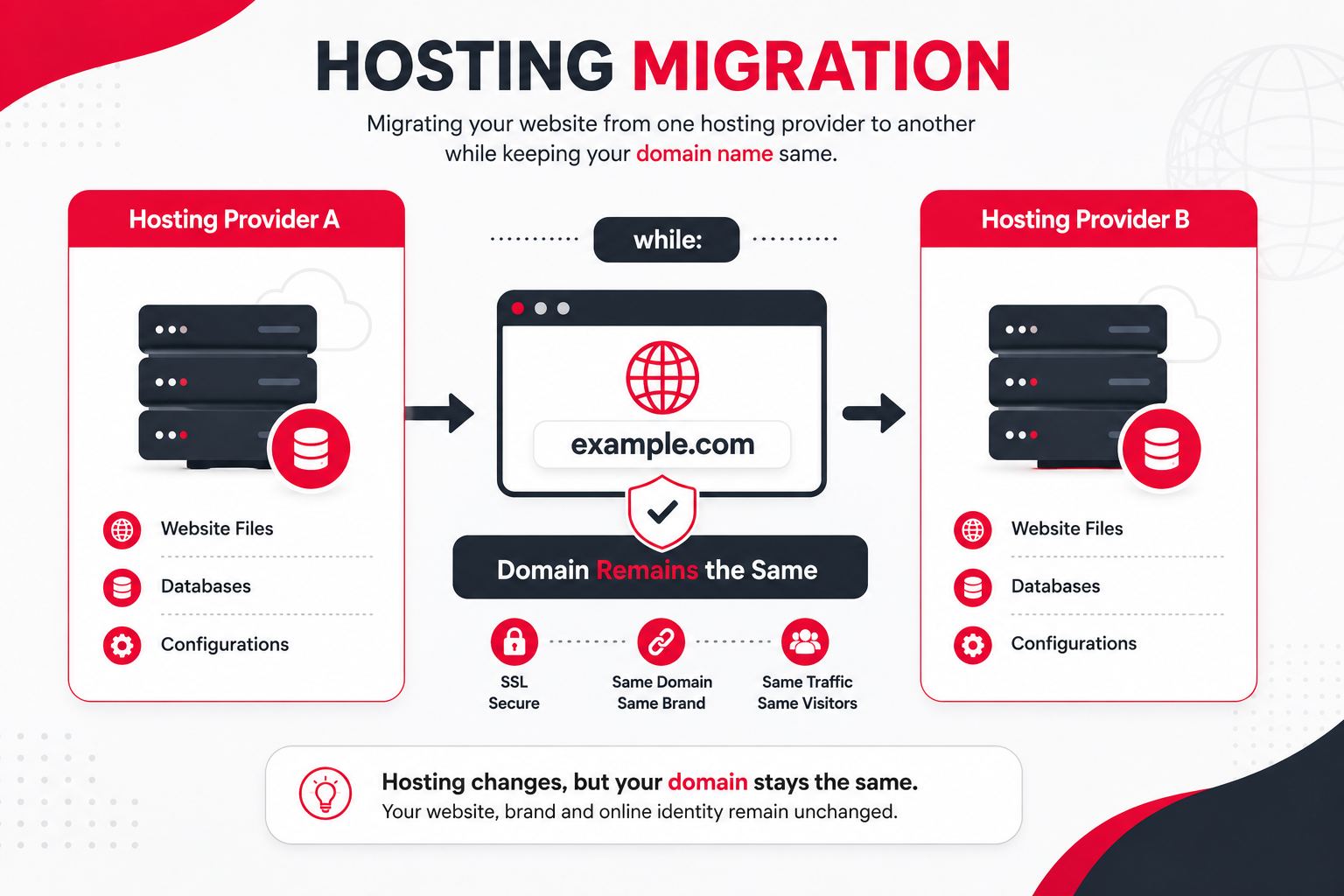
Domain migration changes the domain identity itself.
Useful Tools for Domain Migration
Several tools can help with planning, implementation, and monitoring.
| Tool Category | Primary Purpose |
|---|---|
| Search performance tools | Indexing, crawling and search visibility |
| Website crawlers | URL discovery and technical auditing |
| Analytics platforms | Traffic and conversion monitoring |
| Backlink tools | Backlink analysis |
| Server logs | Search crawler behaviour |
| DNS tools | DNS verification |
| Redirect checkers | HTTP status testing |
| Performance tools | Speed and Core Web Vitals |
| Spreadsheet software | URL mapping |
Popular professional solutions can include search-engine webmaster tools, crawling software, analytics platforms, backlink intelligence platforms, server log analysers, and DNS diagnostic tools.
The exact tool is less important than the quality of the migration process.
Real-World Examples of Domain Migration
From a small blog changing its brand name to a large company consolidating multiple websites, domain migration plays an important role in many real-world digital transformations.
1. Company Rebranding
Suppose a company called Alpha Digital Services uses:
alphadigitalservices.comIt later rebrands as AlphaX and purchases:
alphax.comMigration might look like:
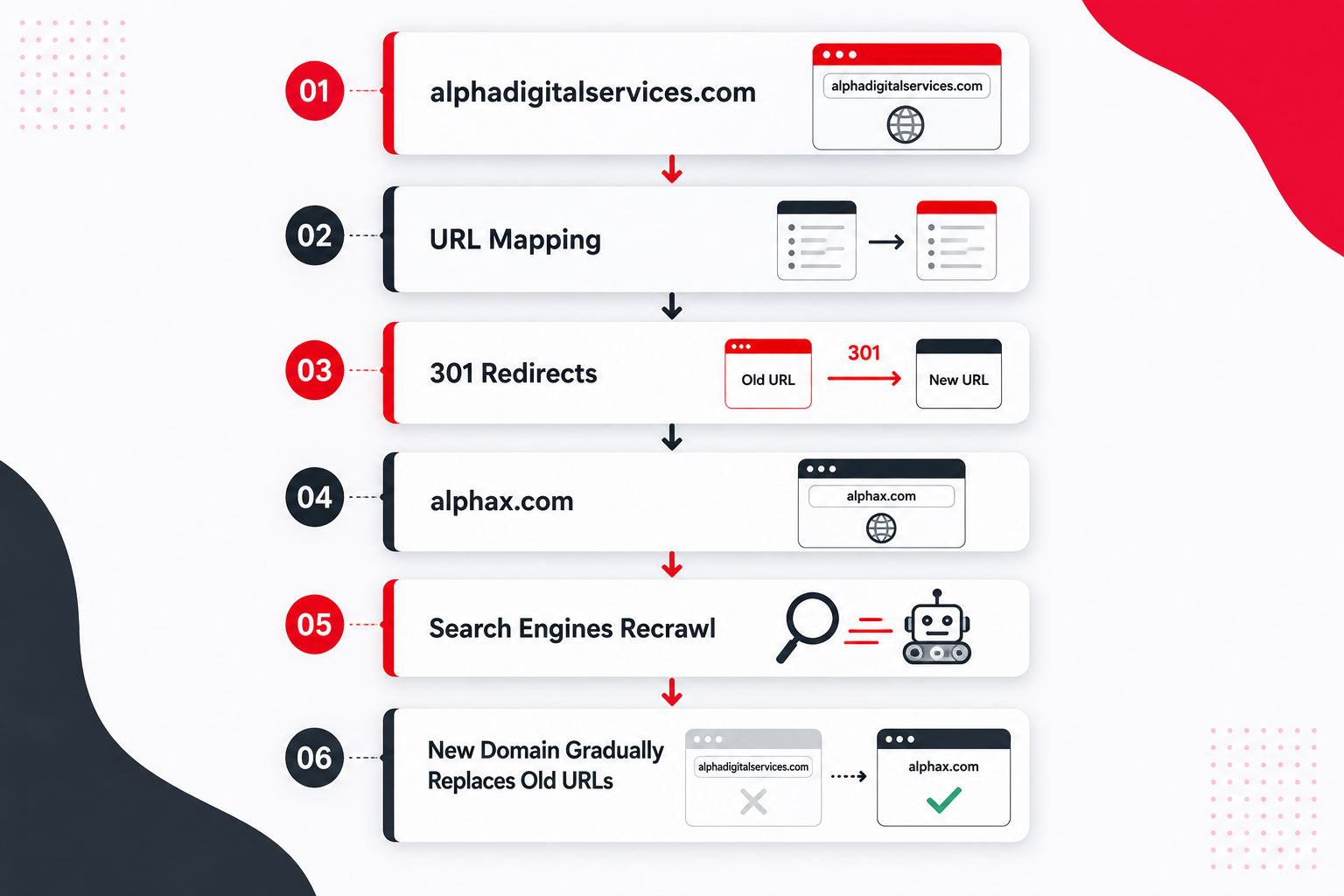
2. Blog Rebranding
Imagine a technology blogger operates:
mytechblog2026.comAfter building a large audience, the blogger acquires:
techscope.comInstead of launching an entirely disconnected website, the owner migrates existing articles to corresponding URLs and redirects old pages.
This allows existing users and backlinks to continue reaching the content.
3. Business Acquisition
Company A acquires Company B.
Instead of maintaining two separate websites indefinitely, Company B’s important content may be incorporated into Company A’s domain.
However, URLs should be mapped according to content relevance.
For example:
companya.com/cloud-servicesshould ideally redirect to:
companya.com/cloud-servicesrather than automatically redirecting everything to:
companya.com4. Multiple Domains Consolidated Into One
Suppose a company operates:
- brandsoftware.com
- brandmarketing.com
- brandconsulting.com
It may decide to consolidate these websites under:
brand.comwith sections such as:
- brand.com/software/
- brand.com/marketing/
- brand.com/consulting/
This can simplify brand management, but the SEO migration needs careful content mapping.
Expert Tips for Successful Domain Migration
A successful domain migration is not only about moving files—it is about preserving the relationships between your old URLs, new URLs, search engines, backlinks, analytics systems, and users.
Here are some practical recommendations.
1. Keep the Migration as Simple as Possible
Avoid changing everything simultaneously unless necessary.
Changing the following together increases troubleshooting complexity:
- Domain
- CMS
- Design
- Content
- URL architecture
- Hosting
When possible, separate major changes into manageable phases.
2. Preserve URL Paths Where Practical
If:
oldsite.com/blog/articlecan become:
newsite.com/blog/articlethe migration is easier to map and test.
3. Prioritise High-Value Pages
Give special attention to URLs with:
- High organic traffic
- Strong rankings
- Valuable backlinks
- Conversions
- Revenue
- Brand mentions
4. Maintain Redirects Long-Term
Do not remove important redirects shortly after migration simply because the new site appears indexed.
Old links may continue receiving visits for years.
5. Update Important External Links
Where practical, contact owners of highly valuable backlinks and ask them to update the destination to the new URL.
6. Monitor Server Logs
Server logs can reveal whether search crawlers are still visiting old URLs and how frequently new URLs are being crawled.
7. Benchmark Before Launch
Export important performance data before migration.
This makes post-migration comparison much more meaningful.
Common Domain Migration Mistakes
A successful domain migration requires careful execution because one incorrect redirect, indexing rule, or URL configuration can affect multiple pages across the website.
1. Redirecting Everything to the Homepage
This destroys page-level relevance.
Instead:
Old Page A → Equivalent New Page A2. Using Temporary Redirects Without a Reason
A permanent domain move should normally use permanent redirects appropriate to the migration.
3. Forgetting Canonical Tags
Old-domain canonicals on new pages can send contradictory signals.
4. Leaving Noindex Enabled
Development environments are often protected with noindex.
If this reaches production accidentally, important pages can disappear from search results.
5. Blocking Crawlers
Incorrect robots rules can prevent search engines from crawling the migrated site.
6. Ignoring Old 404 URLs
Some old URLs may have valuable backlinks even if they were missed by the current sitemap.
Review historical URLs before migration.
7. Creating Redirect Chains
Avoid:
Old Domain → Intermediate URL → HTTP Version → WWW Version → Final URLPrefer:
Old URL → Final New URL8. Changing Content and Domain Simultaneously
If rankings decline, determining whether the cause was the domain change, content rewrite, design change, or architecture change becomes difficult.
9. Not Testing Mobile Pages
Migration testing should cover mobile and desktop experiences.
10. Forgetting Third-Party Integrations
Update integrations involving:
- Payment gateways
- OAuth
- APIs
- Webhooks
- Email platforms
- Advertising systems
- CRM
- Social login
- CDN
Domain Migration Checklist
A successful domain migration requires careful planning and step-by-step execution, and the following checklist can help you avoid common technical and SEO mistakes.
Before Migration:
- Crawl the old website.
- Export important URLs.
- Record traffic and rankings.
- Analyse backlinks.
- Prepare the new domain.
- Create backups.
- Build URL mapping.
- Configure HTTPS.
- Test the new website.
During Migration:
- Deploy the new website.
- Implement direct permanent redirects.
- Update internal links.
- Update canonical tags.
- Update structured data.
- Generate the new sitemap.
- Review robots directives.
- Test tracking.
After Migration:
- Test old URLs.
- Monitor 404 errors.
- Check redirect chains.
- Monitor indexing.
- Monitor organic traffic.
- Monitor rankings.
- Review crawl activity.
- Update important backlinks.
- Keep redirects active.
How Long Does Domain Migration Take?
There is no universal timeline.
The technical deployment itself may take hours or days, but search engine processing can take longer.
Migration speed can depend on:
- Website size
- Crawl frequency
- Website authority
- Number of URLs
- Redirect quality
- Internal linking
- Server performance
- Sitemap quality
- Technical errors
A small website may be processed relatively quickly, while a website containing hundreds of thousands or millions of URLs may require significantly more time.
Therefore, businesses should evaluate migration success over an appropriate period instead of expecting rankings to transfer instantly.
How Does Domain Migration Affect SEO?
Domain migration can temporarily affect SEO because search engines need to understand that old URLs have permanently moved.
A properly executed migration provides several reinforcing signals:
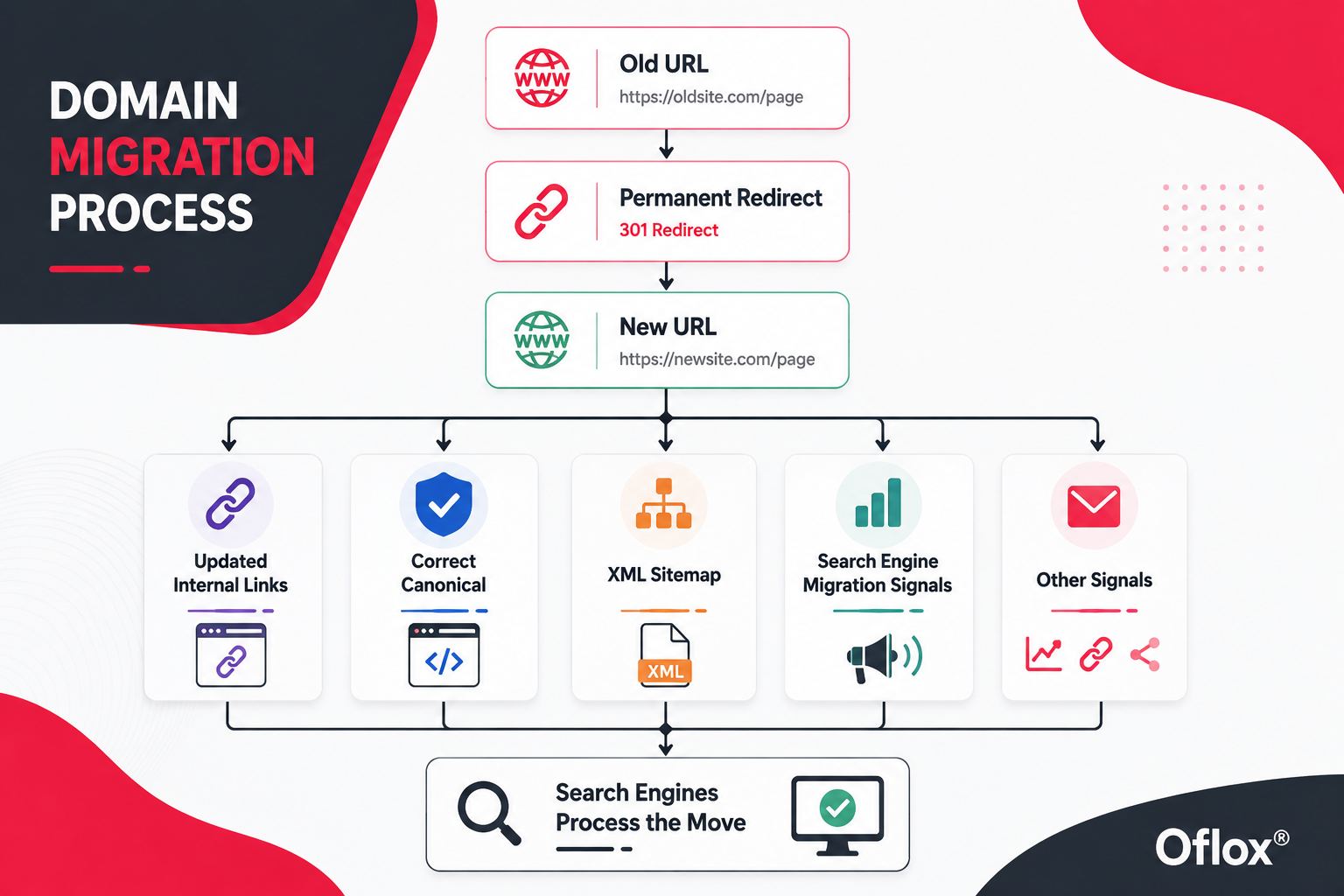
No SEO professional can guarantee absolutely zero ranking fluctuation during a domain migration.
The practical objective is to minimise disruption and make the relationship between old and new URLs as clear as possible.
FAQs:)
A. Domain migration means moving a website from one domain name to another while trying to preserve its pages, traffic, rankings, backlinks, and user experience.
A. Yes. A domain change can temporarily affect crawling, indexing, rankings, and organic traffic. Proper redirects and technical SEO implementation can reduce migration risks.
A. For a permanent domain move, old URLs should generally permanently redirect to their relevant new URLs.
A. Technically it can be configured, but it is usually a poor migration strategy. Page-level redirects to relevant equivalents provide clearer user and search-engine signals.
A. Generally, retaining control of the old domain is valuable because its redirects may continue receiving users and backlinks.
A. You can, but making several major infrastructure changes simultaneously increases complexity. When practical, reducing the number of simultaneous changes makes problems easier to diagnose.
A. Existing backlinks may continue pointing to old URLs. Correct permanent redirects allow visitors and crawlers to reach their new destinations. Important backlinks can also be updated directly where possible.
A. Temporary fluctuations are possible. Serious or prolonged declines can also indicate redirect, indexing, crawling, canonicalisation, content, or tracking problems.
A. Yes. A sitemap containing the new canonical URLs can help search engines discover and process the migrated website.
A. Small websites can be relatively straightforward, but large ecommerce, publishing, SaaS, marketplace, and international websites may require extensive planning, development, SEO auditing, and monitoring.
Conclusion:)
Domain migration is much more than replacing an old website address with a new one. It is a carefully planned process of transferring a website’s content, URLs, users, backlinks, search visibility, tracking systems, and digital identity from one domain to another.
A successful migration starts with a complete website audit, followed by accurate URL mapping, proper permanent redirects, updated internal links, canonical tags, XML sitemaps, crawlability checks, analytics configuration, testing, and continuous post-launch monitoring.
The biggest mistake is treating domain migration as a simple technical switch. Even a small configuration error can affect thousands of URLs, while a properly managed migration can support rebranding, business expansion, domain consolidation, and long-term digital growth.
“A successful domain migration does not simply move a website—it carefully transfers the digital value the website has built over time.” — Mr Rahman
Read also:)
- What Is Website Wireframe? A-to-Z Guide for Beginners!
- What Is Jamstack Development? A-to-Z Guide for Beginners!
- What Is JSON Schema in AI? A-to-Z Guide for Beginners!
If you are planning to migrate an important business website, prepare the migration strategy before changing the domain. The more carefully you map, test, redirect, and monitor the website, the smoother the transition is likely to be.