This article provides a complete guide on What Is Website Wireframe, including its meaning, importance, history, types, working process, key features, benefits, challenges, popular wireframing tools, real-world examples, expert tips, common mistakes, FAQs, and future trends.
Building a professional website is not only about choosing attractive colours, fonts, images, animations, and layouts. Before designers create the final interface and developers start writing code, they need a clear plan showing what information will appear on each page, where different elements will be placed, and how users will navigate through the website.
This is where a Website Wireframe becomes useful. A wireframe works like a blueprint for a website. It provides a simple visual representation of the webpage structure and shows important elements such as headers, navigation menus, content sections, images, buttons, forms, sidebars, CTAs, and footers without focusing heavily on final colours or visual styling.
Today, website wireframing plays an important role in UI/UX design, website development, SaaS product design, e-commerce development, landing page creation, mobile-first design, and digital product planning. It allows designers, developers, marketers, business owners, and clients to review the website structure before spending significant time and resources on final design and development.
A well-planned wireframe can also help identify usability problems early, improve content hierarchy, simplify navigation, clarify user journeys, and reduce unnecessary design or development changes later.

So, if you are planning to design a new website, redesign an existing website, or learn UI/UX and web development, understanding website wireframes can help you create a stronger foundation before moving to the final design.
Let’s explore it together.
Table of Contents
What Is Website Wireframe?
A website wireframe is a simple visual representation of the structure, layout, functionality, and content hierarchy of a webpage before its final visual design and development are created.
In simple words, a wireframe shows what will appear on a webpage, where it will appear, and how important elements will be organised.
The Nielsen Norman Group describes a wireframe as a skeletal outline of a design layout that represents an interface’s structure and functionality before visual design is considered.
A typical website wireframe may contain:
- Header
- Logo position
- Navigation menu
- Hero section
- Heading and text areas
- Image placeholders
- CTA buttons
- Search bar
- Product sections
- Forms
- Testimonials
- Sidebar
- Footer
- Navigation links
Instead of showing a real photograph, for example, a wireframe may simply display a rectangle with an X inside it.
Instead of writing complete website content, it may use placeholder text.
Instead of designing a beautiful CTA button, it may simply contain a rectangle labelled “Get Started.”
The objective is not to make the website beautiful.
The objective is to make the website logical, usable, organised, and easy to understand.
Why Is Website Wireframing Important?
A well-planned website starts with a strong foundation, and wireframing helps create that foundation by organising the layout, navigation, content, and important user actions in advance.
1. Provides a Clear Website Structure
A wireframe determines how individual sections of a webpage will be organised.
Instead of discussing vague ideas such as:
“We need a modern homepage with services and testimonials.”
the team can actually see:
- Where services appear
- How many services are highlighted
- Where testimonials appear
- What CTA follows them
- How navigation works
- Where supporting content belongs
It converts an abstract idea into something visible.
2. Improves User Experience
Good website design is not only about attractive graphics.
Visitors should be able to understand:
- Where they are
- What the website offers
- Where they should click
- How they can find information
- What action they should take next
Wireframing allows UX designers to address these questions before visual styling distracts from structural problems.
3. Saves Development Time
Changing a rectangle in a wireframe may take seconds.
Changing an already developed website section could require modifications to HTML, CSS, JavaScript, components, responsiveness, integrations, and testing.
Finding structural problems earlier can therefore reduce unnecessary rework.
4. Improves Team Communication
Website projects often involve:
- Business owners
- Project managers
- UX designers
- UI designers
- Developers
- SEO professionals
- Content writers
- Digital marketers
- Clients
A wireframe gives these stakeholders a common visual reference.
5. Clarifies Functionality
Wireframes do not simply define where things appear.
They can also indicate functionality.
For example:
- What happens after clicking a button?
- Where does a form appear?
- What fields are required?
- How does navigation behave?
- Which content appears first?
- What information is hidden inside tabs?
Annotations can be added to explain these behaviours.
Brief History and Background of Website Wireframing
The concept behind wireframing existed before modern website design.
Architecture, industrial design, engineering, publishing, and software development have long used sketches, diagrams, blueprints, and structural plans before creating final products.
When graphical user interfaces and websites became increasingly sophisticated, designers needed similar methods to plan digital interfaces.
During the early web era, websites were relatively simple. Many consisted primarily of text, basic navigation links, tables, and static images.
As websites evolved into more sophisticated digital products, planning became increasingly important.
Web designers had to think about:
- Information architecture
- User journeys
- Navigation
- Interaction
- Content hierarchy
- Conversion paths
- Responsive behaviour
Paper sketches were commonly used for early interface ideas.
Later, specialised software made digital wireframing faster and easier.
Today, collaborative design platforms allow multiple team members to create, comment on, review, and modify wireframes remotely.
In 2026, wireframing remains an important part of UX workflows even as AI-assisted design tools become more capable.
Types of Website Wireframes
Website wireframes are commonly classified according to their fidelity, meaning how much detail they contain.
Three useful categories are:
| Type | Detail Level | Best Use |
|---|---|---|
| Low-Fidelity | Low | Initial ideas and brainstorming |
| Mid-Fidelity | Medium | Layout planning and team review |
| High-Fidelity | High | Detailed planning and developer handoff |
1. Low-Fidelity Wireframe
A low-fidelity or lo-fi wireframe is a rough representation of a webpage.
It usually includes:
- Simple boxes
- Lines
- Basic labels
- Placeholder images
- Minimal content
- Little or no colour
- Rough spacing
Low-fidelity wireframes are commonly used during early brainstorming because they can be created and modified quickly.
They may even be drawn using:
- Paper
- Pencil
- Pen
- Whiteboard
- Sticky notes
For example:
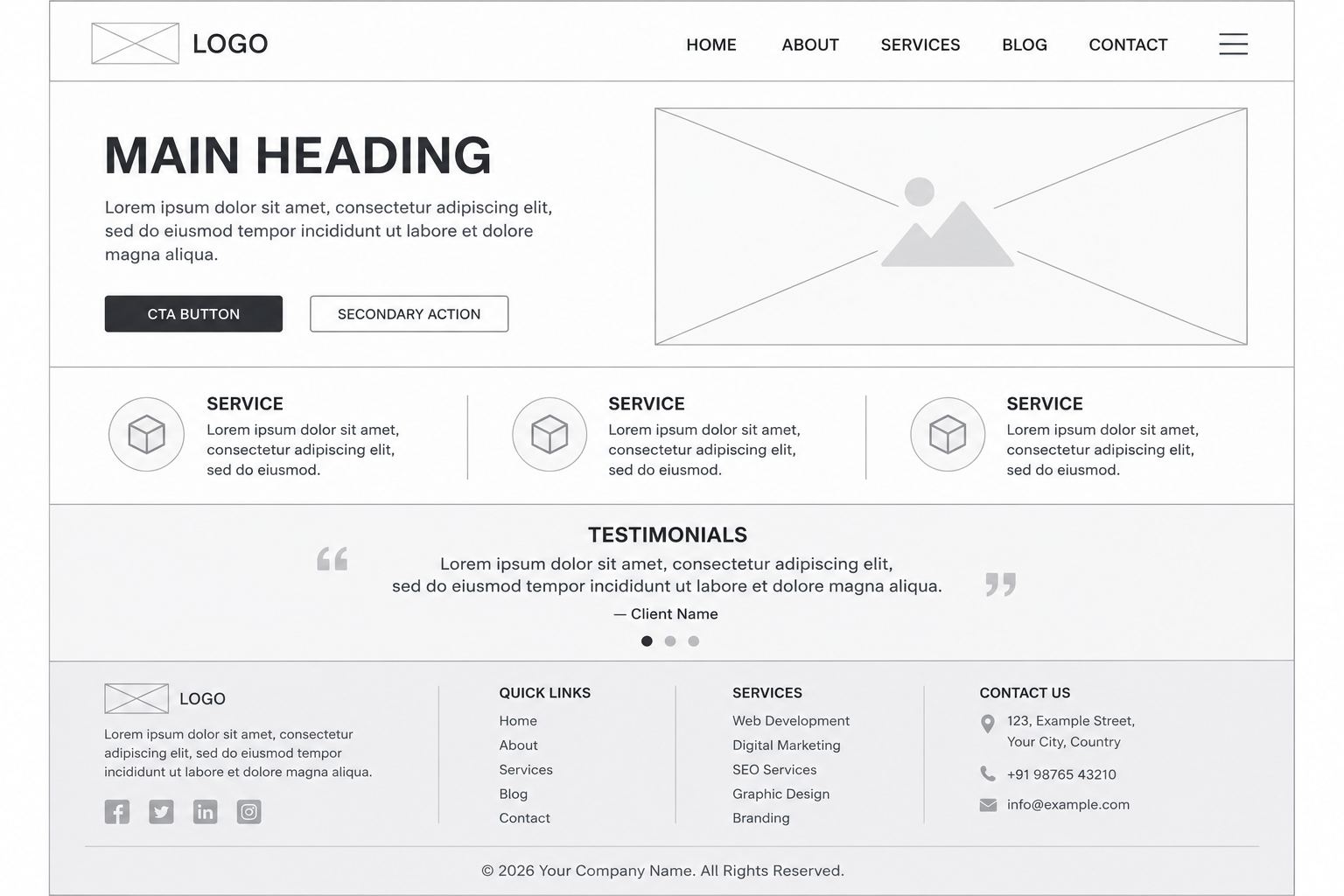
It is not visually impressive, but it communicates the basic layout effectively.
2. Mid-Fidelity Wireframe
A mid-fidelity wireframe adds more accuracy.
It may include:
- Proper spacing
- Grid structure
- Clear typography hierarchy
- More accurate components
- Button sizes
- Form fields
- Detailed navigation
- Multiple shades of grey
- Realistic section dimensions
It still avoids unnecessary visual styling.
This makes mid-fidelity wireframes particularly useful for internal reviews and client discussions.
3. High-Fidelity Wireframe
A high-fidelity wireframe provides a much more detailed representation.
Depending on the team’s terminology and workflow, it can include:
- Accurate dimensions
- Real content
- Detailed interface elements
- Icons
- Images
- Specific component states
- Limited interactions
- Responsive behaviour
High-fidelity wireframes can be useful when teams need greater precision for developer handoff or usability validation.
However, once complete branding, colours, polished imagery, and sophisticated interaction are introduced, the deliverable may be better described as a mockup or prototype, depending on its purpose.
Website Wireframe vs Mockup vs Prototype
These three terms are often confused.
However, they represent different stages and purposes.
| Factor | Wireframe | Mockup | Prototype |
|---|---|---|---|
| Primary Purpose | Structure | Visual appearance | Interaction |
| Colours | Usually minimal | Yes | Yes |
| Typography | Basic | Final/near-final | Final/near-final |
| Images | Placeholders | Real images | Real images |
| Interactivity | Minimal/none | Usually none | Usually interactive |
| Detail | Low–High | High | Medium–High |
| Main Question | What goes where? | What will it look like? | How will it work? |
A simple way to remember the difference is:
- Wireframe = Structure
- Mockup = Appearance
- Prototype = Experience
Wireframes establish the basic blueprint, mockups introduce visual styling, and prototypes simulate interactions that users can test.
Key Features of a Good Website Wireframe
An effective wireframe should communicate the webpage clearly without becoming unnecessarily complicated.
1. Clear Layout
The page should be divided into understandable sections.
For example:
Header → Hero → Benefits → Services → Testimonials → CTA → Footer2. Content Hierarchy
Important information should receive greater visual priority.
A wireframe can indicate hierarchy through:
- Size
- Position
- Spacing
- Grouping
- Alignment
3. Navigation Structure
Menus and navigation links should show how users move between important areas of the website.
4. CTA Placement
Important actions should be visible.
Examples include:
- Buy Now
- Get Quote
- Book Demo
- Contact Us
- Start Free Trial
- Download
- Subscribe
5. Functional Elements
Forms, search boxes, filters, menus, sliders, tabs, buttons, and other interactive components should be represented where necessary.
6. Image and Media Placeholders
Instead of selecting final images immediately, placeholders can indicate where:
- Images
- Videos
- Product photographs
- Illustrations
- Maps
will appear.
7. Annotations
Notes can explain functionality that is not obvious from the static layout.
For example:
“Clicking this button opens the enquiry form.”How Does Website Wireframing Work?
A professional wireframing process generally moves from research to structure, testing, refinement, and design handoff.
1. Understand the Website Goal
First, determine why the website is being created.
Possible goals include:
- Generate leads
- Sell products
- Generate phone calls
- Build brand awareness
- Get appointments
- Publish information
- Sell subscriptions
- Promote services
Every major page and CTA should support a meaningful user or business goal.
2. Understand the Target Audience
Ask:
- Who will visit the website?
- What are they searching for?
- What problems do they have?
- What information do they need?
- Which device are they likely to use?
- What action should they take?
Wireframing without understanding users can produce a visually organised page that still provides a poor experience.
3. Create the Sitemap
A sitemap identifies the main pages.
For example:
Home
- → About
- → Services
- → Service Detail
- → Portfolio
- → Blog
- → Contact
For an e-commerce website:
Home
- → Categories
- → Product Listing
- → Product Detail
- → Cart
- → Checkout
- → Order Confirmation
4. Define User Flows
A user flow represents the path a visitor takes to achieve a goal.
Example:
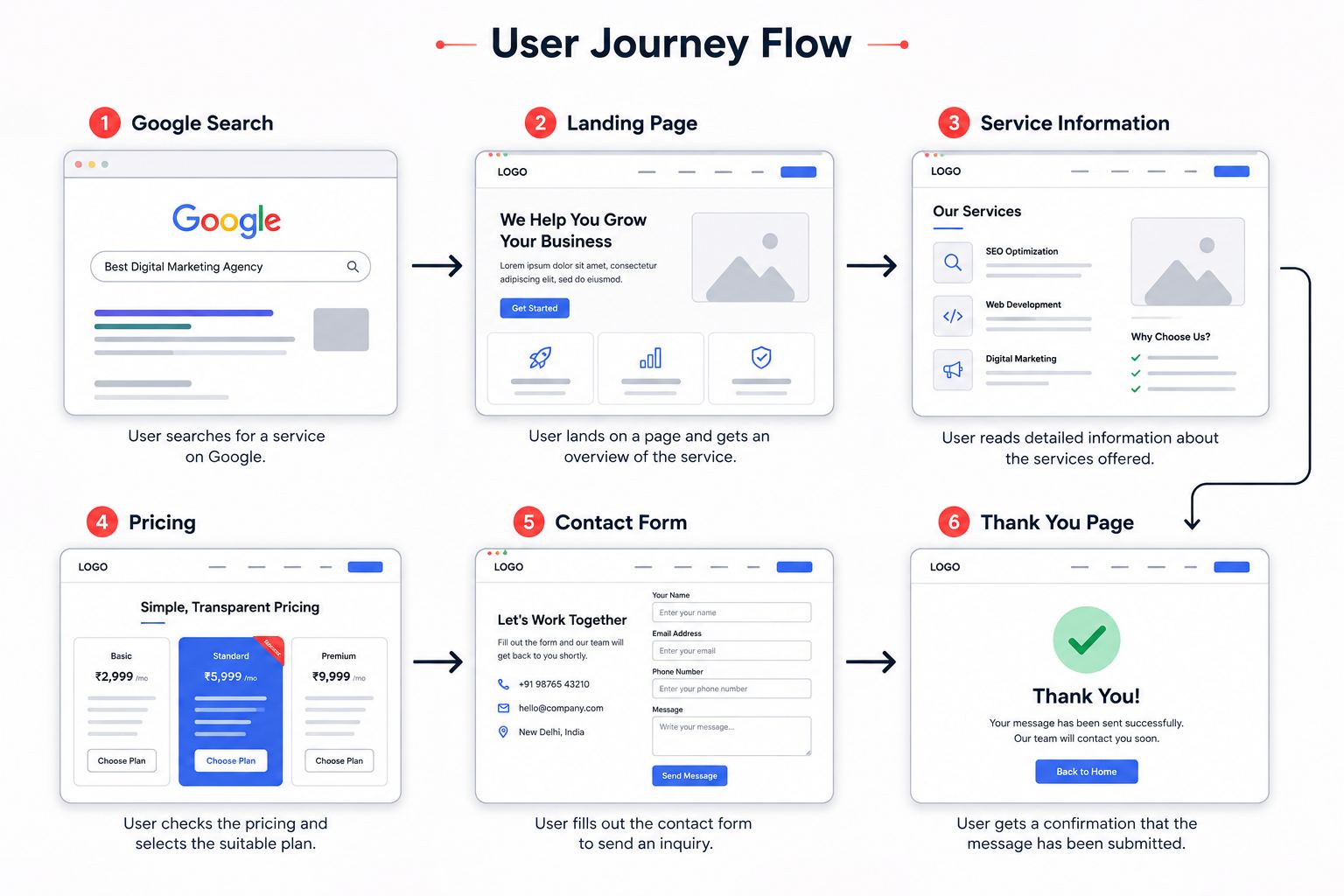
Understanding these journeys helps determine what each wireframe needs.
5. Prioritise Content
Decide what users need to see first.
For a service business homepage, the priority might be:
- What the company offers
- Why visitors should trust it
- Major services
- Previous work
- Testimonials
- CTA
- Contact information
6. Create Rough Sketches
Begin with simple layouts.
Do not spend too much time perfecting colours, fonts, or illustrations.
Try multiple variations quickly.
7. Create the Digital Wireframe
Once the basic structure looks promising, move it into a digital wireframing tool.
Add:
- Grids
- Sections
- Components
- Navigation
- Buttons
- Forms
- Labels
- Notes
8. Review the User Experience
Now examine the wireframe from a visitor’s perspective.
Ask:
- Can visitors understand the page quickly?
- Is the navigation clear?
- Is important content visible?
- Are CTAs placed logically?
- Is anything unnecessary?
- Does the journey require too many steps?
9. Collect Feedback
Share the wireframe with relevant stakeholders.
Feedback should focus primarily on:
- Structure
- Functionality
- Content
- User flow
- Business requirements
rather than colours or decorative styling.
10. Test and Iterate
Wireframes are meant to change.
Revise sections based on feedback and usability observations.
Wireframing supports iteration because early layouts can be modified far more easily than finished products.
11. Move Towards UI Design and Prototyping
Once the structure is approved, the team can proceed toward:
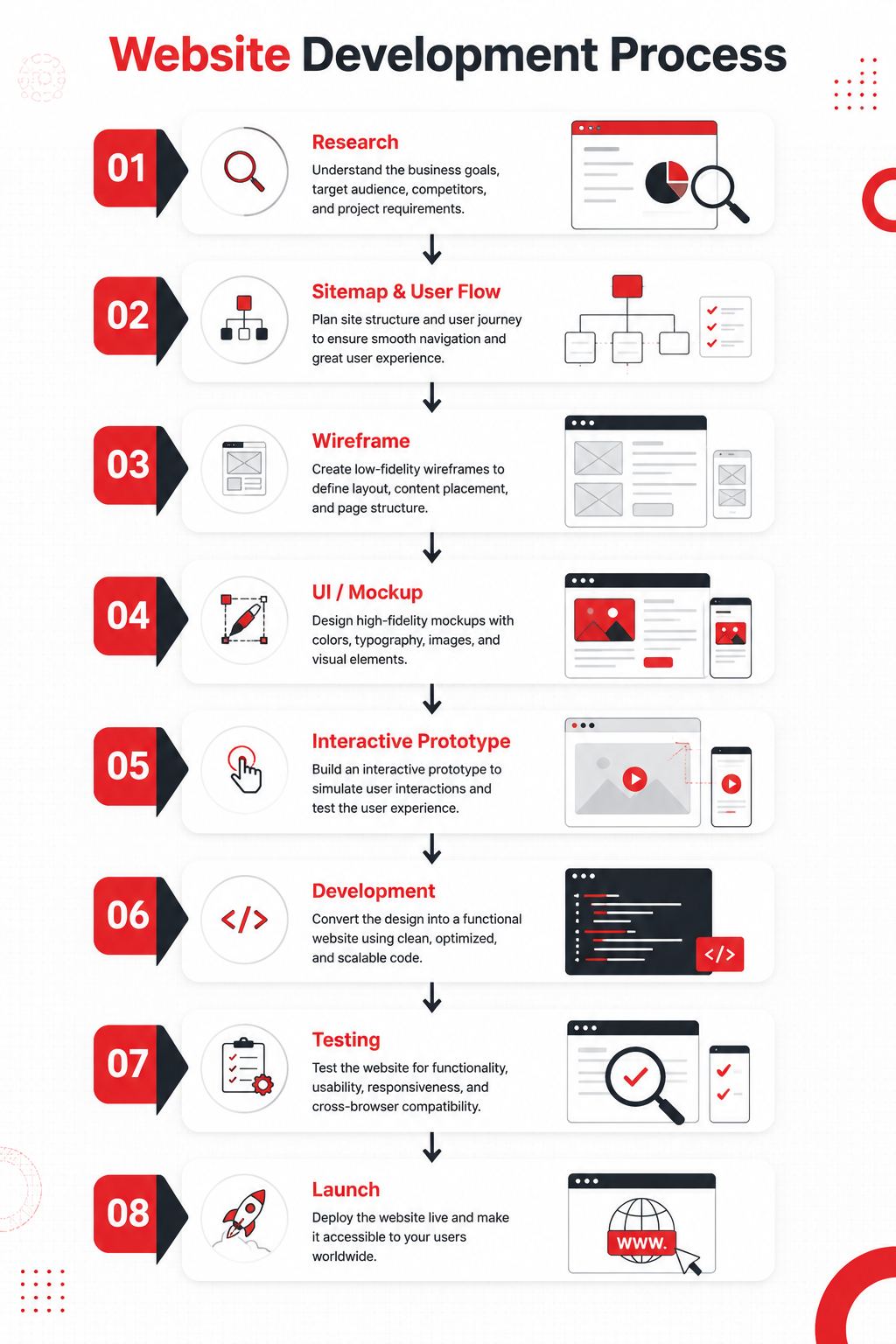
Major Benefits of Website Wireframing
Website wireframing offers both design and business advantages.
- Faster Decision-Making: Stakeholders can see the proposed structure instead of trying to imagine it from text descriptions.
- Lower Cost of Changes: Structural changes made before coding are generally easier than changes made after development.
- Better User Experience: Navigation, hierarchy, and functionality can be evaluated earlier.
- Improved Collaboration: Designers, developers, marketers, writers, and clients can discuss the same visual structure.
- Better Content Planning: Writers can understand which sections need copy, Approximate content length, heading hierarchy, CTA requirements, and Image requirements.
- Better Conversion Planning: Marketers can examine where important conversion elements should appear. For example, lead forms, Pricing CTAs, Product recommendations, Trust signals, Testimonials, and Contact buttons.
- Reduced Scope Confusion: Wireframes help define what the team is actually going to build. This can reduce situations where stakeholders expect sections or features that were never clearly documented.
Challenges and Limitations of Website Wireframes
Wireframing is extremely useful, but it is not perfect.
1. Clients May Misunderstand Them
Some clients may see a grey wireframe and think:
“Why does the website look so basic?”
Explain beforehand that the wireframe represents structure, not final appearance.
2. Low-Fidelity Designs Lack Context
Very simple wireframes may not communicate complicated interactions properly.
Annotations or prototypes may be required.
3. Too Much Detail Can Waste Time
Designers sometimes turn a wireframe into an almost-complete UI design.
That defeats the purpose of rapid structural experimentation.
4. Static Wireframes Cannot Explain Every Interaction
Animations, dropdown behaviour, gestures, transitions, dynamic filtering, and advanced states may require interactive prototypes.
5. Wireframes Can Become Outdated
If requirements change but documentation is not updated, developers may work from outdated layouts.
6. Stakeholders Can Focus on the Wrong Things
People may start discussing:
- Font choices
- Colours
- Image styles
- Button colours
during a stage intended for structural feedback.
Keeping wireframes visually simple helps reduce this distraction.
Popular Website Wireframing Tools
Different tools are suitable for different workflows.
1. Figma
Figma is widely used for collaborative interface design.
It can support:
- Wireframes
- UI design
- Components
- Prototypes
- Developer handoff
- Team collaboration
Its ability to move from early layouts to detailed interfaces makes it suitable for complete product design workflows.
2. Balsamiq
Balsamiq focuses strongly on low-fidelity wireframing.
Its sketch-like appearance intentionally keeps attention on structure rather than polished visual design.
3. Miro
Miro is useful for collaborative planning, brainstorming, user flows, diagrams, workshops, and early wireframing.
4. Adobe XD
Adobe XD has historically been used for interface design and prototyping. Teams evaluating it for new workflows should check Adobe’s current product availability and support before adopting it.
5. Sketch
Sketch provides interface design, components, prototyping, and collaboration capabilities, particularly for teams working in the Apple ecosystem.
6. Lucidchart
Lucidchart can be useful when wireframes need to be combined with diagrams, flowcharts, process maps, and system documentation.
Tool Comparison:
| Tool | Best For | Learning Level |
|---|---|---|
| Figma | Complete UX/UI workflow | Beginner–Advanced |
| Balsamiq | Low-fidelity wireframes | Beginner |
| Miro | Brainstorming and collaboration | Beginner |
| Sketch | Professional interface design | Intermediate |
| Lucidchart | Diagrams + simple wireframes | Beginner–Intermediate |
Real-World Examples of Website Wireframes
Understanding wireframes becomes easier through practical examples.
1. E-Commerce Website
An online fashion store may create the following homepage wireframe:
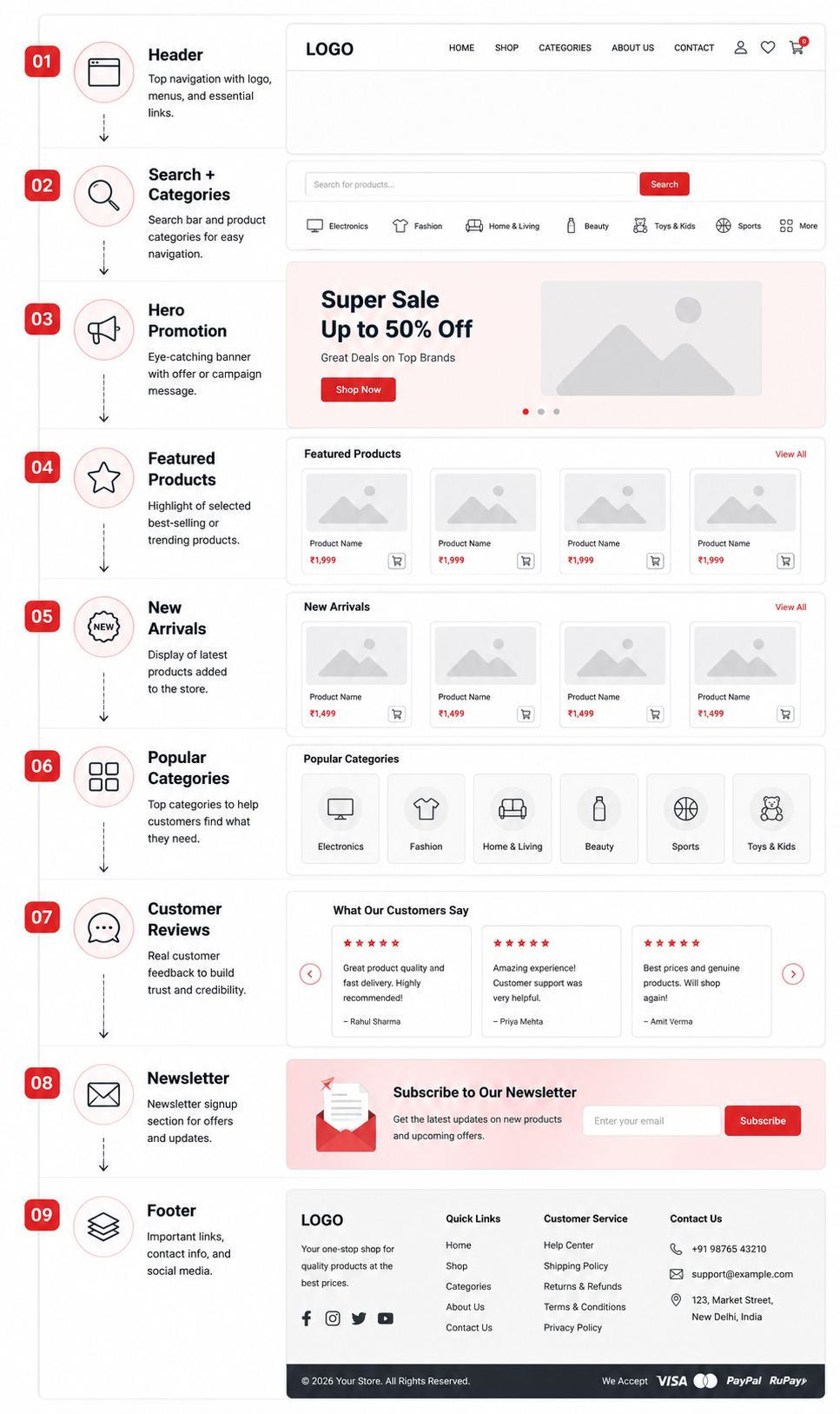
The wireframe helps determine product visibility before designers start creating polished product cards.
2. SaaS Website
A SaaS homepage might use:
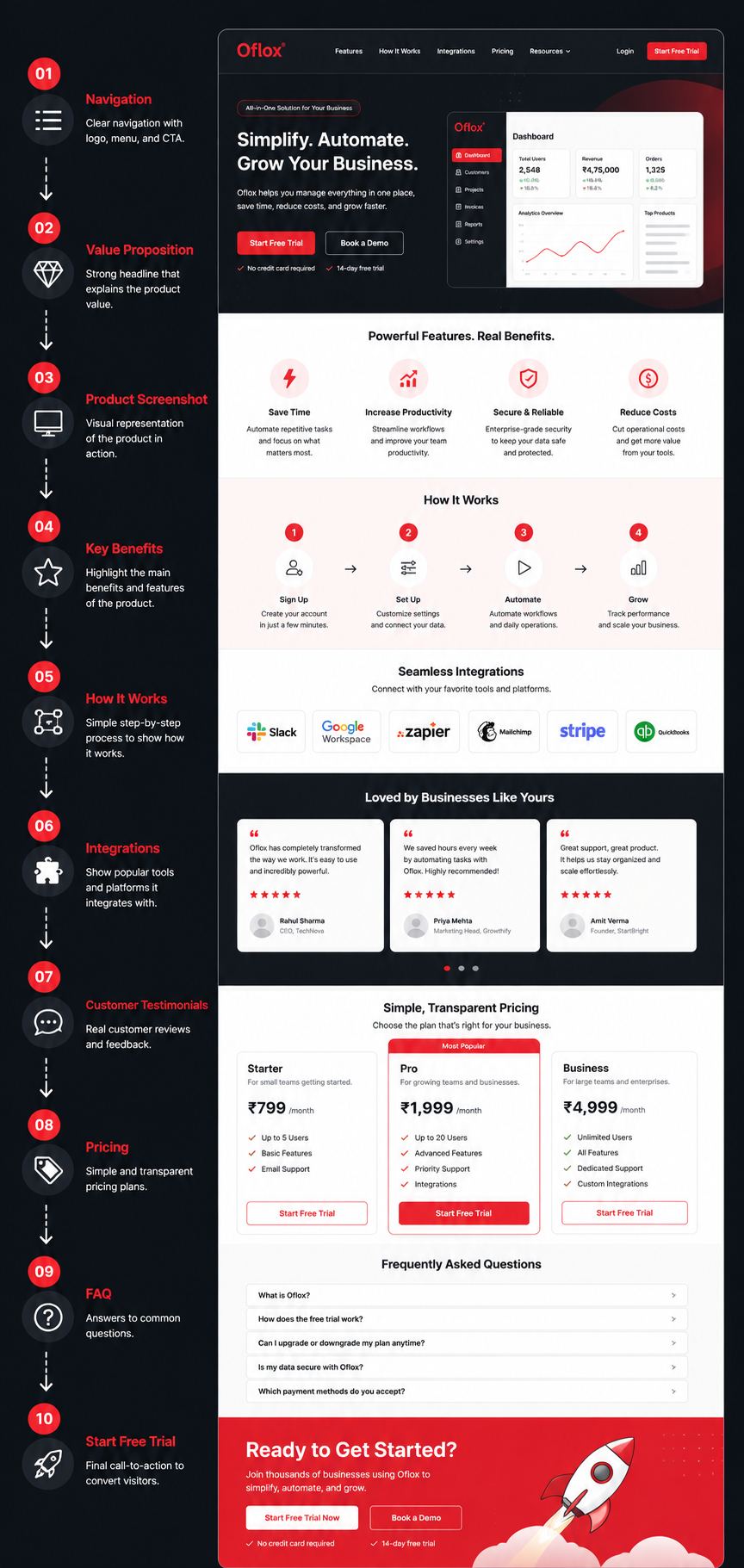
This allows the marketing and product teams to discuss the conversion journey before development.
3. Local Service Business
Suppose a local interior design company needs a lead-generation website.
Its wireframe could contain:
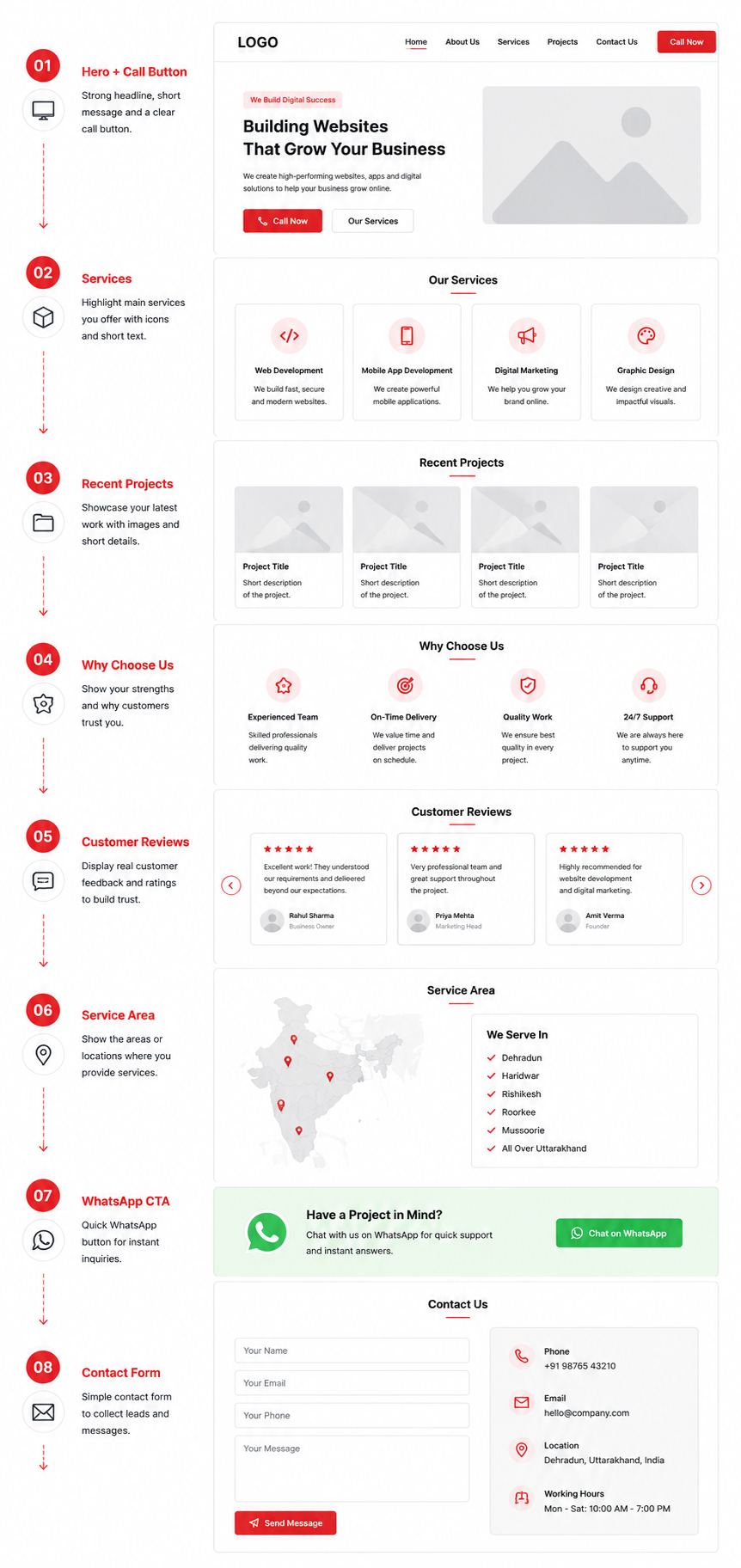
This layout focuses strongly on local lead generation.
Website Wireframing and SEO
Wireframes are usually associated with UX design, but they can also influence SEO planning.
Search engine optimisation should ideally be considered before the website is fully designed.
1. Heading Structure
Wireframes can identify where:
- H1
- H2
- H3
content will logically appear.
2. Internal Linking
Designers and SEO teams can plan:
- Category links
- Related pages
- Breadcrumbs
- Footer links
- Contextual links
3. Content Placement
Important SEO content should not be treated as an afterthought.
Wireframes can reserve appropriate space for useful copy.
4. Mobile Experience
A mobile-first wireframe encourages teams to prioritise essential content and actions on smaller screens.
5. Conversion UX
SEO traffic has limited business value if users cannot easily understand the page or complete the intended action.
Therefore, good UX architecture and SEO planning should complement each other.
Expert Tips for Creating Effective Website Wireframes
Creating boxes on a screen is easy. Creating a wireframe that supports users, developers, marketers, and business objectives requires more thought.
1. Start With User Goals
Before placing any section, ask:
What does the visitor need here?This keeps the website user-centred.
2. Design Mobile-First When Appropriate
Starting from smaller screens forces you to prioritise essential information.
You can then expand the structure for tablets and desktops.
3. Keep Early Wireframes Simple
Do not introduce visual details too early.
Concentrate on:
- Structure
- Flow
- Function
- Hierarchy
4. Use Real Content Where It Matters
Placeholder text is useful during early ideation.
However, real headings, button labels, prices, or product names can expose layout problems that generic placeholder text hides.
5. Prioritise the Primary CTA
Every important page should have a clearly defined primary action.
6. Annotate Complex Behaviour
If an element behaves in a way that cannot be understood from the static layout, add a short note.
7. Consider Different States
Modern interfaces often require:
- Empty state
- Loading state
- Error state
- Success state
- Logged-in state
- Logged-out state
These should be considered where relevant.
8. Involve Developers Early
Developers may identify technical limitations or simpler implementation approaches before the design becomes fixed.
9. Review Accessibility Early
Think about:
- Logical reading order
- Keyboard navigation
- Form labels
- Content hierarchy
- Tap targets
- Responsive layouts
Accessibility should not be postponed until the website is finished.
Common Website Wireframing Mistakes
Avoiding common mistakes can make the wireframing process significantly more effective.
- Starting Without Research: Do not create layouts simply because they look familiar. Understand users and business objectives first.
- Designing Visual Details Too Early: Colours and decorative elements can distract stakeholders from structural decisions.
- Ignoring Mobile Layouts: A desktop-only wireframe may create major problems later when responsive layouts are required.
- Adding Too Many CTAs: When everything is important, nothing feels important. Establish a primary action and use secondary actions carefully.
- Ignoring Real Content: A layout that works with “Lorem Ipsum” may fail when real headings and paragraphs are added.
- Forgetting User Flow: Individual pages can look logical while the journey between them remains confusing.
- Skipping Feedback: Wireframes are designed for iteration. Treating the first version as final removes one of their biggest advantages.
- Making Every Page Completely Different: Consistency makes websites easier to understand and develop. Use reusable patterns for Headers, Forms, Cards, Buttons, Footers, and Content sections.
- Ignoring SEO and Content Teams: If SEO professionals and content writers are involved only after design completion, important content requirements may be difficult to accommodate.
- Treating a Wireframe as the Final Design: Remember, A wireframe is the structural blueprint—not necessarily the finished website.
Future of Website Wireframing: 2026 and Beyond
Wireframing is changing rapidly as AI becomes integrated into design and development workflows.
1. AI-Generated Wireframes
Designers can increasingly describe requirements in natural language and receive initial interface concepts.
For example:
“Create a mobile-first homepage wireframe for an Indian accounting SaaS product with pricing, testimonials, integrations, FAQs, and free-trial CTA.”
AI can generate an initial structure that designers refine.
2. Wireframes From Text Prompts
Natural-language interfaces will reduce the time required to convert product requirements into initial layouts.
3. Wireframe-to-Code Workflows
The boundary between design and development will continue becoming thinner.
Structured designs can increasingly be transformed into:
- HTML
- CSS
- React components
- Design-system components
- Responsive layouts
However, generated code still requires human review for usability, accessibility, maintainability, security, and performance.
4. AI-Assisted UX Analysis
AI systems may increasingly evaluate wireframes for issues such as:
- Weak hierarchy
- Unclear CTAs
- Navigation complexity
- Accessibility concerns
- Missing states
- Inconsistent patterns
5. More Responsive Planning
Instead of designing isolated desktop and mobile screens, future workflows are likely to model adaptive components that automatically respond to different screen sizes.
6. Design Systems Will Become More Important
Wireframes will increasingly use reusable components connected with established design systems.
For example:
Wireframe Button

↓

Design-System Button

↓

Production Component
This can improve consistency between design and development.
7. Human Judgment Will Remain Important
AI may make wireframe creation faster, but it does not remove the need for UX thinking.
Designers still need to understand:
- User intent
- Business priorities
- Context
- Accessibility
- Human behaviour
- Brand requirements
- Technical constraints
The future is therefore less about AI replacing wireframing and more about AI accelerating the wireframing process.
FAQs:)
A. A website wireframe is a basic visual blueprint showing the structure of a webpage, including where navigation, headings, images, buttons, forms, and content sections will appear before final design and development.
A. Wireframes help teams plan structure, navigation, content hierarchy, functionality, and user journeys before investing heavily in UI design and development.
A. No. A wireframe primarily represents structure and functionality, while a final website design includes colours, typography, branding, images, and polished visual details.
A. Wireframes are commonly described as low-fidelity, mid-fidelity, and high-fidelity, based on their level of detail.
A. Yes. Figma can be used for wireframing, UI design, interactive prototyping, collaboration, and developer handoff.
A. Yes. Beginners can start with paper and pencil or simple digital tools. Wireframing is primarily about organising information and functionality rather than producing beautiful graphics.
A. Not every tiny website requires a formal wireframing phase. However, wireframes are particularly valuable for business websites, e-commerce platforms, SaaS products, applications, redesigns, landing pages, and websites involving multiple stakeholders.
A. It depends on project complexity. A basic landing page can be sketched quickly, while a large e-commerce platform or SaaS application may require many screens, user flows, revisions, and stakeholder reviews.
A. Wireframes do not directly improve rankings, but they can support SEO by helping teams plan content hierarchy, internal linking, navigation, mobile usability, and important page sections before development.
A. Yes. Modern AI-assisted design workflows can generate initial interface concepts from prompts and requirements. Human review is still important to ensure usability, accessibility, technical feasibility, and alignment with business goals.
Conclusion:)
A Website Wireframe is an important part of the website planning and UI/UX design process because it provides a clear visual structure of a webpage before final design and development begin.
Instead of directly focusing on colours, fonts, images, animations, and other visual elements, a wireframe helps designers, developers, marketers, and business owners first plan important elements such as page layout, navigation, content hierarchy, buttons, forms, CTAs, user flow, and overall functionality.
From simple hand-drawn sketches to detailed digital wireframes created using modern design tools, wireframing can help teams identify usability problems early, improve collaboration, reduce unnecessary development changes, save time and cost, and create a better user experience.
As AI-powered design tools, prompt-based website builders, automated UX analysis, design systems, and wireframe-to-code technologies continue to improve in 2026 and beyond, creating website wireframes is likely to become faster and more intelligent. However, understanding user requirements, business goals, accessibility, content priorities, and real-world user behaviour will continue to require proper planning and human judgement.
So, whether you are a UI/UX designer, web developer, digital marketer, business owner, startup founder, or beginner learning website development, understanding website wireframing can help you plan websites more effectively before investing time and resources in final design and coding.
Hopefully, this article has helped you understand What Is Website Wireframe, how it works, why it is important, its different types, benefits, tools, examples, and how wireframes can contribute to creating better and more user-friendly websites.
“A successful website begins with a clear wireframe, because great digital experiences are planned before they are designed.” — Mr Rahman
Read also:)
- What Is AI Website Testing? A Complete Beginner’s Guide!
- What Is Code Splitting? Complete Guide with Examples!
- What Is JavaScript Async? A Complete Beginner’s Guide!
If you have any questions, experiences, or suggestions related to Website Wireframing, feel free to share your thoughts in the comment section below. Thanks for reading.