This complete guide will explain What Is HTTP Compression, how HTTP Compression works, why it is important, and how Gzip, Brotli, Zstandard, Accept-Encoding, Content-Encoding, and compressed data transfer help improve website speed and performance.
Modern websites transfer a large amount of data between web servers and users’ browsers, including HTML, CSS, JavaScript, JSON, XML, SVG, images, and other web resources.
When a user opens a website, these resources need to travel from the web server to the browser through the internet. Larger files require more data to be transferred, which can increase loading time, bandwidth usage, and overall website performance costs.
This is where HTTP Compression becomes important.
HTTP Compression is a web performance technique used to reduce the size of suitable HTTP responses before they are transferred from a server to a browser. The browser then automatically decompresses the received data and uses the original content normally.
Modern HTTP Compression commonly uses technologies such as Gzip, Brotli, and Zstandard (Zstd) to reduce the transfer size of text-based resources such as HTML, CSS, JavaScript, JSON, XML, and SVG.
The compression process also uses HTTP headers such as Accept-Encoding and Content-Encoding to determine which compression method the browser supports and which encoding the server has applied to the response.
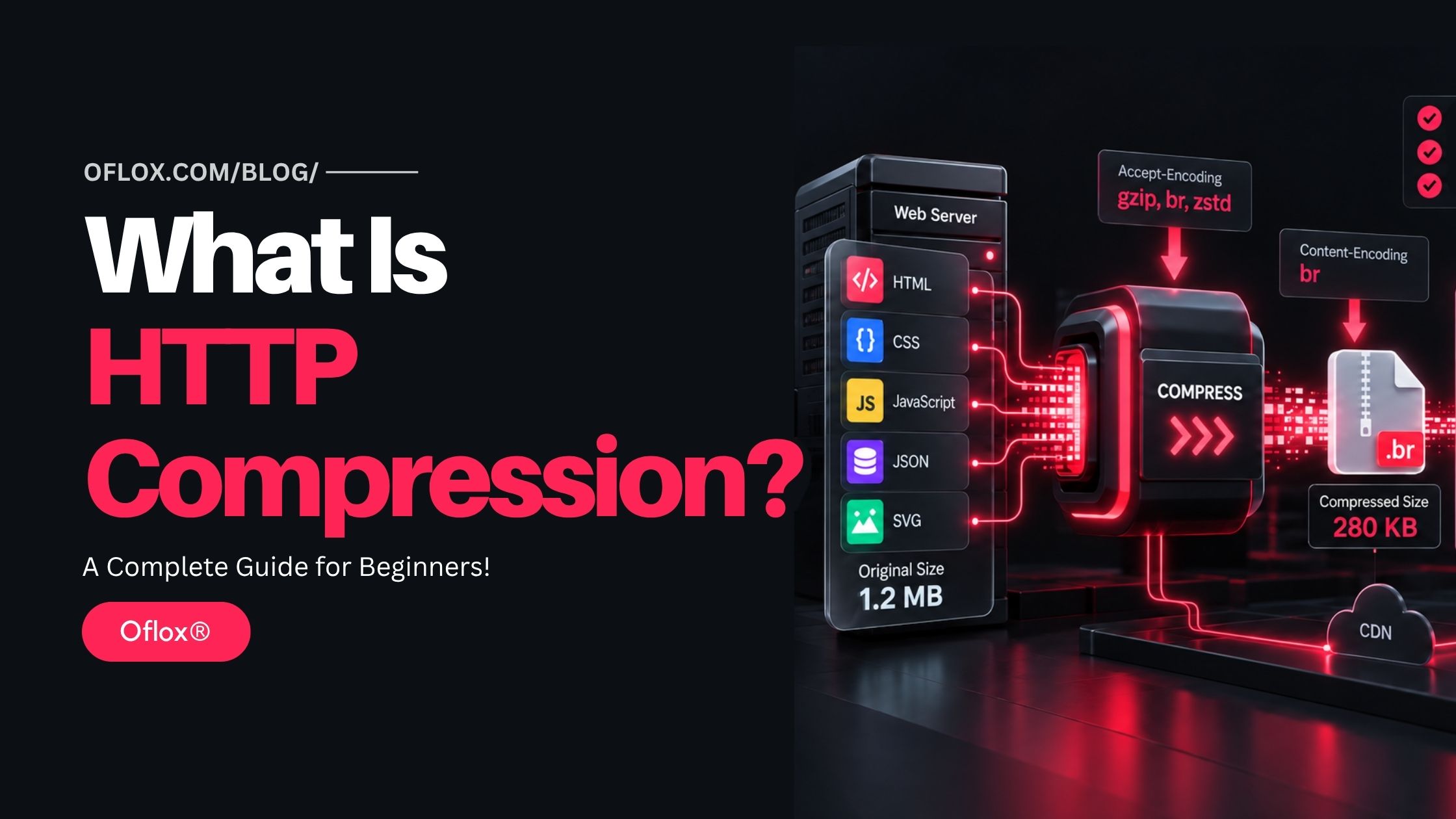
Whether you are a beginner, web developer, SEO professional, website owner, system administrator, or someone interested in improving website speed, learning about HTTP Compression can help you better understand data transfer, bandwidth optimisation, server performance, browser communication, and modern web performance optimisation.
Let’s explore it together.
Table of Contents
What Is HTTP Compression?
HTTP Compression is a web performance technique in which HTTP content is compressed before being transmitted between a server and a client, reducing the number of bytes transferred over the network.
In most website scenarios, the client is a web browser such as Chrome, Firefox, Safari, or Edge.
The basic process looks like this:
Browser Request → Server Checks Supported Compression → Server Compresses Response → Compressed Response Travels Over Network → Browser Decompresses ResponseThe important point is that compression changes the representation used during transmission without changing what the original resource represents.
For example:
Content-Type: text/html
Content-Encoding: gzip
Here, the actual resource is still HTML.
The Content-Type tells the browser what the content represents, while Content-Encoding tells it that the representation has been compressed using Gzip and therefore needs to be decoded before use.
HTTP semantics define Content-Encoding specifically for transformations such as compression while preserving the underlying media type of the representation.
HTTP Compression in Simple Words
Imagine you need to send a large blanket through a courier company.
Instead of packing the blanket loosely inside a huge box, you use a vacuum bag to reduce its size.
- The blanket is still the same blanket.
- Only its packed size becomes smaller.
Once the package reaches the destination, the receiver removes the vacuum packaging and gets the original blanket back.
HTTP Compression works in a similar way.
A web server takes a compressible resource such as:
style.cssand sends a smaller compressed version across the internet. The browser receives it, decompresses it automatically, and uses the original CSS instructions.
The visitor normally does not notice that this compression and decompression process happened.
Why Is HTTP Compression Important?
Website performance depends on many factors, including:
- Server response time
- Network latency
- File sizes
- Browser processing
- JavaScript execution
- Image optimisation
- Caching
- CDN configuration
- Number of HTTP requests
HTTP Compression specifically targets transfer size.
Reducing the amount of data transferred can help website resources reach the visitor faster.
Web.dev recommends compressing text-based resources such as HTML, JavaScript, CSS, and SVG. It also notes that Brotli can often provide better compression than Gzip, though the exact result depends on the content and configuration.
Why it matters in practical situations?
Consider a website that sends:
| Resource | Original Size |
|---|---|
| HTML | 120 KB |
| CSS | 180 KB |
| JavaScript | 600 KB |
| JSON | 100 KB |
| SVG | 60 KB |
| Total | 1,060 KB |
If suitable compression significantly reduces these resources, the user may need to download only a fraction of the original text-based payload.
That can be useful for:
- Mobile visitors
- Slow networks
- International audiences
- High-traffic websites
- SaaS applications
- E-commerce websites
- Content-heavy websites
- Web applications using large JavaScript bundles
- APIs returning large JSON responses
Brief History of HTTP Compression
HTTP Compression developed alongside the growth of the web.
In the early days of the internet, web pages were relatively small. Websites often contained basic HTML, a limited number of images, and very little JavaScript.
As websites became more advanced, their size increased considerably.
Developers started sending:
- Large stylesheets
- JavaScript libraries
- Application bundles
- Structured JSON data
- Complex HTML documents
- API responses
Reducing network transfer became increasingly important.
1. Gzip
Gzip became one of the most commonly used compression formats for web content.
It uses DEFLATE-based compression and has remained widely supported across web servers, browsers, proxies, CDNs, and development environments.
2. Brotli
Google developed Brotli as a newer lossless compression format.
Brotli was standardised as a compressed data format in RFC 7932 in 2016. It combines techniques including LZ77 and Huffman coding and was designed to provide strong compression efficiency.
Brotli subsequently became widely used for web delivery.
3. Zstandard
Zstandard, commonly called Zstd, is another modern lossless compression technology designed to provide a strong balance between compression ratio and processing speed.
RFC 8878 describes the Zstandard format and registers it for use as a content encoding.
Modern HTTP implementations are gradually expanding their use of Zstandard and dictionary-based compression techniques.
How Does HTTP Compression Work?
HTTP Compression normally involves communication between the browser and server. Let us understand it step by step.
1. The Browser Requests a Resource
Suppose a visitor opens:
https://example.com/The browser sends an HTTP request to the server.
The request may contain an Accept-Encoding header such as:
Accept-Encoding: gzip, deflate, br, zstdThe exact list depends on the browser and environment.
Accept-Encoding tells the server which content codings the client is capable of accepting. HTTP also allows preference weights using q values.
2. The Server Reads Accept-Encoding
The web server examines the request.
It checks:
- Which compression formats the browser supports.
- Which compression formats the server supports.
- Whether the requested resource should be compressed.
- Which supported format should be selected.
Suppose both browser and server support Brotli.
The server may choose Brotli.
3. The Server Compresses the Resource
Imagine the requested HTML document is:
100 KBThe server processes the document through the configured compression algorithm.
The resulting representation could become significantly smaller.
The exact reduction varies according to factors such as:
- File type
- Repeated text patterns
- Compression algorithm
- Compression level
- File size
- Dictionary usage
- Server implementation
4. The Server Sends Content-Encoding
The response may contain:
Content-Encoding: brThis tells the browser:
The response body has been encoded using Brotli.
The browser now knows which decoding process should be applied.
5. The Compressed Data Travels Over the Network
Instead of sending the full uncompressed response body, the server sends the compressed representation.
This reduces network transfer.
That is the main performance advantage.
6. Browser Decompresses the Response
The browser automatically decompresses the response. The website developer normally does not need JavaScript to perform this process.
After decompression, the browser continues processing the resource normally.
For example:
- HTML is parsed.
- CSS is applied.
- JavaScript is executed.
- JSON is passed to the application.
- SVG graphics are rendered.
Important HTTP Compression Headers
Several HTTP headers are particularly relevant.
1. Accept-Encoding
Accept-Encoding tells the server which content encodings the client can accept.
Example:
Accept-Encoding: gzip, deflate, br, zstdAnother valid form can include preferences:
Accept-Encoding: gzip;q=1.0, identity;q=0.5A value of q=0 indicates that a particular coding is not acceptable.
2. Content-Encoding
Content-Encoding tells the client which encoding has actually been applied.
Example:
Content-Encoding: gzipor:
Content-Encoding: bror where supported:
Content-Encoding: zstd3. Vary
When compressed and uncompressed or differently compressed versions can be delivered, caching systems need to understand that the representation can vary based on Accept-Encoding.
A commonly used response header is:
Vary: Accept-EncodingThis helps shared caches distinguish between different encoded versions of the resource. MDN specifically notes the importance of varying cached responses according to Accept-Encoding when content negotiation is used.
Major HTTP Compression Algorithms
Different algorithms can be used for HTTP content compression.
The most important are:
| Algorithm | HTTP Token | General Position |
|---|---|---|
| Gzip | gzip | Highly established and widely compatible |
| Brotli | br | Strong compression for web content |
| Zstandard | zstd | Modern high-performance compression |
| Deflate | delfated | Older supported mechanism |
| Identity | identity | No compression |
Let us understand the major options.
What Is Gzip Compression?
Gzip is one of the most widely used compression formats for transmitting web content.
It has excellent compatibility and works particularly well for text resources.
Typical Gzip candidates include:
- HTML
- CSS
- JavaScript
- XML
- JSON
- SVG
- Plain text
One of Gzip’s biggest advantages is its mature ecosystem.
It is supported across many:
- Browsers
- Web servers
- CDNs
- Reverse proxies
- Hosting environments
For this reason, Gzip remains an important fallback even when newer algorithms are available.
What Is Brotli Compression?
Brotli is a modern lossless compression format that can provide better compression efficiency than Gzip for many web assets.
The HTTP content coding token is:
brOne useful characteristic of Brotli is its static dictionary, which can help it efficiently encode patterns frequently found in textual content.
According to web.dev, Brotli can produce roughly 15–20% better compression than Gzip in relevant text-compression scenarios, although actual results depend on the resource and settings.
Brotli is particularly useful for:
- HTML
- CSS
- JavaScript
- SVG
- JSON
- Pre-compressed static web assets
Many CDNs and modern hosting systems can automatically use Brotli when the visitor’s browser supports it.
What Is Zstandard Compression?
Zstandard, or Zstd, is a lossless compression algorithm designed to provide high compression performance while maintaining fast compression and decompression speeds.
Its HTTP content coding token is:
zstdRFC 8878 defines the Zstandard compressed format and its use as a registered content encoding.
As of the modern web platform, HTTP documentation also recognises Zstd among available content encodings.
Zstd is especially interesting for the future because it provides developers and infrastructure providers with another option when balancing:
- Compression ratio
- Compression speed
- Decompression speed
- CPU usage
- Network savings
However, configuration and compatibility should always be checked across the actual browser, CDN, proxy, and server environments being used.
Gzip vs Brotli vs Zstandard
Here is a simplified comparison:
| Factor | Gzip | Brotli | Zstandard |
|---|---|---|---|
| Maturity | Very high | High | Growing for HTTP delivery |
| Compatibility | Excellent | Excellent on modern browsers | Environment-dependent |
| Compression Ratio | Good | Usually stronger for web text | Strong |
| Compression Speed | Good | Depends strongly on level | Generally fast |
| Decompression Speed | Fast | Fast | Very fast in many workloads |
| Typical Use | Universal fallback | Modern web assets | Emerging modern HTTP delivery |
| HTTP Token | gzip | br | zstd |
There is no requirement that every website choose only one algorithm. A modern delivery stack can negotiate the most appropriate supported option and retain fallbacks.
What Type of Files Should Be Compressed?
HTTP Compression is most useful for text-based resources.
1. Good compression candidates
- HTML
- CSS
- JavaScript
- JSON
- XML
- SVG
- Web manifests
- Text files
- API responses
- Some font formats depending on delivery format
2. Resources that usually should not be recompressed
- JPEG
- WebP
- AVIF
- PNG in most cases
- MP4
- MP3
- ZIP
- GZIP archives
- Other already-compressed binary formats
MDN recommends compression for suitable resources while avoiding unnecessary compression of already-compressed content such as images, audio, and video.
Major Features of HTTP Compression
HTTP Compression provides several important technical features that make modern websites more efficient.
1. Automatic Negotiation
The browser communicates its supported formats using Accept-Encoding. The server can then select an appropriate encoding.
2. Transparent Decompression
Modern browsers automatically decode compressed HTTP responses. Users do not need to manually extract anything.
3. Multiple Algorithm Support
Servers can support multiple formats simultaneously, such as:
Brotli → preferred
Gzip → fallback
Identity → final fallback
Actual selection depends on negotiation and server configuration.
4. Content-Type Independence
HTTP content encoding can compress a representation without changing its underlying media type.
For example:
Content-Type: application/json
Content-Encoding: br
The resource remains JSON after decompression.
5. CDN Compatibility
Major CDN architectures can compress suitable content at edge locations or deliver previously compressed versions.
This allows compression to work together with global content delivery.
6. Configurable Compression Levels
Algorithms normally provide different compression levels.
Higher compression may reduce transfer size further but can require additional server CPU and compression time.
The right level therefore depends on the workload.
Benefits of HTTP Compression
HTTP Compression can provide several practical benefits when configured properly.
1. Reduces Page Transfer Size
The primary benefit is reduced network payload.
Smaller transferred resources require fewer bytes to cross the network.
2. Can Improve Page Loading Speed
When fewer bytes need to be downloaded, visitors may receive resources faster, particularly on slower connections.
This can improve perceived performance.
3. Saves Bandwidth
Consider a website transferring 500 GB of compressible text content every month.
Even a moderate reduction in transfer size could represent considerable bandwidth savings.
This becomes increasingly important for high-traffic websites.
4. Helps Mobile Users
Many users browse websites through mobile networks where:
- Bandwidth may fluctuate.
- Latency may be high.
- Connection quality may change.
- Data usage may matter.
Smaller transfers can improve usability under these conditions.
5. Improves API Efficiency
Modern web applications frequently communicate with APIs.
Suppose an API returns a large JSON response containing:
{
  "products": [...],
  "categories": [...],
  "reviews": [...]
}
JSON frequently contains repeated property names and textual structures, which can make it suitable for compression.
6. Supports Better Infrastructure Efficiency
Reducing transferred data can also decrease network load across:
- Origin servers
- Reverse proxies
- CDN edges
- Application gateways
- API platforms
However, real-time compression also consumes CPU, so infrastructure efficiency requires the right balance.
Challenges of HTTP Compression
Compression is highly useful, but it is not completely free.
1. CPU Usage
Compression requires computation.
When a server compresses large responses dynamically, CPU consumption can increase.
This matters on:
- Shared hosting
- High-traffic websites
- CPU-constrained servers
- Large APIs
- Real-time applications
2. High Compression Levels Can Be Expensive
Maximum compression is not always the fastest solution.
For example, a server could spend significantly more CPU time to save only a small additional number of bytes.
A balanced configuration is usually more practical.
3. Small Files May Not Benefit
Very small resources may gain little from compression because compression itself has overhead.
Web.dev notes that extremely small resources, such as those below roughly 1 KiB, may not compress effectively.
4. Already-Compressed Files Provide Little Benefit
Compressing JPEG, WebP, ZIP, or MP4 files again may provide almost no useful reduction while consuming server resources.
5. Incorrect Cache Configuration
If a cache does not properly differentiate compressed representations, incorrect responses could theoretically be served.
This is one reason Vary: Accept-Encoding is important.
6. Legacy Compatibility
A newer compression algorithm may not be available throughout every infrastructure layer.
Always verify:
- Browser support
- CDN support
- Reverse-proxy support
- Server support
- Application framework support
- Hosting configuration
How to Enable HTTP Compression
The exact implementation depends on your server and hosting environment.
1. Apache
Apache commonly supports response compression through modules such as mod_deflate.
A typical configuration may look similar to:
<IfModule mod_deflate.c>
    AddOutputFilterByType DEFLATE text/html
    AddOutputFilterByType DEFLATE text/plain
    AddOutputFilterByType DEFLATE text/css
    AddOutputFilterByType DEFLATE application/javascript
    AddOutputFilterByType DEFLATE application/json
    AddOutputFilterByType DEFLATE application/xml
    AddOutputFilterByType DEFLATE image/svg+xml
</IfModule>
The exact configuration should be adapted to the server environment rather than copied blindly.
2. Nginx
Nginx provides a Gzip module.
A simplified configuration can look like:
gzip on;
gzip_comp_level 5;
gzip_min_length 1024;

gzip_types
    text/plain
    text/css
    application/javascript
    application/json
    application/xml
    image/svg+xml;
Brotli support depends on the server build or environment.
3. WordPress
WordPress website owners may receive compression through:
- Hosting configuration
- Apache/Nginx settings
- Performance plugins
- Reverse proxies
- CDN services
Before enabling compression through multiple systems, check whether it is already active.
Duplicating configuration across a CDN, plugin, and web server may create unnecessary complexity.
4. CDN Compression
Modern CDNs can often automatically negotiate and deliver compressed versions of supported resources.
This is useful because edge servers may handle compression close to visitors rather than forcing the origin server to perform every operation.
Static vs Dynamic Compression
There are two important implementation strategies.
1. Static Compression
Files are compressed beforehand.
For example:
app.js
app.js.gz
app.js.br
When a compatible request arrives, the server delivers the appropriate pre-compressed version.
| Advantages | Best for |
| Lower runtime CPU usage | CSS bundles |
| Excellent for versioned static files | JavaScript bundles |
| Can use stronger compression during the build process | Static HTML |
| SVG | |
| Build-generated assets |
2. Dynamic Compression
The server compresses the response when the request arrives.
| Advantages | Disadvantages |
| Works with dynamically generated content | Requires runtime CPU |
| Useful for API responses | Aggressive compression levels may increase response processing time |
| Suitable for personalised pages |
A hybrid system commonly works best:
Pre-compress static assets + dynamically compress suitable changing content.How to Check Whether HTTP Compression Is Working
There are several useful methods.
1. Browser Developer Tools
Open Chrome DevTools and go to:
Network → Select Resource → HeadersLook for:
Content-Encoding: bror:
Content-Encoding: gzipor another supported encoding.
You can also compare:
- Resource size
- Transferred size
2. cURL
You can inspect headers using commands such as:
curl -I -H "Accept-Encoding: gzip, br" https://example.com/Or request compressed content using:
curl --compressed https://example.com/5+ Popular HTTP Compression Testing Tools
Useful tools include:
| Tool | Main Use |
|---|---|
| Chrome DevTools | Inspect request and response headers |
| Firefox Developer Tools | Analyse network transfers |
| cURL | Test HTTP content negotiation |
| Lighthouse | Audit website performance |
| PageSpeed Insights | Check performance opportunities |
| WebPageTest | Analyse detailed resource transfers |
| GTmetrix | Review front-end performance |
| Server logs/APM | Measure server-side compression cost |
Do not depend on only one test.
Use browser developer tools when you need to confirm exactly which encoding a particular response received.
Practical HTTP Compression Examples
1. Blog Website
A blog page contains:
- 100 KB HTML
- 200 KB CSS
- 450 KB JavaScript
Total text resources:
750 KBHTTP Compression may substantially reduce the transmitted size.
For readers using mobile networks, this reduction can noticeably improve delivery.
2. SaaS Application
A SaaS dashboard loads:
dashboard.js = 1.2 MBThe production build is already minified but still contains repeated textual patterns.
Brotli compression reduces its network transfer significantly.
The server sends:
Content-Encoding: brThe browser automatically restores the JavaScript content before processing it.
3. E-Commerce API
An API returns:
700 KB JSONThe client sends:
Accept-Encoding: br, gzipThe server selects Brotli and returns:
Content-Encoding: brThe network payload becomes smaller while the application ultimately receives the same JSON representation after decoding.
4. Already-Compressed Image
A website contains a 300 KB WebP image. The developer tries to compress it using Gzip. The saving is minimal because WebP already uses image compression.
The server performs additional work without achieving meaningful transfer reduction.
The better optimisation approach may involve:
- Resizing the image
- Adjusting image quality
- Responsive images
- Better dimensions
- Lazy loading
rather than HTTP recompression.
HTTP Compression vs Minification
These techniques are related but different.
| HTTP Compression | Minification |
|---|---|
| Applied during content delivery | Applied to source assets |
| Reduces transmitted representation size | Removes unnecessary source characters |
| Reversed automatically by browser | Usually not reversed |
| Gzip/Brotli/Zstd | Minifiers/build tools |
| Works on repeated byte patterns | Removes whitespace/comments and rewrites code |
For example:
Original CSS:
body {
    background: white;
    margin: 0;
}
Minified:
body{background:#fff;margin:0}The minified file can then also be Brotli- or Gzip-compressed.
Therefore:
Minification + HTTP Compression can be used together.
HTTP Compression vs Caching
Compression and caching solve different performance problems.
- Compression: Reduces the amount of data that needs to be transferred between the server and the browser.
- Caching: Reduces how often the same resource needs to be downloaded again.
- Use Both Together: A well-optimised website usually combines compression and caching for better performance.
- Example Workflow: CSS is minified, Brotli-compressed, given long-lived cache headers, stored by the CDN, and then cached by the browser.
- Different Roles: Compression reduces transfer size, while caching reduces repeated transfers. Both solve different parts of the website performance problem.
Expert Tips for Better HTTP Compression
Proper configuration is more important than simply enabling the highest possible compression level.
- Compress Text-Based Content First: Prioritise HTML, CSS, JavaScript, JSON, XML, and SVG because these files usually provide the best compression opportunities.
- Prefer Modern Compression With Fallbacks: Use Brotli or other modern encodings where supported, while keeping Gzip as a reliable fallback for wider compatibility.
- Pre-Compress Static Assets: Generate compressed versions of static CSS, JavaScript, and other assets during the build or deployment process when possible.
- Avoid Maximum Compression Everywhere: The highest compression level is not always the best choice. Compare file-size reduction, CPU usage, compression time, Time to First Byte, and overall latency.
- Configure Vary Correctly: When responses change according to Accept-Encoding, make sure caching systems correctly handle different compressed versions.
- Do Not Compress Everything: Avoid recompressing already-compressed resources where the additional size reduction is negligible.
- Test Real Production Responses: Do not assume compression is working just because it is enabled in settings. Check actual response headers on the live website.
- Check CDN and Origin Separately: Your origin server may use Gzip while your CDN delivers Brotli. Test the final response that real visitors receive.
- Monitor CPU After Changes: Compression can reduce network transfer while increasing server CPU usage, so always measure the overall performance impact.
Common HTTP Compression Mistakes
Many website owners enable compression but still make configuration mistakes.
- Compressing Images and Videos: Trying to Gzip JPEG, WebP, MP4, or similar already-compressed formats usually provides very little benefit.
- Using Excessive Compression Levels: Higher compression can consume more CPU resources. Do not optimise only for smaller file size; focus on overall response performance.
- Forgetting Vary: Accept-Encoding Incorrect cache variation can cause inconsistent behaviour when different compressed versions are stored by intermediary caches.
- Assuming Gzip Is the Only Option: Gzip is still important, but Brotli is widely used and Zstandard is becoming increasingly relevant.
- Assuming Brotli Is Always Better: Brotli can provide excellent compression, but CPU cost, compression level, file size, CDN behaviour, and static or dynamic content should also be considered.
- Ignoring Very Small Files: Compression overhead may be greater than the actual benefit when responses are extremely small.
- Enabling Compression in Multiple Layers Without Testing: Compression may be enabled through WordPress, Apache, Nginx, a reverse proxy, CDN, or application framework. Always identify which layer is handling the final response.
- Looking Only at Lighthouse Scores: Performance scores are useful, but you should also inspect actual HTTP headers, transferred size, and network behaviour for accurate results.
Security Considerations of HTTP Compression
Compression has historically interacted with certain security vulnerabilities when secrets and attacker-controlled content are compressed together.
Examples from the broader web-security history include compression-related side-channel attacks. This does not mean normal HTTP Compression should simply be disabled everywhere.
Instead, security-sensitive applications should carefully consider:
- Secret information
- User-controlled input
- Authentication tokens
- Cross-origin behaviour
- TLS compression history
- Sensitive reflected data
Developers working on financial, authentication, or high-security applications should follow current framework and infrastructure security guidance rather than treating compression as purely a performance setting.
HTTP Compression and SEO
HTTP Compression is not a magic SEO ranking technique. However, it contributes to website performance.
A faster and more efficient website can support:
- Better user experience
- Faster content delivery
- Improved mobile usability
- More efficient crawling in some scenarios
- Performance-oriented optimisation strategies
The correct SEO approach is therefore:
Use HTTP Compression as one component of a complete technical performance strategy.It should work alongside:
- Browser caching
- CDN
- Image optimisation
- Lazy loading
- Code splitting
- Minification
- Critical CSS
- Efficient JavaScript
- Server optimisation
- Database optimisation
FAQs:)
A. HTTP Compression is a technique used to reduce the size of HTTP content before it is transmitted between a web server and client. The browser automatically decompresses the received content before using it.
A. HTTP Compression reduces the amount of data transferred over the network, which can improve loading performance and reduce bandwidth usage.
A. Text-based resources such as HTML, CSS, JavaScript, JSON, XML, SVG, and plain text are generally strong candidates.
A. Already-compressed formats such as JPEG, WebP, AVIF, MP4, MP3, ZIP, and similar resources usually receive little benefit from additional HTTP compression.
A. Gzip is a widely supported lossless compression format commonly used to reduce the transfer size of website text resources.
A. Brotli is a modern lossless compression format that can provide better compression than Gzip for many web resources.
A. Brotli often provides stronger compression for web text, but the best option depends on compression level, server resources, caching strategy, resource type, and compatibility requirements.
A. Zstandard, also known as Zstd, is a modern lossless compression algorithm designed to combine strong compression with high processing performance.
A. HTTP Compression does not directly guarantee higher rankings, but it can support better website performance and user experience as part of technical SEO optimisation.
A. No. HTTP/2 improves how HTTP communication is transported and multiplexed, but website response bodies can still benefit from content compression.
A. No. HTTP/3 changes the transport architecture, while content compression reduces the size of transferred representations. They solve different problems.
A. Yes. Real-time compression consumes CPU resources. Extremely aggressive settings on high-traffic websites may increase server load.
A. You can inspect the Content-Encoding response header through browser Developer Tools, cURL, WebPageTest, or similar network-analysis tools.
Conclusion:)
We hope this article has helped you understand what HTTP Compression is, how HTTP Compression works, and why it is important for improving modern website and web application performance.
HTTP Compression plays an important role in reducing the amount of data transferred between a web server and a user’s browser. It uses compression technologies such as Gzip, Brotli, and Zstandard (Zstd) to reduce the transfer size of suitable resources such as HTML, CSS, JavaScript, JSON, XML, and SVG.
HTTP headers such as Accept-Encoding, Content-Encoding, and Vary: Accept-Encoding help browsers, servers, CDNs, and caching systems correctly negotiate and deliver compressed content.
However, HTTP Compression is not only about making files smaller. Developers should also understand concepts such as browser caching, CDN delivery, minification, image optimisation, server performance, compression levels, and bandwidth usage to build faster and more efficient websites.
Modern servers and CDNs can automatically handle much of the compression process, but developers should still test real production responses, choose suitable compression methods, avoid unnecessary recompression, and monitor server performance instead of simply using the highest compression level.
“HTTP Compression reduces unnecessary bytes in transit, helping websites deliver content faster and use bandwidth more efficiently.” — Oflox®
Read also:)
- What Is JavaScript Engine? A-to-Z Guide for Beginners!
- What Is AI Website Testing? A Complete Beginner’s Guide!
- What Is Code Splitting? Complete Guide with Examples!
Have questions or suggestions about HTTP Compression? Share them in the comments below and help other developers understand how compression can improve website speed and performance.