This complete guide will explain What Is Lazy Loading, how lazy loading works, why it is important, its features, benefits, challenges, implementation methods, tools, SEO impact, common mistakes, real-world examples, and future trends.
Lazy loading is one of the simplest ideas in web performance: do not download or initialise something before the user is likely to need it.
Instead of forcing a browser to fetch every image, video, embedded map, advertisement, script, or application module during the initial page load, a website can delay selected non-critical resources until the visitor scrolls near them or performs a relevant action.
This small change can make a page feel much faster. It reduces unnecessary network requests, saves mobile data, lowers initial page weight, and allows important above-the-fold content to receive more bandwidth and processing time.
However, lazy loading must be applied carefully. If a developer lazy-loads the main hero image, an essential font, or a component visible at the top of the page, the technique can delay the very content the user is waiting to see.

Whether you are a website owner, blogger, SEO professional, WordPress user, developer, e-commerce manager, or digital marketer, understanding lazy loading can help you build faster and more user-friendly digital experiences.
Let’s explore it together.
Table of Contents
What Is Lazy Loading?
Lazy loading is a performance optimisation technique in which a website, application, or browser delays loading a non-critical resource until that resource is needed or is likely to be needed soon.
For example, imagine a long blog post containing 30 images. A visitor initially sees only the title, introduction, and first image.
Without lazy loading, the browser may request all 30 images immediately. With lazy loading, it can load the visible content first and postpone images located farther down the page until the visitor scrolls near them.
In simple words, lazy loading means “load later when required,” while eager loading means “load now.”
Lazy loading is not limited to images. It may be used for:
- Images and image galleries
- YouTube videos and other embedded players
- Google Maps and third-party iframes
- Advertisements and social media widgets
- JavaScript modules and application routes
- Product reviews or recommendations
- Comments and related-post sections
- Large data tables and dashboard panels
- API results and additional product listings
- Fonts, CSS, or other assets in specialised implementations
The exact trigger may be the resource entering or approaching the viewport, a button click, a route change, a tab becoming active, or an application detecting that the resource will soon be needed.
Why Is Lazy Loading Important?
Modern webpages are often rich in images, video embeds, trackers, widgets, advertisements, and interactive components.
These assets compete for bandwidth, memory, and processor time. Loading everything at once can make the browser spend valuable time downloading and processing content the visitor may never view.
Lazy loading helps prioritise the initial experience.
The browser can focus on the page structure, heading, navigation, primary copy, and important visual content. Resources outside the first screen can wait.
This matters particularly for visitors using:
- Mobile data
- Slow internet connections
- Entry-level smartphones
- Older computers
- Busy public networks
- Limited data plans
It is also important for content-heavy websites where a single page may contain dozens of images, videos, maps, advertisements, or embedded tools.
A slow page can increase abandonment, interrupt conversion journeys, and reduce engagement.
Lazy loading cannot fix every website speed problem, but it complements other optimisation methods such as:
- Image compression
- Responsive images
- Browser caching
- Content delivery networks
- Code minification
- Efficient hosting
- Database optimisation
- Removal of unnecessary plugins
- Core Web Vitals optimisation
A Short History and Background of Lazy Loading
The basic concept of loading something only when needed existed long before modern websites.
Software systems have historically used deferred loading for files, memory, database relationships, and application components.
As webpages became more visual and JavaScript-heavy, downloading everything during the initial request became expensive.
Developers started using custom scripts that watched scrolling and replaced placeholder image URLs with actual image URLs.
Early implementations usually listened to browser events such as:
- Scroll
- Resize
- Orientation change
- Page movement
These solutions worked, but poorly written event handlers could run repeatedly and create additional work on the browser’s main thread.
JavaScript libraries later simplified the process and introduced better placeholders, thresholds, fallbacks, and compatibility support.
The introduction of the Intersection Observer API provided a cleaner browser mechanism for observing when an element entered or exited a viewport or specified container.
It allowed developers to implement lazy-loading behaviour without continuously calculating element positions during scrolling.
Native browser lazy loading later made common image and iframe use cases much simpler.
Developers can now add loading=”lazy” to eligible HTML elements and allow the browser to decide when to fetch them.
Major browsers broadly support native image lazy loading. Therefore, many websites no longer need a heavy JavaScript library for basic lazy-loading requirements.
Today, code splitting, dynamic imports, streaming, partial rendering, islands architecture, selective hydration, and server components apply the same principle beyond media: deliver valuable work first and postpone what is not yet needed.
How Does Lazy Loading Work?
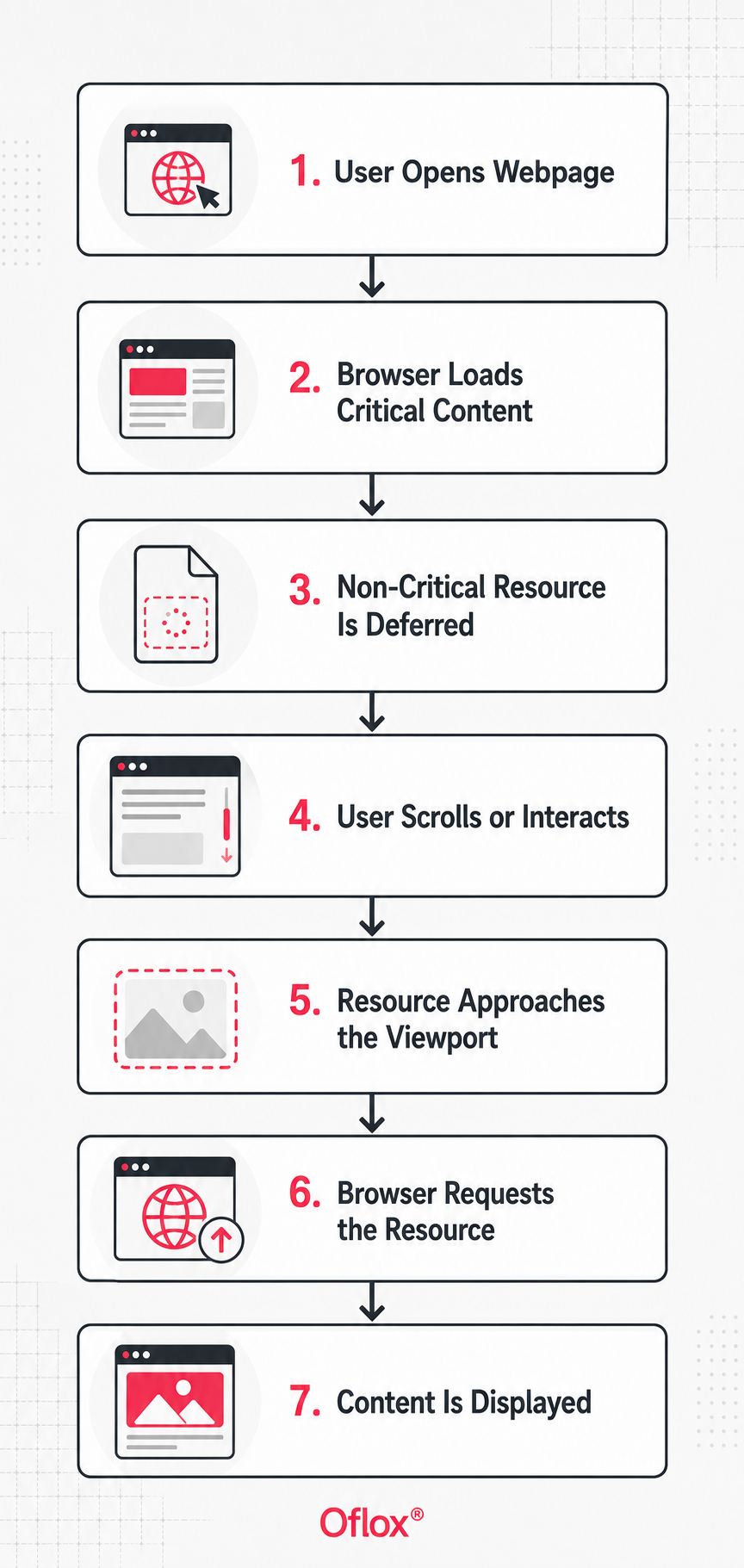
Lazy loading normally follows a simple decision process:
- The browser receives the page’s initial HTML.
- It identifies critical and non-critical resources.
- Critical content is requested and rendered first.
- A lazy resource remains deferred.
- A lightweight placeholder may appear in its position.
- The browser or JavaScript observes the resource’s location.
- The visitor scrolls or performs a relevant action.
- The resource approaches the viewport or becomes necessary.
- The browser requests the actual resource.
- The real content replaces the placeholder.
The browser may fetch a resource before it becomes completely visible so that it is ready when the user reaches it.
The exact timing can depend on:
- Browser heuristics
- Resource type
- Device performance
- Internet connection
- Distance from the viewport
- Developer-defined settings
- Browser data-saving behaviour
Lazy Loading Flow:
Types of Lazy Loading
The following types of lazy loading explain how different website resources can be deferred until users are likely to need them.
1. Native Image Lazy Loading
The simplest method uses the HTML loading attribute:
<img
  src="product-chair.webp"
  alt="Wooden chair with upholstered seat"
  width="800"
  height="600"
  loading="lazy">
The browser treats the image as a candidate for deferred loading.
The image’s width and height should still be provided. These dimensions allow the browser to reserve the correct amount of space before the image loads and reduce unexpected layout movement.
2. Native Iframe Lazy Loading
Offscreen video players, maps, and other embedded pages can be expensive because they may download scripts and supporting resources.
Native iframe lazy loading can be implemented similarly:
<iframe
  src="https://www.youtube.com/embed/VIDEO_ID"
  title="Lazy loading tutorial"
  width="560"
  height="315"
  loading="lazy"
  allowfullscreen>
</iframe>
Always include a meaningful iframe title for accessibility.
For very heavy embeds, a click-to-load facade may provide greater savings than loading the complete iframe as soon as it approaches the viewport.
For example, a website can show a lightweight YouTube thumbnail and play button. The complete YouTube player can load only when the visitor clicks the button.
3. JavaScript Lazy Loading with Intersection Observer
Custom JavaScript is useful when you need greater control over:
- Loading thresholds
- Background images
- Animations
- API requests
- Placeholder behaviour
- Fade-in effects
- Older markup patterns
Example:
<img
  class="lazy-image"
  src="placeholder.svg"
  data-src="office-interior.webp"
  alt="Modern office interior"
  width="1200"
  height="800">

<script>
const images = document.querySelectorAll('.lazy-image');

const observer = new IntersectionObserver((entries, observerInstance) => {
  entries.forEach((entry) => {
    if (!entry.isIntersecting) return;

    const image = entry.target;
    image.src = image.dataset.src;

    image.addEventListener('load', () => {
      image.classList.add('is-loaded');
    }, { once: true });

    observerInstance.unobserve(image);
  });
}, {
  rootMargin: '300px 0px'
});

images.forEach((image) => observer.observe(image));
</script>
The rootMargin begins loading before the image becomes visible. This reduces the chance that a fast-scrolling visitor sees an empty placeholder.
4. Code Splitting and Dynamic Imports
Large web applications can divide JavaScript into smaller chunks.
Instead of delivering the entire application bundle during the first page load, a specific feature can load only when required.
button.addEventListener('click', async () => {
  const { openInvoiceEditor } = await import('./invoice-editor.js');
  openInvoiceEditor();
});
This method is commonly used for:
- SaaS dashboards
- Online editors
- Application routes
- Modal windows
- Analytics charts
- Admin tools
- Payment modules
- Report generators
It reduces initial JavaScript but introduces a new request when the visitor opens the feature.
5. Route-Level Lazy Loading
Single-page applications can load the code for a route only when a user navigates to that route.
For example, an e-commerce homepage does not need to download every JavaScript module used only on the account settings, order history, refund, or returns page.
The required module can load when the visitor opens that particular route.
6. Interaction-Based Loading
Some content should load only after an intentional user action.
Examples include:
- Loading a map after clicking “View Map”
- Opening a chatbot after selecting its icon
- Loading a video player after clicking a thumbnail
- Displaying reviews after opening the Reviews tab
- Loading a payment interface during checkout
- Opening an advanced calculator when requested
This approach can reduce unnecessary third-party requests and support better privacy choices.
7. Database and Backend Lazy Loading
The term lazy loading also appears in backend development and object-relational mapping.
Related data is fetched only when application code accesses it.
This can reduce unnecessary database queries. However, careless implementation may create the N+1 query problem, where an application generates many small database requests.
Frontend lazy loading and backend lazy loading share the same general principle, but they operate at different layers.
Eager Loading vs Lazy Loading
| Point | Eager Loading | Lazy Loading |
|---|---|---|
| Timing | Resource loads immediately | Resource loads later when needed |
| Best for | Critical and above-the-fold content | Below-the-fold or optional content |
| Initial requests | Usually higher | Usually lower |
| Initial bandwidth | Higher | Lower |
| Interaction delay | Resource is already available | A short delay may occur |
| Main risk | Loading unused resources | Loading important resources too late |
Neither method is always better.
A high-quality webpage uses eager loading for essential content and lazy loading for suitable non-critical content.
Major Features of Lazy Loading
Lazy loading provides several practical features:
- Demand-based delivery: A resource is fetched when it becomes relevant.
- Viewport awareness: Images and embeds can load as they approach the visible area.
- Placeholder support: Reserved space, colour blocks, blurred previews, posters, or skeleton screens can appear while content loads.
- Configurable preloading distance: Custom implementations can begin loading early using thresholds or root margins.
- Native browser support: Basic image and iframe cases require little or no JavaScript.
- Component-level control: Application code, charts, editors, and dashboard panels can load separately.
- Progressive enhancement: Core content can remain usable while richer features load later.
- Reduced third-party activity: Maps, videos, social widgets, advertisements, and chat tools can be postponed.
Benefits of Lazy Loading
The following benefits explain why lazy loading has become an important performance optimisation technique for modern websites and web applications.
1. Faster Initial Page Experience
By reducing the number and size of early downloads, lazy loading can shorten the work required to show useful content.
The improvement is especially noticeable on long pages with many images, videos, widgets, or embedded resources.
2. Lower Initial Page Weight
A resource the visitor never reaches may never be downloaded.
This saves transferred bytes and reduces unnecessary data usage.
For example, if a visitor reads only the first half of a long blog post, images near the bottom may not need to be downloaded at all.
3. Better Bandwidth Prioritisation
Below-the-fold images no longer need to compete immediately with:
- Stylesheets
- JavaScript
- Fonts
- Navigation assets
- The main image
- Product information
- Essential interface elements
The browser can use available bandwidth for resources that contribute directly to the first screen.
4. Reduced Server and CDN Requests
If visitors view only part of a page, deferred assets below that point may not be requested.
At scale, this can reduce origin server or CDN traffic. However, actual savings depend on traffic behaviour, caching rules, CDN pricing, and page structure.
5. Improved Performance on Mobile Devices
Avoiding unnecessary work can improve perceived speed on slower mobile connections and less powerful devices.
It can be particularly useful for audiences using:
- Budget smartphones
- Rural internet connections
- Crowded mobile networks
- Limited data packages
- Older mobile browsers
6. More Efficient Use of Browser Resources
Large images, iframes, videos, and application components can consume memory and processing time.
Deferring them can reduce initial browser pressure and allow the page to become usable sooner.
7. Potential Improvements in Engagement
When useful content appears sooner, visitors may be more willing to continue:
- Reading an article
- Viewing products
- Exploring services
- Completing a form
- Making a purchase
- Contacting the business
Website speed does not automatically guarantee conversions, but it removes an important source of friction.
8. Cleaner Application Architecture
Code splitting encourages developers to identify which features are:
- Critical
- Optional
- Route-specific
- Interaction-specific
- Admin-only
- Available only to logged-in users
This can produce smaller entry bundles and clearer module boundaries.
Challenges and Limitations of Lazy Loading
The following challenges and limitations explain why lazy loading should be implemented selectively, tested carefully, and monitored regularly.
1. Delayed Content During Fast Scrolling
If loading begins too late, visitors may see empty areas or placeholders while scrolling quickly.
A sensible preload distance and lightweight assets can reduce this problem.
2. Poor Largest Contentful Paint When Misused
The page’s main image is often the Largest Contentful Paint element.
Lazy-loading it delays discovery or fetching and can worsen LCP.
Hero images, featured images, main product images, and other likely above-the-fold LCP candidates should normally load eagerly.
Where appropriate, fetchpriority=”high” can signal that an important image should receive a higher fetching priority.
3. Layout Shifts
If image dimensions or aspect ratios are missing, the browser may not reserve enough space.
Content then moves when the image arrives, harming visual stability and potentially increasing Cumulative Layout Shift.
4. JavaScript Dependency
A fully custom implementation can fail if:
- JavaScript contains an error
- A script is blocked
- The lazy-loading library fails
- A plugin conflict occurs
- Browser extensions interfere
- The visitor disables JavaScript
Native HTML and progressive enhancement reduce this risk.
5. Search and Accessibility Errors
Search engines can process many modern lazy-loading implementations. However, hidden content, invalid markup, missing image URLs, or interaction-only content can still create discovery problems.
Screen readers also require meaningful alternative text, accessible labels, logical content order, and keyboard-friendly controls.
6. Too Many Small Chunks
Code splitting can be overdone.
Hundreds of tiny JavaScript files can create request overhead, complicate caching, and cause interaction delays.
The goal is to create useful boundaries, not maximum fragmentation.
7. Third-Party Behaviour
Third-party widgets may create:
- Layout problems
- Consent issues
- Tracking errors
- Measurement problems
- Initialisation failures
- Unexpected scripts
- Design inconsistencies
Test the complete workflow instead of assuming that adding an iframe attribute solves everything.
How to Implement Lazy Loading in a Website?
A proper lazy-loading implementation begins with analysing which resources should load immediately and which can be safely deferred.
1. Audit the Page
Identify large images, embeds, scripts, and network requests.
Note which resources appear above and below the fold on common mobile and desktop screen sizes.
2. Identify Critical Resources
Mark the resources required for the first screen and the primary user task.
These may include:
- Website logo
- Navigation
- Main heading
- Hero image
- Featured image
- Main product image
- Primary call-to-action
- Essential interface controls
Do not delay them through a blanket lazy-loading rule.
3. Select Safe Lazy-Loading Candidates
Good candidates include:
- Below-the-fold article images
- Product images farther down a listing
- Related posts
- Lower-page testimonials
- Embedded maps
- Video players
- Social media feeds
- Advertisements
- Comments
- Non-essential dashboard panels
- Additional search results
4. Choose the Simplest Method
Start with native loading=”lazy” for images and iframes.
Use Intersection Observer only when you need custom thresholds, background-image handling, animations, API-driven content, or advanced placeholder behaviour.
Use dynamic imports for code-heavy features.
5. Reserve Layout Space
Add accurate width and height attributes or use the CSS aspect-ratio property.
This allows the browser to calculate the required space before the asset downloads.
.video-frame {
  width: 100%;
  aspect-ratio: 16 / 9;
  background: #f2f2f2;
}
6. Use Responsive and Optimised Media
Lazy loading does not make an oversized image efficient.
Compress images, use suitable formats, and provide srcset and sizes so the browser can select an appropriate file.
<img
  src="office-800.webp"
  srcset="
    office-480.webp 480w,
    office-800.webp 800w,
    office-1200.webp 1200w"
  sizes="(max-width: 700px) 100vw, 800px"
  width="1200"
  height="800"
  loading="lazy"
  alt="Team workspace with wooden desks">
7. Choose an Appropriate Loading Distance
For custom implementations, begin loading before the element becomes visible.
There is no universal margin. Test the behaviour on realistic devices, internet connections, and scrolling speeds.
8. Provide a Useful Placeholder
A placeholder should preserve space and communicate progress without distracting the visitor.
Options include:
- Neutral background colour
- Dominant image colour
- Blurred low-quality preview
- Video poster image
- Skeleton layout
- Lightweight thumbnail
- Loading animation
9. Provide Fallbacks Where Necessary
If an important audience uses unusual browsers or scripts may be disabled, ensure that the core page remains understandable.
A noscript image can be used for older custom patterns, although native browser support makes it unnecessary for many projects.
10. Test Performance and User Experience
Compare the website before and after implementation.
Inspect:
- Largest Contentful Paint
- Cumulative Layout Shift
- Interaction to Next Paint
- Request count
- Transferred bytes
- Loading waterfall
- Console errors
- Keyboard navigation
- Fast scrolling
- Cold cache
- Repeat visits
- Mobile and desktop layouts
11. Monitor Real Users
Laboratory tests are useful, but real-user monitoring reveals different devices, connections, screen sizes, and visitor behaviour.
Monitor field data so improvements are not limited to a powerful development computer.
Lazy Loading and SEO
Lazy loading can support SEO through better performance and user experience, but it is not a direct ranking shortcut.
Search engines still need:
- Accessible HTML
- Discoverable URLs
- Descriptive alternative text
- Valid image markup
- Logical content structure
- Reliable navigation
- Crawlable links
Follow these lazy-loading SEO practices:
- Keep a valid image URL in native
srcor standards-based responsive markup. - Add descriptive
alttext that explains the image’s purpose. - Do not lazy-load the primary above-the-fold or likely LCP image.
- Provide image width and height to protect visual stability.
- Avoid hiding essential text behind scrolling or clicks purely to manipulate loading.
- Make pagination or crawlable links available when infinite scrolling contains indexable items.
- Test rendered HTML and important content in search engine inspection tools.
- Combine lazy loading with compression, caching, CDN delivery, and responsive images.
Lazy loading can reduce early competition for bandwidth, but poor implementation can harm LCP or leave important content undiscoverable.
Treat it as performance engineering, not as a simple checkbox.
Lazy Loading in WordPress
Modern WordPress can add loading, fetchpriority, and decoding attributes according to context.
Its optimisation logic attempts to avoid delaying images that are likely to appear above the fold.
Many WordPress websites therefore do not need another plugin for basic image lazy loading.
Duplicate optimisation can cause:
- Multiple placeholders
- JavaScript conflicts
- Images that never appear
- Blurry images
- Broken sliders
- A delayed hero image
- Incorrect LCP optimisation
WordPress users should:
- Inspect the generated page source, not only the editor.
- Confirm that the featured or hero image is not being delayed.
- Check whether the theme, page builder, CDN, and optimisation plugin all modify image markup.
- Purge page, browser, and CDN caches after configuration changes.
- Test posts, category pages, WooCommerce archives, product galleries, sliders, and mobile menus separately.
- Keep image dimensions and responsive variants enabled.
Common tools include performance plugins, image CDNs, and page builders with built-in lazy-loading options.
Use the smallest reliable setup. More optimisation layers do not automatically create more speed.
Tools for Testing and Implementing Lazy Loading
| Tool or Method | Main Use |
|---|---|
| Chrome DevTools Network | See when an image, iframe, or JavaScript chunk is requested |
| Chrome DevTools Performance | Investigate rendering, scripting, and interaction costs |
| Lighthouse | Run a controlled performance and best-practice audit |
| PageSpeed Insights | Review laboratory and available field performance data |
| WebPageTest | Compare waterfalls, filmstrips, devices, and connection profiles |
| Google Search Console | Monitor Core Web Vitals groups and page experience signals |
| Intersection Observer | Build custom viewport-aware loading behaviour |
| Native loading attribute | Implement basic image and iframe lazy loading |
| Dynamic import() | Load JavaScript modules on demand |
| Image CDN | Resize, compress, and deliver responsive media efficiently |
Tools provide evidence, not a final answer.
Test the actual page template and business journey because a homepage, article, product page, landing page, and checkout page have different critical resources.
Real-World Examples of Lazy Loading
Real-world examples of lazy loading show how websites delay non-critical resources to improve speed, efficiency, and user experience.
- Long-Form Blog Article: A 4,000-word tutorial contains 25 screenshots. The first screenshot loads normally, while the remaining below-the-fold images use native lazy loading. This makes the initial experience lighter without removing useful visuals.
- E-Commerce Category Page: A category page shows 60 products. The first visible row loads eagerly, while later product images load as they approach the viewport. Product card dimensions remain fixed so the grid does not jump.
- Video Landing Page: A marketing page displays a video thumbnail and play button instead of immediately loading a complete third-party player. The YouTube iframe is created only when the visitor clicks the play button. This can save more initial work than iframe lazy loading alone.
- Restaurant Website: The homepage displays the address, phone number, menu link, and booking information immediately. An interactive map loads only after the visitor clicks “View Location,” reducing unnecessary third-party resources for people who do not need directions.
- SaaS Dashboard: The dashboard loads account totals and essential controls first. A heavy analytics chart library is dynamically imported only when the user opens the Reports section.
- Infinite Product Feed: The application requests the next group of products as the visitor approaches the end of the current list. It preserves accessible navigation and avoids fetching the complete catalogue at once.
Expert Tips for Implementing Lazy Loading
These expert recommendations can help you avoid common implementation problems and achieve better performance across different devices and internet connections.
- Prioritise user-visible value: Make decisions based on the initial viewport and user task, not a blanket rule.
- Never lazy-load the likely LCP image: Load it normally and consider a suitable high fetch priority where justified.
- Reserve exact space: Use intrinsic dimensions or aspect ratio for every deferred visual.
- Start slightly before visibility: A reasonable preload margin avoids blank content during normal scrolling.
- Optimise the resource itself: Compress media and serve the correct dimensions. Delayed waste is still waste.
- Prefer native features first: Add JavaScript only when the use case requires additional control.
- Use click-to-load facades for heavy embeds: This is especially useful for video players, maps, chat tools, and social widgets.
- Keep essential content independent: Core text, navigation, and actions should not disappear when a script fails.
- Measure on mid-range mobile devices: A fast office laptop can hide delays and main-thread problems.
- Watch interaction latency: A lazy component that takes several seconds after a click feels broken.
- Avoid duplicate systems: Do not let the CMS, theme, plugin, CDN, and custom script transform the same image.
- Review after redesigns: A previously below-the-fold image may become a hero image after a template update.
Common Lazy Loading Mistakes
The following common lazy-loading mistakes should be avoided to ensure that deferred resources load correctly without affecting important website content.
- Lazy-Loading Every Image: The first logo, hero, banner, featured image, or product image may be visible immediately. Delaying every image can make the page appear slower even if fewer bytes are downloaded initially.
- Forgetting Width and Height: Missing dimensions cause the layout to move when images arrive. Add intrinsic dimensions and allow CSS to scale images responsively.
- Using a Heavy Library for a Simple Need: Native lazy loading may already cover images and iframes. A large JavaScript dependency can add more code than it saves.
- Starting Too Late: Loading only when an element is completely visible creates empty boxes for fast-scrolling visitors. Start loading before the element enters the viewport when using a custom observer.
- Not Optimising Images: A 5 MB photograph remains expensive even if it downloads later. Resize, compress, and provide responsive versions.
- Ignoring Accessibility: Lazy-loaded images still need accurate alternative text. Buttons that activate maps or videos require Accessible names, Keyboard support, Visible focus, and Appropriate labels.
- Breaking Search Discovery: Replacing every real URL with non-standard data attributes without a reliable fallback may make content harder to discover. Prefer native markup whenever possible.
- Testing Only the Homepage: Lazy-loading behaviour may differ across templates. Test articles, product pages, category pages, search results, checkout pages, landing pages, logged-in areas, and mobile layouts.
- Trusting a Single Score: A higher laboratory score does not prove that every visitor’s experience has improved. Inspect waterfalls, visual loading, field data, user journeys, and business outcomes.
- Combining Conflicting Plugins: Multiple optimisation tools may rewrite the same image markup. Symptoms include Images that never appear, Double fade effects, Blurry images, Console errors, Broken sliders, Incorrect image dimensions, and LCP images marked as lazy.
FAQs:)
A. Lazy loading means delaying a resource until the user needs it or is likely to need it. For example, an image below the fold can load when the visitor scrolls near it.
A. It can support SEO through better website performance and user experience. However, essential content must remain discoverable and accessible through valid markup.
A. It can reduce initial requests and transferred bytes. The result depends on the page structure, resource sizes, visitor’s device, connection, and which assets are delayed.
A. Usually no. A hero image is often visible immediately and may be the LCP element. Delaying it can worsen perceived speed and Core Web Vitals.
A. Lazy loading decides when a resource should be requested. Caching decides whether a previously downloaded resource can be reused.
A. Lazy loading delays resources or content until they are required. Pagination divides content into separate pages. Infinite scrolling may combine lazy data fetching with a continuously expanding page.
A. Yes, but they do not use the standard image loading attribute in the same way. A custom observer can add a class or style when an element approaches the viewport.
A. Modern WordPress can optimise eligible media. However, themes, plugins, page builders, and CDNs may change the final markup.
A. Not always. Native browser support and CMS features may be sufficient. A plugin may still help with background images, video facades, exclusions, placeholders, and advanced controls.
A. Intersection Observer is a browser API that reports when an observed element intersects a viewport or container. It is commonly used for lazy loading, infinite scrolling, and visibility-based behaviour.
A. Yes, if space is not reserved before media loads. Add image width and height or use CSS aspect ratio to maintain a stable layout.
A. Open the Network panel in browser developer tools, reload the page, and scroll slowly. Deferred resource requests should appear when their elements approach the viewport. Also inspect visual stability and Core Web Vitals.
A. Yes. Code splitting and dynamic imports can load a module when a route, component, or feature is requested.
A. Most media-rich websites can benefit, but the implementation should match the page. A simple page containing one small image may gain little, while a large gallery may gain significantly.
A. An unsupported browser generally ignores the loading attribute and loads the resource normally. If supporting a specific older environment is essential, use a properly tested fallback.
Conclusion:)
Lazy loading has become an important website performance technique because it allows browsers and applications to delay non-critical images, videos, iframes, scripts, components, and other resources until users are likely to need them.
Instead of downloading every website resource during the initial page load, lazy loading helps the browser prioritise important above-the-fold content first. This can reduce initial page weight, save bandwidth, decrease unnecessary requests, and improve the overall browsing experience.
However, lazy loading should be implemented selectively. Hero images, featured images, main product images, and other important resources visible in the initial viewport should generally load immediately because delaying them may negatively affect Largest Contentful Paint and perceived website speed.
By combining lazy loading with image compression, responsive images, browser caching, CDN delivery, proper image dimensions, efficient code, and regular performance testing, website owners can create faster, more stable, and more user-friendly websites.
Whether you manage a WordPress blog, e-commerce website, SaaS platform, business website, or web application, using lazy loading correctly can help you deliver important content faster without unnecessarily loading resources that visitors may never view.
“Lazy loading is not about making users wait; it is about making the most important content arrive first.” — Oflox®
Read also:)
- What Is Browser Caching? A Complete Guide for Beginners!
- What Is Domain Migration? A-to-Z Guide for Beginners!
- What Is Website Wireframe? A-to-Z Guide for Beginners!
I hope you found this article helpful in understanding what lazy loading is and how it works. If you have any questions, experiences, or suggestions, please feel free to share them in the comment section below.