This article provides a complete guide on What Is Model Context Protocol (MCP), including its meaning, importance, history, working process, architecture, key features, benefits, challenges, tools, real-world examples, security considerations, expert tips, common mistakes, frequently asked questions, and future trends.
Artificial Intelligence is becoming more capable, but an AI model cannot automatically access your files, databases, APIs, business applications, development tools, or other external systems. To perform useful real-world tasks, AI applications need a reliable and standardised way to connect with these external resources.
This is where Model Context Protocol (MCP) becomes useful. MCP is an open standard designed to help AI applications connect with external tools, data sources, and services through a common communication method. Instead of creating a separate integration for every AI application and platform, developers can use MCP to build more flexible and reusable connections.
Today, MCP is becoming increasingly relevant for AI agents, coding assistants, enterprise AI systems, SaaS applications, automation platforms, developer tools, and intelligent business workflows. As AI moves beyond simply answering questions and starts interacting with real-world systems, technologies such as MCP can play an important role in making these connections more organised, scalable, and secure.
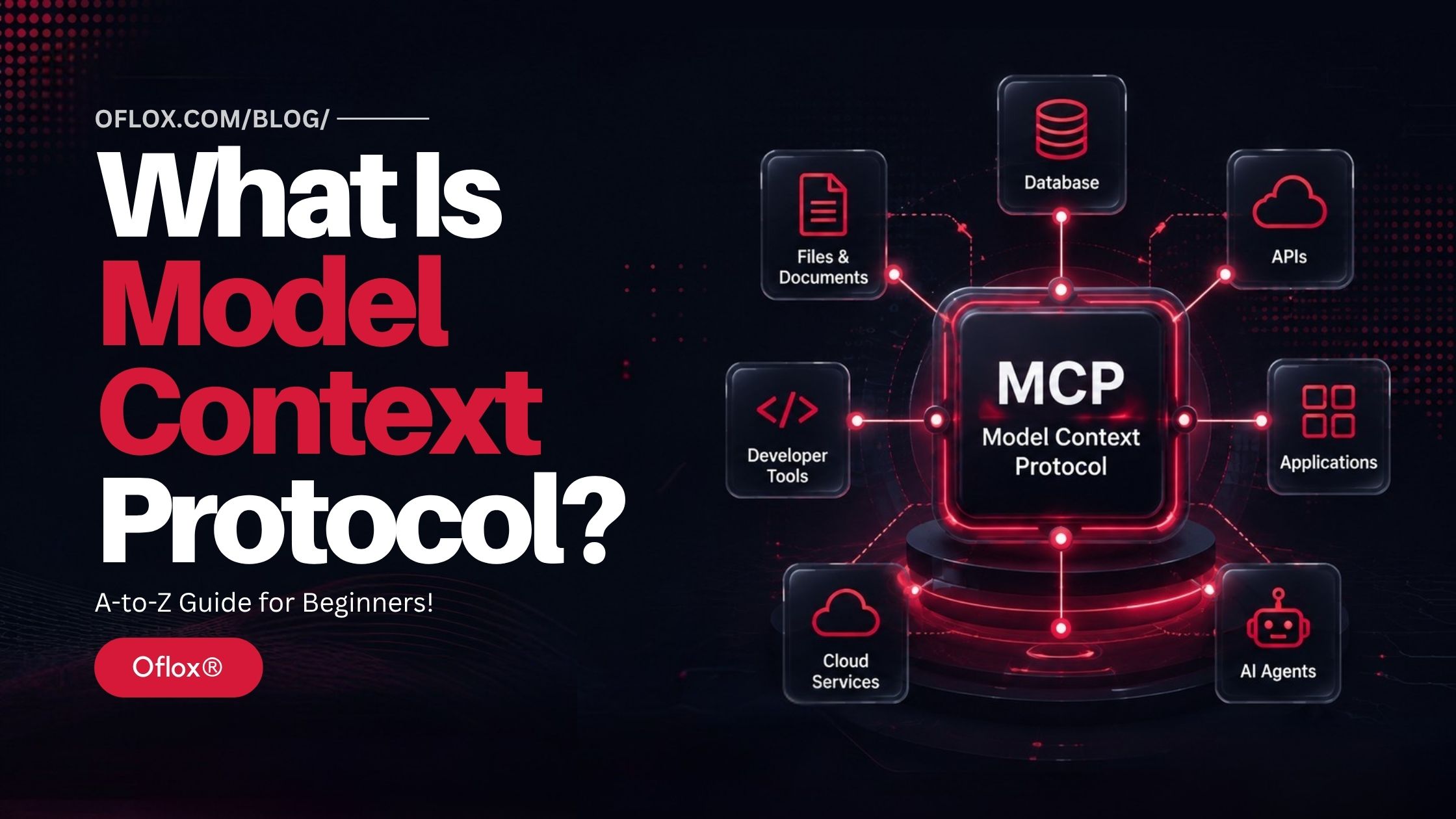
So, whether you are a developer, business owner, SaaS founder, AI enthusiast, or simply curious about the future of connected AI, understanding MCP can help you better understand how the next generation of AI applications may communicate with the tools and information around them.
Let’s explore it together.
Table of Contents
What Is Model Context Protocol?
Model Context Protocol (MCP) is an open protocol that standardises how AI applications connect with external data sources, tools, APIs, applications, and services.
In simple words:
MCP acts like a universal connection layer between AI applications and the external systems they need to understand or use.
For example, imagine an AI assistant that needs to access:
- Company documents,
- Customer databases,
- Git repositories,
- Cloud storage,
- Analytics platforms,
- Project management systems,
- Internal APIs,
- CRM software,
- Marketing platforms,
- or local files.
Without a common protocol, developers may have to create separate custom integrations for each system.
With MCP, compatible applications and services can communicate through a standardised architecture.
The official MCP specification defines server-side primitives including prompts, resources, and tools, which allow servers to provide instructions, contextual information, and executable functions to AI applications.
Why Is Model Context Protocol Important?
Large Language Models are extremely powerful, but a model alone usually does not automatically know everything happening inside your organisation or software environment.
Suppose a company asks its AI assistant:
“What were our five biggest customer complaints this month?”
The model cannot reliably answer unless it has access to relevant information.
That information may exist inside:
- CRM software,
- Support tickets,
- Databases,
- Emails,
- Documents,
- Analytics systems,
- or internal applications.
Traditionally, developers would create individual integrations to connect these systems.
That approach creates what can be described as an integration problem.
Imagine five AI applications connecting with ten business systems. Maintaining many independent connectors can quickly become complicated.
MCP attempts to reduce this fragmentation by creating a shared protocol.
Conceptually, instead of:
- AI Application → Custom Integration → Service A
- AI Application → Custom Integration → Service B
- AI Application → Custom Integration → Service C
developers can build around a common MCP interface.
This makes MCP particularly valuable as businesses adopt AI assistants, AI agents, coding agents, enterprise copilots, and automated AI workflows.
History and Background of Model Context Protocol
The rapid growth of generative AI created an unexpected infrastructure challenge.
AI models became increasingly capable, but useful business information remained distributed across thousands of databases, SaaS applications, developer tools, file systems, and internal platforms.
Connecting these systems normally required proprietary or custom integrations.
Anthropic publicly introduced and open-sourced the Model Context Protocol on 25 November 2024. Its stated goal was to provide a universal open standard for connecting AI systems with data sources instead of relying entirely on fragmented integrations.
MCP evolved quickly during 2025.
An important ecosystem development came in September 2025 with the preview launch of the official MCP Registry, designed as an open catalogue and API for discovering publicly available MCP servers.
By MCP’s first anniversary in November 2025, the protocol maintainers described MCP as having become a widely adopted standard for providing external context to AI applications. The November 2025 specification also introduced improvements related to task-based workflows, authorization, enterprise functionality, extensions, elicitation, and sampling.
As of 2026, the official documentation identifies 2025-11-25 as the current protocol version, while newer changes may appear in draft specifications before becoming current.
This distinction matters because MCP is still developing rapidly.
How Does Model Context Protocol Work?
Here’s a simple step-by-step explanation of how Model Context Protocol works, from connecting an AI application to discovering tools and finally returning useful results.
1. User Sends a Request
Everything normally starts with a user interacting with an AI application.
For example:
“Find the latest sales report and summarise the major changes.”The AI application needs access to an external system containing the sales report.
2. MCP Host Manages the AI Experience
The application containing the AI experience acts as the host.
The host is responsible for coordinating the model, MCP connections, permissions, and user interaction.
The host may be:
- An AI desktop application,
- Coding environment,
- Enterprise assistant,
- Development tool,
- AI-powered SaaS application,
- or agent platform.
3. MCP Client Connects to a Server
Inside the host, an MCP client establishes communication with an appropriate MCP server.
The client and server negotiate compatible protocol capabilities during initialization.
MCP versions use date-based identifiers such as 2025-11-25, and compatible clients and servers agree on the protocol version they will use.
4. Server Exposes Capabilities
The MCP server tells the client which capabilities it provides.
Depending on the server, these may include:
- Resources,
- Tools,
- Prompts,
- Completions,
- or other supported functionality.
For example, a CRM MCP server might expose tools such as:
- Search_customer
- Get_lead
- Create_contact
- Update_opportunity
The AI application can understand what capabilities are available.
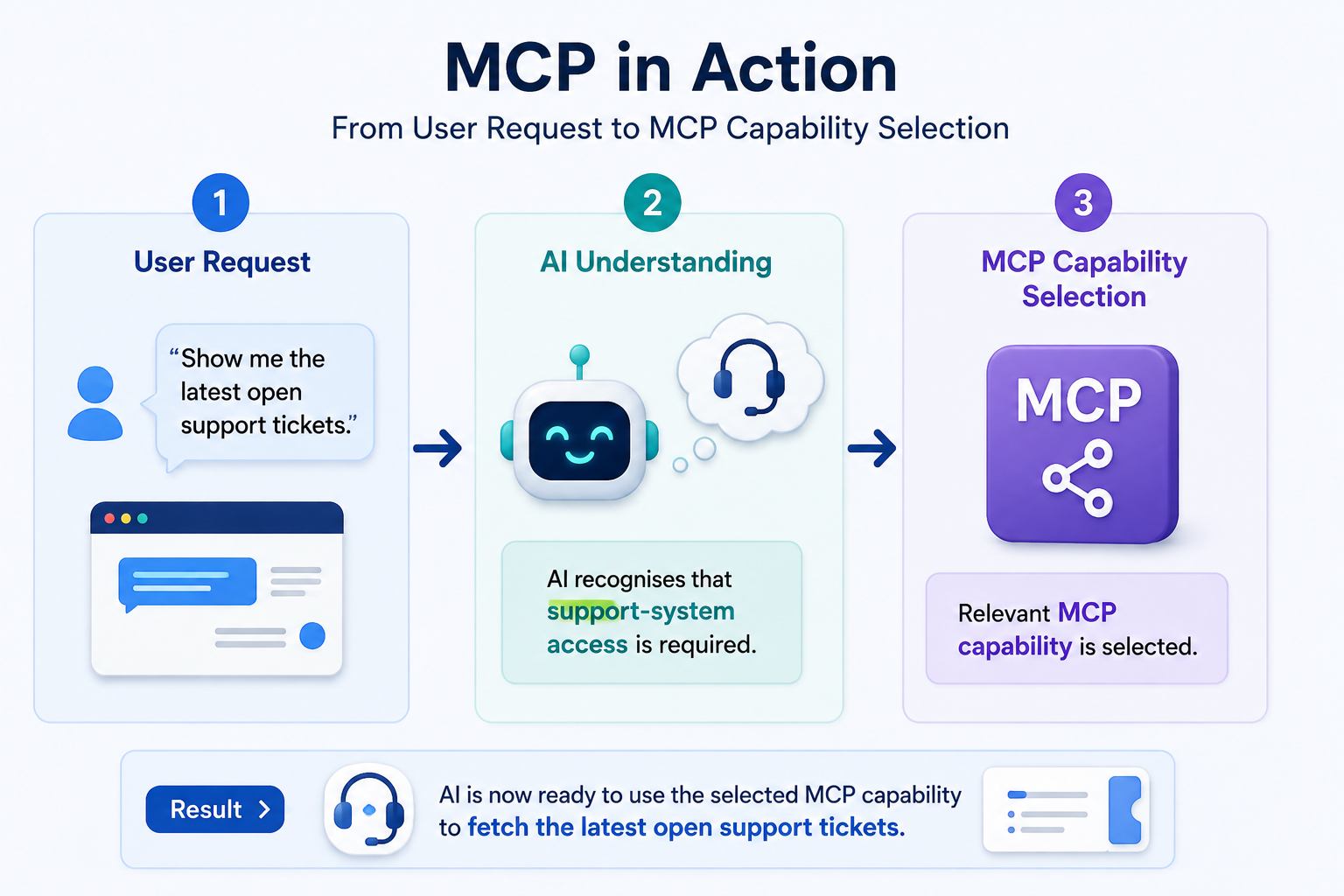
5. AI Determines What It Needs
Based on the user’s request, the AI application determines whether one of the available tools or resources could help.
For example:
6. Permission and Authorization Are Applied
Sensitive operations should not happen invisibly.
The MCP specification emphasises user consent and control. Hosts should obtain appropriate consent before exposing user data or invoking tools, particularly where actions or sensitive information are involved.
Depending on the implementation, the user may be asked to:
- Connect an account,
- Approve access,
- Authorize a service,
- Confirm an action,
- or grant specific permissions.
7. MCP Server Interacts With the External System
The MCP server communicates with the underlying service.
That service might be:
- A database,
- REST API,
- SaaS platform,
- Local file system,
- Development environment,
- Analytics platform,
- or internal business application.
8. Result Returns to the AI Application
The requested information flows back through the MCP connection.
The AI model can then use the returned context to complete the user’s task.
9. AI Generates the Final Response
Finally, the AI application transforms the retrieved information into a useful response.
The overall process can be visualised as:
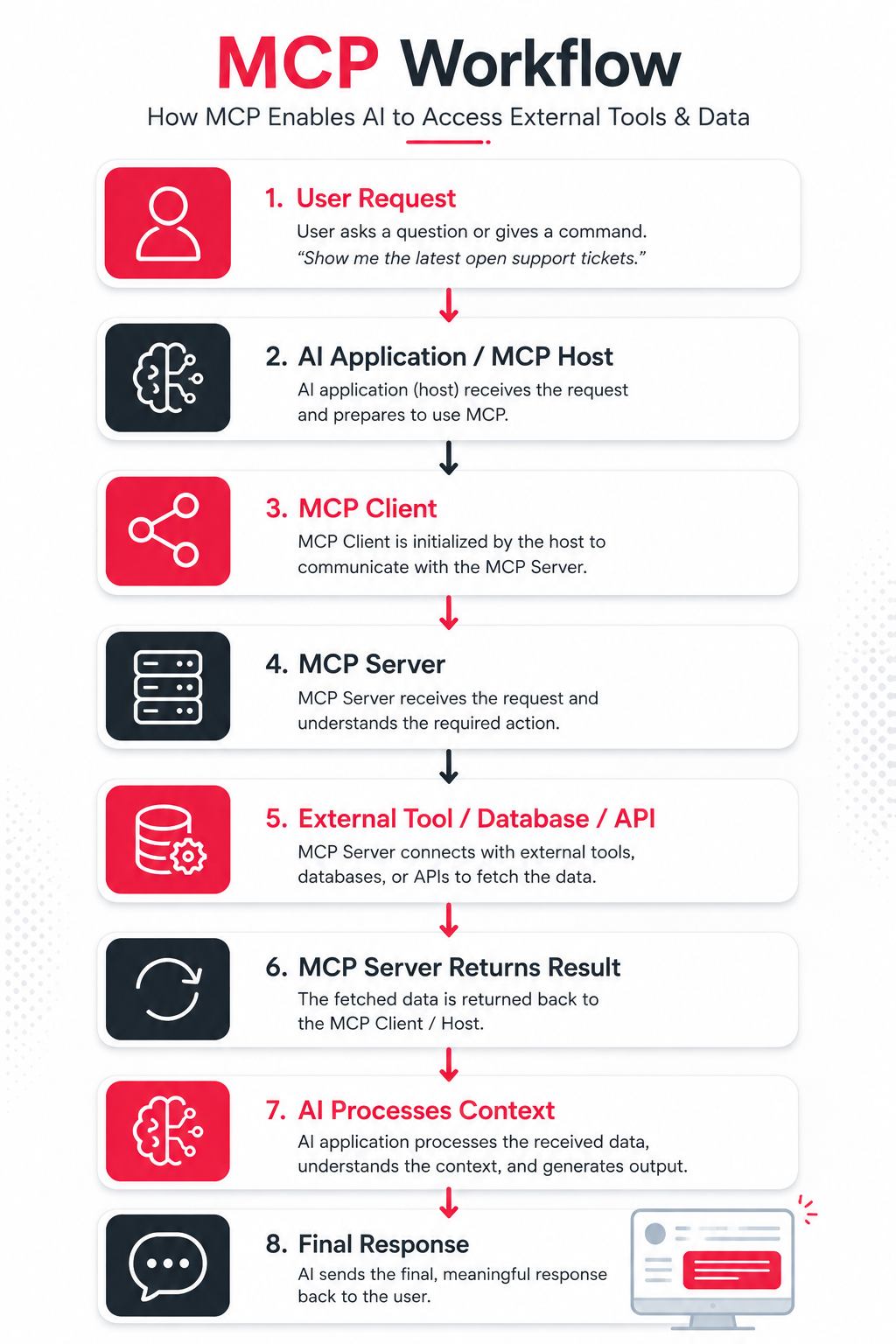
This architecture helps separate the AI reasoning layer from the systems that provide data and actions.
Core Architecture of Model Context Protocol
Understanding MCP becomes easier when we divide the architecture into its main components.
| Component | Main Role |
|---|---|
| MCP Host | Runs and manages the AI experience |
| MCP Client | Maintains communication with an MCP server |
| MCP Server | Exposes capabilities to the AI application |
| Resources | Provide contextual information |
| Tools | Allow actions or information retrieval |
| Prompts | Provide reusable interaction templates |
| External Systems | Databases, APIs, applications and services |
Let us understand the important elements.
1. MCP Host
The host is the application where the AI interaction takes place.
It manages areas such as:
- User interaction,
- Model access,
- MCP clients,
- Permissions,
- Security boundaries,
- And context handling.
2. MCP Client
The MCP client connects the host to an MCP server.
It handles protocol communication and capability negotiation.
An application may work with multiple MCP servers depending on the systems it needs.
3. MCP Server
The MCP server exposes specific functionality through the MCP protocol.
For example, a database MCP server could provide controlled database queries. A project-management MCP server could provide tools for retrieving or updating tasks.
A Git-based server might expose repository-related context.
The server effectively translates between MCP communication and the underlying system.
Three Important MCP Server Primitives
The MCP specification identifies three fundamental server primitives: Prompts, Resources, and Tools.
1. Resources
Resources provide contextual data.
Examples may include:
- Document contents,
- Configuration information,
- Database records,
- File contents,
- Git history,
- Application information,
- or structured datasets.
Resources help give the AI the information it needs.
2. Tools
Tools allow the AI application to perform functions or retrieve information dynamically.
Examples include:
- Searching a database,
- Creating an issue,
- Querying an API,
- Writing a file,
- Updating a record,
- Running a calculation,
- or submitting information.
Tools are particularly important for agentic AI systems because they allow an AI system to move from simply generating text to interacting with external environments.
3. Prompts
Prompts are reusable templates or instructions exposed by an MCP server.
They can help users and applications perform common workflows consistently.
The official documentation describes the control model broadly as:
| Primitive | Primary Control |
|---|---|
| Prompts | User-controlled |
| Resources | Application-controlled |
| Tools | Model-controlled |
However, being model-controlled does not mean tools should execute without safeguards. The MCP specification explicitly emphasises appropriate user consent around tool invocation.
Key Features of Model Context Protocol
MCP offers several characteristics that make it useful for modern AI development.
- Standardised Communication: Its biggest advantage is standardisation. Developers can build integrations against a common protocol rather than inventing a completely different communication pattern for every AI application.
- Client-Server Architecture: MCP uses a structured client-server approach. This separation makes systems easier to organise and potentially easier to maintain.
- Tool Discovery: AI applications can discover tools made available by compatible servers. This is important for dynamic AI-agent environments where different capabilities may become available.
- Resource Access: MCP can expose structured contextual information through resources. This helps AI applications work with information beyond what was included during model training.
- Reusable Prompts: Servers can expose reusable prompt templates for common workflows.
- Capability Negotiation: Clients and servers communicate their supported capabilities during initialization. This helps implementations determine what functionality is available.
- Version Negotiation: MCP uses date-based protocol revisions. Clients and servers can support multiple versions but must agree on a compatible protocol version for communication.
- Authorization Support: Modern MCP specifications include authorization mechanisms designed for remote services and controlled access. Authorization remains especially important for enterprise implementations.
- Extensible Ecosystem: MCP can support many categories of systems, including developer tools, cloud platforms, databases, productivity software, marketing platforms, analytics systems, content management platforms, and enterprise applications.
Benefits of Model Context Protocol
MCP can offer major benefits to developers, businesses, AI platforms, and users when implemented correctly.
- Reduced Integration Complexity: Without a standard protocol, developers may create large numbers of point-to-point integrations. MCP provides a common interface that can reduce repeated integration work.
- Better AI Context: AI responses become more useful when the system can access relevant, current, authorised information. MCP helps applications connect models with external context.
- Faster AI Application Development: Developers can potentially reuse existing MCP servers instead of rebuilding every connector from scratch. This may shorten development cycles.
- Easier Maintenance: A standardised interface can make integrations easier to maintain than a large collection of unrelated custom connectors.
- Better Tool Interoperability: The same MCP-compatible server may potentially be usable by multiple compatible hosts. This creates opportunities for a broader integration ecosystem.
- Supports AI Agents: Modern AI agents need more than text generation. They need the ability to Understand → Decide → Use Tools → Observe Results → Continue. MCP provides infrastructure that can help applications expose external tools and context to those agents.
- Enterprise Integration Potential: Businesses often have information distributed across CRM, ERP, analytics platforms, cloud storage, internal databases, support software, project management systems, and proprietary applications. MCP can provide a standard interface layer for connecting AI experiences with such systems.
MCP vs Traditional API Integration
MCP does not make APIs unnecessary. In many cases, an MCP server itself communicates with an existing API.
The difference is mainly the interface presented to the AI application.
| Factor | Traditional API Integration | MCP |
|---|---|---|
| Primary purpose | Application-to-service communication | Standardised AI-to-context/tool integration |
| Integration approach | Often service-specific | Common protocol |
| Tool discovery | Usually custom | Built into MCP patterns |
| AI-oriented context | Developer-defined | Core design consideration |
| Reusability across AI hosts | Depends on implementation | Major design goal |
| Existing APIs required? | Often | MCP can wrap existing APIs |
Therefore, it is better to think:
MCP complements APIs rather than universally replacing them.MCP vs Function Calling
Function calling allows a model or AI application to invoke structured functions.
MCP operates at a broader integration level.
A simple way to understand the difference is:
Function calling tells an AI how to call a function.
MCP provides a standard protocol through which applications can discover and interact with external capabilities and context.
The technologies can therefore complement each other.
Popular Tools and Technologies for Model Context Protocol
The MCP ecosystem has expanded considerably since its introduction.
- Official MCP Documentation: The official documentation and specification remain the most reliable starting points for understanding protocol architecture, security, authorization, SDKs, and current revisions.
- MCP Registry: The official MCP Registry provides a central metadata repository for publicly accessible MCP servers. It provides standardised server information and discovery functionality. As of 2026, the registry documentation still describes it as being in preview.
- MCP SDKs: Developers can use MCP SDKs and ecosystem libraries to build clients and servers, rather than implementing every protocol detail manually. When selecting an SDK, always verify compatibility with the protocol revision used by your application.
- Developer Environments: MCP has become especially useful in AI-assisted software development. An AI coding environment can potentially use MCP integrations to interact with repositories, documentation, databases, issue trackers, testing infrastructure, and development tools.
- Enterprise AI Platforms: Businesses can also create private MCP servers for internal applications rather than publishing them publicly. For example: Company AI Assistant → Private MCP Server → Internal CRM → Customer Data. This enables controlled enterprise AI workflows without requiring every internal system to expose itself publicly.
Real-World Examples of Model Context Protocol
The easiest way to understand MCP is through practical examples.
1. AI Coding Assistant
Suppose a developer asks:
“Find the bug reported in issue #485 and check which files are probably responsible.”An AI coding assistant could use connected capabilities to:
- Retrieve the issue,
- Inspect repository context,
- Analyse relevant files,
- Understand dependencies,
- Suggest modifications,
- And potentially prepare code changes.
MCP can provide a standard interface for exposing those development capabilities.
2. Customer Support Assistant
A support employee asks:
“Show me this customer's last five support tickets and summarise the unresolved issues.”The workflow could be:
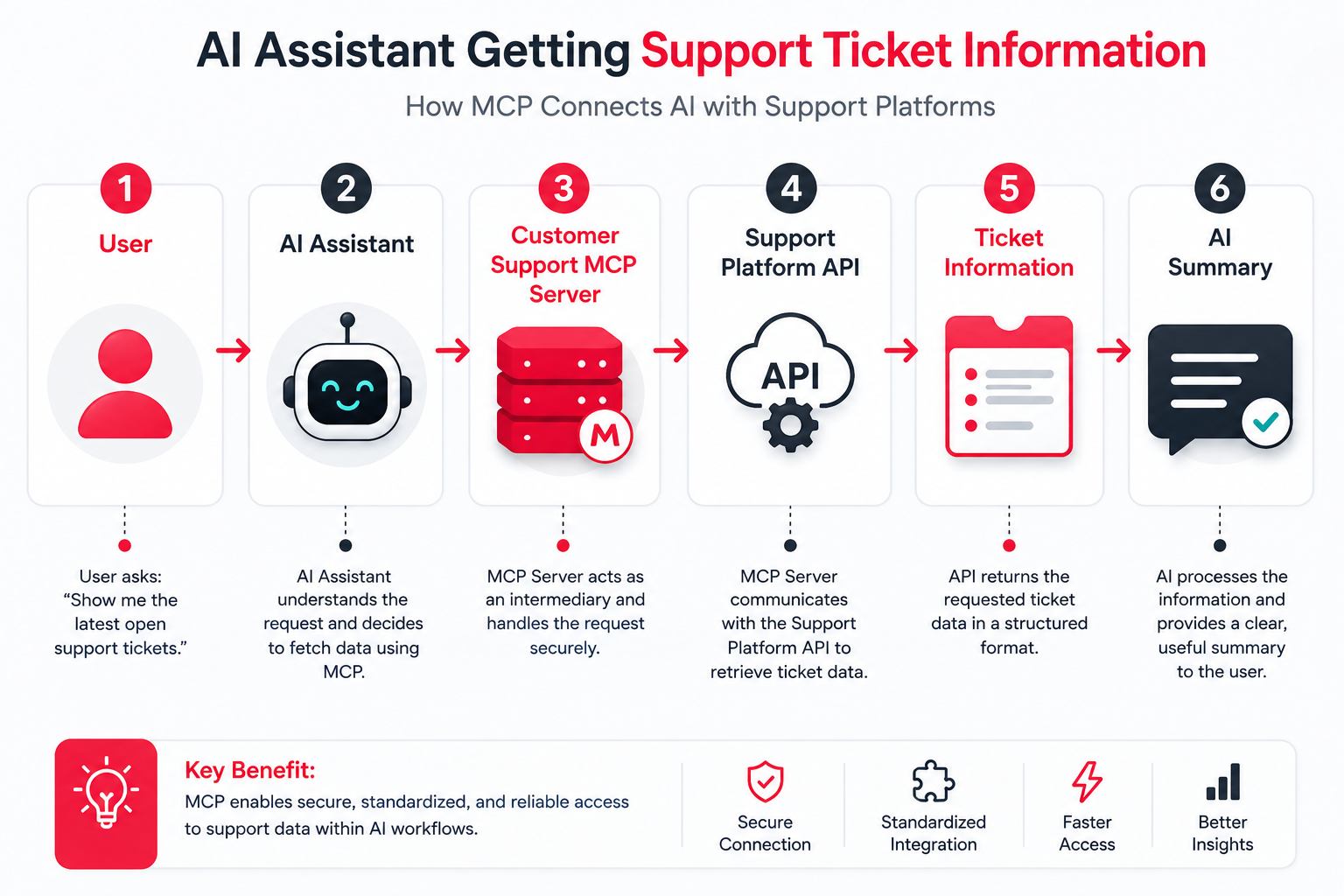
The employee gets contextual information without manually searching multiple screens.
3. Marketing Analytics
A marketer asks:
“Compare campaign performance for the last 30 days and identify campaigns with declining conversion rates.”An appropriate MCP integration could expose analytics or advertising data to the AI application.
The model could then analyse the retrieved information and explain trends.
4. Internal Knowledge Assistant
A company may have thousands of:
- SOPs,
- HR documents,
- policies,
- technical documents,
- product manuals,
- and internal guides.
An MCP server can expose authorised knowledge resources to an internal AI assistant.
Employees could ask:
“What is our refund approval process for enterprise customers?”The assistant could retrieve relevant company documentation and provide an answer grounded in internal information.
5. Database Analysis
Suppose a business owner asks:
“How many customers purchased Product A more than twice during the last six months?”A database-focused MCP server could provide controlled access to relevant querying capabilities.
The AI application could request the necessary data and explain the result.
Model Context Protocol for AI Agents
MCP becomes particularly interesting when combined with AI agents.
Traditional chatbots mainly follow:
Question → ResponseAI agents can follow more complex loops:
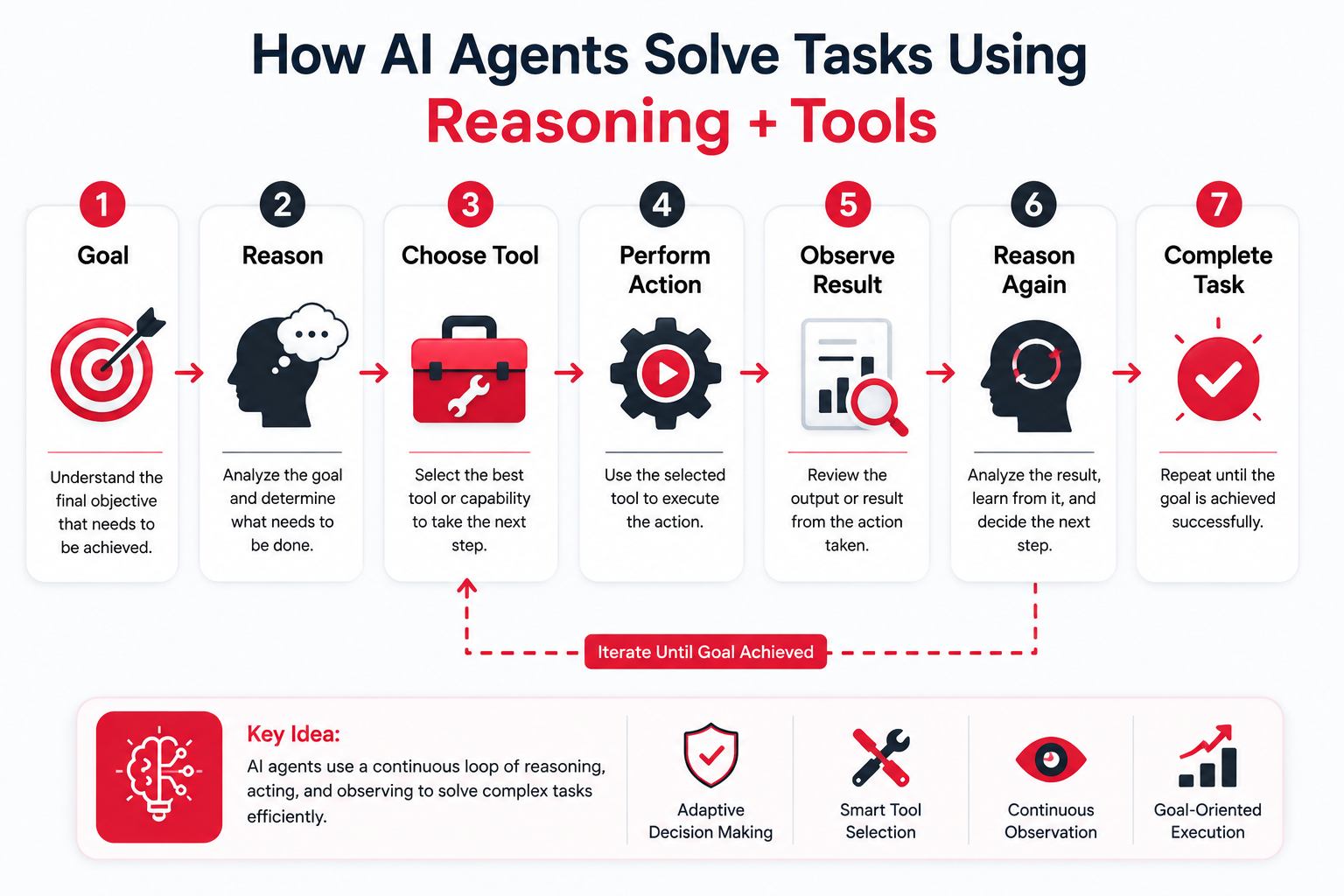
An agent therefore needs reliable ways to discover and access external capabilities.
MCP can serve as one of the infrastructure layers enabling these interactions.
Imagine an SEO agent receiving this instruction:
“Analyse declining organic traffic and prepare recommendations.”The agent could potentially use authorised tools for:
- Analytics data,
- Search-performance data,
- Website crawling,
- Keyword databases,
- CMS information,
- And internal reports.
Instead of building every integration specifically for one agent, MCP-compatible servers could expose these capabilities through standard interfaces.
Challenges and Limitations of Model Context Protocol
MCP is promising, but developers should not assume that using MCP automatically makes an AI system reliable, secure, or intelligent.
1. Security Risks
MCP tools may perform powerful actions. A poorly designed server or client can introduce serious security risks.
The official security guidance discusses threats including:
- Confused deputy attacks,
- Token passthrough,
- Server-side request forgery,
- Session-related risks,
- Local server compromise,
- Credential theft,
- And data exfiltration.
2. Malicious MCP Servers
Installing an unknown local MCP server can be risky.
A local server may run with significant access to the user’s machine.
Official security guidance therefore recommends measures such as sandboxing, restricted privileges, careful consent, and using trusted sources.
3. Permission Management
An AI application should not receive unlimited access merely because it can technically connect to a service.
Permissions should follow the principle of least privilege.
4. Tool Selection Errors
An AI model may choose an inappropriate tool or supply incorrect parameters.
Sensitive actions should therefore include validation and appropriate user confirmation.
5. Reliability
External systems can fail.
APIs may become unavailable, authentication can expire, tools may return errors, and schemas can change.
Applications need proper error handling.
6. Version Compatibility
Because MCP continues to evolve, clients and servers need to handle protocol compatibility correctly.
7. Data Privacy
Organisations must understand:
- What information leaves their environment,
- Which server receives it,
- Which model can access it,
- How credentials are stored,
- And what logs are retained.
Security Best Practices for MCP
Security should be treated as a fundamental part of MCP architecture.
1. Use Trusted MCP Servers
Do not install random MCP servers simply because they promise useful functionality.
Review:
- Source,
- Developer reputation,
- Permissions,
- Code where possible,
- Network access,
- And required credentials.
2. Apply Least Privilege
Provide only the permissions required for a task.
For example, if an AI assistant only needs to read analytics reports, it should not automatically receive permissions to delete campaigns.
3. Require Confirmation for Sensitive Actions
Actions such as:
- Deleting files,
- Sending messages,
- Changing financial information,
- Publishing content,
- Modifying production systems,
- or updating customer records
should have appropriate confirmation controls.
4. Protect Authentication Tokens
Credentials should never be casually included in prompts, configuration files, logs, or public repositories.
The MCP security guidance explicitly warns against improper token passthrough and recommends that servers validate tokens intended for them.
5. Sandbox Local Servers
Where practical, local MCP servers should run with restricted:
- Filesystem access,
- Network access,
- Operating-system permissions,
- And execution privileges.
6. Maintain Audit Logs
Enterprise deployments should maintain appropriate logs showing:
Who requested what → Which tool was used → What action occurred → What result was returnedThis becomes increasingly important as AI agents gain greater autonomy.
How to Start Using Model Context Protocol
For developers exploring MCP, a practical learning path can look like this.
1. Understand MCP Fundamentals
Learn:
- Host,
- Client,
- Server,
- Tools,
- Resources,
- Prompts,
- Transports,
- Authorization,
- And protocol lifecycle.
2. Study the Current Specification
Because MCP changes quickly, avoid relying entirely on old tutorials.
Check the current protocol version in the official documentation.
3. Choose an SDK
Use an appropriate SDK or framework for your preferred programming environment.
4. Build a Simple MCP Server
Start with a safe tool.
For example:
get_current_inventory(product_id)The server could retrieve inventory information from a test database.
5. Connect a Compatible Client
Connect the server to an MCP-compatible host or development client.
6. Test Tool Discovery
Confirm that the client can correctly identify:
- Tool name,
- Description,
- Arguments,
- And expected results.
7. Add Error Handling
Test:
- Missing parameters,
- Invalid authentication,
- API failures,
- Unavailable services,
- Malformed responses,
- And timeouts.
8. Implement Security
Before production deployment, add proper:
- Authentication,
- Authorization,
- Validation,
- Permission controls,
- Logging,
- And sandboxing where necessary.
9. Monitor Usage
Track tool calls, failures, latency, unexpected behaviour, and security events.
Expert Tips for Implementing MCP
Here are some practical expert tips to consider when implementing MCP in your AI applications, tools, and business workflows.
1. Keep Tools Focused
A tool should ideally have one clearly understandable purpose.
Instead of creating:
manage_everythingcreate focused capabilities such as:
- get_customer
- create_customer
- update_customer_status
- get_customer_orders
Clear tool boundaries make behaviour easier to understand and control.
2. Write Clear Tool Descriptions
AI systems rely heavily on tool descriptions when determining what capability to use.
Descriptions should explain:
- what the tool does,
- when it should be used,
- required arguments,
- limitations,
- and important side effects.
3. Separate Read and Write Permissions
Where possible, distinguish between operations that retrieve information and operations that modify information.
This allows stricter control over dangerous actions.
4. Validate Every Input
Never assume model-generated arguments are automatically safe.
Validate them server-side.
5. Design for Failure
External systems will occasionally fail.
Your MCP implementation should return understandable errors that help the application determine what happened.
6. Keep Humans in Control
High-impact operations should maintain meaningful user oversight.
This aligns with MCP’s published security principles around consent, data privacy, and tool safety.
Common Model Context Protocol Mistakes
Even experienced developers can make mistakes while implementing a fast-evolving technology like MCP. Here are some of the most common problems to avoid.
- Giving Excessive Permissions: Do not give an MCP server full account access when read-only access is sufficient.
- Installing Untrusted Servers: An attractive GitHub repository or package name does not automatically make a server safe. Review it before providing credentials or system access.
- Ignoring Tool Descriptions: Poor descriptions can cause models to misunderstand when tools should be used.
- Hardcoding Credentials: API keys and access tokens should be stored securely rather than directly inside source code.
- Skipping Input Validation: Treat model-generated tool arguments as untrusted input.
- Allowing Destructive Actions Without Confirmation: Deletion, payment, publishing, and production changes require additional safeguards.
- Assuming MCP Replaces APIs: MCP often sits on top of existing APIs and services. It standardises AI-facing integration rather than eliminating underlying systems.
- Ignoring Protocol Updates: MCP is evolving quickly. Developers should monitor specification changes and test compatibility before upgrading production environments.
Future of Model Context Protocol: 2026 and Beyond
MCP is still relatively young, but its development suggests several important directions.
1. Larger MCP Server Ecosystem
The number and variety of MCP servers are likely to continue growing.
The official MCP Registry already provides infrastructure for publishing and discovering publicly available servers.
2. Enterprise MCP Registries
Large organisations may maintain approved internal registries containing only reviewed MCP servers.
This could provide employees with secure access to company-approved AI capabilities.
3. Stronger Security Controls
Security will become increasingly important as MCP-connected agents gain access to sensitive systems.
Expect stronger focus on:
- Identity,
- Permissions,
- Auditability,
- Server verification,
- Sandboxing,
- Authorization,
- And enterprise policy enforcement.
4. More Autonomous AI Agents
Future AI agents may dynamically discover capabilities and combine several tools to complete complex objectives.
For example:
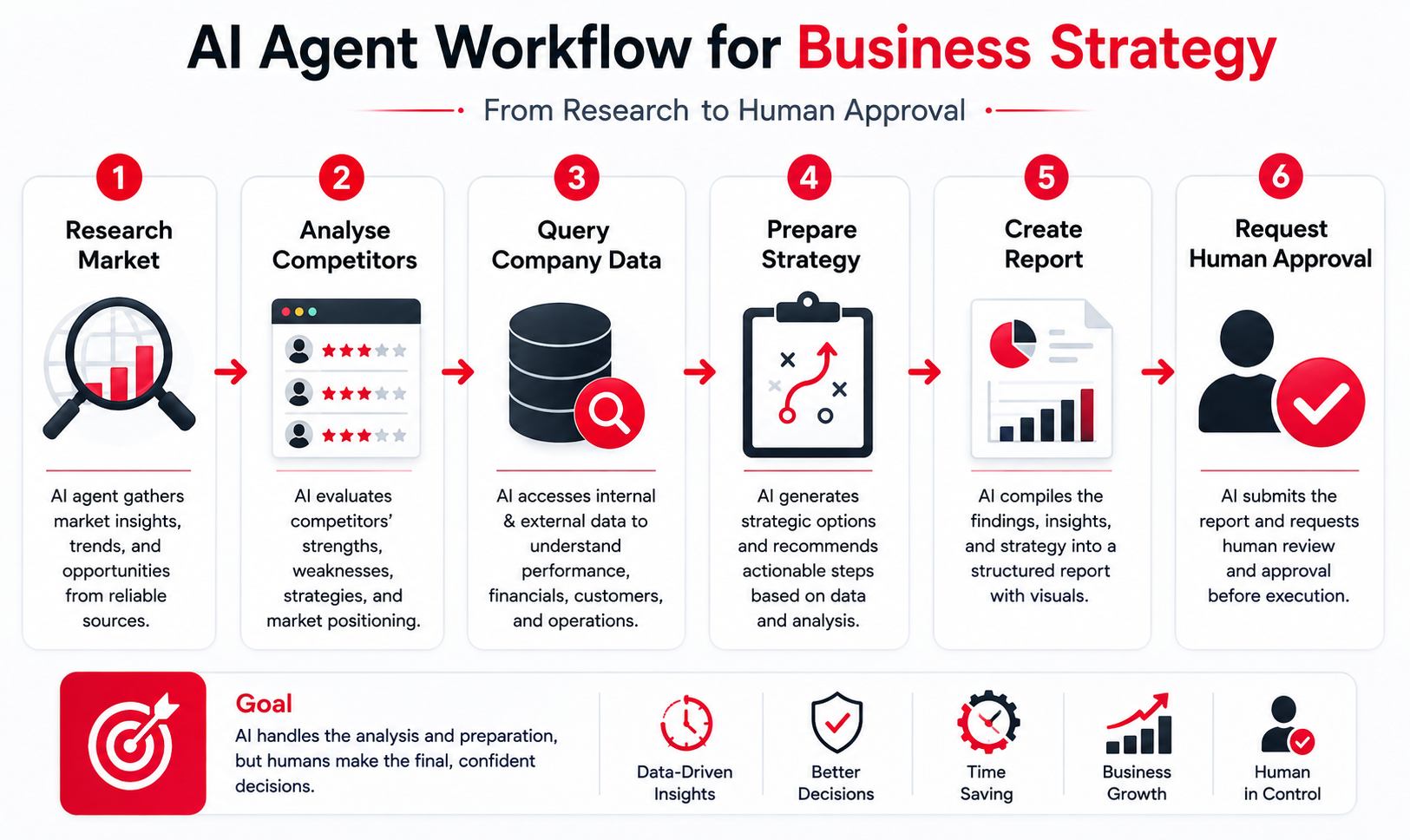
MCP can help provide the integration layer required for such workflows.
5. Task-Based Workflows
The November 2025 MCP specification introduced support related to task-based workflows, indicating movement toward longer-running and more sophisticated agent operations.
6. Better Server Discovery
Registry infrastructure can make it easier for AI applications and developers to discover compatible capabilities instead of configuring every integration manually.
7. Observability and Governance
As MCP becomes part of enterprise infrastructure, organisations will increasingly need to know:
- Which agent used which server,
- Which tools were invoked,
- What data was accessed,
- What actions were performed,
- And whether company policies were followed.
8. MCP as Part of the AI Infrastructure Stack
The long-term importance of MCP may not come from replacing APIs, databases, or AI models.
Instead, it could become an important interoperability layer connecting them.
A future AI stack may look like:
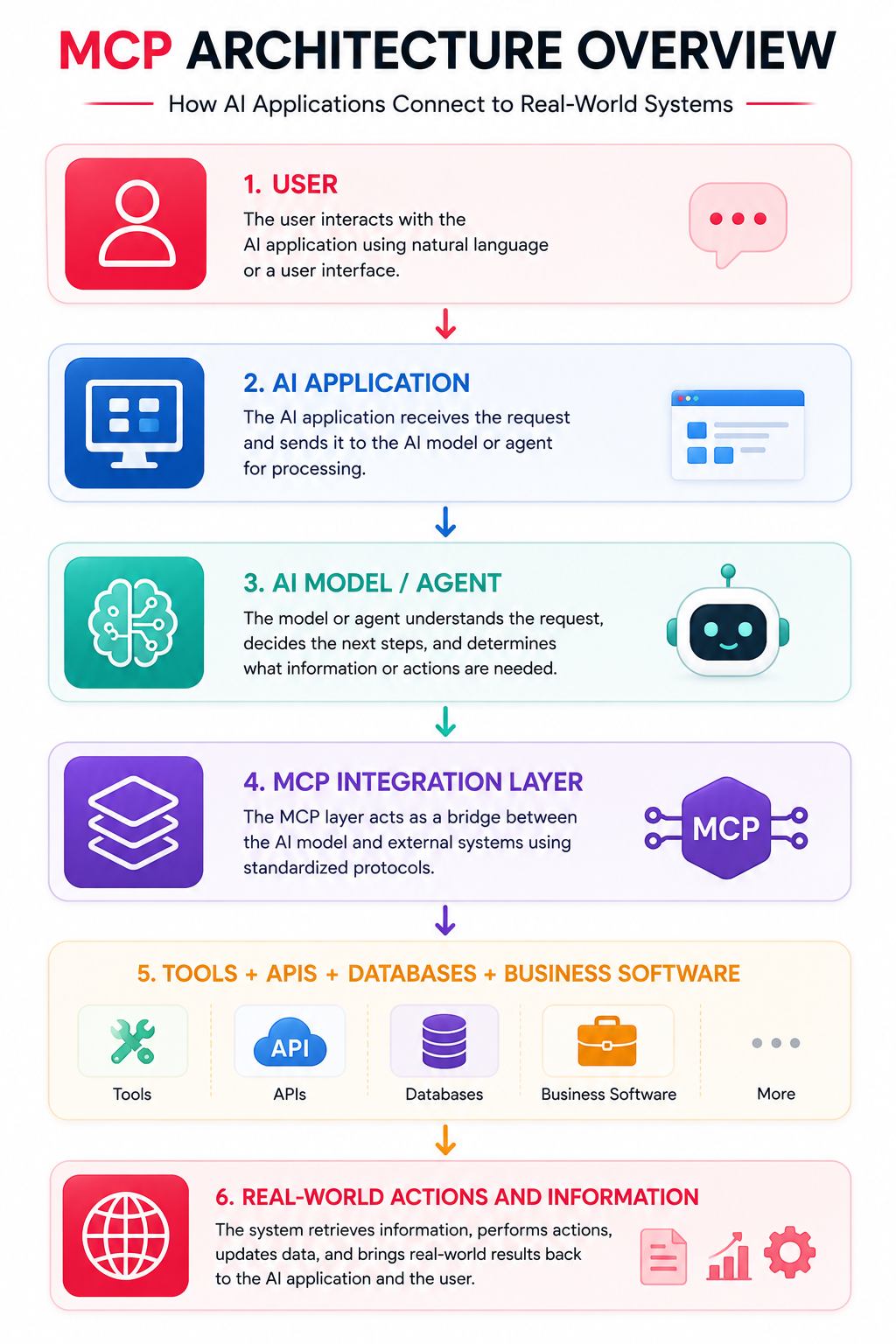
If adoption continues, developers may increasingly think of external AI capabilities in terms of reusable, discoverable tools rather than one-off integrations.
FAQs:)
A. Model Context Protocol (MCP) is an open standard for connecting AI applications with external data sources, tools, APIs, and services through a common protocol.
A. MCP was originally introduced and open-sourced by Anthropic on 25 November 2024.
A. MCP stands for Model Context Protocol.
A. MCP reduces the need for fragmented, custom AI integrations by providing a standard way for compatible applications to communicate with external capabilities.
A. An MCP server is a program or service that exposes capabilities such as tools, resources, and prompts to compatible MCP clients.
A. An MCP client is the component that communicates with an MCP server on behalf of an AI host application.
A. MCP tools are executable functions exposed by servers. They can allow AI applications to retrieve information or perform actions in external systems.
A. Resources are contextual information exposed through MCP, such as files, records, documents, application data, or other structured content.
A. Prompts are reusable templates or instructions provided by MCP servers for particular interactions or workflows.
A. Not exactly. MCP is a protocol designed to standardise how AI applications interact with contextual information and capabilities. MCP servers may themselves communicate with traditional APIs.
A. No. MCP can wrap or interact with existing REST APIs. Traditional APIs continue to provide underlying application functionality.
A. No. Although Anthropic originally introduced MCP, it was released as an open protocol and has developed into a broader ecosystem rather than being conceptually limited to a single model.
MCP can be implemented securely, but it is not automatically safe. Security depends on server trust, permissions, authorization, input validation, credential handling, user consent, sandboxing, and other implementation choices.
A. An appropriately configured MCP server can expose local resources or capabilities, but such access should be carefully restricted because local servers can create significant security risks.
A. Yes. MCP is particularly useful for agentic applications because agents frequently need external tools, contextual information, and services to complete multi-step tasks.
A. As of August 2026, the official MCP versioning documentation lists 2025-11-25 as the current protocol version, while additional proposed changes may exist in draft specifications.
Conclusion:)
Model Context Protocol is becoming an important part of the modern AI ecosystem because it provides a standardised way for AI applications to connect with external tools, APIs, databases, files, business applications, and other data sources.
Instead of creating separate integrations for every AI application and service, MCP provides a common communication layer that can make AI development more flexible, reusable, and scalable. This makes it particularly useful for AI agents, coding assistants, enterprise AI systems, SaaS applications, automation platforms, and modern developer workflows.
However, implementing MCP is not only about connecting AI with more tools. Developers and organisations must also carefully consider security, authentication, permissions, user consent, data privacy, trusted MCP servers, and access control, especially when AI systems are capable of accessing sensitive information or performing real-world actions.
As AI agents become more advanced in 2026 and beyond, Model Context Protocol may play an increasingly important role in creating connected and context-aware AI systems that can understand information, interact with different tools, and complete complex tasks more efficiently.
“Model Context Protocol can become the bridge between AI intelligence and the tools that turn intelligence into real-world action.” — Rahman, Founder of Oflox®
Read also:)
- What Is Unified Communications? A Complete Guide for Beginners!
- What Is AI Software Development? A-to-Z Guide for Beginners!
- What Is Digital Signature Certificate? A-to-Z Guide for Beginners!
We hope this article has helped you understand Model Context Protocol (MCP) and how it works. If you have any questions, experiences, or suggestions related to MCP, feel free to share them in the comments below. We would be happy to hear from you.