This article provides a complete guide on What Is a Local Coding Agent, including its meaning, importance, history, working process, key features, benefits, challenges, popular tools, real-world examples, expert tips, common mistakes, frequently asked questions, and future trends.
Artificial Intelligence is changing the way software is developed. Earlier, developers used AI mainly to generate code snippets, explain errors, or suggest solutions. Today, AI tools are becoming much more advanced and can perform complete development tasks such as reading project files, understanding repositories, editing code, running terminal commands, testing applications, and fixing errors automatically.
This is where a Local Coding Agent becomes useful.
A Local Coding Agent is an AI-powered development assistant that works directly with your local coding environment. Depending on the setup, it can access project files, use terminal commands, analyse code, modify files, run tests, and help developers complete multi-step programming tasks. Some Local Coding Agents can also work with locally hosted AI models, giving developers better control over privacy, data, performance, and infrastructure.
Today, Local Coding Agents are becoming popular among software developers, startups, AI engineers, DevOps teams, cybersecurity professionals, and businesses that want faster development with more control over their source code and development environment.
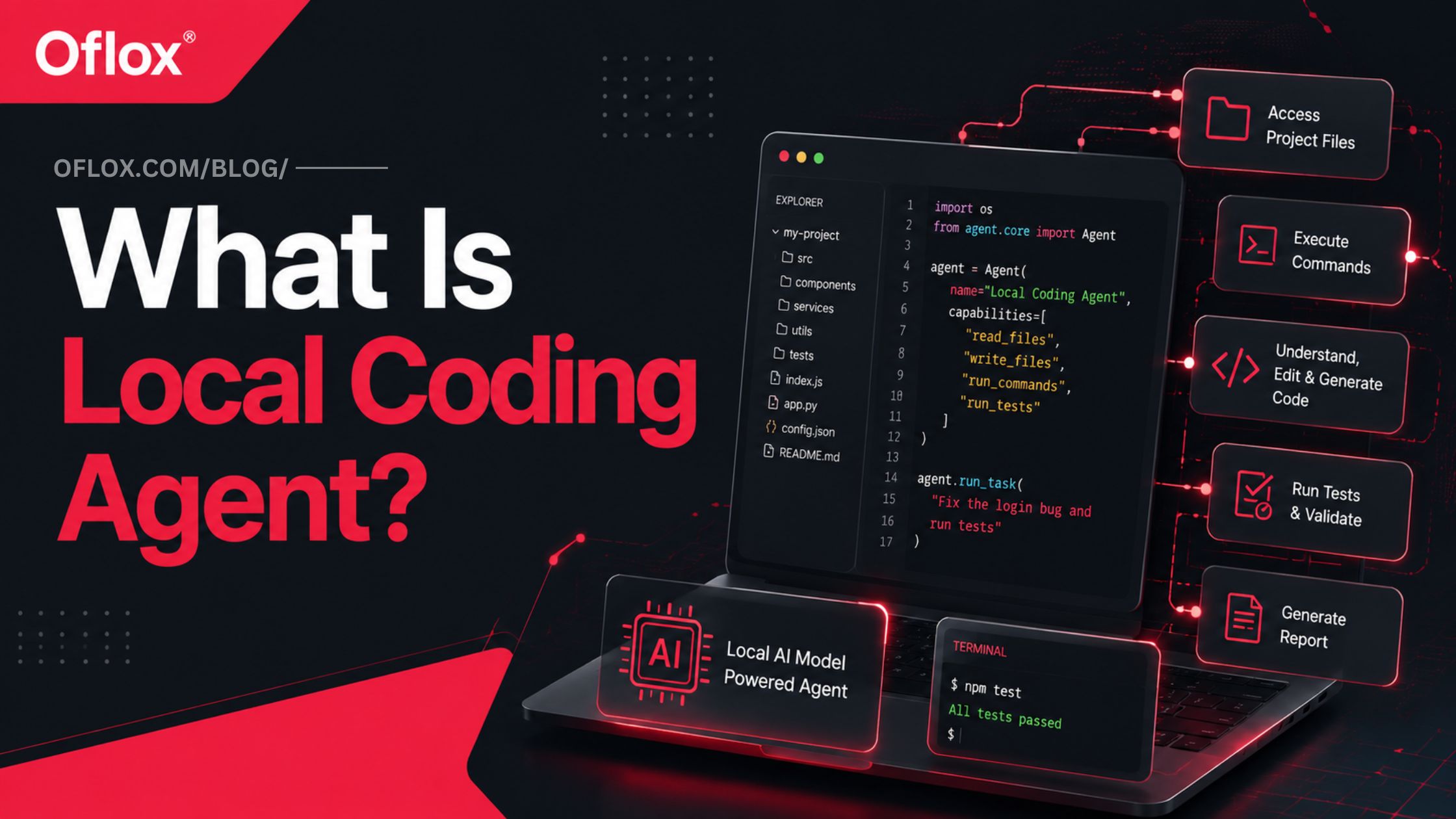
So, if you want to understand how Local Coding Agents work, how they are different from traditional AI coding assistants, and why they are becoming important in modern software development, this guide will explain everything in simple language.
Let’s explore it together.
Table of Contents
What Is a Local Coding Agent?
A Local Coding Agent is an AI-powered programming agent that operates within or alongside a developer’s local computing environment and can autonomously perform software development tasks such as reading code, editing files, executing commands, debugging errors, running tests, and reviewing results.
The word “local” needs some clarification.
There are generally two ways the term is used:
- Local-agent workflow: The coding agent and its tools operate on your local repository and development environment, while the underlying AI model may be accessed through a cloud API.
- Fully local coding agent: The agent, coding harness, model inference, project files, and related processing all remain on infrastructure controlled by the developer or organisation.
Therefore, not every tool described as a local coding agent is automatically 100% offline or private.
A fully local architecture may look like this:
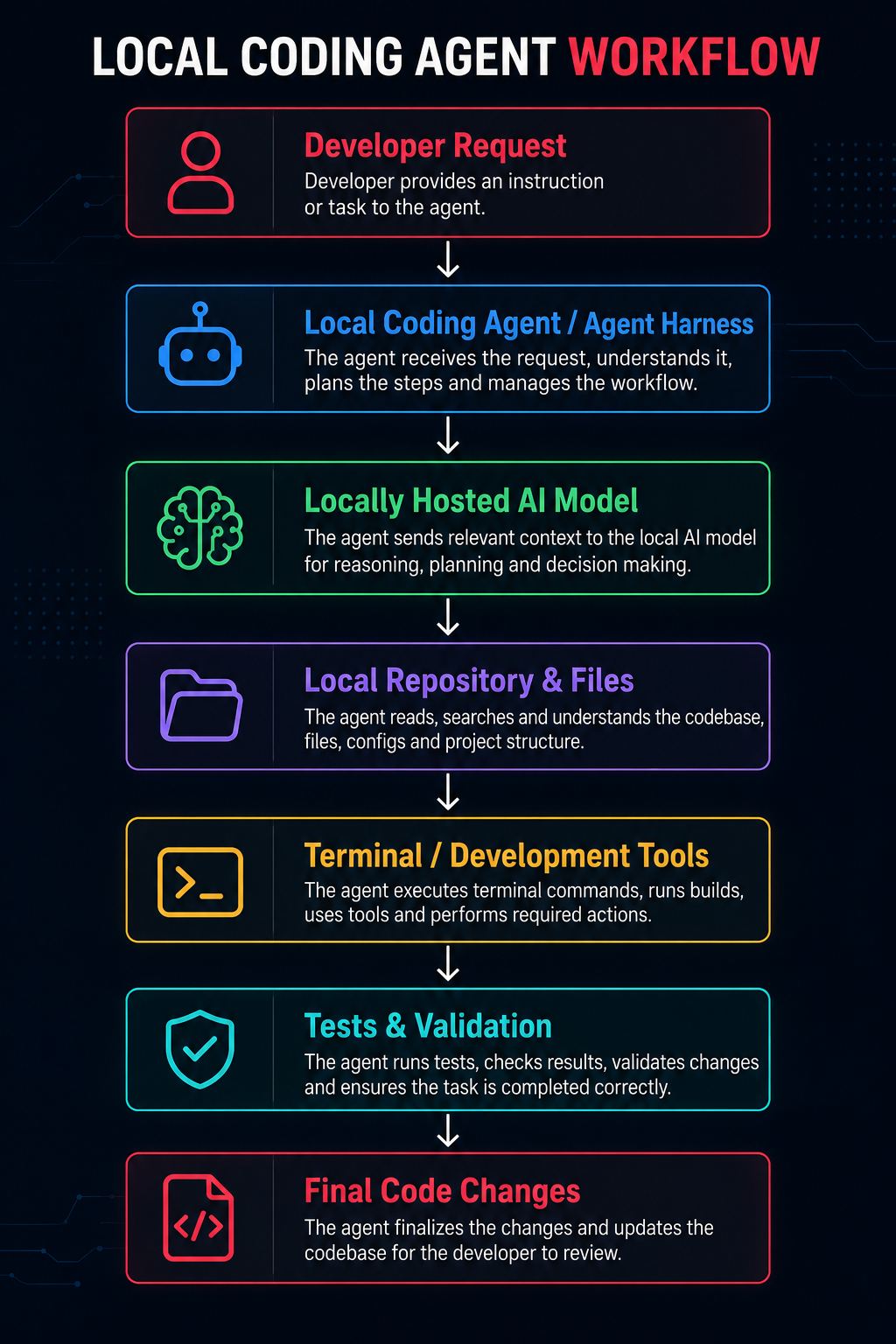
Research and practical implementations in 2026 increasingly describe the AI model as the reasoning engine while the surrounding agent harness provides tools that allow it to perform meaningful work inside a repository.
Local Coding Agent vs AI Coding Assistant
It is easy to confuse an AI coding assistant with a coding agent, but their capabilities can be quite different.
| Area | Traditional AI Coding Assistant | Local Coding Agent |
|---|---|---|
| Primary role | Suggest or generate code | Perform development tasks |
| Repository access | Limited or contextual | Often direct |
| File editing | Usually manual or editor-assisted | Can be autonomous |
| Terminal access | Usually limited | Common |
| Test execution | Developer often runs tests | Agent can run tests |
| Multi-step tasks | Limited | Core capability |
| Error feedback loop | Often manual | Can be automated |
| Git interaction | Limited | Often supported |
| Local models | Sometimes | Common in local-first stacks |
| Offline capability | Usually no | Possible |
| Human approval | User applies suggestions | Configurable permission model |
The major difference is agency. A coding assistant primarily helps the developer decide what code to write. A coding agent can potentially reason, act, observe the result, and act again.
Why Are Local Coding Agents Important?
Modern software projects contain hundreds or thousands of files, dependencies, APIs, configuration files, tests, build systems, and development tools.
Simply generating a code snippet is no longer enough for many development tasks.
A developer might need AI to:
- Understand an unfamiliar repository;
- Locate a bug across multiple files;
- Implement a feature;
- Modify database logic;
- Update tests;
- Run a compiler;
- Inspect errors;
- Fix failed tests;
- Review Git changes;
- Update documentation.
Local coding agents bring AI closer to the actual environment where these tasks happen.
They are particularly attractive where organisations want greater control over source code, infrastructure, model choice, permissions, cost, and development data.
Fully local configurations can also provide offline operation after the necessary software and models have been downloaded. Practical implementations demonstrate local coding harnesses connected to locally served models that can edit files and run commands without relying on a cloud model during normal operation.
History and Evolution of Local Coding Agents
The concept did not appear overnight. It developed through several stages of AI-assisted programming.
1. Code Completion
Early intelligent development tools mainly predicted the next word, statement, or line of code.
The developer remained responsible for almost everything else.
2. AI Code Generation
Large Language Models made it possible to request:
“Write a Python function that validates an email address.”
AI could generate complete functions, classes, scripts, and explanations.
However, developers still had to copy, integrate, and test the generated code.
3. Repository-Aware Assistants
AI tools started gaining access to multiple files and broader repository context.
Instead of understanding only one code snippet, the system could analyse relationships between components.
4. Agentic Coding
Coding tools gained the ability to use tools and perform actions.
The workflow became:
Understand → Plan → Act → Observe → CorrectThis was a major shift because AI moved from merely generating code to participating in the software development process.
5. Local and Terminal-Native Agents
Developers increasingly began using agents directly from terminals, where software development activities such as Git operations, builds, tests, package management, and deployment commands already take place.
A 2026 research paper on terminal coding agents highlights this broader transition toward terminal-native autonomous development and identifies context management, safety controls, planning, execution, and project memory as important components of robust systems.
6. Fully Local Agent Stacks
The next evolution combines:
Local Agent Harness + Local Model Runtime + Open-Weight Coding Model + Local Developer ToolsThis makes it possible to create development workflows where sensitive project context does not need to be sent to an external model provider.
How Does a Local Coding Agent Work?
Although implementations differ, most local coding agents follow an iterative workflow.
1. Developer Provides a Task
Everything starts with an instruction.
For example:
“Add rate limiting to the login API.”
Or:
“Find why the payment tests are failing and fix the issue.”
The task may be simple or may require changes across multiple files.
2. Agent Understands the Request
The AI model analyses the user’s objective.
It may identify:
- Required functionality;
- Likely affected components;
- Project constraints;
- Dependencies;
- Testing requirements;
- Potential risks.
Advanced agents may create an internal plan before editing anything.
3. Agent Explores the Repository
The agent examines the project.
It may use tools to:
- List directories;
- Search filenames;
- Search symbols;
- Read source files;
- Inspect configuration;
- Examine dependencies;
- Inspect tests;
- Review Git history or status.
This gives the model contextual information about how the application works.
4. Relevant Context Is Sent to the Model
A large repository cannot always fit inside an AI model’s context window.
Therefore, the agent must select relevant information.
This process is often called context engineering.
The agent may collect:
User request + project instructions + relevant files + tool results + previous actions + errorsand provide the useful subset to the model.
Effective context management is particularly important during long-running tasks because repeatedly adding command output and source code can cause context bloat. Modern agent architectures therefore use techniques such as context compaction and selective tool discovery.
5. AI Creates a Plan
The agent decides what actions should be performed.
For example:
- Inspect authentication middleware;
- Identify login endpoint;
- Understand existing caching infrastructure;
- Implement rate limiter;
- Update configuration;
- Add unit tests;
- Test suite;
- Inspect Git diff.
Planning reduces unnecessary modifications and makes complex tasks easier to manage.
6. Agent Edits Files
The agent can now modify the repository.
Depending on permissions, it may:
- Create files;
- Edit functions;
- Refactor classes;
- Modify configuration;
- Update dependencies;
- Write tests;
- Update documentation.
Modern terminal agents commonly provide dedicated file reading, searching, writing, and editing tools rather than simply generating text responses.
7. Agent Runs Commands
After changing the code, the agent may execute terminal commands.
For example:
npm test
or:
pytest
or:
npm run build
The exact command depends on the project.
Some local agents require explicit approval before shell commands or potentially risky operations are executed. This permission layer is an important security feature.
8. Agent Observes the Result
Suppose the tests fail.
The agent reads the error:
AssertionError: expected status 200 but received 500
Instead of stopping immediately, an agent can analyse the failure.
This creates the important agentic loop:
Action → Observation → Reasoning → New Action9. Agent Fixes the Problem
Based on the error, the agent may reopen the affected file, modify its implementation, and rerun the tests.
The loop may continue several times.
For example:
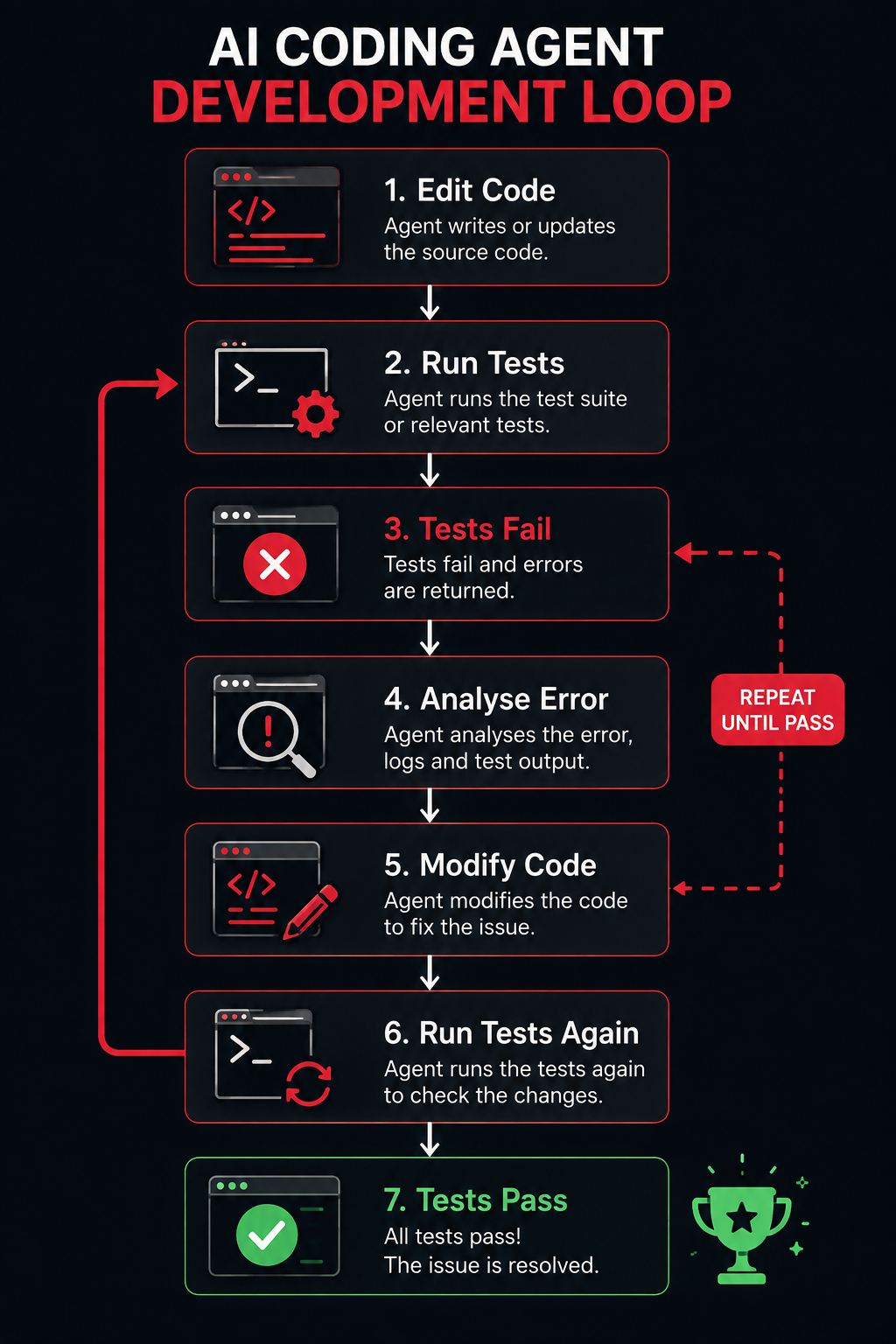
This iterative capability separates a true coding agent from a simple code generator.
10. Developer Reviews the Changes
The agent should not automatically be trusted simply because the tests pass.
The developer should review:
- Modified files;
- Git diff;
- Security implications;
- Dependency changes;
- Test coverage;
- Performance implications;
- Business logic.
Human review remains an essential part of responsible agentic development.
Core Architecture of a Local Coding Agent
A typical system contains several interconnected components.
1. User Interface
This may be:
- Terminal CLI;
- Terminal UI (TUI);
- Desktop application;
- IDE extension;
- Web interface connected to a local service.
The terminal has become particularly popular because it already provides access to Git, package managers, compilers, testing frameworks, and operating-system utilities.
2. Agent Harness
The agent harness is the software surrounding the AI model.
It manages things such as:
- Prompts;
- Tools;
- File access;
- Permissions;
- Context;
- Conversation state;
- Model calls;
- Action loops;
- Error handling.
Think of it as the operating framework of the coding agent.
3. AI Model
The LLM provides reasoning, planning, language understanding, and code generation.
A local stack may use an open-weight coding model served through a local inference runtime.
Alternatively, a locally running agent may connect to a cloud-hosted model.
Therefore:
Local agent ≠ necessarily local model.Always check where inference actually happens.
4. Local Model Runtime
When a model is running locally, another application generally loads and serves it.
Popular approaches include local inference servers and model-running platforms.
The runtime handles:
- Model loading;
- GPU/CPU processing;
- Inference;
- Token generation;
- Memory management;
- API-compatible endpoints.
5. Tool Layer
Tools give the AI the ability to interact with the environment.
Examples include:
read_file
write_file
edit_file
search_files
list_directory
run_command
git_diff
run_tests
Without tools, the model mainly produces text.
With tools, it can take controlled actions.
6. Context Manager
The context manager decides what information the AI should receive.
It may include:
- Project instructions;
- Source files;
- Repository structure;
- Recent command results;
- Previous edits;
- Errors;
- Conversation history.
Good context management can significantly improve agent reliability.
7. Permission and Sandbox Layer
This controls what the agent is allowed to do.
For example:
- Read files: Allowed
- Edit project files: Allowed
- Delete directories: Approval required
- Access internet: Disabled
- Execute dangerous commands: Blocked
Some local coding tools explicitly place file writes, shell commands, network access, or out-of-workspace actions behind permission or sandbox policies.
8. Validation Layer
Finally, the agent verifies its work using tools such as:
- Unit tests;
- Integration tests;
- Linters;
- Type checkers;
- Compilers;
- Build systems;
- Security scanners.
Validation creates a feedback loop that helps the agent detect its own mistakes.
Key Features of Local Coding Agents
Modern local coding agents may offer many features depending on the implementation.
- Repository Understanding: The agent can analyse multiple files and understand relationships between components.
- Autonomous File Editing: It can directly modify source files instead of simply suggesting changes.
- Terminal Execution: The agent can run commands, builds, tests, and development utilities.
- Multi-Step Reasoning: Complex requests can be divided into smaller tasks.
- Testing and Validation: Agents can run tests after modifying code.
- Git Integration: Many agents can inspect Git status, Git diff, commits, branches, and repository history.
- Local Model Support: Some agent frameworks can connect to models running locally.
- Configurable Permissions: Developers can determine which actions require approval.
- Session Memory: Some agents preserve project knowledge or session information so developers do not need to explain the same codebase repeatedly.
- Extensibility: Tools, skills, plugins, or protocols can extend agent capabilities.
Benefits of Using a Local Coding Agent
Here are some of the major benefits of using a Local Coding Agent that make it useful for modern software development workflows:
1. Greater Data Control
For organisations working with confidential source code, keeping more of the workflow on controlled infrastructure can reduce unnecessary external data exposure.
However, this advantage applies fully only when the model, telemetry, plugins, and other integrations are also configured appropriately.
2. Offline Development
Fully local systems can operate without continuous internet connectivity once models and dependencies are available locally.
This can be useful for:
- Restricted environments;
- Remote development;
- Unreliable internet connections;
- Air-gapped systems.
3. Model Freedom
Local-first frameworks may allow developers to choose among different compatible models instead of being locked into one provider.
This gives teams greater flexibility around:
- Performance;
- Hardware;
- Privacy;
- Cost;
- Licensing;
- Model specialisation.
4. Direct Repository Interaction
Agents can work directly with actual project files.
This reduces repetitive copying and pasting between the IDE and AI chatbot.
5. Faster Debugging
A local coding agent can potentially perform the complete debugging loop:
Read Error → Find Code → Edit → Run Test → Read Error → Fix AgainThis can save significant developer time.
6. Development Automation
Routine tasks can be delegated.
Examples include:
- Writing tests;
- Updating documentation;
- Fixing lint issues;
- Refactoring repetitive code;
- Analysing build failures;
- Migrating APIs;
- Updating configuration.
7. Potential Cost Predictability
Running open-weight models on hardware you already control may reduce dependence on per-token cloud API charges.
However, local AI is not truly free.
Costs can include:
- GPU hardware;
- Electricity;
- Maintenance;
- Storage;
- Engineering time;
- Infrastructure management.
8. Customisation
Teams can create specialised agents for their own development environments.
For example:
“Always use our internal API conventions and run security tests before completing backend changes.”
Project-specific instructions can make the agent more useful within an organisation.
Challenges and Limitations of Local Coding Agents
Despite their advantages, local coding agents are not perfect.
1. Hardware Requirements
Large coding models can require substantial RAM, VRAM, storage, and computing power.
A lightweight laptop may struggle with large models.
2. Local Models May Be Less Capable
A small local model may perform well on basic tasks but struggle with:
- Complex architecture;
- Large repositories;
- Long reasoning chains;
- Difficult debugging;
- Advanced tool use.
Model size alone does not determine quality, but the selected model must reliably support the agent workflow.
Practical testing has shown that some smaller local coding models may generate useful text but fail to produce the structured tool calls needed for autonomous file editing and command execution.
3. Context Window Limitations
Large repositories may contain millions of tokens.
An agent cannot simply load everything.
It needs intelligent retrieval and context management.
4. Security Risks
A coding agent with shell access can potentially:
- Delete files;
- Expose secrets;
- Modify configurations;
- Install malicious packages;
- Execute destructive commands.
Therefore, permission controls and sandboxing are extremely important.
5. Hallucinated Code
AI can still generate incorrect code.
It may:
- Invent APIs;
- Misunderstand business logic;
- Introduce vulnerabilities;
- Remove required functionality;
- Produce incomplete tests.
AI-generated code should always be reviewed.
6. Dependency Risks
An agent may suggest installing a package that is:
- Unnecessary;
- Outdated;
- Insecure;
- Incorrectly named;
- Incompatible with the project.
Dependency changes deserve careful human review.
7. Setup Complexity
A fully local stack may require configuring:
- Model runtime;
- Model files;
- Coding harness;
- GPU acceleration;
- Permissions;
- Context limits;
- Development tools.
Cloud coding assistants are generally easier for beginners to start using.
Popular Technologies and Tools for Local Coding Agents
The ecosystem is changing quickly, but several categories are important.
1. Local Model Runtimes
Local inference platforms provide the environment needed to run AI models on your machine.
Common options in local-agent workflows include tools such as Ollama and LM Studio, which can expose locally running models to compatible coding agents.
2. Terminal Coding Agents
The ecosystem now includes numerous terminal-native coding agents capable of reading repositories, editing files, and executing commands. A 2026 community directory catalogues dozens of CLI coding agents and agent harnesses, showing how rapidly this category has expanded.
Examples include open-source/local-first agents, commercial CLI agents, and model-independent harnesses.
When choosing one, evaluate:
- Local model compatibility;
- Supported operating systems;
- Permission controls;
- Sandboxing;
- Git support;
- MCP or tool integration;
- Session management;
- Context handling;
- Licensing;
- Community activity.
Real-World Examples of Local Coding Agents
Here are some real-world examples of Local Coding Agents that show how they can be used to automate and simplify different software development tasks:
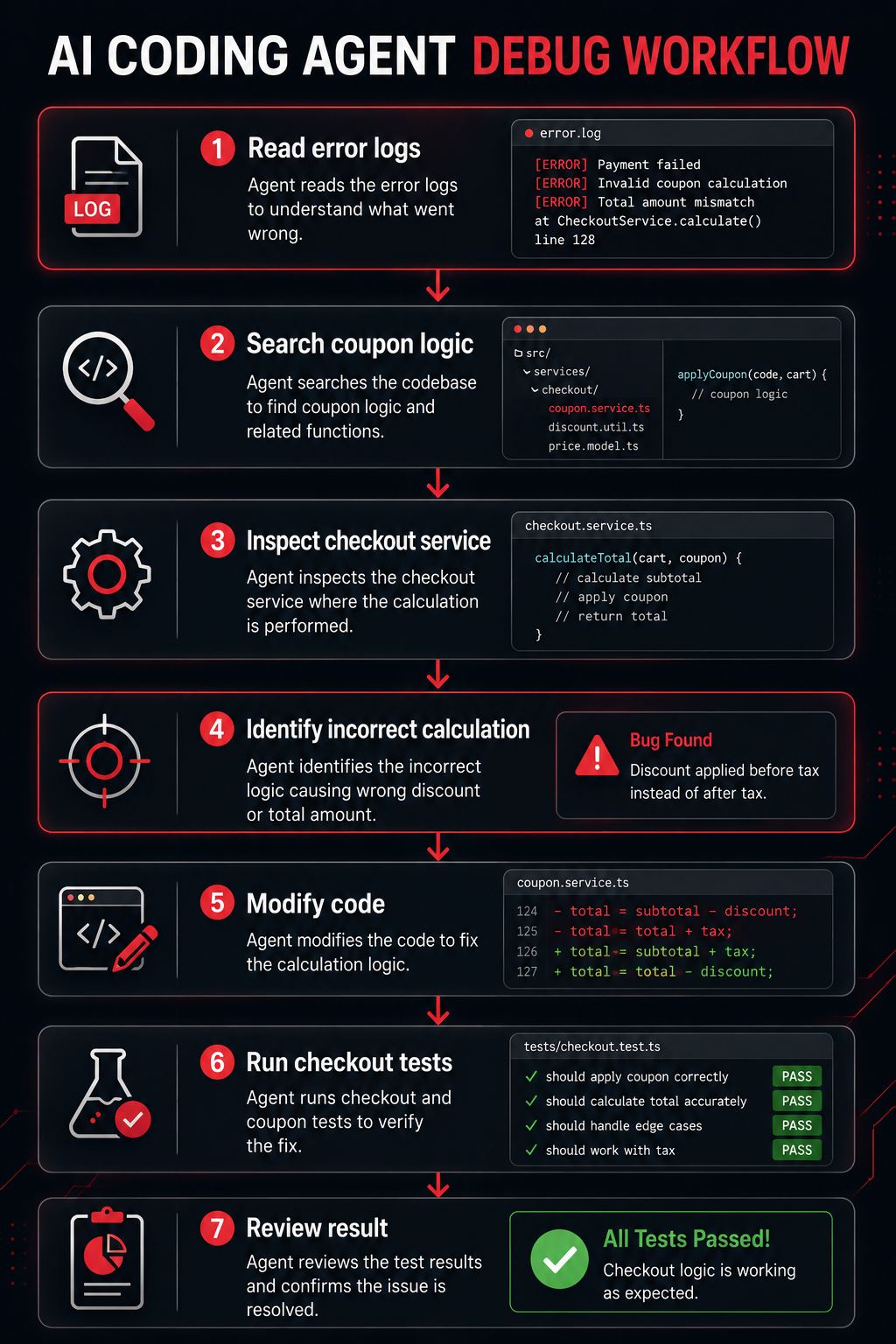
1. Fixing a Bug
Suppose an e-commerce application throws an error during checkout.
You tell the agent:
“Find why checkout fails when a coupon is applied.”
The agent may:
2. Creating Unit Tests
Prompt:
“Add unit tests for the user registration service.”
The agent can inspect existing test conventions, identify edge cases, create test files, run them, and fix failures.
3. Refactoring Legacy Code
Suppose a project contains an oversized function with 700 lines.
You could request:
“Refactor this module into smaller services without changing existing behaviour.”
The agent can inspect dependencies, create smaller components, update imports, and run the existing test suite.
4. Documentation
Prompt:
“Create API documentation for all endpoints in this service.”
The agent can inspect route definitions, request schemas, response structures, and existing comments before generating documentation.
5. Framework Migration
An agent may assist with:
“Update this project to the latest supported version of the framework.”
It can inspect dependency files, identify deprecated APIs, modify code, install dependencies, and run tests.
This is still a high-risk task and should be carefully reviewed.
Local Coding Agent vs Cloud Coding Agent
| Factor | Local Coding Agent | Cloud Coding Agent |
|---|---|---|
| Infrastructure | Developer-controlled | Provider-controlled |
| Offline capability | Possible | Usually limited |
| Hardware requirement | Can be high | Mostly handled by provider |
| Setup | More technical | Usually easier |
| Model selection | Often flexible | Provider dependent |
| Privacy control | Potentially high | Depends on provider |
| Performance | Hardware dependent | Cloud infrastructure |
| Maintenance | User/team | Provider |
| Scaling | Requires infrastructure | Usually easier |
| Cost model | Hardware + operations | Subscription/API usage |
Neither approach is automatically better.
The correct choice depends on the project.
Local Coding Agent vs Local LLM
These terms should not be treated as synonyms.
A Local LLM is simply an AI model running locally.
It may answer:
“How can I fix this JavaScript error?”
But it cannot automatically inspect your repository unless additional tools are provided.
A Local Coding Agent combines the model with an agent harness and development tools.
A useful simplified formula is:
Local LLM + Agent Harness + Developer Tools + Permissions + Feedback Loop = Local Coding AgentThis distinction is extremely important.
How to Set Up a Local Coding Agent
The exact setup depends on the tools you choose, but the general process is similar.
1. Check Your Hardware
Check:
- Operating system;
- RAM;
- GPU;
- VRAM;
- Storage;
- CPU.
Select a model appropriate for the available hardware.
2. Install a Local Model Runtime
Install a compatible runtime capable of serving the selected model locally.
3. Download a Coding Model
Choose a model designed or proven to work well with coding and tool-calling workflows.
Do not choose based only on benchmark scores.
Test whether it can reliably:
- Understand code;
- Follow instructions;
- Generate structured tool calls;
- Analyse errors;
- Maintain context.
4. Install the Coding Agent Harness
Install a compatible terminal or desktop coding agent.
The harness should support your chosen model endpoint.
5. Open Your Repository
Navigate to the project directory.
For example:
cd my-project
Start the agent from the repository.
6. Configure Permissions
Begin conservatively.
For example:
Read Files      → Allow
Edit Files      → Ask
Run Tests       → Allow
Install Package → Ask
Network Access  → Ask
Delete Files    → Ask
Git Push        → Ask
Avoid granting unrestricted access until you understand the agent’s behaviour.
7. Start With a Small Task
Instead of immediately requesting:
“Rewrite my entire application.”
start with:
“Explain the authentication architecture without modifying files.”
Then try:
“Add tests for the login validation function.”
Gradually increase task complexity.
8. Review Every Change
Use Git diff and testing tools to inspect what changed.
Never assume the agent is correct simply because it reports success.
Expert Tips for Implementing Local Coding Agents
Here are some expert tips to help you implement Local Coding Agents safely, efficiently, and effectively in your software development workflow:
1. Use Git Before Giving Write Access
Create a clean commit before allowing an agent to modify the project.
This makes rollback easy.
2. Give Clear Instructions
Bad prompt:
“Fix everything.”
Better prompt:
“Investigate the failing password reset tests. Make the smallest necessary change, preserve the existing API, run relevant tests, and explain what you changed.”
3. Define Project Rules
Create project-level instructions covering:
- Architecture;
- Coding standards;
- Prohibited changes;
- Test requirements;
- Security requirements;
- Preferred libraries.
4. Keep Permissions Minimal
Follow the principle of least privilege.
An agent should receive only the permissions required for the task.
5. Use Automated Tests
Agents become more useful when they can verify their changes.
A project with strong automated tests provides clearer feedback.
6. Review Diffs, Not Just Final Messages
The agent’s explanation may sound convincing while the actual code contains problems.
Always inspect the diff.
7. Protect Secrets
Keep sensitive credentials outside agent-accessible areas whenever practical.
Never casually expose:
API keys
database passwords
private certificates
production credentials
customer data
8. Benchmark Models on Your Own Repository
A model that performs well on a public benchmark may not perform equally well with your stack.
Test several models using representative internal tasks.
Common Mistakes When Using Local Coding Agents
- Giving Full Permissions Immediately: This increases the risk of accidental destructive actions.
- Assuming “Local” Means Completely Private: A local agent may still call a remote AI API or send telemetry. Verify the complete data flow.
- Running Without Git: Without version control, reverting unwanted modifications becomes difficult.
- Using Weak Models for Complex Agentic Tasks: Small models may struggle with tool calling and long-horizon reasoning.
- Giving Vague Prompts: Clear objectives produce better results.
- Skipping Tests: Never rely solely on the agent’s statement that a task is complete.
- Allowing Unreviewed Dependency Installation: Check every new dependency.
- Using AI as the Final Security Reviewer: Coding agents can help identify problems, but specialised security tools and experienced human review remain important.
- Loading Too Much Context: More context is not always better. Irrelevant information can distract the model and consume the context window.
- Trusting Autonomous Commits Blindly: Review every change before merging or deploying it.
Security Best Practices for Local Coding Agents
Security deserves special attention because coding agents can interact directly with development environments.
Follow these practices:
- Use isolated development environments where possible.
- Enable approval for destructive shell commands.
- Restrict network access when unnecessary.
- Protect
.envfiles and production credentials. - Use Git before agent modifications.
- Review package installations.
- Run security scanners.
- Maintain backups.
- Review all generated code.
- Never provide production access unless absolutely necessary and properly controlled.
The objective should be:
Maximum useful autonomy with minimum necessary privilege.
FAQs:)
A. A Local Coding Agent is an AI-powered software development tool that works within or alongside a local development environment and can perform tasks such as reading files, modifying code, running terminal commands, executing tests, and debugging errors.
A. No. A Local LLM is an AI model running on your computer. A Local Coding Agent adds an agent harness, tools, permissions, repository access, and an action-feedback loop around the model.
A. Yes, fully local coding-agent setups can work offline after the required models, runtimes, dependencies, and tools have been downloaded. Agents relying on cloud models or online services still require connectivity.
A. Many open-source tools and models are available without subscription charges, but running them locally still has hardware, electricity, storage, maintenance, and engineering costs.
A. They can be used safely when proper permission controls, sandboxing, version control, backups, testing, and human review are implemented. Giving an autonomous agent unrestricted shell access increases risk.
A. Yes. Many coding agents can create, edit, and delete files depending on the permissions granted.
A. Yes. Terminal execution is one of the defining capabilities of many coding agents, although good systems provide permission controls for risky commands.
A. Yes. Many agents can inspect Git status and diffs, while some can also create commits or interact with branches.
A. Not always. Small models can run on modest hardware, but larger and more capable models generally require more RAM, VRAM, and processing power.
A. They are better understood as development automation tools rather than complete replacements for software engineers. Architecture, product understanding, security, judgement, accountability, and complex decision-making still require experienced humans.
Conclusion:)
Local Coding Agents are becoming an important part of modern software development because they allow AI to work directly with project files, source code, repositories, terminals, development tools, testing frameworks, and local AI models.
Instead of using AI only to generate code snippets or answer programming questions, a Local Coding Agent can perform multiple development tasks such as understanding a codebase, finding relevant files, modifying code, executing commands, running tests, analysing errors, and improving the result. This makes them particularly useful for software developers, AI engineers, startups, DevOps teams, coding professionals, and organisations building AI-powered development workflows.
However, using a Local Coding Agent is not only about giving AI more control over the development environment. Developers and organisations must also carefully consider security, permissions, sandboxing, source-code privacy, terminal access, dependency management, version control, testing, and human review, especially when an AI agent is capable of modifying files or executing system commands.
As AI models and agentic development tools become more advanced in 2026 and beyond, Local Coding Agents may play an increasingly important role in creating faster, smarter, and more autonomous software development workflows where AI can understand projects, perform development tasks, validate its work, and collaborate more effectively with human developers.
“Local Coding Agents can become the bridge between AI-generated code and AI-powered software development where intelligence can understand, act, test, and improve.” — Rahman, Founder of Oflox®
Read also:)
- What Is Model Context Protocol? A-to-Z Guide for Beginners!
- What Is Unified Communications? A Complete Guide for Beginners!
- What Is AI Software Development? A-to-Z Guide for Beginners!
We hope this article has helped you understand Local Coding Agents and how they work. If you have any questions, experiences, or suggestions related to Local Coding Agents, feel free to share them in the comments below. We would be happy to hear from you.