This article provides a complete guide on What Is AI Software Development, including its meaning, importance, history, working process, key features, benefits, challenges, popular tools and technologies, real-world examples, expert tips, common mistakes, frequently asked questions, and future trends.
Artificial Intelligence is rapidly changing the way software is designed, developed, tested, and maintained. From generating code and detecting bugs to automating testing and assisting with complex development tasks, AI is becoming an important part of the modern software development lifecycle.
AI Software Development combines traditional software engineering with technologies such as Machine Learning, Generative AI, Large Language Models (LLMs), and AI agents. It allows developers to work faster, automate repetitive tasks, improve code quality, and build smarter applications capable of learning, analysing data, making predictions, and interacting intelligently with users.
An AI Software Development Company helps businesses leverage these technologies to work faster, automate repetitive tasks, improve code quality, and build smarter applications capable of learning, analysing data, making predictions, and interacting intelligently with users.
Today, startups, software companies, and enterprises are using AI development technologies for everything from intelligent chatbots and recommendation systems to automated coding, fraud detection, predictive analytics, and AI-powered SaaS applications. At the same time, modern AI coding tools are helping developers generate code, create tests, debug errors, understand complex codebases, and improve documentation.
So, if you want to understand how AI is changing the way modern software is built, tested, and maintained, this guide will help you understand everything in a simple and practical way.
Let’s explore it together.
Table of Contents
What Is AI Software Development?
AI Software Development is the process of using Artificial Intelligence technologies, such as Machine Learning, Large Language Models (LLMs), Generative AI, and AI agents, to build intelligent software or assist and automate different stages of the software development lifecycle.
In simple words, it means combining software engineering with Artificial Intelligence.
AI can be involved in software development in two major ways:
- Developing AI-powered software: Developers build applications that use AI capabilities such as recommendation engines, natural language processing, computer vision, predictive analytics, or intelligent automation.
- Using AI to develop software: Developers use AI coding assistants and agents to generate code, review programs, find bugs, create tests, write documentation, refactor applications, and automate development workflows.
For example, instead of manually creating every function of an application, a developer may describe the requirement:
“Create a secure user registration API with email verification.”
An AI development tool can suggest the code structure, generate API logic, create database models, propose test cases, and help identify potential problems.
However, AI-generated output still requires appropriate human review, testing, security checks, and business validation before production deployment.
AI Software Development at a Glance
| Aspect | Description |
|---|---|
| Full Form | Artificial Intelligence Software Development |
| Primary Purpose | Build software faster and add intelligent capabilities |
| Core Technologies | AI, ML, Generative AI, LLMs, NLP and AI agents |
| Main Users | Developers, engineers, startups and enterprises |
| Common Tasks | Coding, testing, debugging, documentation and automation |
| Popular Languages | Python, JavaScript, TypeScript, Java, C++ and others |
| Major Applications | SaaS, healthcare, finance, e-commerce, cybersecurity and automation |
| Development Approach | Human-AI collaboration |
| 2026 Trend | Agentic and AI-driven development |
Why Is AI Software Development Important?
Here are the major reasons why AI Software Development matters for building smarter, faster, and more efficient applications.
1. Faster Software Development
Developers spend considerable time writing repetitive or predictable code.
AI coding tools can generate:
- Functions
- Classes
- APIs
- Database queries
- Configuration files
- Unit tests
- Documentation
- Boilerplate code
Developers can therefore concentrate more on architecture, product requirements, security, and difficult engineering decisions.
2. Improved Developer Productivity
AI acts like an intelligent development assistant.
For example, a developer encountering an unfamiliar function can ask an AI tool to:
- Explain the code
- Find possible errors
- Suggest improvements
- Refactor it
- Generate documentation
- Create tests
This can reduce the time spent searching documentation and troubleshooting routine problems.
3. Better Software Testing
Testing is one of the most important stages of software development.
AI can assist developers in creating test cases, identifying edge cases, analysing failures, and finding suspicious code patterns.
Advanced coding agents can even operate in an iterative loop: write code, execute tests, inspect the failure, modify the implementation, and test it again.
4. Easier Development of Intelligent Applications
AI application development also enables businesses to create applications with capabilities such as:
- Intelligent chatbots
- Recommendation engines
- Fraud detection
- Image recognition
- Voice recognition
- Predictive analytics
- Document analysis
- AI search
- Personalisation
- Autonomous agents
These capabilities were previously expensive and technically difficult for many organisations to develop.
5. Faster Innovation
AI makes experimentation easier.
A startup can potentially turn an idea into a working prototype much faster by combining APIs, AI models, cloud infrastructure, code-generation tools, and automated deployment workflows.
The important distinction is that rapid prototyping does not automatically mean production-ready software. Production systems still require engineering discipline, testing, security, monitoring, governance, and scalability planning.
History and Evolution of AI Software Development
AI and software development have been connected for decades, but their relationship has changed dramatically.
1. Early Artificial Intelligence
The foundations of Artificial Intelligence emerged during the 1950s.
Early researchers attempted to develop computer programs capable of:
- Solving logical problems
- Playing games
- Performing mathematical reasoning
- Simulating human decision-making
These systems mostly depended on explicitly programmed rules.
2. Rise of Machine Learning
During the 1990s and 2000s, Machine Learning became increasingly practical.
Instead of programming every possible rule manually, developers could train algorithms using data.
This led to applications such as:
- Spam detection
- Search ranking
- Fraud detection
- Recommendation engines
- Speech recognition
3. Deep Learning Era
During the 2010s, improvements in computing power, GPUs, data availability, and neural-network techniques accelerated Deep Learning.
Applications expanded into:
- Computer vision
- Speech recognition
- Translation
- Autonomous systems
- Advanced recommendation systems
4. Generative AI Revolution
The early 2020s introduced powerful Generative AI systems capable of creating:
- Text
- Images
- Audio
- Video
- Software code
Large Language Models became especially useful for software engineering because programming languages contain structured patterns that AI models can analyse and generate.
5. AI Coding Assistants
AI then became directly integrated into developers’ daily workflows.
Modern AI coding assistants combine LLMs with programming-specific tools and integrations for tasks such as code generation, review, and refactoring.
6. Agentic Development in 2026
The next major evolution is agentic coding.
Instead of simply asking:
“Write this function.”
Developers can increasingly give AI a broader objective:
“Implement this feature, update the relevant files, write tests, run them, fix failures, and prepare the changes for review.”
Coding agents can break objectives into smaller tasks and use tools such as file systems, terminals, development environments, and version-control workflows to complete them.
This represents an important shift from AI-assisted coding towards AI-assisted software engineering.
How Does AI Software Development Work?
Here’s a simple step-by-step explanation of how AI can fit into a modern software development process.
1. Define the Problem
Every successful software project starts with a clear problem.
For example:
“Customers are waiting too long for basic support queries.”
The business might decide to create an AI-powered customer support application.
Developers should determine:
- Business objective
- Target users
- Functional requirements
- Technical requirements
- Security requirements
- Budget
- Expected outcomes
AI should solve a genuine problem rather than being added simply because it is popular.
2. Gather Requirements
The development team collects detailed requirements.
For example:
- User registration
- Customer authentication
- Chat interface
- Knowledge-base search
- AI-generated responses
- Human-agent escalation
- Conversation history
- Analytics
Generative AI can also help transform broad ideas into structured requirements and user stories.
3. Choose the AI Approach
Not every project requires the same AI technology.
Depending on the requirement, developers might use:
| Requirement | Possible Technology |
|---|---|
| Chatbot | LLM / NLP |
| Image recognition | Computer Vision |
| Sales forecasting | Machine Learning |
| Recommendation system | ML / Deep Learning |
| Document summarisation | Generative AI |
| Voice assistant | Speech AI + NLP |
| Autonomous workflow | AI Agent |
| Fraud detection | ML + anomaly detection |
Selecting the right technology prevents unnecessary complexity.
4. Prepare Data and Context
Many AI applications depend on data.
The development team may need to collect, clean, organise, label, and validate information.
Data can include:
- Customer records
- Product information
- Documents
- Images
- Transaction records
- Support conversations
- Application logs
For LLM applications, teams may also provide trusted contextual information through techniques such as Retrieval-Augmented Generation (RAG).
Data quality matters because poor or irrelevant information can produce unreliable AI outputs.
5. Select Models and Tools
Developers then decide whether to:
- Train a model
- Fine-tune an existing model
- Use a foundation model
- Connect to an AI API
- Use open-source models
- Build a hybrid architecture
The correct approach depends on cost, privacy, performance, latency, accuracy, and scalability requirements.
6. Design the Software Architecture
AI is normally one component of a larger application.
A typical architecture may include:
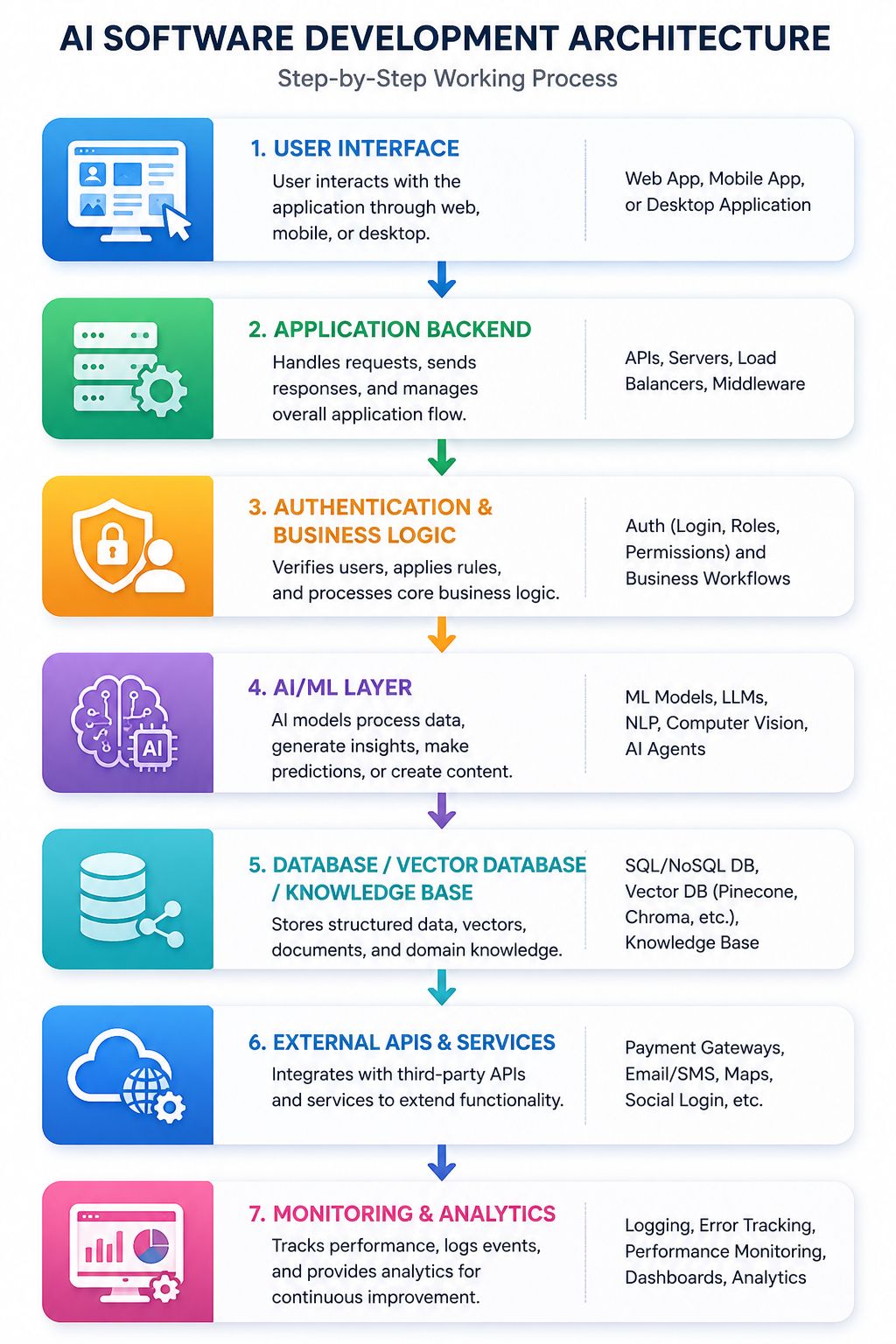
A strong architecture keeps AI components modular so that models or providers can be changed when required.
7. Develop the Application
Developers write the frontend, backend, APIs, databases, integrations, and AI components.
AI development assistants can help with:
- Code generation
- Function completion
- API creation
- SQL queries
- Refactoring
- Code explanation
- Documentation
The goal should not be to accept generated code blindly.
AI should increase development speed while engineers retain control over important technical decisions.
8. Test the Software
Traditional applications generally produce deterministic results.
AI applications may behave probabilistically, making testing more complicated.
Teams should evaluate:
- Functional correctness
- Model quality
- Response accuracy
- Hallucinations
- Latency
- Security
- Bias
- Edge cases
- Cost
- User experience
Agent-based systems require additional evaluation because agents can reason, take actions, and adapt. Production agents therefore need different testing, security, memory, and orchestration approaches from conventional deterministic applications.
9. Deploy the Application
After testing, the application can be deployed using:
- Cloud platforms
- Containers
- Serverless infrastructure
- Virtual machines
- Kubernetes
- Managed AI services
Continuous Integration and Continuous Deployment (CI/CD) can automate many deployment processes.
10. Monitor and Improve
AI applications should never be considered permanently finished.
Teams need to monitor:
- Errors
- User feedback
- AI response quality
- Model performance
- Token/API costs
- Latency
- Security incidents
- Infrastructure usage
Continuous evaluation helps maintain reliability as users, models, data, and requirements change.
Key Features of AI Software Development
AI software development introduces several capabilities that distinguish it from purely traditional development.
- AI-Assisted Code Generation: Developers can describe what they want in natural language and receive relevant code suggestions.
- Intelligent Code Completion: AI understands surrounding code and predicts functions, statements, parameters, or logic.
- Automated Testing Assistance: AI can generate unit tests and suggest edge cases based on application logic.
- Intelligent Debugging: AI can analyse error messages, stack traces, and code to suggest likely causes.
- Code Refactoring: Existing code can be analysed and reorganised for improved readability and maintainability.
- Natural Language Interaction: Developers can interact with development environments using ordinary language.
- Context-Aware Assistance: Advanced development tools can understand multiple files, repositories, dependencies, and project structures rather than analysing one isolated code snippet.
- Autonomous Coding Agents: AI agents can perform multi-step development tasks with limited human intervention. Modern agentic coding systems can plan, write, test, and modify code rather than simply generating isolated suggestions.
- Documentation Generation: AI can help generate README files, API documentation, Code comments, Function explanations, and a developer guide.
- Continuous Learning and Improvement: AI development workflows can use test results, user feedback, evaluation data, and monitoring information to continuously improve applications.
AI Software Development vs Traditional Software Development
| Traditional Development | AI Software Development |
|---|---|
| Mostly manual coding | AI-assisted coding |
| Manual debugging | AI-assisted debugging |
| Manual documentation | AI-generated documentation assistance |
| Developers create most tests manually | AI can generate test cases |
| Search documentation manually | Conversational technical assistance |
| Mostly deterministic applications | May include probabilistic AI components |
| Human executes development tasks | Humans can delegate selected tasks to agents |
| Traditional SDLC | AI-enhanced or AI-driven SDLC |
AI software development does not eliminate traditional software engineering.
Instead, it extends it.
Developers still need expertise in:
- Architecture
- Algorithms
- Databases
- Security
- APIs
- Testing
- Cloud computing
- DevOps
- User experience
AI becomes another powerful engineering layer.
Major Benefits of AI Software Development
Here are the most important benefits of AI Software Development that can help organisations innovate faster, optimise development workflows, and build future-ready applications.
- Increased Development Speed: AI can generate repetitive code and assist with routine development tasks, potentially reducing development time.
- Higher Developer Productivity: Developers can spend less time on repetitive work and more time solving difficult problems.
- Faster Prototyping: Ideas can be converted into prototypes more quickly. This is particularly useful for startups validating product concepts.
- Improved Code Understanding: AI can explain unfamiliar codebases, functions, dependencies, and technical concepts. This can make onboarding easier for new developers.
- Better Testing Coverage: AI can propose additional test scenarios developers might otherwise overlook.
- Reduced Repetitive Work: Tasks such as boilerplate generation, documentation, test creation, and code formatting can be partially automated.
- Improved Application Intelligence: Businesses can integrate Recommendations, Predictions, AI search, Conversational interfaces, Automation, and Personalisation into normal software products.
- Faster Maintenance: AI tools can help developers understand legacy systems, locate bugs, refactor code, and prepare updates.
- Scalable Automation: AI agents can potentially execute workflows that previously required repeated manual actions.
- Better Accessibility for Beginners: Beginners can use AI to understand Programming syntax, Error messages, Algorithms, Frameworks, APIs. However, beginners should still learn programming fundamentals rather than becoming completely dependent on generated code.
Challenges of AI Software Development
Here are some common limitations and challenges of AI Software Development that organisations need to address to build reliable, secure, and scalable AI-powered software.
- Incorrect AI-Generated Code: AI-generated code can look professional while still containing logical mistakes. Therefore, AI-generated code should be treated as a draft, not an unquestionable truth.
- Security Vulnerabilities: Generated code may contain Weak authentication, Insecure API handling, Improper validation, Vulnerable dependencies, Exposed credentials, and Unsafe configuration.
- Data Privacy: Developers must carefully consider what data is sent to external AI services. Sensitive information can include Customer information, Proprietary source code, API keys, Business data, and Financial information. Organisations should understand the privacy and data-retention policies of the AI services they use.
- Hallucination: Generative AI may provide confident but incorrect information. For example, an AI may suggest A non-existent library, an incorrect API, an outdated method, and A fake parameter. Developers must verify generated recommendations.
- Technical Debt: Generating software faster does not necessarily create better software. Poorly reviewed AI-generated code can increase technical debt dramatically.
- Overdependence on AI: Developers who rely on AI for every programming decision may gradually weaken their fundamental problem-solving skills.
- Cost Management: Production AI applications may generate high costs from Model inference, API requests, GPUs, Vector databases, Cloud infrastructure, and Data storage. Teams should monitor unit economics from the beginning.
- Complex Testing: Testing AI applications is more difficult because outputs may vary. Teams need evaluation systems in addition to traditional unit and integration tests.
- Governance and Compliance: Businesses may need controls governing which models are approved, what data models can access, which actions agents can perform, who approves AI-generated changes, and how decisions are logged. As software generation becomes faster, review, security, governance, deployment, and operations increasingly become major bottlenecks.
10+ Popular Tools and Technologies for AI Software Development
The AI development ecosystem contains tools for different stages of application development.
| Category | Examples |
|---|---|
| Programming | Python, JavaScript, TypeScript, Java |
| ML Frameworks | TensorFlow, PyTorch, scikit-learn |
| AI Models | GPT, Gemini, Claude, open models |
| Coding Assistants | GitHub Copilot and AI-powered IDE tools |
| AI Frameworks | LangChain, LlamaIndex and agent frameworks |
| Databases | PostgreSQL, MongoDB |
| Vector Search | Pinecone, Weaviate, Milvus and similar systems |
| Cloud | AWS, Azure, Google Cloud |
| DevOps | Docker, Kubernetes, GitHub Actions |
| APIs | REST, GraphQL and model APIs |
| Monitoring | Application and AI observability platforms |
1. AI-Powered IDEs
The development environment itself is also changing.
An AI IDE combines a traditional software workspace with built-in Artificial Intelligence capabilities for writing, testing, managing, explaining, and modifying code.
2. Coding Agents
Coding agents go beyond autocomplete.
For example, GitHub described its coding agent in 2026 as capable of working on delegated tasks such as bug fixes, tests, and technical debt, and then returning a pull request for human review.
This asynchronous approach may become increasingly important for professional development teams.
Real-World Examples of AI Software Development
Understanding AI software development becomes easier through practical examples.
1. AI Customer Support System
An e-commerce company receives thousands of customer questions.
It develops an AI support system that:
- Receives a question.
- Searches the company’s knowledge base.
- Retrieves relevant information.
- Generates an answer.
- Escalates difficult cases to a human agent.
- Stores feedback for future analysis.
This reduces repetitive work while maintaining human support for complex issues.
2. AI-Powered E-Commerce Recommendations
An online store analyses:
- Product views
- Purchase history
- Search behaviour
- Cart activity
Machine Learning models then recommend products that each customer may find relevant.
3. AI Fraud Detection
Financial applications can analyse transactions in real time.
The system may examine:
- Transaction amount
- Location
- Device
- Historical behaviour
- Frequency
- Risk signals
Suspicious transactions can be flagged for additional verification.
4. AI Document Processing
A company receives thousands of invoices.
AI can:
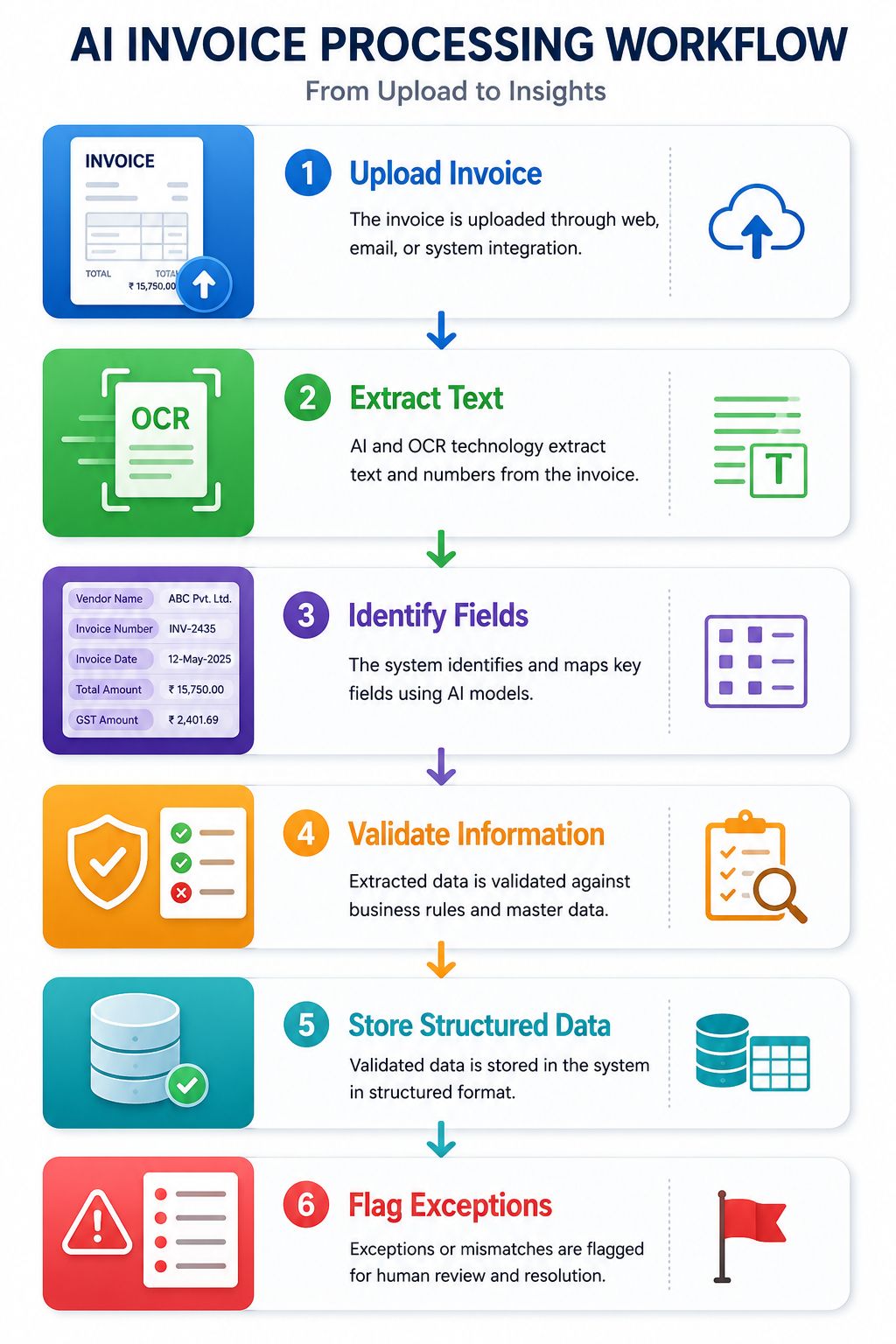
This can significantly reduce manual data entry.
5. AI Coding Agent
A developer creates an issue:
“Add password-strength validation to the registration form and write tests.”
An AI coding agent may:
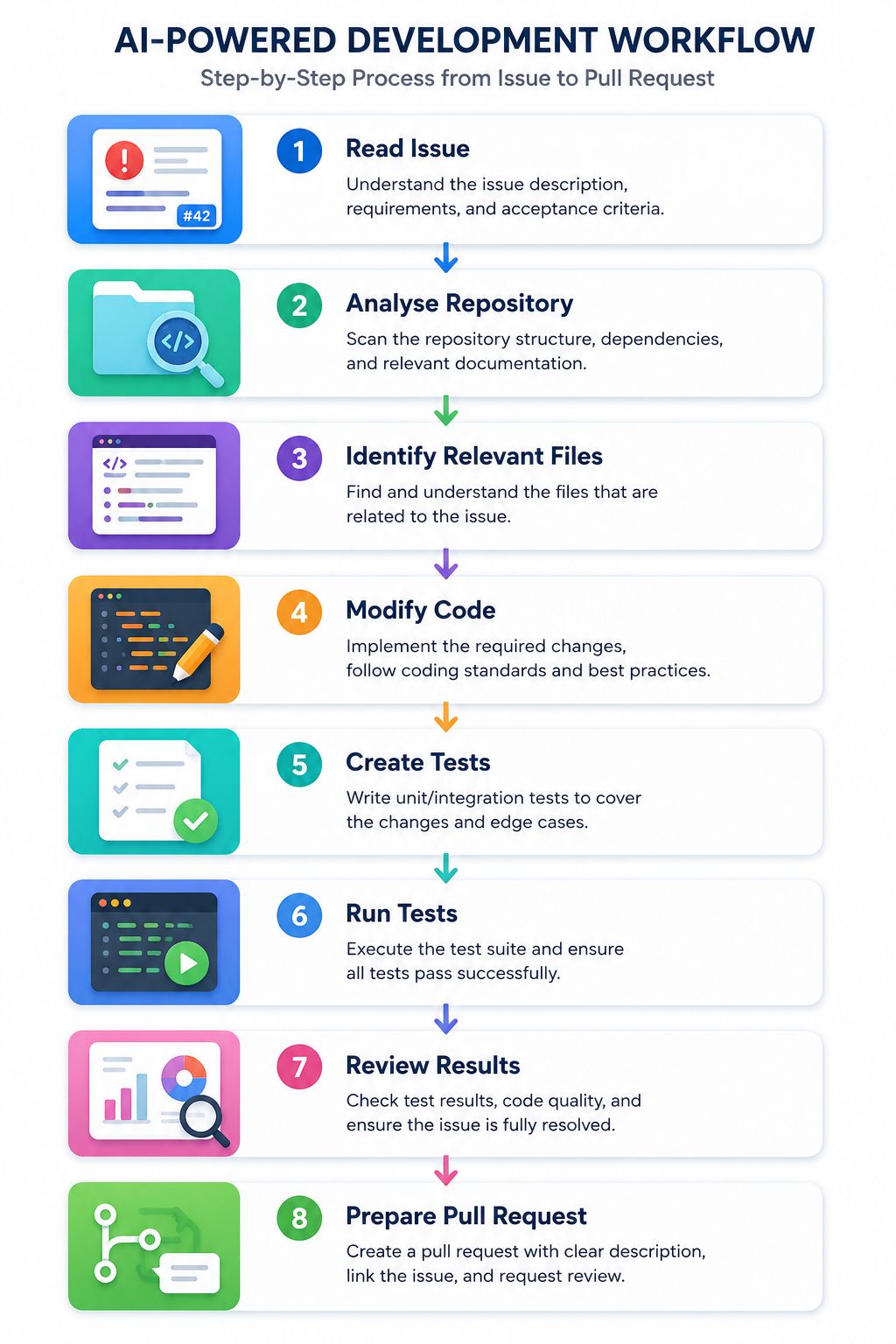
This pattern is already emerging in modern development platforms.
Expert Tips for Successful AI Software Development
Here are practical recommendations for teams building AI-powered applications.
1. Start With the Business Problem
Never begin with:
“We need AI.”
Begin with:
“What problem are we trying to solve?”
Then determine whether AI is genuinely the right technology.
2. Keep Humans in the Loop
Important actions should have appropriate human oversight.
This becomes particularly important for:
- Financial decisions
- Healthcare applications
- Security systems
- Production deployments
- High-impact automated actions
3. Use Clear Specifications
AI coding systems perform better when requirements are precise.
In 2026, spec-driven development is becoming increasingly relevant because detailed specifications provide a source of truth that AI agents can use while executing development tasks.
4. Test AI-Generated Code
Never assume generated code is secure or correct.
Use:
- Unit testing
- Integration testing
- Static analysis
- Code reviews
- Security scanning
- Dependency scanning
5. Build Modular Architectures
Avoid making the entire application dependent on a single model.
Create abstraction layers so models can be changed when necessary.
6. Measure AI Quality
Define measurable metrics such as:
- Accuracy
- Task success rate
- Response latency
- Hallucination rate
- Cost per request
- User satisfaction
7. Protect Sensitive Information
Never casually expose credentials, private customer information, or confidential business data to AI tools.
8. Monitor Production Continuously
Production AI systems require observability.
Monitor behaviour rather than assuming successful deployment means the system will always remain reliable.
Common AI Software Development Mistakes
AI can dramatically increase development speed, but that speed can also amplify mistakes. Here are some of the most common errors teams should avoid.
- Blindly Copying AI-Generated Code: Never deploy generated code without understanding and reviewing it.
- Giving AI Vague Requirements: Prompt: “Build a website.” is far less useful than a detailed specification defining architecture, features, security, constraints, and acceptance criteria.
- Ignoring Security: Security should be considered from the first stage of development.
- Skipping Tests Because the Code Looks Correct: Professional-looking code can still fail in edge cases.
- Using AI Where It Is Not Required: Not every application requires an LLM. Sometimes a normal database query or deterministic algorithm is faster, cheaper, and more reliable.
- Ignoring AI Costs: An application may work perfectly during testing but become expensive when thousands of users begin making model requests.
- Ignoring Model Limitations: Models can hallucinate, misunderstand context, or generate inconsistent responses.
- Building Without Evaluation Metrics: If you cannot measure whether an AI feature is working correctly, improving it becomes difficult.
- Allowing Agents Excessive Permissions: An autonomous coding agent should receive only the permissions necessary for its job. Principles such as least privilege, sandboxing, logging, and human approval are increasingly important as agents gain access to terminals, files, external services, and deployment infrastructure.
- Replacing Human Judgment Completely: AI should support engineering judgment rather than eliminate accountability.
FAQs:)
A. AI software development means using Artificial Intelligence to build intelligent applications or using AI tools to help developers design, write, test, debug, deploy, and maintain software.
A. No. Machine Learning is one technology within Artificial Intelligence. AI software development is broader and may include Machine Learning, Generative AI, LLMs, NLP, computer vision, AI agents, and traditional software engineering.
A. AI can already perform many software development tasks and some agents can execute multi-step coding workflows. However, production software still requires human oversight for requirements, architecture, security, testing, governance, and accountability.
A. AI is more likely to transform developers’ work than simply eliminate software engineering. Developers may spend less time writing repetitive code and more time on architecture, requirements, validation, security, and higher-level problem solving.
A. Python is one of the most widely used languages for AI and Machine Learning because of its ecosystem. However, JavaScript, TypeScript, Java, C++, and other languages are also widely used depending on the application.
A. Not automatically. AI-generated code must be reviewed, tested, scanned, and validated before being used in production.
A. An AI coding agent is an AI-powered system capable of carrying out software engineering tasks with a degree of autonomy. It can potentially analyse a project, modify files, run commands, execute tests, identify errors, and refine its work.
A. A coding assistant primarily helps a developer by answering questions and suggesting or generating code. A coding agent can take a broader objective and execute multiple development steps with greater autonomy.
A. Yes. Startups can use AI development tools for rapid prototyping, coding assistance, testing, documentation, customer automation, analytics, and intelligent product features.
A. Useful skills include Programming, Software engineering, APIs, Databases, Cloud computing, Machine Learning fundamentals, LLM application development, Prompt and context engineering, Security, Testing, and AI evaluation.
Conclusion:)
AI Software Development is changing the way modern applications are planned, built, tested, deployed, and maintained. By combining traditional software engineering with technologies such as Machine Learning, Generative AI, Large Language Models, and AI agents, developers can automate repetitive tasks, improve productivity, reduce development time, and create smarter digital products.
From AI-assisted coding and automated testing to intelligent debugging and agentic development, AI is becoming an important part of the software development lifecycle. However, AI-generated code and automated workflows still require proper testing, security checks, human review, and clear technical standards.
As we move through 2026 and beyond, businesses and developers who learn how to use AI responsibly will be better positioned to build faster, more scalable, and more intelligent software solutions. The future of software development will likely depend on human expertise working together with AI, rather than one replacing the other.
“The future of software development is not about replacing developers with AI, but empowering developers to build better software with AI.”
Read also:)
- How to Make Blurry Pictures Clear App Free: A Complete Guide!
- What Is Parallel Programming? A Complete Guide for Beginners!
- What Is Voice Biometrics? A Complete Beginner’s Guide!
Have you ever used AI tools for coding, testing, debugging, or software development? Share your experience or questions in the comments below—we’d love to hear from you!